This project uses Open Street Map, geographical calculation, and graphs to measure a city street map's similarity with grids in two approaches: angles of intersections and straightness of streets. I use two distinct sets of methods in measuring angles of street intersections. Initially, I use OSM import and identify intersections through traffic lights. Next, I use an improved method, combining Overpass API and graphs. Finally, I apply a similar approach to measure the straightness of the streets.
Introduction
Introduction
The grid plan is a prevalent city planning design where streets intersect at right angles, creating a grid pattern. This design is evident in some major cities including New York, Barcelona, and Chicago. However, there are also distinct designs on city planning in the rest of the world, such as Rome, Paris, and HongKong.
The similarity between city street maps and grids is evaluated from two perspectives: The intersection angle between streets, and the straightness of streets. In a city close to a grid, the mean and median of distribution of angles should be close to 90 degrees, while having a small standard deviation. In addition, the streets should be relatively straight, which is measured through the average change in angles.
Calculate Intersection Angles
Calculate Intersection Angles
Processing Data from Open Street Map
Processing Data from Open Street Map
To begin with, I import and select data from Open Street Maps. After importing the data set including query features, such as ways and nodes, based on features of nodes and ways, I select the major streets in the map.
Import Data
Import Data
Define function to import data from local document path or a certain geographical region:
OSMImport=ResourceFunction["OSMImport"]
Import data from local OSM document (street map of Dallas area):
osm = CloudGet["https://www.wolframcloud.com/obj/d56a9f22-8a34-4872-af08-794eab0be967"];
Visualization of Streets
Visualization of Streets
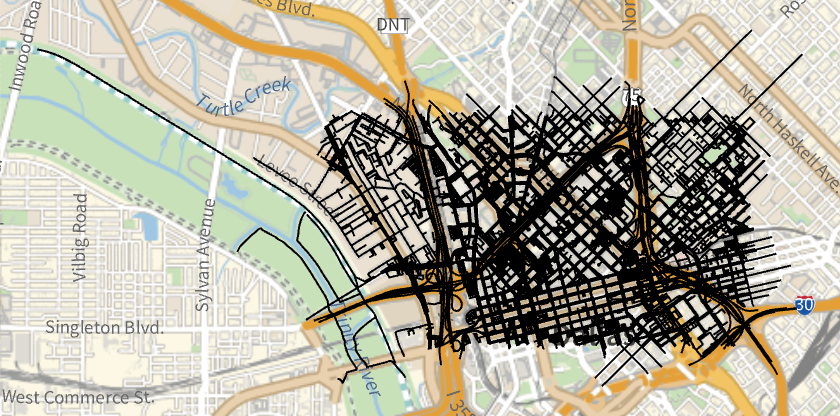
To select streets, I select the query feature "Ways" with tag of "highway".
Select all roads in the area using query features:
In[]:=
GeoGraphics[Values[Line[Values[osm[["Nodes",#Nodes,"Position"]]]]&/@Select[osm["Ways"],KeyExistsQ[#Tags,"highway"]&]]]
Out[]=
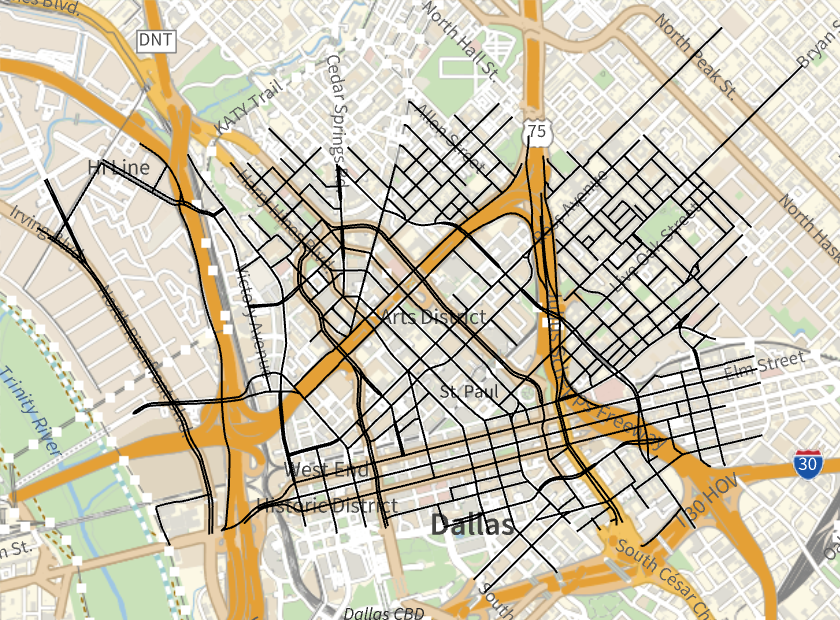
I filter out the sidewalks and roads in parks by selecting the ones with "highway" tag value of "primary", "secondary", "tertiary", and "residential", which represent the main streets.
Filter major roads in the area:
In[]:=
GeoGraphics[Values[Line[Values[osm[["Nodes",#Nodes,"Position"]]]]&/@Select[osm["Ways"],MatchQ[#[["Tags","highway"]],"primary"|"secondary"|"tertiary"|"residential"]&]]]
Out[]=
Angle Calculation Process
Angle Calculation Process
There is no specific query features of intersection in Open Street Map, so I initially use traffic signals to represent intersections.
I compute the horizontal angle of a road at an intersection by connecting the traffic light and nearest node on the corresponding road if the traffic light is the end of the road, which enables me to compute the horizontal road at the traffic light. If the traffic light is at the middle of the road, I connect the two nearby nodes and get horizontal angle of the line connecting them.
Finally, I compute angle between streets by obtaining the absolute value of the difference between horizontal angles of them .
Select Traffic Signals
Select Traffic Signals
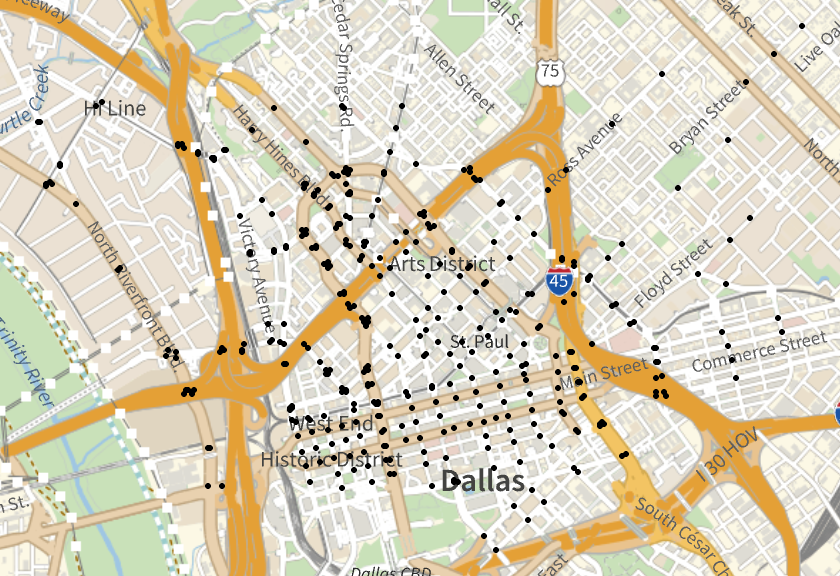
Select all traffic signals in the region, and get the geographical locations of them:
In[]:=
trafficSignals=Select[osm["Nodes"],MatchQ[#[["Tags","highway"]],"traffic_signals"]&];positions=Lookup[#,"Position"]&/@trafficSignals;
Visualize the distribution of traffic signals:
GeoGraphics[Point/@positions]
Out[]=
Get Nodes that Form Intersection Angles
Get Nodes that Form Intersection Angles
Get geographical location of a certain node based its code in Open Street Map:
getPosition[Code_]:=osm["Nodes",Code]["Position"][[1]]
Select streets that pass through a given node:
selectedWays[Code_]:=Select[osm["Ways"],MemberQ[#[["Nodes"]],Code]&];
Get nearest nodes to the given node on each of the selected streets through matching patterns:
getNearest[Code_] := Module[{selectedWays = Select[osm["Ways"], MemberQ[#[["Nodes"]], Code] &], nearbyNodeList = {}}, nearbyNodeList = Values[Lookup[#, "Nodes"] & /@ selectedWays]; DeleteDuplicates[Join[Cases[nearbyNodeList, {___, x_, Code, y_, ___} :> {x, y}], Cases[nearbyNodeList, {Code, x_, ___} | {___, x_, Code} :> {x}]]]]
Compute Angles
Compute Angles
Compute horizontal angle of one street:
computeOneAngle[nL_List,Code_]:=Which[ Length[#]==1,GeoDirection[getPosition[Code],getPosition[#[[1]]]], Length[#]==2,GeoDirection[getPosition[#[[1]]],getPosition[#[[2]]]] ]&/@nL;
Compute angles between streets intersect at traffic signal:
In[]:=
computeAngle[Code_]:= Which[Length[computeOneAngle[getNearest[Code],Code]]>1,DeleteDuplicates[Abs/@Subtract@@@Permutations[Flatten[computeOneAngle[#,Code]&/@Permutations[getNearest[Code],{1}]],{2}]],True,0]
Collection of Angles
Collection of Angles
Get Open Street Map codes of all traffic signals:
In[]:=
listSignals=Select[osm["Nodes"],MatchQ[#[["Tags","highway"]],"traffic_signals"]&];keysSignals=Keys[listSignals];
I eliminate the angles with magnitude 0-10, 170-190, and 350-360, because they can be recognized as the same route. Then, I transfer the angles between 190-350 degrees to 360 minus the original value, so all the angles are within the range 10-170 degrees. This helps clean the data and remove large outliers.
Iterate the computeAngle function through all the traffic signals:
In[]:=
collection=QuantityMagnitude[Flatten[Map[computeAngle,keysSignals]]]/.x_/;(x<10||170<x<190||350<x<360):>Nothing;finalCollection=collection/.x_/;(x>180):>360-x;
Plot in Histogram, Get Mean, Median and SD
Plot in Histogram, Get Mean, Median and SD
Now that I have all the angle data at traffic signals of the selected region, I plotted it in histogram to better visualize the result, and provide data of mean, median, and standard deviation.
Plot histogram of angle degree distribution:
In[]:=
Histogram[finalCollection,10]
Compute mean, median, and standard deviation of angle degree distribution:
An Improved Method of Computing Angles
An Improved Method of Computing Angles
The previous method has two limitations: the OSM Import Function is only available for importing a small region, which is unavailable in processing map of large city, and traffic signals do not always represent intersection of streets. In many European city centers, there are few traffic signals, so most intersections are not computed, causing the previous method to be inaccurate.
Here, I use Overpass API import, a more efficient API import method, and I turn the street maps into graphs in order to find all intersections directly. As a result, the degrees of angles are computed more efficiently and accurately.
Overpass API Import
Overpass API Import
The Overpass API is a read-only API that serves as a data processing tool for the OpenStreetMap project. It's designed to extract data from the OSM database, making it a powerful tool for many map-related applications. Overpass API has an advantage that it can import much larger area than OSM Import function.
Define function to import data including geographical location from a certain geographical region:
Import data from a specified region:
Display the GeoBoundsRegion:
Transfer Streets within Import Region to Graph
Transfer Streets within Import Region to Graph
I first select all the streets in the region, then transfer them to a format that I can easily reference. Finally, I transfer all the streets to a graph.
Select Streets and Transfer Format
Select Streets and Transfer Format
Select all streets in given region by selecting the query feature "ways" with tag of "highway", and tag value of "primary","secondary","tertiary", and "residential":
By implementing patterns, parse the Overpass response:
Create Graphs of the Region Street Map
Create Graphs of the Region Street Map
Draw undirected edges between all the neighboring nodes on streets:
Create street graph of the region:
Angle Calculation Process
Angle Calculation Process
Similar as the traffic signal method mentioned previously, in the calculating process, I first compute the horizontal direction of one street, then take the difference between streets by calculating the difference between two horizontal directions.
Select Intersection Points
Select Intersection Points
Select points that vertex degree is more than 2, which represents intersection points:
Compute Angles
Compute Angles
Compute the horizontal angle of one street:
Compute the angle between two streets at an intersection:
Collection of Angles
Collection of Angles
Functions that iterate through all streets within the graph and get a list of angles at intersections, while having same processing of angles as the previous section:
Plot Histogram, compute Mean, Median, Standard Deviation
Plot Histogram, compute Mean, Median, Standard Deviation
Now that I have the angle data at all the intersections of the selected region, I plotted it in histogram to better visualize the result, and provide data of mean, median, and standard deviation.
Plot a histogram of the total collection of angles:
Compute mean, median, and standard deviation of angle degree distribution:
Compute Straightness of Streets
Compute Straightness of Streets
In this section, first I find the nodes which are not at an intersection. Then, I compute the average shift in angle between the two neighbor nodes. This is calculated by the angle between the three points multiplied by the minimal distance of the two adjacent street segments, added up for all parts of the street and divided by the total street length.
Find Non-Intersection Nodes
Find Non-Intersection Nodes
Select all nodes with exactly 2 adjacent vertices, which represent that it is not at intersection:
Compute Average Angle Change Rate
Compute Average Angle Change Rate
Calculate the product of the angle between the three points and the minimal distance of the two adjacent street segments, then add up for all parts:
Calculate Average Change in Angles in Graph of City Street Map
Calculate Average Change in Angles in Graph of City Street Map
Input graph of given region's street maps:
Compute the sum of product of distance and change in angles:
Construct a function that computes total distance of the streets:
Apply function into graph of street map:
Take the quotient of the sum of product of distance and change in angles and the total distance of the streets, which is the average change in angles:
Apply to Different Cities
Apply to Different Cities
Plot various datapoints collected for different cities:
Conclusion & Future Improvements
Conclusion & Future Improvements
Overall, I developed functions that can accurately compute the angles of intersections and straightness of streets, and have pretty good efficiency in computing. In the future, more visualization work can be accomplished for this project. For example. I can visualize the difference between city planning styles in regions across the world by marking them with different colors based on their standard deviation of intersection angle distribution and average change in angles of streets.
Acknowledgements
Acknowledgements
Thank you to my mentor Kegan and teaching assistants who have helped me: Sam, William, Karan, and Joseph.
References
References
Nikos A . Salingaros (1998) Theory of the urban web, Journal of Urban Design, 3 : 1, 53 - 71, DOI : 10.1080/13574809808724416
OpenStreetMap Wiki. OpenStreetMap Wiki. Retrieved July 13, 2023, from https://wiki.openstreetmap.org/wiki/Main_Page
Orthogonal Grids and Their Variations in 17 Cities Viewed from Above | ArchDaily. (2020, October 10). ArchDaily; ArchDaily. https://www.archdaily.com/949094/orthogonal-grids-and-their-variations-in-17-cities-viewed-from-above#:~:text=Streets%20intersect%20at%20right%20angles,parks%2C%20among%20other%20urban%20spaces.&text=Most%20cities%20that%20feature%20a,previously%20thought%2Dout%20urban%20design.
CITE THIS NOTEBOOK
CITE THIS NOTEBOOK
Find mathematical patterns in city street maps
by Xingchen Li
Wolfram Community, STAFF PICKS, July 13, 2023
https://community.wolfram.com/groups/-/m/t/2964315
by Xingchen Li
Wolfram Community, STAFF PICKS, July 13, 2023
https://community.wolfram.com/groups/-/m/t/2964315