The Wolfram Emerging Leaders Program is a 4 month long project based program designed for gifted high school students to take a deep dive into a topic of their choice. Students work remotely in small groups to take their project from ideation to completion, with the guidance of Wolfram experts. Wolfram Emerging Leaders Program participants are selected from the Wolfram High School Summer Camp, which is open to talented, STEM oriented students age 17 and under.
Introduction
Introduction
Have you ever thought about why the unemployment rates in certain regions always remain low while other regions show consistent high unemployment? Do you want to know what contributes to unemployment, and if analyzing unemployment rates to reveal hidden patterns or correlations in society?
Over the past semester, we crunched data from the Bureau of Labor Statistics to analyze unemployment rates of various demographics, and we used this data to create and test an unemployment rate predictor.
Unemployment is a key economic indicator. High, persistent unemployment can signal serious distress in an economy and even lead to social and political turmoil.
Over the past semester, we crunched data from the Bureau of Labor Statistics to analyze unemployment rates of various demographics, and we used this data to create and test an unemployment rate predictor.
Unemployment is a key economic indicator. High, persistent unemployment can signal serious distress in an economy and even lead to social and political turmoil.
Guiding Questions
Guiding Questions
◼
Why do some regions show consistently high unemployment, while others do not?
◼
What are some geographic or demographic characteristics of these regions?
◼
How do different social, political, and economic events impact unemployment rates in the US?
◼
Can we possibly predict unemployment?
Some Factors we Would Like to Investigate in the Future
Some Factors we Would Like to Investigate in the Future
◼
Changes in administration
◼
Big events (stock market crashes, recessions, etc)
◼
Income and Wealth Inequality
◼
Immigration
◼
Technological advancements
Data Collection
Data Collection
Data Collection
We used data from the Bureau of Labor Statistics (BLS) to collect in unemployment by state, county, and year. Data collection and cleaning was much harder than we anticipated, as we had to search through the BLS website for the desired data, do some preliminary cleaning, and combine various datasets and tables together in Wolfram.
Exploring our Data
Exploring our Data
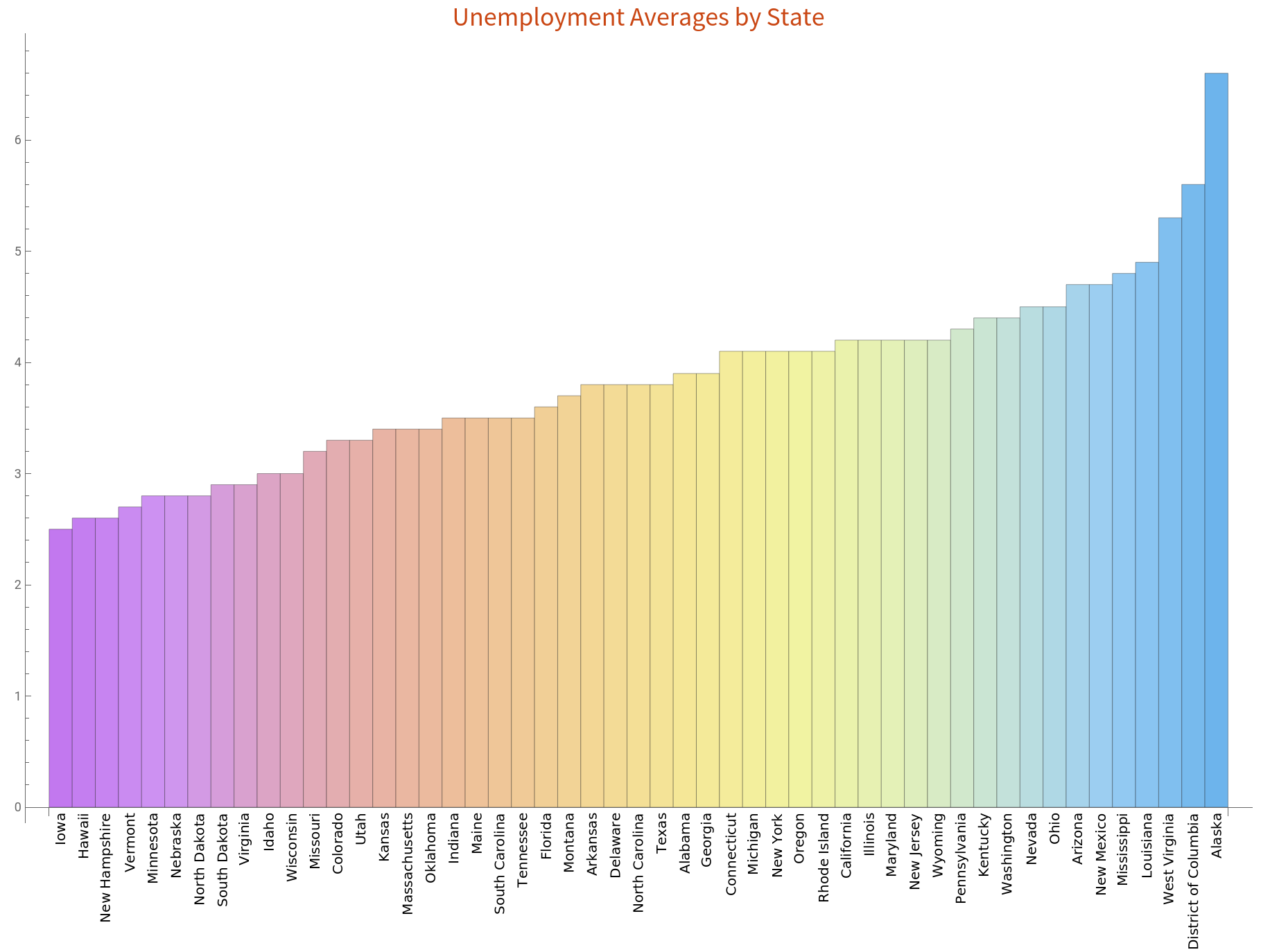
As a basic start, we wanted to create a chart which would show the average unemployment by state.
Create an association of state to unemployment rate, and sort by unemployment rate.
In[]:=
In[]:=
columns=Normal[data]//First;dataset=Rest[Normal[data]];assocData=Association@@MapThread[Rule,{columns,#}]&/@dataset;unemploymentDataset=Dataset[assocData];
In[]:=
totalUnemployment =Sort[AssociationThread[Normal[unemploymentDataset[Select[#Type"Total" &]][All,1]] Normal[unemploymentDataset[Select[#Type"Total" &]][All,3]]]];
In[]:=
BarChart[Values[totalUnemployment],ChartLabelsPlaced[Keys[totalUnemployment],Below,Rotate[#,Pi/2]&],ChartStyle"Pastel",PlotLabelStyle["Unemployment Averages by State","Subsubsection"],ImageSizeFull,BarSpacingNone]
Out[]=
General Observations
General Observations
We began by generating general facts about unemployment. By calculating various measurements on unemployment, we found that the economy is in good shape, with a 3.8% unemployment rate.
Find the average unemployment rate across all states
Total[unemploymentDataset[Select[#Type"Total"&]][All,3]//Normal]/51
Out[]=
3.82549
Highest and Lowest Unemployment Rates
We find that the state with the highest unemployment rates is Alaska, with 6.6% unemployment.
In[]:=
Last[totalUnemployment//Normal]
Out[]=
Alaska6.6
At the other end of the scale, we find that the state with the lowest unemployment is Iowa, with 2.5% unemployment across all groups.
In[]:=
First[totalUnemployment//Normal]
Out[]=
Iowa2.5
Unemployment by Age Group
Unemployment by Age Group
Creating Variables for Unemployment by Age Group
Creating Variables for Unemployment by Age Group
Unemployment Averages by State and Age Group
Unemployment Averages by State and Age Group
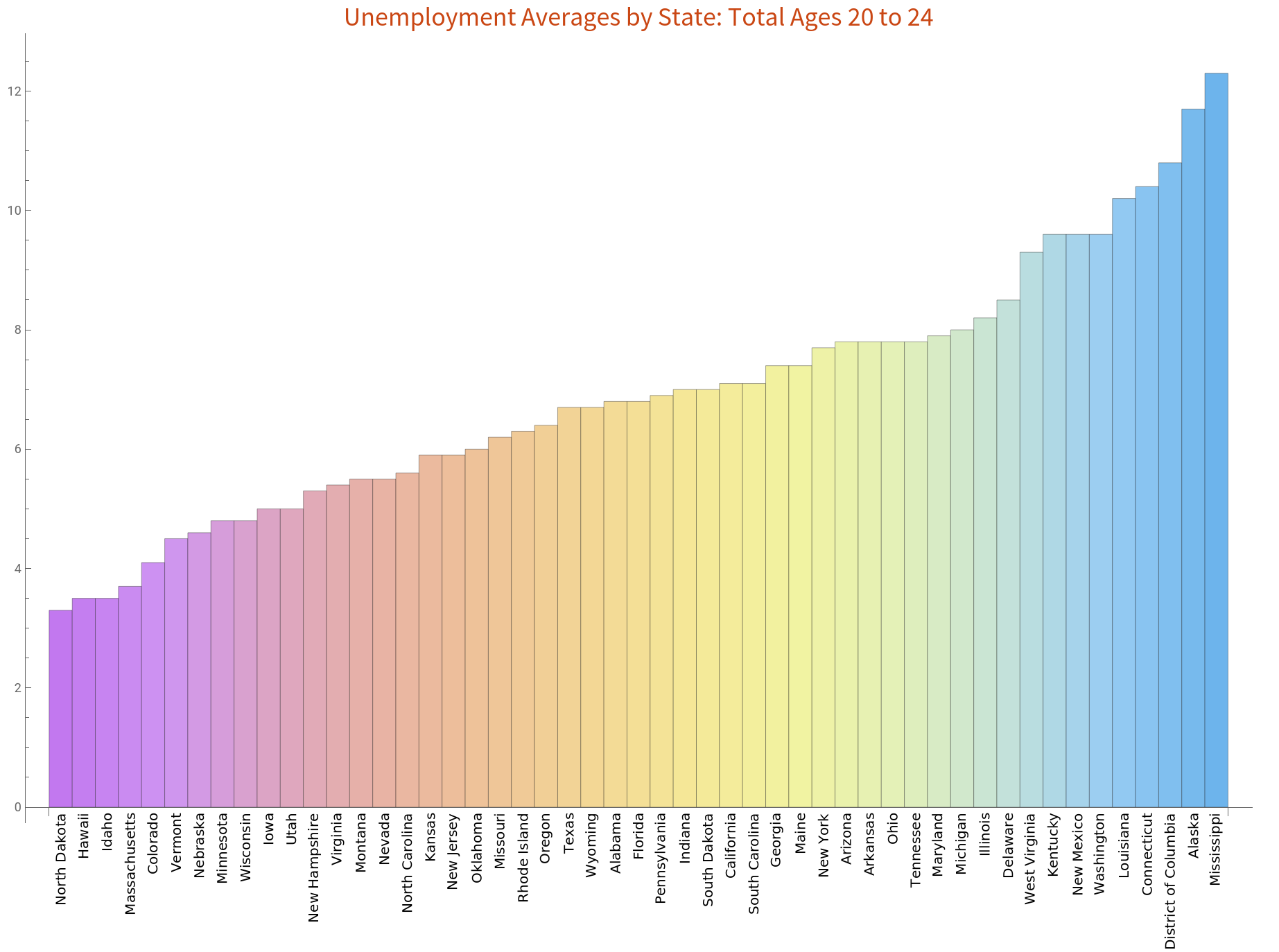
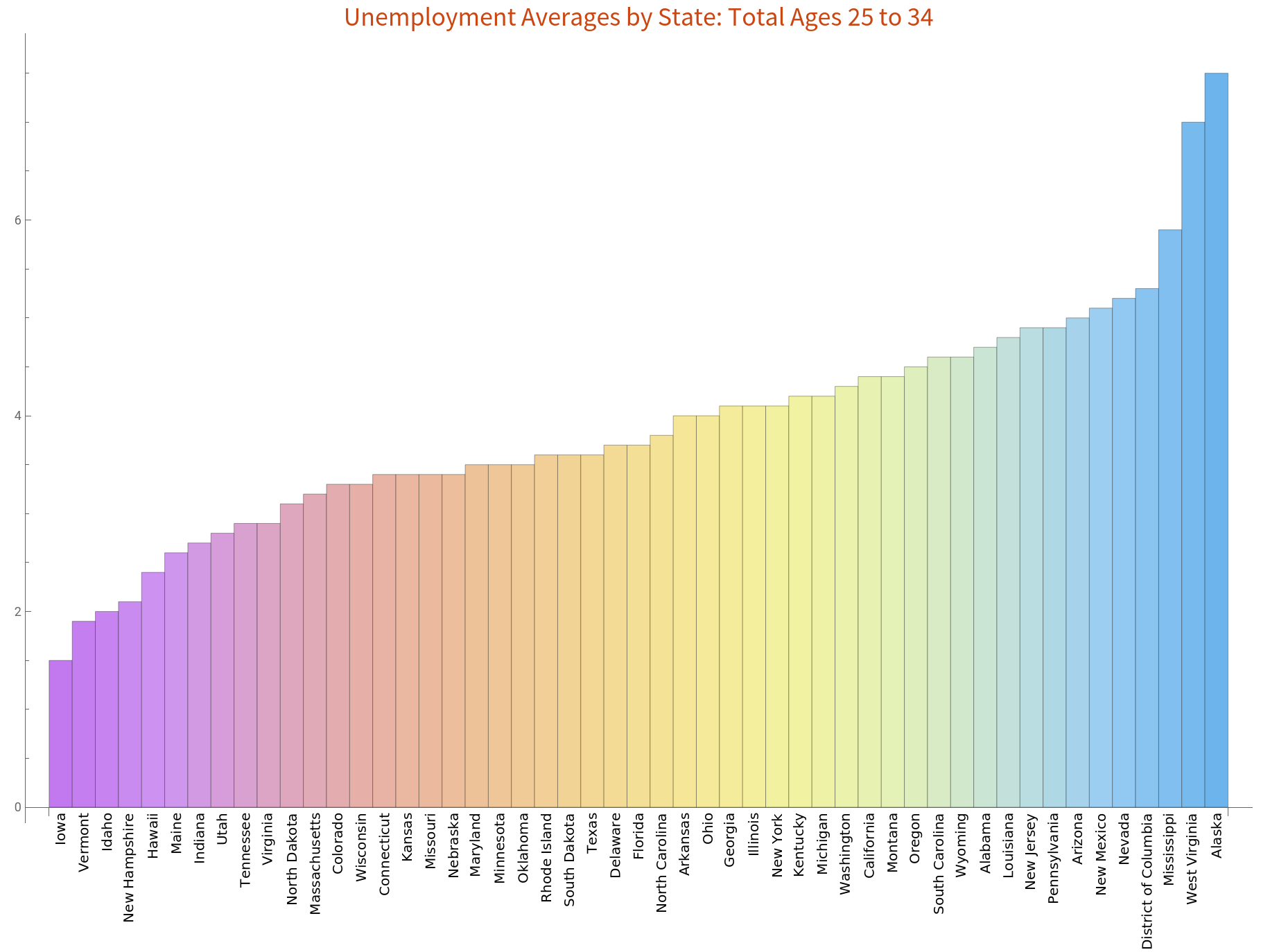
Unemployment by age is a really interesting statistic. Here, you can see how unemployment rates on average get lower as people get older. Notice how the 20-24 age group has the highest rates, while the 55-64 group has the lowest rates. We will delve into deeper analysis in the next subsection.
In[]:=
BarChart[Values[total2024assoc],ChartLabelsPlaced[Keys[total2024assoc],Below,Rotate[#,Pi/2]&],ChartStyle"Pastel",PlotLabelStyle["Unemployment Averages by State: Total Ages 20 to 24","Subsubsection"], ImageSizeFull, BarSpacingNone]
Out[]=
In[]:=
BarChart[Values[total2534assoc],ChartLabelsPlaced[Keys[total2534assoc],Below,Rotate[#,Pi/2]&],ChartStyle"Pastel",PlotLabelStyle["Unemployment Averages by State: Total Ages 25 to 34","Subsubsection"], ImageSizeFull, BarSpacingNone]
Out[]=
Basic Statistics by State and Age Group
Basic Statistics by State and Age Group
We also wondered about age and how it ties into unemployment. The media constantly portrays younger generations, currently the millennials, as having higher unemployment rates and being lazier.
But is that true? And if so, why? Let’s have a look at the average unemployment for Men, Women, White people, and African Americans by age.
But is that true? And if so, why? Let’s have a look at the average unemployment for Men, Women, White people, and African Americans by age.
Yes, millennials do have much higher rates than older people, with rates averaging around 4%. However, the younger generations are not at fault. Young adults are just entering the job market, so they have the highest likelihood of being unemployed. Meanwhile, older citizens are beginning to retire, so their rates will be dropping.
In addition to the negative correlation between age and unemployment (as age goes up, unemployment goes down), we found that men have slightly higher rates than women. We also found that unemployment rates are, on average, lower for African Americans than for White people in our data set.
Yes, millennials do have much higher rates than older people, with rates averaging around 4%. However, the younger generations are not at fault. Young adults are just entering the job market, so they have the highest likelihood of being unemployed. Meanwhile, older citizens are beginning to retire, so their rates will be dropping.
In addition to the negative correlation between age and unemployment (as age goes up, unemployment goes down), we found that men have slightly higher rates than women. We also found that unemployment rates are, on average, lower for African Americans than for White people in our data set.
Unemployment by Region
Unemployment by Region
Heat Plots of Regional Unemployment Rates
Heat Plots of Regional Unemployment Rates
One of the best tools for visualization of unemployment are Heat Plots. We generated two preliminary Heat Plots, the first showing the average rate by state, and the second showing the average rate by county. Because we are only plotting the current unemployment, and not any historical data, we use inbuilt Wolfram data for Civilian Unemployment Rates.
Diving Deeper into Regional Unemployment
Diving Deeper into Regional Unemployment
We anticipated finding more patterns at the sub-state level. Therefore, we generated some zoomed in heat maps by general U.S. region. This allowed us to analyze disparity in rates at the county level and the regional level.
In every region, most of the counties have rates lower than 5%, which shows signs of a successful economy. However, some regions have rates higher than this, and a couple of regions per county have rates that are much higher than the average. For example, the rate in Yuma, the dark red county in Arizona, is a staggering 35%. In addition, the Northeast has much lower unemployment rates than the rest of the country. This is likely due to the high concentration of people and jobs near New York and Pennsylvania.
Create regional heatmaps of the US. In an attempt to keep the notebook small, these images have been Bitmapped
Unemployment by Industry
Unemployment by Industry
We wanted to analyze unemployment by industry to see which industries were suffering and which were doing well, which would allow us to trace the data back to real world events and predict rates based on current events. The first step was to create a dataset of unemployment by industry by each month from January 2006 to October 2019. This data is provided by the BLS website.
Create a function to arrange the data so that each industry has it’s monthly unemployment number associated with the relevant month.
Next, we created a Date List Plot of all of the industries to visualize them together. Below is a chart of unemployment rates by industry from 2006 to 2019. The y axis is the number of people unemployed, so it is easy to tell the scope of the unemployment. The key allows you to distinguish and compare industries. For example, the construction and manufacturing industries have had high rates. This makes sense, considering America is moving more towards a service - oriented economy and away from traditional manufacturing.
Create a DateListPlot
Unemployment by Race
Unemployment by Race
We also analyzed racial disparity in unemployment across the 21 st century. Would we find any unusual spikes or dips that we can trace back to current events?
Create a function to arrange the data so that each race has it’s monthly unemployment number associated with the relevant month.
This Date List Plot shows all of the unemployment rates by race from 2006 to 2019. As you can see, people of Black racial identity generally have the highest unemployment rates across the years, followed by Hispanic, White, and finally Asian. All of the races show an upward spike around 2008 - 2010, when the recession hit. It appears that blacks were hit the hardest by the recession, as their rates rose considerable more than those of the other races. Afterwards, there has been a steady downward trend. This shows that Presidents Obama and Trump have succeeded in containing and reducing unemployment.
Create DateListPlot
Visualizing Changes Over Time
Visualizing Changes Over Time
So far, we have explored the basic statistics of our data. We will now drill deeper into regional time series data by creating a Manipulate which allows the user to explore regional heat maps over time.
Generating Heat Plots Function
Generating Heat Plots Function
Arranging the Data
Arranging the Data
We begin by importing unemployment data for each county in the USA from 2010-2018.
In order to split the county data into relevant States and use the data in our Manipulate, we need to know how many counties are in each state according to our data. We found, in alphabetical order:
From this, we can split our County data into states by partitioning the list. Next, we synthesized all of the rates from 2010 to 2019 into one big list, grouped by state. That’s a total of 30,050 county rates!
Split data for each year into states, then create a list of all the years
Creating the Function
Creating the Function
Our goal for this function is to allow a user to enter a state and a year, and create a Heat Plot of unemployment data for that state and year.
We found out that we do not have data of Kalawao county, Hawaii and Alexandria, Virginia in our unemployment rate-lists, so we proceeded to create another function to delete those two whenever we are working with Hawaii or Virginia.
findCounties generates a list of the counties in a specified State, and removes Kalawao county, Hawaii and Alexandria, Virginia
Then we need to find the specific part of the data we’re being asked for. We need to find the section of data relevant to the state entered, and then within that we need to find the appropriate year’s data.
isolateCountyByStateYear takes the state and the input year and chooses the appropriate selection of the list of data.
generateHeatPlot takes the State and the Year, calls the previous functions, and returns a heat plot of unemployment for that State and Year
We can now use our function to generate a heat plot for any state in any year from 2010 to 2018. Here is the output for Virginia in 2013
Manipulate Displaying Changes of Unemployment from 2010 - 2018
Manipulate Displaying Changes of Unemployment from 2010 - 2018
We expected the manipulate to work with all states, but there was too much data for our code to handle. So, we created a demo version containing only the Northeastern states.
Creating a manipulate showing Northeastern states’ data. To show all states, replace the list of entities with the stateEntities list. This will make the manipulate run more slowly.
Let' s see how the manipulate works to show us the differences over 10 years in New Jersey. Light yellow is 1.8 - 3.8 %, and dark red is up to 14 %. Cape May, the southernmost county of NJ, has had consistently high rates over the years. Overall, there is a decreasing trend in unemployment, which is consistent with our previous findings. As you can see, Northern Jersey has lower unemployment rates than southern Jersey, and light yellow is filling up a larger portion of the graph as time progresses.
Predicting with Regression and Neural Networks
Predicting with Regression and Neural Networks
Now that we have garnered all this interesting data and visualized it, we wanted to dive into predictive analytics. Could we accurately predict rates in the future with our mountain of data?
After data cleaning BLS data for 2010-2018, we produced two predictions for next year’s unemployment rate. The first utilizes a linear best fit curve and one utilizing a quadratic best fit curve. After taking a mean of the two predictions, we outputted our prediction for the next year.
Predicting Unemployment Rates by Race
Predicting Unemployment Rates by Race
We created two separate predict functions for race and industry, one to predict racial changes, and one for the Education and Health industry. To produce these predicting functions, we fed Wolfram’s Predict algorithm with data from 2006 to 2019 and trained it with a neural network. At first, we tried using linear regression. However, the data is not at all linear, so linear regression did not give results that we expected. After doing more research on various algorithms for prediction, we decided on neural networks. Their flexibility is ideal for our task.
A function to create training sets for unemployment data.
Create training data for each race. trainingData[[1]] is white, trainingData[[2]] is Hispanic, etc.
Create a predictor for each race
We can now use our prediction functions to predict future unemployment rates.
Create a list of dates by month from 11/2019 to the end of 2025
Predict future unemployment for each race. futureData[[1]] is white, futureData[[2]] is Hispanic, etc.
Create correctly formatted lists of training data and future data to create a DateListPlot
Create a DateListPlot showing predictions of future data
From this combined graph of actual and predicted rates, we can see that the race predictor appeared to produce more accurate results for White and Asian compared to Black and Hispanic. The predicted Asian trend line shows a relatively stable unemployment rate, with the same volatility as the recorded Asian unemployment rates from BLS. The predicted White rate shows a downward trend that appears sharper than the recorded rates, with rates almost touching zero by 2025! This prediction appears to be too ambitious, as rates touched an all time low in 2019. However, our model did not take this into account, so it predicted that rates will continue to drop. For Black and Hispanic, our model predicted a spike in rates and then a gradual decrease from 2020 to 2025.
Predicting Unemployment Rates by Industry
Predicting Unemployment Rates by Industry
Create training data for the Education and Health Industry
We then created a predictor for unemployment in the education and health industry.
Predict the trend of unemployment for the Education and Health Industry
Join the past and future data into one list
Create a DateListPlot showing predictions of future data
As you can tell, our results reflect the current downward trend, although the predicted trend line appears to be more volatile than the actual data. With future work and more data, we can make our predictor more accurate. Other possible weights to include are policy changes and widespread technological advancements. If we teach the model the effects of policies and tech development on the various industries, we can create a predictor that is more reliable and industry sensitive.
Wrapping Up
Wrapping Up
Future Works
Future Works
Much of our project focused on descriptive and predictive analytics. We did a very thorough job of collecting, cleaning, and visualizing data, and we successfully created predictors for Unemployment by race, an example of the Education and Health industry, and by region. Unfortunately, we cannot confirm the accuracy because we do not have enough data. For future works, we hope we can produce a better predicting function by incorporating factors other than year-- if our predictor accounts for year, policies, technological advancement, and other factors, we can create an accurate predictor and simulate a wealth of scenarios. We also would like to make a manipulate that can handle large amounts of data. If we can collect the unemployment data for all over the world, we certainly generate the heat plots of any region in the world and predicting the unemployment rate in that region just by plugging in year. We will also work on improving the predictors for race and industry to be able to make reliable predictions for the future.
References
References
1. Bureau of Labor Statistics: https://www.bls.gov
2. Pew Research Center: https://www.pewresearch.org
3. Data.gov: https://www.data.gov/
2. Pew Research Center: https://www.pewresearch.org
3. Data.gov: https://www.data.gov/
Acknowledgements
Acknowledgements
We are grateful for everyone involved in the Wolfram Summer Camp, as this project would not be possible without you guys. We would also like to thank Rory Foulger for their support and feedback throughout our project, and we had a lot of fun this semester working with Rory and other campers as part of the Wolfram Emerging Leaders Program.
Also, thanks for such a cool language Stephen!
Also, thanks for such a cool language Stephen!