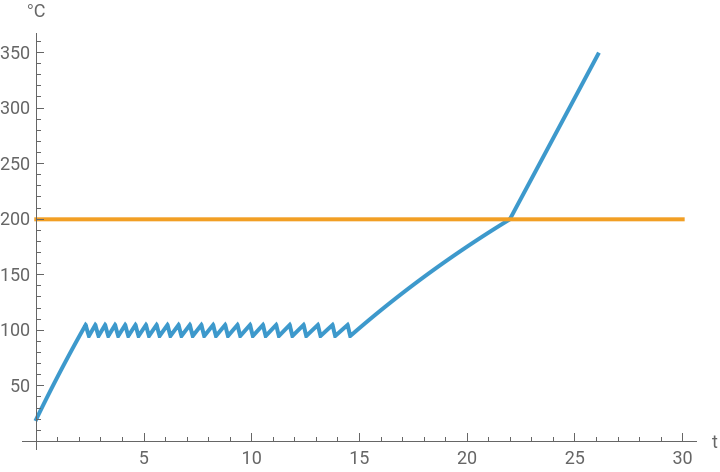
We validate a safety requirement in a model of a chemical reaction that, if a decomposition activation temperature is reached, can lead to a thermal runaway. To do this we use the new validation functionality in the Wolfram Language. We test the activation temperature condition for several initial concentrations of a reactant. Further analysis of the requirement validation failures easily lets us extract the corresponding configuration and visualize the region in which the requirement fails.
Lets make use of the newly introduced validation functionality in a model of thermal runaway. First we perform a general exploration of the model to see the general behavior of a few variables of interest, and later we explicitly tackle one requirement, analyse the results and identify initial conditions that avoid catastrophe and improve our system.
The validation functionality in the Wolfram Language allows us to verify system behaviors, such as safety, performance, physical requirements or design constraints. We now have a powerful temporal statement language and can easily introduce uncertainty in parameters, initial values and inputs to match statistical validation standards. We can query information on requirement validation failures, analyse it, and easily find potential causes and fixes to accelerate our modeling workflow. Lets see this in action.
Exploration
Exploration
In[]:=
ImportString,"MO";
In[]:=
trmodel=SystemModel["ThermalRunaway"]
Out[]=
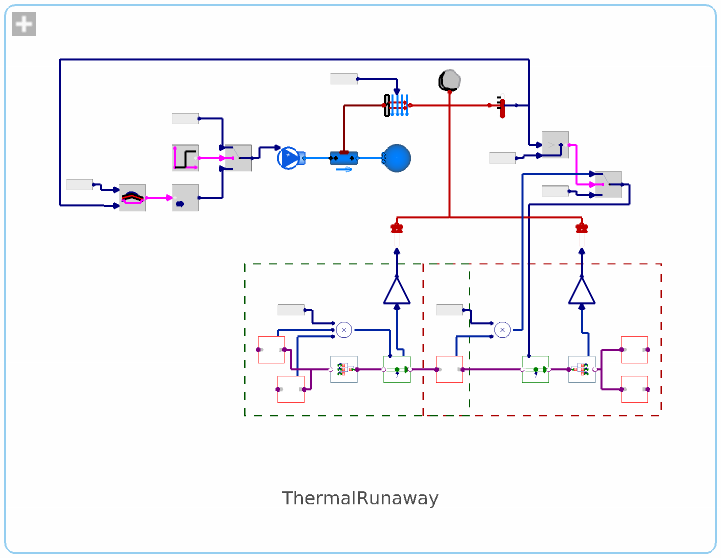
Simulate the model with different initial values for the concentrations of one the reactants:
In[]:=
trsims=SystemModelSimulate/@(SystemModel[trmodel,<|"ParameterValues"->{"reactantA.initialValue"->#},"ModelName"->"TR"<>ToString[#]|>]&/@Range[20,100,20]);
Validation
Validation
The temperature in the reaction tank must be below the decomposition activation temperature
The temperature in the reaction tank must be below the decomposition activation temperature
Validate the requirement “The temperature in the reaction tank must be below the decomposition activation temperature”:
In[]:=
trval=SystemModelValidate[trsims,SystemModelAlways[t,"container.T"[t]<"activationT.y"[t]]]
Out[]=
SystemModelValidationData


Show the failure plot:
In[]:=
trval["FailurePlot",1]
Out[]=

Extract the stored failure configuration:
In[]:=
trfailConfig=Extract[trsims,trval["ConfigurationsPosition"]]
Out[]=
SystemModelSimulationData

Plot the tank and activation temperatures:
In[]:=
SystemModelPlot[trfailConfig,{"container.T","activationT.y"}]
Out[]=


Getting started
Getting started
SystemModelValidate documentation page
Related talks
Related talks
Wolfram Technology Conference 2024: Validating System Models
Wolfram Technology Conference 2021: System Modeler: Introducing the Business Simulation Library
Download
Download
References
References
CITE THIS NOTEBOOK
CITE THIS NOTEBOOK
Thermal runaway in validation of industrial manufacturing with System Modeler and Wolfram Language
by Sergio Vargas
Wolfram Community, STAFF PICKS, August 4, 2025
https://community.wolfram.com/groups/-/m/t/3524866
by Sergio Vargas
Wolfram Community, STAFF PICKS, August 4, 2025
https://community.wolfram.com/groups/-/m/t/3524866