In[]:=
DesignedImageTransformationPackage
DesignedImageTransformation provides a speedup replacement for repeated ImageTransformation.
This is basically done by pre calculating the relation between pixel positions of the input image versus the pixel positions in the output image. This relation is memorized such that repeated transformations for different input images but with the same properties (size, ..., etc.) gain a substantial speedup.
The arguments and optionals are identical to ImageTransormation, a new Resampling->”Round” very similar to existing “Nearest” is provided for highest speedup. All options of ImageTransformation with exception of Masking and Background are supported.
This is basically done by pre calculating the relation between pixel positions of the input image versus the pixel positions in the output image. This relation is memorized such that repeated transformations for different input images but with the same properties (size, ..., etc.) gain a substantial speedup.
The arguments and optionals are identical to ImageTransormation, a new Resampling->”Round” very similar to existing “Nearest” is provided for highest speedup. All options of ImageTransformation with exception of Masking and Background are supported.
In[]:=
Needs["DesignedImageTransformation`"]??DesignedImageTransformation
Out[]=
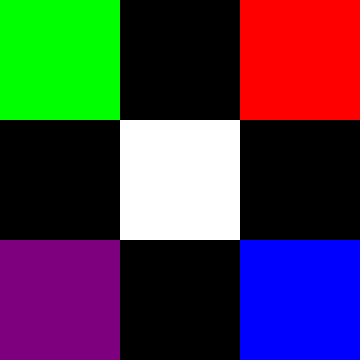
Create a 3 x 3 sample image.
In[]:=
image=SparseArray[{{3,1}Purple,{1,3}->Red,{3,3}Blue,{1,1}->Green,{2,2}White},{3,3},Black]//Normal//Image[#,ImageSizeSmall]&
Out[]=
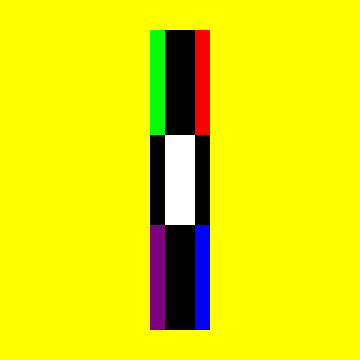
Squeeze in x, stretch in y, increase output size, increase PlotRange.
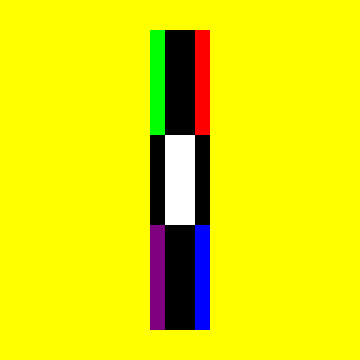
Show ImageTransformation for comparison.
Show ImageTransformation for comparison.
In[]:=
TF=Apply[{x,y}{2x,1/2y}];
In[]:=
DesignedImageTransformation[image(*//ColorConvert[#,"Grayscale"]&*),TF,24,DataRange2{{-1,1},{-1,1}},PlotRange5{{-1,1},{-1,1}},Resampling"Round",PaddingYellow]ImageTransformation[image,TF,24,DataRange2{{-1,1},{-1,1}},PlotRange5{{-1,1},{-1,1}},Resampling"Nearest",PaddingYellow]//Image[#,ImageSizeSmall]&
Out[]=
Out[]=
Pre calculate a transform based on transform parameters.
Show the created DesignObject.
Show the created DesignObject.
In[]:=
dit=DesignedImageTransformation[{3,3},TF,200,DataRange2{{-1,1},{-1,1}},PlotRange5{{-1,1},{-1,1}},Resampling"Round",PaddingYellow]
Out[]=
DesignedImageTransformation

Apply the operator form of the transform DesignObject on an image
In[]:=
dit[image]
Out[]=
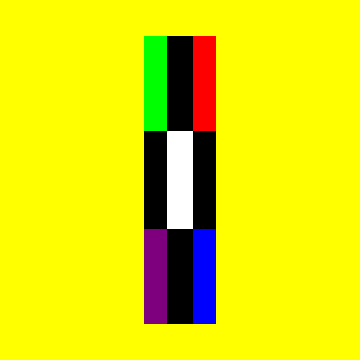
Apply the pre calculated transform on an image.
AbsolutTiming comparison.
AbsolutTiming comparison.
In[]:=
DesignedImageTransformation[image,dit]ImageTransformation[image,TF,200,DataRange2{{-1,1},{-1,1}},PlotRange5{{-1,1},{-1,1}},Resampling"Nearest",PaddingYellow]Print["ImageDimensions: ",ImageDimensions@%]AbsoluteTiming[Do[DesignedImageTransformation[image,dit],100]];Print["Timing DesignedImageTransformation: ",%[[1]]];AbsoluteTiming[Do[ImageTransformation[image,TF,200,DataRange2{{-1,1},{-1,1}},PlotRange5{{-1,1},{-1,1}},Resampling"Nearest",PaddingYellow],100]];Print["Timing ImageTransformation: ",%[[1]]];
Out[]=
Out[]=
ImageDimensions: {200,200}
Timing DesignedImageTransformation: 0.25957
Timing ImageTransformation: 18.2707
In[]:=
dit["Function"]dit["Properties"]dit[{Padding,"Properties","Function"}]//Column[#,DividersAll]&
Out[]=
ApplyFunction{x,y},2x,
y
2
Out[]=
{Function,Transform,Resampling,Padding,ImageDimensionsIN,ImageDimensionsOUT,PlotRange,DataRange,ImagePos,ArrayPos,ListPos,Properties}
Out[]=
Padding |
Properties{Function,Transform,Resampling,Padding,ImageDimensionsIN,ImageDimensionsOUT,PlotRange,DataRange,ImagePos,ArrayPos,ListPos,Properties} |
FunctionApplyFunction{x,y},2x, y 2 |