Floods have cost over $1.2 trillion and 200,000 deaths globally over the past 30 years, with Northeast US heavy precipitation events increasing 60% since 1950 due to climate change. To inform adaptive mitigation approaches, this project develops cellular automaton models that simulate where runoff travels and pools on ground terrain in Millburn, New Jersey. First, elevation and a five-class land cover are extracted from geographic data. Second, over several framework improvements, the final model in the WCA2D family moves water by analyzing surface-difference leveling bounded by Manning’s equation and the critical wave speed, with rainfall, infiltration, storm drain, and advection mechanisms to ensure hydrological consistency while staying computationally efficient. The validated model is then applied to quantifying flood mitigation, comparing strategies like green and permeable infrastructure, retention basins, and levees placed in exposed areas, determining that precipitation source-control measures reduce peak flooding most effectively by roughly half the modeled storm.
Introduction
Introduction
Pluvial flooding occurs when heavy rainfall exceeds the combined infiltration capacity of soil and engineered drainage, so the same water accumulates and flows over the land, called surface runoff. Flooding and natural disasters have been severely intensified by climate change, and recent events like Hurricane Ida on September 1, 2021 affected me and my community in Millburn, New Jersey. The township’s existing HEC-RAS engineering studies estimate how much water arrives at given locations, and after seeing all the damage that occurred, I was motivated to explore the complementary question of where water travels and pools once it is on the surface.
We extract elevation and terrain data from Wolfram GeoGraphics data. Land cover determines two hydrologic properties per surface type, Manning’s roughness coefficient n, which sets how fast water can move over a surface, and the SCS curve number, a measure of how much rainfall a surface can drain before saturation. For example, concrete pavement is at the impervious extreme and forest soil is far more absorptive. A cellular automaton model is used to model the town as a 300x300 grid, and it repeatedly updates itself through iterations.
This study has four objectives. The first is to construct a mass-conserving cellular automaton for surface water on Millburn’s real elevation and land cover. The second is to ground the flow rule in applied physics through Manning’s equation and the critical wave speed, so that it is hydrologically consistent but not too computationally intensive. The third is to involve the model into a complete cycle with rainfall, drainage (natural and engineered), and advective transport. The fourth is to apply the validated model as a planning and optimization tool that identifies flood hotspots and proposes the best type of infrastructure to be placed according to a simulated scenario.
This project makes a couple of simplifications. The domain of the grid is closed at its edges, so contributing terrain beyond the study frame is not accounted for. Additionally, the storm sewer network is represented as a constant capacity as opposed to being mapped. Finally, results are comparative since there is not calibration against observed flooding.
The intended application of this project is municipal. It provides a model that runs fairly quickly on open-source geographic data, allowing a town to test where flooding concentrates, and to compare the effect of permeable pavement, green infrastructure, storage, and barriers that is unique to them. Although the model is ran on Millburn’s geographic data for this project, the functions are generalizable and can be adapted to different areas as well.
We extract elevation and terrain data from Wolfram GeoGraphics data. Land cover determines two hydrologic properties per surface type, Manning’s roughness coefficient n, which sets how fast water can move over a surface, and the SCS curve number, a measure of how much rainfall a surface can drain before saturation. For example, concrete pavement is at the impervious extreme and forest soil is far more absorptive. A cellular automaton model is used to model the town as a 300x300 grid, and it repeatedly updates itself through iterations.
This study has four objectives. The first is to construct a mass-conserving cellular automaton for surface water on Millburn’s real elevation and land cover. The second is to ground the flow rule in applied physics through Manning’s equation and the critical wave speed, so that it is hydrologically consistent but not too computationally intensive. The third is to involve the model into a complete cycle with rainfall, drainage (natural and engineered), and advective transport. The fourth is to apply the validated model as a planning and optimization tool that identifies flood hotspots and proposes the best type of infrastructure to be placed according to a simulated scenario.
This project makes a couple of simplifications. The domain of the grid is closed at its edges, so contributing terrain beyond the study frame is not accounted for. Additionally, the storm sewer network is represented as a constant capacity as opposed to being mapped. Finally, results are comparative since there is not calibration against observed flooding.
The intended application of this project is municipal. It provides a model that runs fairly quickly on open-source geographic data, allowing a town to test where flooding concentrates, and to compare the effect of permeable pavement, green infrastructure, storage, and barriers that is unique to them. Although the model is ran on Millburn’s geographic data for this project, the functions are generalizable and can be adapted to different areas as well.
Setting up the Flood Simulation
Setting up the Flood Simulation
Initializing Data Constraints
Initializing Data Constraints
Setting up Constants
Setting up Constants
I start the project by getting all the necessary data in the program for a certain location. This data includes the elevation, binary water body masking, and terrain classification. All of these variables will be necessary later in use for the cellular automata:
In[]:=
location={40.738,-74.3245};gridSize=300;g=9.8;cellSize=30.;dt=1.0;rainRate=0.;
Now, we can assign RGB values to each of the map colors we want to extract for terrain:
In[]:=
waterColor={0.64644,0.786587,0.881283,1.};vegetationColor={0.788,0.882,0.725,1.};roadColor={1,1,1,1.};highwayColor={0.9137,0.8196,0.6863,1.};otherColor={0.9882,0.9725,0.8980,1.};culDeSacColor={0.6,0.6,0.6,1.};
Preliminary Maps
Preliminary Maps
Now, I can import the map using GeoGraphics for our location. The first is a general map of the Millburn/Short Hills area in New Jersey:
In[]:=
range=Quantity[3.0,"Kilometers"];map=GeoGraphics[{Red,PointSize[Large],Point[GeoPosition[location]]},GeoRange->range,GeoBackground->GeoStyling["StreetMapNoLabels"]]
Out[]=
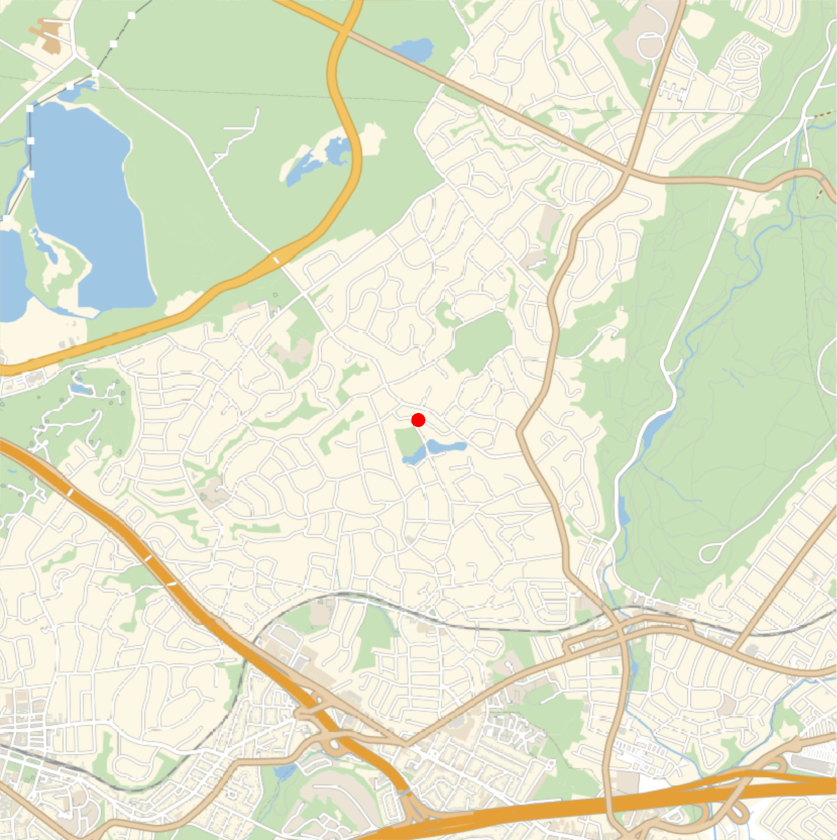
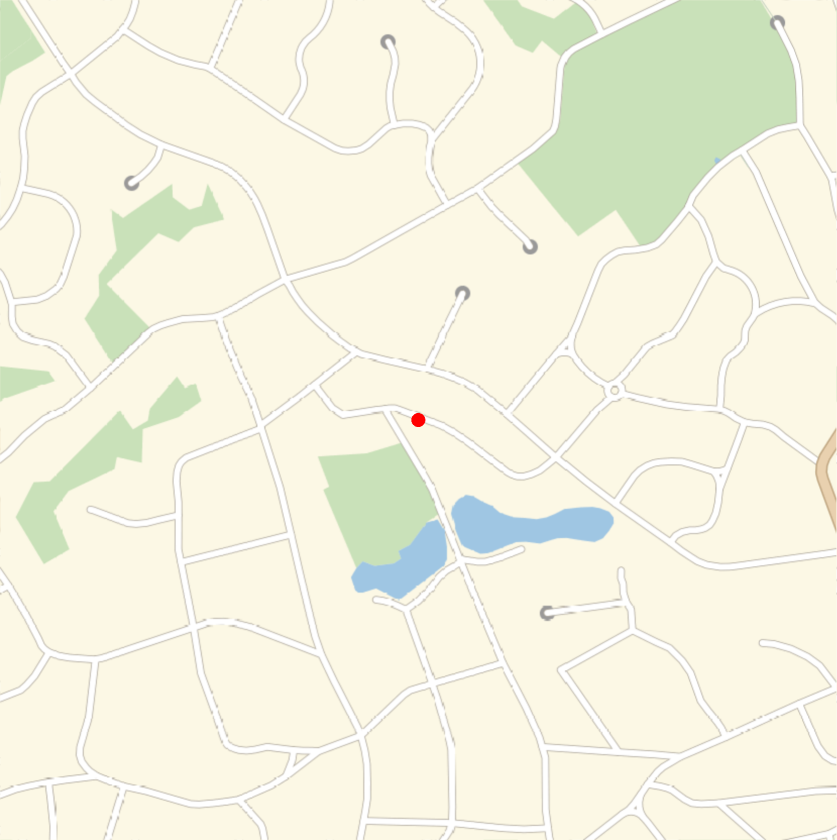
Our study area map will be slightly more zoomed in to allow for better accuracy and water flow simulation. It will still be generally centered in Millburn/Short Hills, and include water bodies, vegetation, roads, and residential areas:
In[]:=
range=Quantity[0.75,"Kilometers"];millburnMap=GeoGraphics[{Red,PointSize[Large],Point[GeoPosition[location]]},GeoRange->range,GeoBackground->GeoStyling["StreetMapNoLabels"]]
Out[]=
Extracting Individual Variables for Terrain Dataset Construction
Extracting Individual Variables for Terrain Dataset Construction
I began by extracting data from the Wolfram Geographic Database as a local source of high quality map data.
Elevation and Visualization
Elevation and Visualization
First, I get elevation using the GeoElevationData function and convert that to an array of gridSize (referenced from the 2023 Water Flow CA project):
In[]:=
elevation=ArrayResample[QuantityMagnitude[GeoElevationData[GeoDisk[GeoPosition[location],range],UnitSystem->"Metric"]],{gridSize,gridSize}];;
Using sample data (not used in the model) from Millburn, we can create a 3D visualization with Manipulate and ListPlot3D to see the elevation range and where it is distributed:
data=GeoElevationData,GeoRange,GeoProjectionAutomatic;Manipulate[ListPlot3D[Reverse[data],MeshFunctions->{#&},Mesh30,ImageSizeMedium,ColorFunction->Function[{x,y,z},If[z<=sealevel,ColorData["DeepSeaColors"][0.01z],ColorData["SandyTerrain"][0.001z+0.6]]],ColorFunctionScaling->False,PlotLegends->Automatic],{sealevel,50,600,10},SaveDefinitions->True]
Out[]=



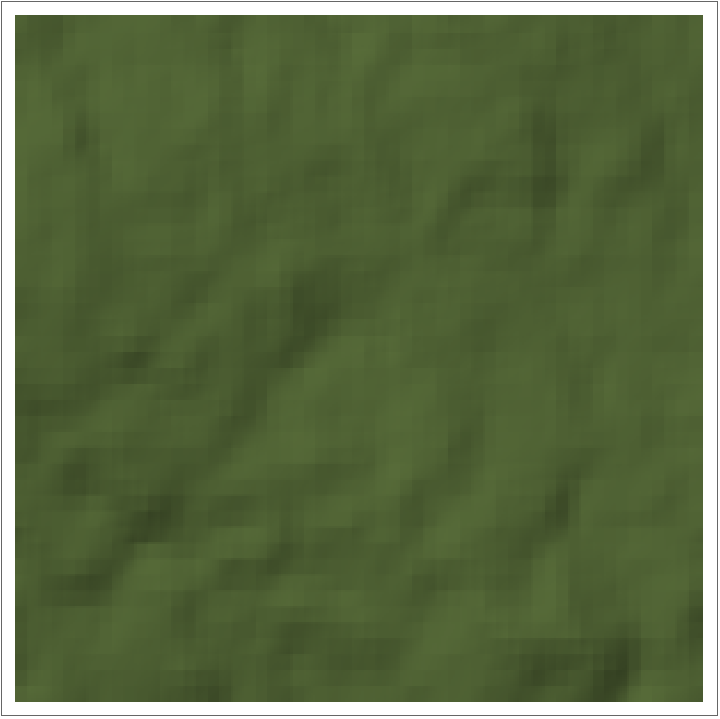
Using the study’s elevation data, we can also see a textured 2D ReliefPlot of the terrain:
In[]:=
Manipulate[ReliefPlot[elevation,ColorFunction->Function[{x},If[x<=sealevel,ColorData["DeepSeaColors"][0.1x+2],ColorData["SandyTerrain"][0.1x]]],ColorFunctionScaling->False,PlotLegends->Placed[BarLegend[Automatic,LegendLabel->"Elevation"],{After,Top}]],{sealevel,0,10},SaveDefinitions->True]
Out[]=
Land Cover Definition by Color Isolation
Land Cover Definition by Color Isolation
Next, we define the isolateColor function, which will be useful in getting the water and terrain masks from the map. This function takes in an image, and isolates all instances of the given color in it by using similar RGB bounds, outputting an RGB image that is resized to the gridSize:
Now, we begin to apply these functions to water and terrain, using our map from before and the color values we previously initialized, and visualize them in an organized manner with GraphicsGrid:
We end up with 6 different images where black space is the background and other colors (like blue or beige) represent the target detection. These images are classified into four groups of terrain with different characteristics in the model.
1. waterImageMill marks existing water bodies. These cells have Manning' s n = 0.03, typical of open channel flow, and curve number 100, meaning zero infiltration capacity, since a water body is already saturated ground. In the current model they otherwise behave as regular low terrain that rainfall lands on and flow passes through.
2. vegetationImageMill covers parks, forest reserves, and other space that is generally comprised of green vegetation. These cells receive the highest infiltration capacity, with a curve number 69 giving roughly 0.114 m of soil storage, and a high Manning' s n of 0.035, since grass and uneven land obstruct water flow. The combined effect is the absorption of more rainfall and slowing flow to lower elevation areas, which is why green infrastructure is a mitigation strategy.
3. roadImageMill, highwayImageMill, and culDeSacImageMill are combined together to form the impervious land network. These cells receive the lowest Manning' s n = 0.013 for smooth asphalt and concrete, and curve number 95, so nearly all rain that comes becomes runoff moving at a high velocity (why we often see large streams of water forming on ordinary roads). Because roads are also locally graded and often sit at low elevation relative to other lots, they act as the standing drainage channels of the simulation, and water takes along the street network toward low ground.
4. otherImageMill is the terrain that is not a part of any of the masks above, which in this frame is residential houses, driveways, and lawns taken at a finer scale. It receives intermediate properties, like Manning's n = 0.04 and curve number 83, reflecting roughly half lawn and half roof. This class dominates the study region of interest by land share, so its parameters have the largest influence on total runoff volume, and the composite CN 83 follows the standard SCS treatment of certain residential districts.
1. waterImageMill marks existing water bodies. These cells have Manning' s n = 0.03, typical of open channel flow, and curve number 100, meaning zero infiltration capacity, since a water body is already saturated ground. In the current model they otherwise behave as regular low terrain that rainfall lands on and flow passes through.
2. vegetationImageMill covers parks, forest reserves, and other space that is generally comprised of green vegetation. These cells receive the highest infiltration capacity, with a curve number 69 giving roughly 0.114 m of soil storage, and a high Manning' s n of 0.035, since grass and uneven land obstruct water flow. The combined effect is the absorption of more rainfall and slowing flow to lower elevation areas, which is why green infrastructure is a mitigation strategy.
3. roadImageMill, highwayImageMill, and culDeSacImageMill are combined together to form the impervious land network. These cells receive the lowest Manning' s n = 0.013 for smooth asphalt and concrete, and curve number 95, so nearly all rain that comes becomes runoff moving at a high velocity (why we often see large streams of water forming on ordinary roads). Because roads are also locally graded and often sit at low elevation relative to other lots, they act as the standing drainage channels of the simulation, and water takes along the street network toward low ground.
4. otherImageMill is the terrain that is not a part of any of the masks above, which in this frame is residential houses, driveways, and lawns taken at a finer scale. It receives intermediate properties, like Manning's n = 0.04 and curve number 83, reflecting roughly half lawn and half roof. This class dominates the study region of interest by land share, so its parameters have the largest influence on total runoff volume, and the composite CN 83 follows the standard SCS treatment of certain residential districts.
The following block changes the lists from having RGB values for the desired isolated color to having binary values for easier data use:
I combined all the three street-related grids into one (concreteBinaryGrid) and initialized the terrainClassGrid, using a Which block to classify each point into one of the four overall types as mentioned above:
Merging into Total Terrain Dataset
Merging into Total Terrain Dataset
Finally, I can merge all three datasets at the same spatial resolution of {300,300}, creating a final dataset that is kept in a {300,300,3} array (note: this dataset is not used for access in the remainder of this notebook, but should be exported as the comprehensive dataset that was constructed):
Setting up the Simple cellular automata Model (Version 1)
Setting up the Simple cellular automata Model (Version 1)
I start by creating a preliminary version of the cellular automata model to simulate water movement in flooding.
Terrain and Visualization Setup
Terrain and Visualization Setup
I first initialize three arrays: waterDepth, currSaturation, and maxCurrSaturation. The first of the three represents the height of water above the elevation of the cell, and those two quantities can be added together to determine the slope of water flow. The second array represents the current amount of terrain absorption of the water that passes through. The third array is Manning' s roughness coefficient n, to see how different terrain influences water spread through the land. The fourth uses the SCS-CN Curve Runoff estimation on both types of pavements and replaces all the elements of the terrainGrid.
The water depth and saturation arrays are currently kept to holding all 0’s, while the nGrid gets roughness coefficients from the terrainGrid. The maximum saturation grid is also set up based on the Curve Numbers for each terrain cell:
I define a preliminary version of the graphWater function to visualize the water + elevation grid each time our model is run, utilizing Graphics3D and coordinates with different colors to differentiate between terrain and runoff. The multiplicationFactor input is used to see how much to scale the water visualization by in our simulation so we can see movement in detail:
Defining Cellular Automata Rule
Defining Cellular Automata Rule
I then determined a cellular automata rule for the basic simulation, going cell-by-cell for one iteration. This will do the following:
1. I set the output visualization to use the above graphWater function with the center coordinates and adding or subtracting the gridSize/2 (defined as outputVisualization).
2. Set the current cell as minCell for the case that it is in a valley or pit.
3. Simulate infiltration and drainage into the terrain using the maximum amount of water that can still be saturated by the soil’s capacity (defined as drainageValue). Then, we apply this to the current cell by removing that amount of water and increasing saturation.
4. Look at the four Von-Neumann neighboring cells. and for each one, check if its total water level (sum of elevation and waterDepth), and if it is lower than the current minimum cell, I set that as the cell with the steepest descent.
5. I define the waterChange (the amount of water that is to be removed from the current cell) to either all of the water that exists, or the difference between their total water levels. Then, I remove this amount of water from the current cell and add it to the cell with the steepest difference in total level.
6. Finally, I iterate to the next cell (nextI is the row and nextJ is the column). We have cases built in place if the current point is at the end of a row, or at the end of the grid and need to go to the beginning. Finally, it returns the instance of the list with these values updated so the simulation function can continue to run: {gridSize, nextI, nextJ, centerX, centerY}.
1. I set the output visualization to use the above graphWater function with the center coordinates and adding or subtracting the gridSize/2 (defined as outputVisualization).
2. Set the current cell as minCell for the case that it is in a valley or pit.
3. Simulate infiltration and drainage into the terrain using the maximum amount of water that can still be saturated by the soil’s capacity (defined as drainageValue). Then, we apply this to the current cell by removing that amount of water and increasing saturation.
4. Look at the four Von-Neumann neighboring cells. and for each one, check if its total water level (sum of elevation and waterDepth), and if it is lower than the current minimum cell, I set that as the cell with the steepest descent.
5. I define the waterChange (the amount of water that is to be removed from the current cell) to either all of the water that exists, or the difference between their total water levels. Then, I remove this amount of water from the current cell and add it to the cell with the steepest difference in total level.
6. Finally, I iterate to the next cell (nextI is the row and nextJ is the column). We have cases built in place if the current point is at the end of a row, or at the end of the grid and need to go to the beginning. Finally, it returns the instance of the list with these values updated so the simulation function can continue to run: {gridSize, nextI, nextJ, centerX, centerY}.
The function basicWaterSpreadRule has the rule for one cellular automata iteration, creating a visualization, draining water from the current cell, and sending all of its water to its steepest neighbor if it exists (if not, nothing changes). After making these changes, it goes to the next cell on the right or wraps around until it reaches a certain amount of iterations:
I can now run basic test cases to ensure simple functionality of the simulation on a 5x5 grid.
With a random row and column, I set random waterDepth values for the 25 cells of intersection surrounding the center point (r,c):
With a random row and column, I set random waterDepth values for the 25 cells of intersection surrounding the center point (r,c):
Throughout this project, I use the NestList function, which is very useful in this scenario with a cellular automata for two reasons.
1) It allows the program to input a list iteratively, so the grid can be updated in the function continuously and be taken in again with new indices to focus on.
2) At the end of the simulation, it returns a comprehensive list with all the individual outputs from every run of the function, which allows me to see map visualizations progressing through time.
1) It allows the program to input a list iteratively, so the grid can be updated in the function continuously and be taken in again with new indices to focus on.
2) At the end of the simulation, it returns a comprehensive list with all the individual outputs from every run of the function, which allows me to see map visualizations progressing through time.
Then, I can go through every cell (5^2 * 2 = 50 iterations) using the NestList function with the basicWaterSpreadRule:
Weighted Physics-Guided Cellular Automata
Weighted Physics-Guided Cellular Automata
I now define more complex rules for cellular automata that incorporate physics and weighted transfer to better model water flow.
Model Setup
Model Setup
The idea for this 2.0 model is to preserve the same infiltration as the simple case and look at the same four neighbors, but give a certain amount to each one based on physical equations, hence the attributes being “weighted” and “physics-guided”.
Equation Definition
Equation Definition
To do this, I used Manning's formula (also known as Manning's equation), which is an empirical formula used to estimate the average velocity of a liquid in open flow. The equation has the following subparts when adapted to this issue:
H represents the total water level, as a sum of z (terrain elevation) and d (water depth):
t_k is the transfer to each neighbor. First, it computes the sum of the steepness water level differences between the center cell (H_c) and each of its four neighbors k (H_k). If this expression is negative, nothing is added. Then, it divides that result by 5 as there are 5 cells in total that need to be leveled out among themselves:
S represents the slope, or the largest surface drop around the cell divided by the width of the cell (simple rise over run calculation):
v_M, which is the most direct manifestation of Manning’s equation, predicts how fast water moves over a rough surface. The n in the denominator takes from our terrain classification, with smooth pavement letting water flow faster and vegetated ground slowing it significantly. This is then multiplied by the water depth (d) raised to the 2/3rd power and the square root of slope (S), as deeper and steeper water moves faster:
v_C is the critical velocity, or the speed of gravity (g) in shallow water of depth d. In this model, it functions as a ceiling limit that bounds the Manning estimate in very steep cases to keep it physically consistent:
F represents the flux capacity of the water, and it is dependent on the smaller value between v_M and v_C, multiplying it by the water depth (d) and the timestep (Δt) to simulate a certain amount of time for flooding. It then divides this value by the cell width (Δx):
φ presents a leveling rule for the total outflow V (the sum of all the water level neighbor differences), with two bounds, being the predicted water flux (F) and the existing water depth (d). The fraction takes the largest value possible that can be applied as a water rate:
Graph Visualization
Graph Visualization
This is a new version of the graphWater function that includes the color of the terrain the water is on:
Cell-by-Cell Version
Cell-by-Cell Version
We begin by creating the first type of model 2.0, which similarly to the first model, iterates through the grid cell-by-cell. However, one iteration occurs on the whole grid at once, as the differences in water level are frozen until they are applied after passing all cells for consistency. There are three main functions being used for this CA simulation: calculateCellDifferences, neighborWaterFlow, and wholeGridSpreadRuleCellByCell, with the first two being helpers and the last one putting everything together.
The following function computes all the differences between the center cell and its neighbors, and applies different aspects of Manning’s formula to figure out the weights of water transfer to each neighbor:
This function checks each neighbor for their output in the previous calculateCellDifferencesFunction, storing individual changes in the delta array and applying them at the end of an iteration through all cells of the grid.
Finally, we input the whole grid and run algorithms, which is made up of a infiltration first step, and then applies neighborWaterFlow and calculateCellDifferences to all the cells before visualization.
Whole Grid Version
Whole Grid Version
Now, we can create a 2.0 version of the model that runs on the entire grid at once. Although it includes the same general formulas as the cell-by-cell one, I added two helper functions: createDifferenceArrays and accessDifferences, and edited the original to calculateCellDifferences2 to take into account the full array operations. The main difference in the way this option logically works is that it needs to find differences between cells at the start, separating them into horizontal and vertical edges (horizontalDiffs and verticalDiffs), instead of taking direct indices for individual cells.
This function generates the horizontal and vertical difference arrays using the Differences function on the sum of elevation and water depth:
There are four cases: rows are equal and columns differ by 1, differ by -1, or vice versa for columns being equal. Based on one of those, I indexed the respective difference array by an amount combining gridSize and certain row/column indices:
The general workflow of this function is identical to calculateCellDifferences, first creating the differences, and applying Manning’s equations to output the weights of water transfer:
Like before, we can now make a full rule to run on every update of the cellular automata, draining out the current cell and then adding all water level changes to delta before visualizing.
Simulations and Time Experiment
Simulations and Time Experiment
Runtime Comparison
Runtime Comparison
Now, with two competing models wholeGridSpreadRuleCellByCell and wholeGridSpreadRule, we can determine which one is generally more efficient, and can therefore be used for the duration of the essay. To do this, we will run two timed experiments:
1) A simple test that simulates each model for a 10 iterations, and then multiplies that to project runtime for 1000 steps.
2) A more in-depth experiment with 5 trials and 5 steps, such that we can have a more accurate comparison.
1) A simple test that simulates each model for a 10 iterations, and then multiplies that to project runtime for 1000 steps.
2) A more in-depth experiment with 5 trials and 5 steps, such that we can have a more accurate comparison.
This function calculates the AbsoluteTiming of a 150x150 sub-grid, reassigning the water and saturation grids back to their original state between the two models. It then creates a table showing the type of approach, average time per step, and the projected time for 1000 steps:
I can now run the multiple-trial experiment, using Nest and Table. Then, another table is outputted with some extra values like the minimum time taken per step and standard deviation:
Therefore, we have determined that the cell-by-cell algorithm is more efficient, and we will use its architecture through the rest of this essay.
Simulation of Water on Bowl and Millburn
Simulation of Water on Bowl and Millburn
Now, we can run a simulation with Manipulate visualizations on both a bowl and Millburn to see water flow.
This function uses the wholeGridSpreadRuleCellByCell to run iterations:
Setting up different terrain colors:
I first setup the bowl simulation and run it:
Now, I run the Millburn simulation:
Finally, I use Manipulate to simulate both of them:
Flood Mechanism Additions
Flood Mechanism Additions
The next step is to add certain functionality of the model to better capture the complexities of flooding and its interaction with hydrological flow and terrain type.
Terrain Update
Terrain Update
For all of the types of terrain I originally extracted, I now assign the following variables to them: Manning’s n, Curve Number, percolation, diffusionFactor, and sewerCapacity using an association:
Then, I reconstructed each of those variables’ grids with Map on a created propertyGrid:
We end up with the following:
Modeling Improvements
Modeling Improvements
Function Updates
Function Updates
I calculated the differences between the current cell and its neighbors, now including the diffuseGrid to compare slopes:
I then simulated advection as an extra mechanism of water flow, which uses the existing water velocity and its momentum to keep flowing down:
This is the overall cellular automaton rule, which now also includes sewer removal and advection as mechanisms for water flow.
This function resets most of the grids and important variables so that multiple simulations can be run:
Simulation Testing
Simulation Testing
We again define some of the reviews for the simulation. In this case, elevation is modeled with a bowl, to test if water pools in the middle:
Use depthFrames to generate plots that visualize rain and water surface:
Optimizing Infrastructure Placement for Flood Mitigation
Optimizing Infrastructure Placement for Flood Mitigation
I first downsampled the elevation and terrain grids to 100x100 to have a faster runtime, and set dt to 5:
I also recreate all of the necessary grid in case their values have changed by tests earlier in the notebook.
This function simulates a storm scenario by applying gradual rainfall:
Instead of simply counting each cell with a certain amount of water as flooded, I defined total flooded area as the sum of contiguous clusters where their water levels exceed the threshold of 0.15:
I then record some baseline metrics and statistics about the flood, and identify the grid coordinates of the deepest flood hotspot to determine where to place infrastructure to alleviate risks:
Mitigation Experiments and Results
Mitigation Experiments and Results
Creates the map with a given center and radius:
The following function rebuilds the elevation and terrain grids:
Five functions are written to set up the respective cells of each intervention type so that they can have an effect on flooding:
Measures the average peak water depth within the most extreme flood hotspot:
I defined the visualization colors that correspond to each type of terrain:
This function generates a difference relief map comparing peak and baseline water depth:
Final output of the figure showing how the chosen infrastructure reduced flooding in certain areas:
Conclusion
Conclusion
This project goal was to create a model that simulates where water flows over a given terrain, and what infrastructure can be built to mitigate flood risk. The final versions of cellular automaton developed here conserve mass and keep a stable water level, and real elevation routes storm water along the street network into the low ground where past floods have occurred. Comparing the runtimes of different modeling approaches showed that a direct cell-by-cell implementation is more efficient than calculating one difference-array at the start. Under a designed storm of 60 millimeters per hour, the model identified a peak flood hotspot, and the mitigation experiments ranked the five interventions. Permeable pavement and green infrastructure conversion, which subtract water at the source, reduce hotspot flooding by around half. On the other hand, the retention basin and the levee, which only relocate water, barely decreased flooding levels, and the levee actually visibly deepened water upstream of its wall. The results agree with the literature citing green infrastructure as a strong mechanism for flood prevention, and this comes from the physics behind the model, demonstrating the model can capture the influences of flooding that matter.
Limitations and Future Steps
Limitations and Future Steps
There are a couple of limitations that should be mentioned in the context of this study. First, the domain is closed at the edges of the grid apart from advective outflow, so differences in terrain and water pooling outside of the boundary was excluded from all statistics by an inside margin. Second, the storm sewer network is represented as a constant given to drainage capacity beneath paved surfaces rather than being mapped at certain areas, and extracted water body masks behave as ordinary low terrain rather than additional storage. Importantly, these results should be viewed as comparative because the intervention options were ranked under one design storm, and absolute depths are uncalibrated against observed flood events.
Each limitation can be treated with an extension. To increase calibration, one could take a recorded flood event (like Hurricane Ida or any historical storm precipitation), or compare simulated inundation against FEMA flood maps and the township’s HEC-RAS extents to get better water level magnitudes. Additionally, the extracted water masks provide the basis for treating the ponds and the Rahway river as new hydraulic features with river inflows at their boundary. The sewer field could also be rebuilt from municipal inlet data if accessible. Finally, because the entire pipeline is taken from a single coordinate and location range, it could be developed as an interactive tool in which a user enters any location, the model extracts local terrain and land cover, and proposes infrastructure to place directly on the map, which would extend a case study into a generalizable flood planning tool.
Each limitation can be treated with an extension. To increase calibration, one could take a recorded flood event (like Hurricane Ida or any historical storm precipitation), or compare simulated inundation against FEMA flood maps and the township’s HEC-RAS extents to get better water level magnitudes. Additionally, the extracted water masks provide the basis for treating the ponds and the Rahway river as new hydraulic features with river inflows at their boundary. The sewer field could also be rebuilt from municipal inlet data if accessible. Finally, because the entire pipeline is taken from a single coordinate and location range, it could be developed as an interactive tool in which a user enters any location, the model extracts local terrain and land cover, and proposes infrastructure to place directly on the map, which would extend a case study into a generalizable flood planning tool.
Acknowledgements
Acknowledgements
Thank you very much to the Wolfram High School Summer Research Program, including Megan, Rory, Eryn, Cyrus, and Stephen Wolfram for their continuous dedication and help for our projects. Next, I want to give a big thank you to my mentor, Felipe Amorim, for his invaluable guidance throughout the planning, coding, and communication parts of my project. I also want to acknowledge all of the TAs that helped me with questions I had and to improve my thinking ability throughout this process, including Daniel Xu and Eric Archerman. Finally, I would like to thank all of the new students I met during this camp for motivating me and making my time here very enjoyable.
Additional thanks to Stephen Wolfram for suggesting this project.
Additional thanks to Stephen Wolfram for suggesting this project.
References
References
◼
Guidolin, M., Chen, A. S., Ghimire, B., Keedwell, E. C., Djordjević, S., & Savić, D. A. (2016). A weighted cellular automata 2D inundation model for rapid flood analysis. Environmental Modelling & Software, 84, 378–394. https://doi.org/10.1016/j.envsoft.2016.07.008
◼
Cheng, G. (2023, July 13). Morphological analysis of river tributaries and flood plains: A multi-dimensional approach [Wolfram Community post]. Wolfram Community. https://community.wolfram.com/groups/-/m/t/2964526
◼
Zhou, S. (2023, July 13). Modeling water flow using cellular automata [Wolfram Community post]. Wolfram Community. https://community.wolfram.com/groups/-/m/t/2964707
◼
Liu, K. (2025, July 10). Modeling 3D fire spread using cellular automata and optimizing fire suppressant placement [Wolfram Community post]. Wolfram Community. https://community.wolfram.com/groups/-/m/t/3502932
◼
Yang, J., Liu, K., Wang, M., Zhao, G., Wu, W., & Yue, Q. (2024). A convolutional neural network-weighted cellular automaton model for the fast prediction of urban pluvial flooding processes. International Journal of Disaster Risk Science, 15, 754–768. https://doi.org/10.1007/s13753-024-00592-4
◼
Swiss Re Institute. (2023, December 14). Natural catastrophes in focus: Floods. Swiss Re. https://www.swissre.com/risk-knowledge/mitigating-climate-risk/floods.html
◼
U.S. Department of Agriculture, Soil Conservation Service. (1986). Urban hydrology for small watersheds (Technical Release 55). https://www.nrc.gov/docs/ML1421/ML14219A437.pdf
◼
U.S. Global Change Research Program. (2023). Fifth National Climate Assessment: Chapter 21, Northeast. https://doi.org/10.7930/NCA5.2023.CH21
◼
Rehak, B. (2021, December 2). How stormwater detention basins work. Reduce Flooding. https://reduceflooding.com/2021/12/02/how-stormwater-detention-basins-work/
◼
U.S. Army Corps of Engineers. (n.d.). How levees work. National Levee Database. https://levees.sec.usace.army.mil/levee-basics/how-levees-work/
◼
California Department of Transportation. (2018, June 20). Erosion Control Toolbar: Permeable Paving. https://dot.ca.gov/programs/design/lap-erosion-control-design/tool-1-lap-erosion-control-toolbox/tool-1nn-40-permeable-paving
◼
Oregon State University Extension Service. (n.d.). Stormwater solutions for green infrastructure. https://extension.oregonstate.edu/stormwater-green-infrastructure
CITE THIS NOTEBOOK
CITE THIS NOTEBOOK
Using cellular automata to predict flood plains through water spread and ground absorption
by Suvid Bordia
Wolfram Community, STAFF PICKS, July 9, 2026
https://community.wolfram.com/groups/-/m/t/3753304
by Suvid Bordia
Wolfram Community, STAFF PICKS, July 9, 2026
https://community.wolfram.com/groups/-/m/t/3753304