Why This Matters
Why This Matters
Can a kettle learn when to stop heating?
This workflow explores how a reinforcement learning (Q-learning) agent can learn to control a physical system — a virtual electric kettle — using a hybrid of simulation and machine learning.
Instead of using traditional PID control or hand-tuned logic, we train the agent in Wolfram Language on a physically accurate model built in System Modeler (Modelica). This setup can generalize to other thermal systems, offering a flexible approach to smart control.
Tools Used
Tools Used
◼
Wolfram System Modeler — simulates thermodynamic and electrical behavior of the kettle
◼
Wolfram Language — trains and deploys the Q-learning agent
Step 1: Build the Kettle Simulation in System Modeler
Step 1: Build the Kettle Simulation in System Modeler
What’s in the Model?
What’s in the Model?
Import the kettle model:
In[]:=
ImportString,"MO";
Load and display the Electric Kettle Control model:
In[]:=
SystemModel["ElectricKettleControl",{"Diagram",Frame->False,ImageSize->Large}]
Out[]=
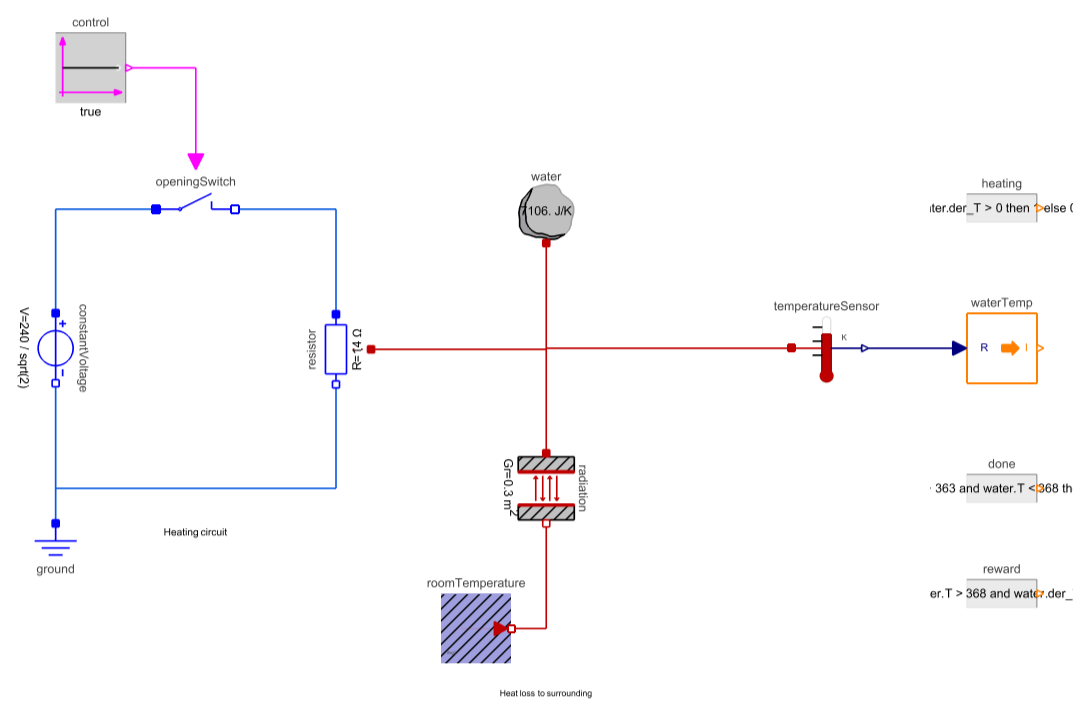
The system model includes:
◼
Control Switch: Turns heater ON or OFF.
◼
Resistor + Voltage Source: Simulates electrical heating.
◼
Water with Thermal Mass: Stores heat.
◼
Sensor: Measures temperature.
◼
Reward Logic:
◼
+2 if temperature is inside 363–368 K.
◼
+1 if it’s heating or cooling in the right direction.
◼
–1 if it’s heating or cooling in the wrong direction.
◼
Done Condition: Episode ends when target range is reached.
The simulation is used in real-time during training to test each action.
Step 2: Teach the Agent How to Control the Kettle (Q-Learning)
Step 2: Teach the Agent How to Control the Kettle (Q-Learning)
What Are We Trying to Do?
What Are We Trying to Do?
Imagine you’re learning how to boil water:
◼
You look at the temperature.
◼
You decide whether to turn the heater ON or OFF.
◼
Over time, you figure out what actions work best to get the water to the right temperature — and stop before it overheats.
This is exactly what we want our agent to do.
Instead of teaching it step-by-step rules, we let it learn from experience using something called Q-learning.
What is Q-Learning?
What is Q-Learning?
Q-learning is like trial-and-error learning:
◼
The agent tries different actions in different situations (states).
◼
After each action, it sees if the result was good (reward) or bad (penalty).
◼
It remembers the best actions in a Q-table — kind of like a cheat sheet for future decisions.
Over time, the agent gets better and better at knowing what to do.
Key Terms
Key Terms
◼
Definitions:
◼
State: What’s happening now?
◼
For us, it’s the water temperature and whether the heater is ON or OFF.
◼
Action: What can the agent do?
◼
It can turn the heater ON (2) or OFF (1).
◼
Reward: Was that a good move?
◼
It gets +2 when the water is just right, –1 when it’s heating the wrong way, and 1 otherwise.
◼
Q-Table: Where it stores its knowledge.
◼
Each row is a situation; each column says how good it is to take each action.
Define all situations:
Define all situations:
Temperature states (Kelvin):
In[]:=
tempStates=Range[298,398];
Heating OFF (1) or ON (2):
In[]:=
heatingStates=Range[1,2];
All possible state combinations:
In[]:=
states=Tuples[{tempStates,heatingStates}];
Define actions:
Define actions:
Action: 1=OFF, 2=ON:
In[]:=
actions=Range[1,2];
In[]:=
numStates=Length[states];numActions=Length[actions];
Make an Empty Q-Table
Make an Empty Q-Table
Initialize Q-table with zeros for each state-action pair:
In[]:=
Qtable=Thread[List[states,ConstantArray[0,{numStates,numActions}]]];
Here the Q-table starts with zeros — the agent knows nothing yet.
Define Training parameters:
In[]:=
totalEpisodes=1500;(*Howmanytimestotrain*)learningRate=0.8;(*Howquicklytolearnfromexperience*)gamma=0.95;(*Howmuchfuturerewardsmatter*)epsilon=1.0;(*Howmuchtoexplorerandomlyatfirst*)
Epsilon-greedy policy: At first, explore randomly. Gradually reduce randomness to exploit learned policy.
In[]:=
epsilon=0.8;maxEpsilon=1.0;minEpsilon=0.01;decayRate=0.01;
Load System Modeler paclet (required for real-time simulations):
In[]:=
Needs["WSMLink`"];
What Happens During Training?
What Happens During Training?
In each episode:
◼
Start at a random temperature and random delta T (heating or cooling state).
◼
Do up to 50 steps:
◼
Pick an action (randomly or from Q-table).
◼
Try it in the System Modeler simulation.
◼
See the result (new temperature, reward).
◼
Update the Q-table based on how good the action was.
◼
Repeat and learn over many episodes.
◼
Simulate → Get State → Choose Action → Apply → Observe → Update
Q-Learning Episode Function
Q-Learning Episode Function
In[]:=
maxSteps=50;episode[i_]:=Module{initialState,state,conn,takeStep,newState,reward,done,rowPos,newRowPos,action,qMaxIndex,expTradeoff},(*Randomlyinitializestartingstate*)initialState={RandomInteger[{298,398}],RandomInteger[{1,2}]};state=initialState;(*Startreal-timesimulationwithinitialstate*)conn=WSMRealTimeSimulate["ElectricKettleControl",100000,WSMInitialValues->{"water.T"->initialState[[1]],"control.k"->{True,False}[[initialState[[2]]]]},Method->{"WriteSimulationData"->True,"SimulationRate"->500}];(*Defineafunctiontotakeastepinthesimulation*)takeStep[]:=Module[{newStateStep,rewardStep,doneStep},conn["Start"];WSMLink`Simulate`SetParameters[conn,"control.k"->{True,False}[[action]]];Pause[0.01];(*Waitforstateupdate*)conn["Pause"];newStateStep=IntegerPart[conn[{"waterTemp.y","heating.y"}]];{rewardStep,doneStep}=IntegerPart[conn[{"reward.y","done.y"}]];{newStateStep,rewardStep,doneStep}];(*Maintrainingloopfortheepisode*)Do(*Exploration-exploitationtradeoff*)expTradeoff=RandomReal[];action=If[expTradeoff>epsilon,(*Exploit:choosebestactionfromQ-table*)rowPos=FirstPosition[Qtable,state][[1]];qMaxIndex=FirstPosition[Qtable[[rowPos,2]],Max[Qtable[[rowPos,2]]]][[1]];qMaxIndex,(*Explore:pickrandomaction*)RandomInteger[{1,2}]];(*Takeaction,observeresult*){newState,reward,done}=takeStep[];(*IfnewstatenotinQ-table,exit*)If[MissingQ[FirstPosition[Qtable,newState]],Break[]];(*Q-valueupdate*)rowPos=FirstPosition[Qtable,state][[1]];newRowPos=FirstPosition[Qtable,newState][[1]];Qtable[[rowPos,2,action]]+=learningRate*(reward+gamma*Max[Qtable[[newRowPos,2]]]-Qtable[[rowPos,2,action]]);state=newState;Ifdone==1,PrintTemporary"✅ Reached goal in episode ",i;Break[],{maxSteps};(*Decayexplorationrate*)epsilon=minEpsilon+(maxEpsilon-minEpsilon)*Exp[-decayRate*i];(*Storeintermediateresults*)(*Export[FileNameJoin[{NotebookDirectory[],"Qtable",ToString[i]<>".mx"}],Qtable];*)conn["Stop"];;
Run training episodes:
OPTIONAL: Store the results in a file so that you can retrieve it later:
Remove all untrained states. Only learned values (i.e., where Q ≠ 0) are retained.
Sort based on temperature value:
Categorize rewards based on heating status:
Remove duplicate temperature values to have a monotonically increasing column:
Remove cases where both the heating status (ON and OFF) have not been explored to remove discontinuities:
Step 3: Make Sense of the Learned Policy
Step 3: Make Sense of the Learned Policy
The following plot helps to visualize when the\b action (turn heater ON) is desirable at each temperature.
◼
Positive reward values: No need to take action.
◼
Negative reward values: Avoid these states take action.
◼
Sharp peaks or dips: These indicate high confidence — either a good or bad action for that state.
Observations
◼
when water temperature is below 363 K ⟶ negative reward ⟶ Turn heater ON
◼
when water temperature is above 363 K ⟶ positive reward ⟶ No action needed/Turn heater OFF
Step 4: Deploy the Agent
Step 4: Deploy the Agent
Convert the Q-table into a 2D lookup format. Create a lookup table in System Modeler:
Add a row with 0 and 1, that will be used as an input for the 2D interpolation table:
Create a lookup table in System Modeler based on the learned policy:
Add the table to the model and use the learned policy as a controller:
Plot the model response for different initial starting water temperature:
Insights
Insights
◼
The agent reliably learned to heat towards 363 K and stop when target is reached
◼
Q-values show high confidence zones and under-explored regions
◼
Easy to extend this setup to other thermal or process control systems
CITE THIS NOTEBOOK
CITE THIS NOTEBOOK
Teaching a kettle to think: Q-learning with System Modeler & Wolfram Language
by Ankit Naik
Wolfram Community, STAFF PICKS, July 8, 2025
https://community.wolfram.com/groups/-/m/t/3494353
by Ankit Naik
Wolfram Community, STAFF PICKS, July 8, 2025
https://community.wolfram.com/groups/-/m/t/3494353