U.S. Senate voting records are have been published and available to the public since 1789 in order to adhere to the Constitution. However, for the average U.S. citizen, examining each and every record can reveal little about the power dynamics within Senate. By processing voting data, we can visualize connections between senators that have similarities in their voting and challenge the claim that our government simply has a bipartisan relationship. Extending the same methods used in this project to foreign voting records can also help us isolate independent and swing voters that are more easily influenced, information that is likely useful for the U.S. government.
Introduction
Introduction
The U.S. Senate has been a imperative part of the United States’ legislative branch for nearly 236 years. Each year, the body of 100 people vote on thousands of issues that pertain to the lives of millions of Americans. Many today regard the body as a bipartisan network, however with further analysis we can examine the smaller, stronger coalitions that exist within each party. At the same time, visualizing these networks can help us isolate those that remain on the peripheries of each group and are more likely to be roped into other factions as swing voters. In this project, we will examine the trends and alliances within the U.S. Senate through its voting records.
Setting Up Data and Functions
Setting Up Data and Functions
Here, we import the data of voting records for US senators from 2024-2025 118th to 119th congress. 99 votes, All 1s (Yeas), 6s (Nays), and 9s (No vote). In addition, we are importing the data that lists the political party and state of each senator from 2001 to 2025.
In[]:=
voteData=CloudGet[CloudObject@
https://www.wolframcloud.com/obj/3e76c447-68df-41c9-8e06-de7547e73f78
];In[]:=
partyData=CloudGet[CloudObject@
https://www.wolframcloud.com/obj/ae6420d3-afe3-455a-999a-8672feb7b071
];In[]:=
dataRows=Rest[partyData];
In[]:=
partyLookup=AssociationThread@@Transpose[dataRows];
Adding the remaining senators that were elected before 2001.
In[]:=
AssociateTo[partyLookup,#]&/@{"Charles Schumer"->"D-NY","Michael Crapo"->"R-ID","Richard Durbin"->"R-IL","Susan Collins"->"R-ME","Addison McConnell"->"R-KY","Charles Grassley"->"R-IA","Ronald Wyden"->"D-OR","John Reed"->"D-RI","Patricia Murray"->"D-WA"};
This is the function that we will be using to turn the data we imported into a clear network graph. First, we take a dataset of the original .csv file containing the names and voting records of the senators and remove the headers. Then, we reformat all of the names into a new column, and with the new dataset, generate a list of all possible pairs. This amounts to 4950 combinations. Each pair is then examined in the findEdges function. Once we get the list of edges returned, we can graph our final network, with each node being a senator and each edge being a connection of political similarity. The parameter noSwings is a boolean that establishes whether or not we want to display the “swing” voters in our final graph, or rather the people that do not belong to a faction.
Function to visualize the raw voting data file into a voting network.
In[]:=
visualizeVotingData[data_,threshold_,noSwings_]:=Module[{headers=First[data],dataRows,table,pairs,edges,ds,newNames,newDS,vertices,dataRows2},dataRows=Rest[data];table=DeleteColumns[AssociationThread[headers,#]&/@dataRows,"icpsr"];ds=Dataset[table];newNames=reformatName[#]&/@Normal[ds[All,"name"]];dataRows2=MapThread[Append,{Rest[data],newNames}];pairs=Subsets[dataRows2,{2}];edges=findEdges[pairs,threshold];(*re-formatexistingLASTNAME,firstnamemiddlenametoaFirstnameLastnameParty-Stateway,thenletallofthenames*)If[noSwings==True,Graph[edges,VertexLabels->Placed["Name",Tooltip]],Graph[newNames,edges,VertexLabels->Placed["Name",Tooltip]]]]
voteMatchCount is a function that essentially compares the two lists passed in as arguments. It should return the number of matches. This is how we will compare the voting records between two senators.
In[]:=
voteMatchCount[v1_,v2_]:=Count[MapThread[Equal,{v1,v2}],True];
Here, we will draw the edges of the graph. The “similarity threshold” is the number of matches between two senators’ votes. In defining edges, we only want to make an edge if the two senators have some voting similarity. Otherwise we would end up with a shape the looks like a circle, since most of the senators have voted the same as every other senator on at least 1 issue.
As we lower the similarity threshold, we will see a decrease in modularity. For now, we will set the similarityThreshold to 15. This should draw an edge to any senators that have voted the same on at least 15 issues. In defining edges, we are taking the names of both the senators from our list of pairs (remember it is a 2D array) and both of their votes. (pairs[i,1,5;;] should return all of the remaining votes that will just be an array of {1,6,1,9,1,....} 99 times. We can compare each of the pairs in the senator pairs list by applying this function. Then, compare the number that was returned with our similarityThreshold which in this case is 10. If the number of similar votes is greater than or equal to 10, then we construct an edge between the two senators.
As we lower the similarity threshold, we will see a decrease in modularity. For now, we will set the similarityThreshold to 15. This should draw an edge to any senators that have voted the same on at least 15 issues. In defining edges, we are taking the names of both the senators from our list of pairs (remember it is a 2D array) and both of their votes. (pairs[i,1,5;;] should return all of the remaining votes that will just be an array of {1,6,1,9,1,....} 99 times. We can compare each of the pairs in the senator pairs list by applying this function. Then, compare the number that was returned with our similarityThreshold which in this case is 10. If the number of similar votes is greater than or equal to 10, then we construct an edge between the two senators.
Function that checks for commonalities in voting given a list of pairs of senators, and returns a list of all the edges between the senators.
In[]:=
findEdges[pairs_,threshold_]:=Module[{edges,name1,votes1,name2,votes2,matches},edges=Table[name1=pairs[[i,1,-1]];votes1=Drop[pairs[[i,1,5;;]],-1];name2=pairs[[i,2,-1]];votes2=Drop[pairs[[i,2,5;;]],-1];matches=voteMatchCount[votes1,votes2];If[matches>=threshold,UndirectedEdge[name1,name2],Null],{i,Length[pairs]}];DeleteCases[edges,Null]]
This function that takes in a string formatted “LASTNAME, Firstname Middlename (Nickname)” and just returns “Firstname Lastname - PARTY-STATE” abbrev.
In[]:=
reformatName[name_]:=Module[{newName},newName=StringJoin[StringSplit[name,{" ",","}][[3]]," ",Capitalize[ToLowerCase[StringSplit[name,{" ",","}][[1]]]]];If[KeyExistsQ[partyLookup,newName],newName=StringJoin[newName," ",Lookup[partyLookup,newName]],newName]]
This is an example of what it does to the names in the dataset.
In[]:=
reformatName["ALSOBROOKS, Angela"]
Out[]=
Angela Alsobrooks D-MD
Exploring Variance in Party Centralization
Exploring Variance in Party Centralization
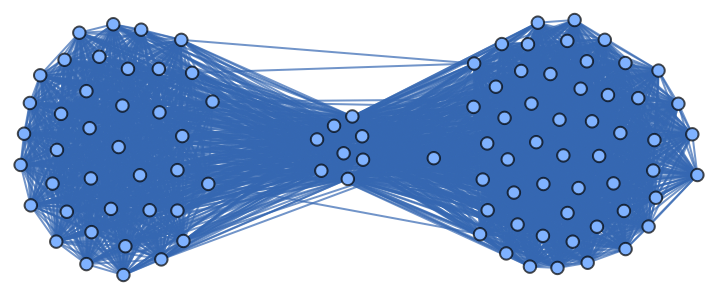
This is what our network of senators should look like if we draw an edge between every senator that had at least 15 votes in common out of our sample of 99 votes. As expected, a group of two clusters formed, with each cluster representing one political party.
In[]:=
visualizeVotingData[voteData,15,True]
Out[]=
Here, we are going to generate a list of graphs that contain gradually increasing thresholds of similarity, then create a Manipulate that iterates through these graphs to visualize the effect of the similarity threshold. As we increase our threshold of matched votes, we can isolate the body of senators into two political factions. As we continue to increase our threshold, we can observe that there is not necessarily an equal distribution of decentralization, with the Democratic party’s network being relatively more spread out than the Republican’s. At the same time, we can see even smaller, more centralized groups clearly within our larger Republican and Democratic networks. The nodes that lie along the ends of the graph are the senators that no longer share a similar voting pattern to anyone else, and therefore cannot form an edge.
Create a table of all the graphs with gradually increasing thresholds of similarity.
In[]:=
graphs=Parallelize[Table[Rasterize[visualizeVotingData[voteData,i,False]],{i,1,98,1}]];
In[]:=
Export["graphs-anim-400.gif",ListAnimate[graphs,3],"GIF",ImageSize->400]
In[]:=
Import["C:\\Users\\schoo\\graphs-anim-400.gif","AnimatedImage"]
Out[]=
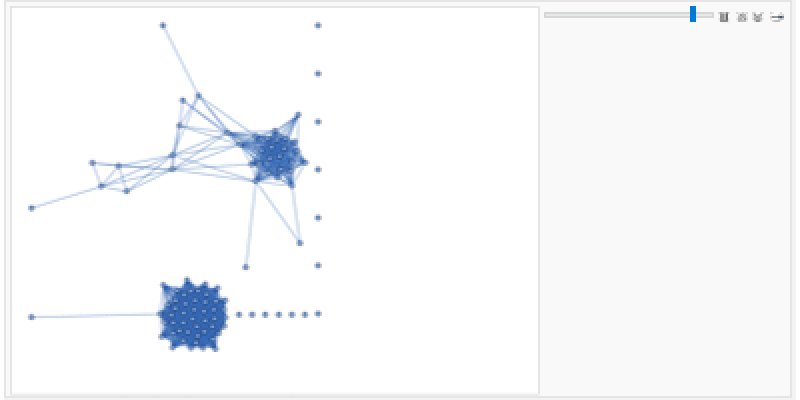
Manipulate that shows the effect of changing the similarityThreshold variable in the voting networks.
ListAnimate[Table[graphs[[similarity]],{similarity,15,98,1}(*,SaveDefinitions->True*)],2]
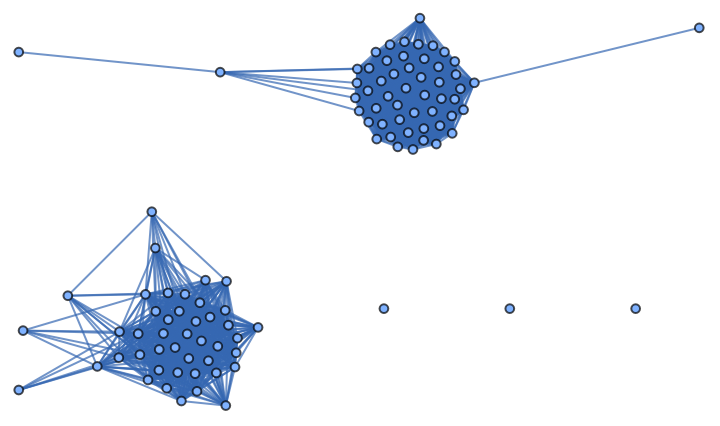
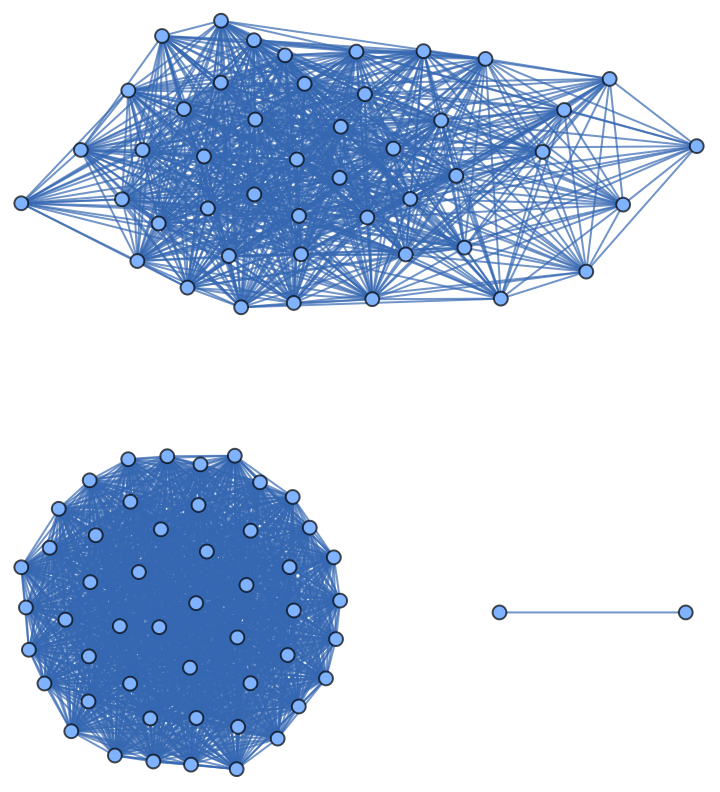
Let’s isolate this graph, where we can see that our current Senate has an more centralized Republican majority, and decentralized Democrat minority.
In[]:=
visualizeVotingData[voteData,80,False]
Out[]=
Let’s contrast this graph with the voting network just a few months before.
Below we can observe that before the 2024 election, Republicans were generally more decentralized than Democrats. During this time, Democrats were the majority party and Republicans were the minority.
Below we can observe that before the 2024 election, Republicans were generally more decentralized than Democrats. During this time, Democrats were the majority party and Republicans were the minority.
In[]:=
In[]:=
visualizeVotingData[voteData2,80,True]
Out[]=
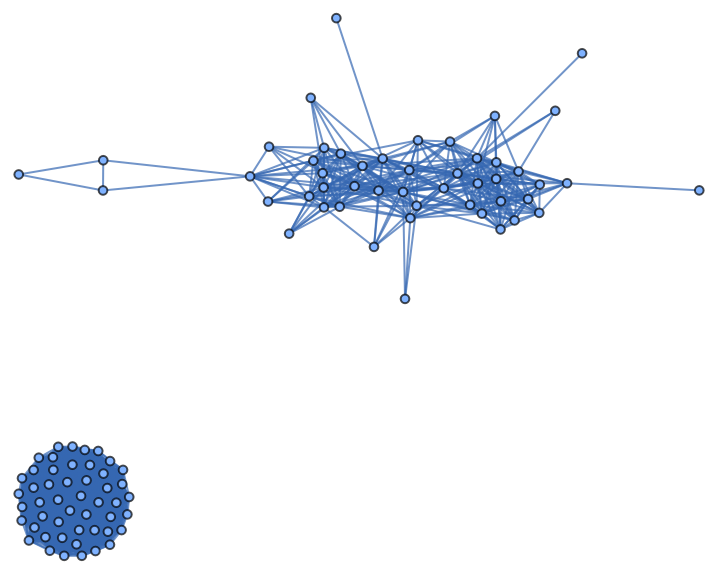
The 116th congress had a Republican majority from 2019 to 2021, the 117th and 118th congress had Democratic majority from 2021-2025, and the 119th congress has a Republican majority for 2025 to 2026. We notice that every time a party holds the majority in senate, they become more centralized, and their political counterparts become more and more decentralized. This further emphasizes the importance of holding majority in congress, because parties are not just able to have more people from their own party, but also control and sway the opinions of opposing members as well.
We can observe party centralization overtime. Here, I define a list of dates that correspond to all of the datasets represented in the visuals on the graph.
In[]:=
dates={"3/12/2020 to 9/20/2020","9/20/2020 to 1/20/21","1/20/2021 to 6/8/2021","6/8/2021 to 8/21/2021","8/21/2021 to 12/09/2021","12/13/2021 to 4/27/2022","4/27/2022 to 12/15/2022","12/15/2022 to 4/27/2023","9/7/2023 to 12/06/2023","1/31/2024 to 4/30/2024","4/30/2024 to 9/30/2024","9/30/2024 to 7/4/2025"};
Here, I create a list to create the graphs that show party centralization overtime.
In[]:=
partyCentralization={};
In[]:=
AppendTo[partyCentralization,visualizeVotingData[CloudGet[
https://www.wolframcloud.com/obj/9fd8c322-598f-4b3e-acd6-35146f36abe5
],80,True]]In[]:=
partyCentralization=CloudGet[CloudObject@
https://www.wolframcloud.com/obj/9bae2bf7-440d-4936-b6fd-eb0a12d8bf4e
];Here, I create a manipulate to show the graphs from the partyCentralization table.
In[]:=
Manipulate[Column[{Show[partyCentralization[[time]]],Grid[{{"date:",dates[[time]]}}]}],{time,1,12,1},SaveDefinitions->True]
Out[]=


Locate a Senator
Locate a Senator
It can also be helpful for people to locate a senator of their choice within each network, as it gives further insight into who the senator allies with and how aligned they are with the rest of their party.
This is a function that highlights the senator of the user’s choice in red.
Here, we call the function and pass in the graph of our choice.
Alliances and Factions Within the U.S. Senate
Alliances and Factions Within the U.S. Senate
When we increased our similarity threshold, we saw an increase of modularity within our voting network. Here, we will further explore the extent to which we can analyze a presumably bipartisan network for smaller factions given individual voting records from 9/7/2023 to 12/06/2023.
Import voting data from 9/7/2023 to 12/06/2023
Draw the graphs for each similarity threshold of the voting data. Total of 99 graphs. CommunityGraphPlot should highlight the communities found within the network.
Draw manipulate that iterates through the visualizations.
Increase the “similarity” variable to break up the network into even smaller factions.
Isolate the graph for the voting data when the similarity threshold was 88.
Let’s take a look at this frame. Here, we can see high modularity. The dots that are on their own are the senators that tend to vote on their own and are not necessarily confined to a faction. This can be crucial to identify in voting systems both in the U.S. Senate and foreign governments, as swing voters can be more willing to change opinions and cooperate with other political forces. In addition, it can be important for voters to understand where their candidates lie on each political faction.
There are a total of 20 committees in the U.S. Senate, each designed to tackle different categories of legislation. The committees that each senator is affiliated with largely influences how they vote, as they often sponsor bills with other senators in their committee. Therefore understanding the common committees between senate factions can help us understand why certain senators have similar voting patterns. Here, I am importing data on all of the current Senate committee membership. In the .csv file, the data is formatted such that you see the name of the committee as a header and underneath a list of all of the members. I reformat it so that I have an association with all of the Senate members and the committees they are in.
Before: “SSAF”{{“name””John Boozman”,”party””majority”,”rank”1,”title””Chairman”,”bioguide””B001236”}...}
After: John Boozman{SSAF,SSAP,SSEV,SSRA,SSVA,JCSE}...
In the file, the senators are associated to only the abbreviated versions of committees, so I need another file to associate the abbreviated names to their full names. (EX: SSAP Senate Committee on Appropriations).
Before: “SSAF”{{“name””John Boozman”,”party””majority”,”rank”1,”title””Chairman”,”bioguide””B001236”}...}
After: John Boozman{SSAF,SSAP,SSEV,SSRA,SSVA,JCSE}...
In the file, the senators are associated to only the abbreviated versions of committees, so I need another file to associate the abbreviated names to their full names. (EX: SSAP Senate Committee on Appropriations).
Code to import and reformat the information on Senate committees and membership.
Code to draw an association thread between the senate members and the committees they are a part of. In addition, I get rid of the subcommittees’ abbreviations. For example, for SSAF, there are the subcommittees SSAF13, SSAF14, SSAF15....etc. I call them all under their main committee name, SSAF because I don’t have information on what the expanded forms of those subcommittees are called.
Here, I take in a 2D array of the groups, then see the top two most common committees amongst the group. I do this by iterating through the list of all of the names in each group that is in senatorGroups and looking up the name on my senatorsAndCommittees Association. I then append all of the names found from the Association for each senator, then see what is the most common committee between all of them.
Now, we can use the function findCommonInterest to label our graph! Each label should consist of the top two committees for each of the networks separated by a newline.
Graphing the factions (without the extra vertices) and labeling them.
Here is another example with voting data from 6/8/2021 to 8/21/2021. Here, we see a clear divide within the Democratic party.
Here is a Table of all of all data visualizations of the factions within senate over time. By keeping the similarity threshold to 96 and removing the swing voters, we can isolate the voting groups that are more consistent.
Conclusions
Conclusions
After analyzing multiple voting networks, we have been able to visualize the impact of party majorities on party distributions, formation of factions, and what topics bring each senator together. Our visualizations have showed that party majorities tend to persuade senators from the opposing parties and often remain centralized. In addition, we have been able to illustrate how a supposedly bipartisan network can contain many smaller, more centralized coalitions that vote together based on common committee interest. Understanding the factions that form within a voting network can help voters understand where their state’s senators lie politically and who they are allied with, both issues that can affect a senator’s reelection. Government transparency is a part of the United States’ beliefs, and Americans should have the right to examine the social dynamics behind a seemingly distant political body. Beyond that, it is important to show how the U.S. Government right now is at its most polarized state, with many senators failing to agree on a single issue. This can lead to inefficiency in our government, but also reflects how Americans today live in such a binary world of politics. Finally, in the future I would use this on voting data outside of the United Sates. The nature of this project allows it to be used on any political faction from a distance. Extracting the smaller coalitions within any government body is essential for understanding foreign politics and isolating independent voters.
Sources
Sources
◼
New Senators 2001-present. (n.d.). United States Senate. Retrieved July 9, 2025, from https://www.senate.gov/senators/NewSenators.htm. Used to get the party and state data of each Senator.
◼
“unitedstates / congress-legislators”. (n.d.). GitHub. Retrieved July 9, 2025, from https://github.com/unitedstates/congress-legislators/blob/main/committee-membership-current.yaml. Data for each of the Senate committees and its members.
◼
Wolfram, C. (2022, August). Network Analysis of Partisanship. https://christopherwolfram.com/projects/voting-modularity/
◼
US Congress Legislature | 2025-2026 | 119th Congress. (n.d.). Legi Scan. https://legiscan.com/US
◼
Lars & Koirala, Nabin & Groppa, Sergiu & Luechinger, Roger & Gantenbein, Andreas & Sandor, Peter & Kollias, Spyros & Riederer, & Franz & Muthuraman. (n.d.). Structural brain network characteristics in patients with episodic andchronic migraine. The Journal of Headache and Pain, 10.1186/s10194-021-01216-8., 22.
Acknowledgements
Acknowledgements
I would like to thank my mentor, Nora, who demonstrated her interest in my project from the moment it was assigned to me. I was not just able to learn so much about Wolfram and its possibilities from her, but also learned about world politics and interesting linguistic hypotheses. It was amazing to have a mentor that fully supported me throughout my time at WSRP. I would also like to thank the directors of WSRP ‘25, Megan, Eryn, and Rory for leading such a fun and rigorous program. Lastly, I would like to thank all of the people I met at WSRP. I learned so much from everyone else’s projects and research, and it really inspired me to work hard on this project.
CITE THIS NOTEBOOK
CITE THIS NOTEBOOK
Analysis of senate voting networks
by Langlen Khuraijam
Wolfram Community, STAFF PICKS, July 11, 2025
https://community.wolfram.com/groups/-/m/t/3502424
by Langlen Khuraijam
Wolfram Community, STAFF PICKS, July 11, 2025
https://community.wolfram.com/groups/-/m/t/3502424