The Office is a popular sitcom that has been around since 2007. It features a group of well acquainted characters in, well, an office. The comedy in the show emerges from the characters spending so much time around each other, it has a 9/10 IMDB rating and is rated 81% on Rotten Tomatoes. This means that unlike rotten tomatoes, The Office is a pretty well loved show. By pulling post data fromThe Office subreddit (r/DunderMifflin), we can gauge how users respond to certain episodes, not just what the rating on IMDB is. In the past, others have looked into the correlations between emoji usage or done sentiment analysis on specific individuals; here I will be doing sentiment analysis on the comments made by users regarding specific episodes. In the results, I found that the negativity rates of episodes within a season fluctuate greatly, creating a mountain-like visual. Additionally, I found that there were much more comments and discussion in the 9th and final season of The Office.
Importing Data
Importing Data
Working With Reddit API and Episode Discussions Queries
Working With Reddit API and Episode Discussions Queries
First, I need to import data from Reddit. I used the Reddit API and query specifically for episode discussions to lighten the load of data necessary to work with.
Imports posts as XML elements:
In[]:=
importedData=Import["https://www.reddit.com/r/DunderMifflin/search.xml?q=episode%20discussion&type=link&limit=10&t=all&restrict_sr=on","XMLElement"]
◼
Click To See a Sample
The raw data imported in is in XML element format. In XML format, there are bunches of XML element headers nested. The data needed, including the title, id, and link to a Reddit post is nested within these XML elements. To snatch the data out, we need to find patterns in the way the XML elements are nested in order to create a general pattern to fit the data. These two functions will help us with matching to a pattern:
Defines a function to take the last element at the deepest nested level:
In[]:=
extractInfo[xmlData_, index_:-1] := NestWhileList[#[[-1]]&, xmlData, Length@ #[[index]]!=0&][[-1, -1]]
Defines a function to remove empty lists:
In[]:=
removeEmptyLists[xmlPostData_] := Take[DeleteCases[xmlPostData, {}, All]][[2, All, -1]];
To be more precise (as I'm sure I've left you in the dark), an other thing that I noticed is that each XMLElement wrapper that wraps around an entire post has the keyword "entry" as its first element. But, there are other pieces of information returned with the import statement, including the Reddit logo, search query, banners, etc. By using pattern matching, its easy to make sure that we only extract info from XML elements that hold post information and ignore the other information returned with our query. (Sorry Reddit)
Combine extractInfo[] and removeEmptyLists[] and return an association of all the extracted data for us to put into a database:
In[]:=
getInfo[x_ /; MatchQ[x, XMLElement["entry", ___,{__XMLElement..}]]] := Module[{cleanedData, cleanedLabels},cleanedData = extractInfo/@removeEmptyLists[x] ;cleanedLabels = Table[x[[3, elementIndex, 1]], {elementIndex, x[[3]] // Length}];AssociationThread[cleanedLabels, cleanedData]]getInfo[x_] := Nothing
Call getInfo[] on the imported data:
In[]:=
postData=Table[getInfo@importedData[[1]][[3]][[postIndex]],{postIndex,10,importedData[[1,3]]//Length}]
We now need to import the rest of our data, that was only the first sample! The Reddit API lets us specify patterns for getting posts before or after a certain other post so that we can iteratively query all of the data we need, even with the restriction of 100 posts per query. Though, it's a little funky, when you want to get a post before a different post, you use the "after" parameter, not "before".
Define function to run one iteration (one search query) of importing and extracting data, with options for number of posts previously viewed and the position of the last viewed post:
In[]:=
repeat[afterIndex_, count_] := Module[{raw, formatted},raw = Import[StringJoin["https://www.reddit.com/r/DunderMifflin/search.xml?q=episode%20discussion&type=link&limit=100&t=all&restrict_sr=on", "&after=", afterIndex, "&count=", ToString[count]],"XMLElement"];formatted = Table[getInfo @ raw[[1]][[3]][[postIndex]], {postIndex, 10, raw[[1,3]]//Length}]]
Repeatedly calls the repeat[] until the list with all resulting data is no longer is update:
In[]:=
allPostData=FixedPoint[Flatten[Join[#,repeat[#[[-1,"id"]],Length@#]]]&,postData,10];
Get Episode Commentaries
Get Episode Commentaries
I have two different types of data I am going to be working with: episode discussions, and random posts that people make regarding certain episodes. Because I have to process random ("meme") posts differently than the posts directly dedicated to reacting to an episode, it requires a different function and search query (tiresome, I know). We already got the posts for episode discussions, all that's left is the random posts! We query specific enough to get posts that mention specific episodes so that we can correlate the reactions accordingly.
Define a function to return the extracted data from making two search queries for the episode in the season:
In[]:=
getEpisodeCommentary[seasonNum_, episodeNum_] := Module[{query1, query2, raw}, query1 = StringRiffle[{"season", ToString[seasonNum], "episode", ToString[episodeNum]}, "%20"]; query2 = StringJoin["S", ToString[seasonNum], "%20", "E", ToString[episodeNum]]; raw = Table[Import["https://www.reddit.com/r/DunderMifflin/search.xml?type=link&limit=100&t=all&restrict_sr=on&q=" <> query, "XMLElement"], {query, {query1, query2}}]; Table[Table[getInfo @ rawData[[1]][[3]][[postIndex]], {postIndex, 10, rawData[[1,3]]//Length}], {rawData, raw}] // Flatten ]
Create association of seasons to their episodes amounts:
In[]:=
seasonEpisodes = AssociationThread[Range@9, {12, 22, 25, 18 , 28, 26, 26, 24, 25}]
Out[]=
112,222,325,418,528,626,726,824,925
Call the function for each seasons and their associated episodes :
commentaryPosts = Table[Pause[0.3];Map[getEpisodeCommentary[season, #]&, Range@seasonEpisodes[[season]]], {season, 9}]
Querying (Lots) of Replies to Episode Discussion Posts
Querying (Lots) of Replies to Episode Discussion Posts
Next, we need to get all the comment replies to each of the posts in the discussion episode threads. This will let us gauge the reactions that people have to episodes in a clear manner. We can't really get much information out of the title, "S1E1 Episode Discussion. But the replies to that title on the other hand? Gold.
Create a connection with Reddit through Wolfram’s built-in API support:
reddit=ServiceConnect["Reddit","New",SaveConnection->True]
Get the replies/comments on each Reddit episode discussion post:
In[]:=
commentsFromPosts=reddit["PostCommentsData","Post"->allPostData[[#,"id"]],MaxItems->500][["Comments",All,"Body"]]&/@Range@Length@allPostData;
Some of you may be really mad at me. Confused? Angered? Livid? You may be wondering why we didn't use SerivceConnect[] earlier, why we had to do the daunting manual task of cleaning all the data. ServiceConnect has a limit and doesn't give you the same freedom with parameters that importing the data yourself does here. We would have no way to "go back in time" or iteratively query posts from Reddit the same way we did above using the parameters "before" and "after" . But, getting replies to a comment is way easier since it gives our little query a more definite space to look in rather than just saying "get me all posts from this subreddit".
Defines a list of rules to connect all of the comments from posts back to their parent post; this will be useful later:
postsToComments=Thread[allPostData[[All,"title"]]->commentsFromPosts]//Normal
For my computer's sake, we converted our subreddit comment data into a list. To me, it had some benefits, it felt easier to work with in this case and didn’t require us to wait for dynamic updating to load when we query things or use our dataset directly. For the sake of my computer's stability, I felt like this was a good choice. We also needed to begin cleaning our data bit and prepare for the upcoming (very exciting) exploration. We want to get the main ideas of these comments by removing non- important words and removing any missing values in our dataset. This way, we can do a little exploring and see what people like to say in their comments!
Delete list elements with deleted comments:
In[]:=
tidifyData[database_, deletePhrases_: "[deleted]"] := DeleteCases[#, deletePhrases]& /@ (Normal /@ database)
Get important words out of each comment (words that aren't "the", "or", etc.):
In[]:=
getKeyWords[comments_] := TextWords[DeleteStopwords[Flatten[comments][[1;;Length@comments]]]] // Flatten;
Clean and extract important words from the episode discussion replies:
In[]:=
tidyComments=tidifyData[commentsFromPosts//Flatten];commentWords=getKeyWords[tidyComments]
Clean and extract important words from the random episode commentary posts:
In[]:=
commentaryTitles=Normal[commentaryPosts[[All,All,All,"title"]]]//Flatten;commentaryWords=getKeyWords[tidifyData[commentaryTitles]]
Combines the two lists of significant words:
In[]:=
allDataWords=Join[commentWords,commentaryWords]
Analyzing Reactions
Analyzing Reactions
Visualizations/ Exploration
Visualizations/ Exploration
Now for the fun part! We can start exploring our data and getting a feel of what it looks like.
To get an idea of how many comments are in each post:
Length@commentsFromPosts[[#]]&/@Range@Length@allPostData
Out[]=

Organize words by part of speech to get more specific word visualizations:
POSdata=TextCases[StringRiffle[allDataWords," "],{"Noun","Adjective","Adverb","ProperNoun"}];
Initialize a cool color palette (not really cool, but it's the thought that counts):
In[]:=
colorPalette={RGBColor[0.17,0.39,0.],RGBColor[0.58,0.71,0.54]};
Get the n most common words of a certain part of speech in our data:
In[]:=
getMostCommon[type_String, n_Integer] := Commonest[Flatten[POSdata[type]], n]
Display some data in a bar graph with chart labels and custom color palette:
In[]:=
wordChart[counts_, words_]:=BarChart[counts, ChartLabelsPlaced[words,Axis,Rotate[#,Pi/4]&], ChartStylecolorPalette]
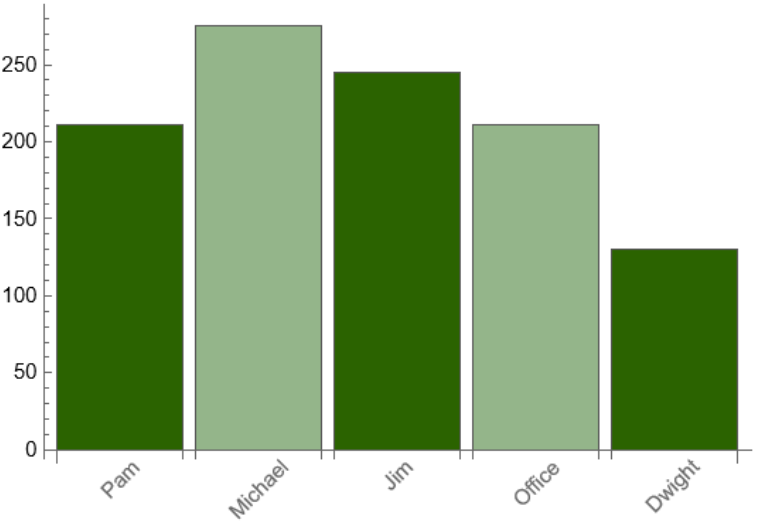
The five most common characters discussed, is Michael the fan favorite (or most hated)?
In[]:=
mostCommonPNouns=getMostCommon["ProperNoun",5];countsCommonestPNouns=Count[allDataWords,#]&/@mostCommonPNouns;wordChart[countsCommonestPNouns,mostCommonPNouns]
Out[]=
Let’s see a word cloud, tiger style!
Word cloud of all words used in comments:
Word cloud with all the adjectives used in comments:
Organizing and Filtering Data
Organizing and Filtering Data
The last step before we begin doing sentiment analysis is organizing our data! Starting off with our discussion episodes, big shocker–some of them aren't actually for discussing episodes! In fact, if those weren't part of our dataset, there are some posts discussing something, but its not episodes of The Office! Due to all of this, it's important that we select the correct posts from our dataset of all posts.
Define function that checks whether or not a piece of text is actually an episode discussion for an episode of The Office:
Selects post titles that are deemed real episode discussion titles by stringsWithNums[]:
Similarly, when looking through the commentary, I noticed that a lot of the posts weren't actually relevant or specific to an episode. If I include these posts in the analysis, it could skew the results and make them less valuable. Posts like this included fan creations, and general, non specific questions. These are damaging since the analysis focuses on the reaction to episodes and the contents of them, these other posts are not reactions to episodes and will not help with such analysis. I noticed a pattern in the posts we wanted to filter out, most of them were non specific, they didn't pertain to a certain episode and therefore discuss the plot of the episode. The plot of the episode is derived from the characters so the best solution I came up with was to remove posts that didn't mention specific characters from the data to analyze.
Creates a pattern that will match strings that contain any character first names:
Selects commentary that contains character names, numbers, and doesn't contain "superfan" (superfan episodes that we want to exclude):
Next, we needed to extract the episode and season numbers from the commentary posts. Although it would've been nice (and much easier) if we could've used the information from what search query we did to import this post data, this is unreliable because the Reddit search queries don't always return results that exactly match our intents or phrases in the way we want; therefore deeming it unreliable. As well, there are multiple posts that are found in multiple search queries, becoming duplicates in our database and further complicating things. The best solution I found to this was to extract all the episode and season numbers using pattern matching.
Defines a pattern matching function that will return the season and episode number from a string:
Defines function to clean up results from extractEpisodeNums:
Run extractEpisodeNum[] on all discussion titles to removes cases where no episode number was found:
Run extractEpisodeNum[] on all commentary titles to removes cases where no episode number was found:
Sentiment Analysis!
Sentiment Analysis!
Now we can get to the fun part! We will do sentiment analysis on each reply in discussion threads and each title in the commentary posts. Using the information from the titles about the episode and season number, we can correlate how positive an episode was according to the reactions from the subreddit posts! This will allow us to (finally) begin analyzing our results. After this project, I truly believe that a majority of a data scientist's job is their data acquisition adventure.
Defines the sentiment classifier:
Define function to perform sentiment analysis on some data and format it:
Performing sentiment analysis on the commentary and the replies:
Define a function to organize data from doing the sentiment analysis to make it easier for graphing and analysis purposes:
Define another function to organize data by grouping by season and sorting the results:
Re-formats the data and groups commentary replies by episode number:
Combines the data from the two sources:
Define function to find how much commentary was negative:
Define function to find how many comments were made on a certain episode:
Define function to plot the amount of times a characters name is mentioned throughout the show:
Collect data to be used for graphs:
Creates labels by season:
Time to see the plots! Within these visualizations, I included the number of comments/posts that were associated with each episode as well as the percentage of negative comments for that episode. The number of comments helps us determine the accuracy of the results, the more comments there were for an episode, the better we understand the opinions of the users. Additionally, the number of comments will help us determine the popularity of an episode, correlating to how much people want to comment or discuss an episode.
Make a plot of the frequencies of characters being mentioned over time:
Make a plot of the erratic negativity ratings for the episodes in each season:
Make a chart visualizing the episode by episode negativity levels and comment numbers:
What does this graph show?
Throughout each season, we can say with generality that there are fluctuating negativity levels across its episodes. This shows the relation between plot events and the reactions that people have. I'm not a show producer or in the movie business but even I can say that this makes sense. You would want to have fluctuating levels, highs and lows, throughout a show, its what keeps people hooked. After every increase in negative responses, we can see a gradual decrease in negativity levels. This could correspond to plot events that slowly get resolved as episodes go on. Another thing to notice is the decreasing negativity levels in the first season. ManyOffice enjoyers have agreed on the slowness and less interesting nature in the first couple of episodes of the first season. This trend is observed in the graph where we can see that the negative attitudes towards the show begin to decrease as plot progresses through the season.
What about the number of comments?
A point I would like to bring up is the increasing number of comments as the episode number grew larger. Although this could be correlated to the newer times and popularization of technology, I propose a different view; many enjoyers of The Office were not around when the show first began debuting, especially in the seasons with larger amounts of comments. In the 8th season, there were about 7 million viewers. By the 9th: 5 million.
Throughout each season, we can say with generality that there are fluctuating negativity levels across its episodes. This shows the relation between plot events and the reactions that people have. I'm not a show producer or in the movie business but even I can say that this makes sense. You would want to have fluctuating levels, highs and lows, throughout a show, its what keeps people hooked. After every increase in negative responses, we can see a gradual decrease in negativity levels. This could correspond to plot events that slowly get resolved as episodes go on. Another thing to notice is the decreasing negativity levels in the first season. ManyOffice enjoyers have agreed on the slowness and less interesting nature in the first couple of episodes of the first season. This trend is observed in the graph where we can see that the negative attitudes towards the show begin to decrease as plot progresses through the season.
What about the number of comments?
A point I would like to bring up is the increasing number of comments as the episode number grew larger. Although this could be correlated to the newer times and popularization of technology, I propose a different view; many enjoyers of The Office were not around when the show first began debuting, especially in the seasons with larger amounts of comments. In the 8th season, there were about 7 million viewers. By the 9th: 5 million.
The number of viewers was going down, meaning that there would be less viewers to actively comment on the subreddit and make such a significant increase in number of comments. Additionally, in 2020, years after the final episode of The Office, there were around 9 million viewers.
It's safe to say that all of the people binge-watching shows during the pandemic didn't just fast forward to the last season, they watched the whole show. It doesn't make sense to suggest that the number of comments was increasing due to the popularization of technology when there were less people actively watching the show when the technology would've been becoming more popular. And even better, there were more viewers years later, meaning that we can't correlate viewership and comments to the increase in technology because by 2020, Reddit had already become platform to use.
I feel as if this increase in comments has to do more with it being the last season and people reaching the end of the show and wanting to find a place to discuss what happened or their thoughts on the finales. It is the last season, after all. Although it may also be a combination of increasing amounts of technology, plot heightened reactions (whether it be negative or positive), and it being the end of the show.
I feel as if this increase in comments has to do more with it being the last season and people reaching the end of the show and wanting to find a place to discuss what happened or their thoughts on the finales. It is the last season, after all. Although it may also be a combination of increasing amounts of technology, plot heightened reactions (whether it be negative or positive), and it being the end of the show.
Future Work
Future Work
I would love to continue working on this in the future. If I had more time I could get more precise or accurate with my filtering functions so that I could capture more episodes data and include more things in my final results. Additionally, I want to do further analysis. Looking into the IMDB ratings a little further or episode descriptions would've been really interesting to analyze. It could've helped me gain a further understanding of the results. For the future, creating my own sentiment classifier would be really interesting, as it would let me tweak a model to detect sarcasm or particularities of modern online language usage.
Acknowledgements
Acknowledgements
The office ratings and viewership [OC]. reddit. (n.d.). Retrieved July 21, 2022, from https://www.reddit.com/r/dataisbeautiful/comments/66awqa/the_office_ratings _and _viewership _oc/
Spangler, T. (2021, January 29). ‘the office’ was by far the most-streamed TV show in 2020, Nielsen says. Variety. Retrieved July 21, 2022, from https://variety.com/2021/digital/news/the-office-most-streamed-tv-show-2020-nielsen-1234883822/
Wikimedia Foundation. (2022, July 20). The Office (American TV series). Wikipedia. Retrieved July 21, 2022, from https://en.wikipedia.org/wiki/The_Office_(American_TV _series)
Spangler, T. (2021, January 29). ‘the office’ was by far the most-streamed TV show in 2020, Nielsen says. Variety. Retrieved July 21, 2022, from https://variety.com/2021/digital/news/the-office-most-streamed-tv-show-2020-nielsen-1234883822/
Wikimedia Foundation. (2022, July 20). The Office (American TV series). Wikipedia. Retrieved July 21, 2022, from https://en.wikipedia.org/wiki/The_Office_(American_TV _series)