This project explores different computer vision techniques to match an image of a flag (for example, of the American flag) to an emoji of the US flag. The four techniques discussed are Cosine Distance, Nearest Neighbor, Edge-detected logistic regression, and logistic regression.
First Approach: Image Distance
First Approach: Image Distance
For the first approach, I used an object detection model called YOLOv3 to identify the location of a flag in an image. Once the bounding box was returned, the image would then be cropped. The cropped image would be passed into the RemoveBackground[] function to isolate the contents of the flag. The contents of the flag would then be compared (using the ImageDistance[]) function to several images of flag emojis and determine which emoji had the closest distance.
Model Definition
Model Definition
Flag Cropping
Flag Cropping
The code below uses the YOLOv3 model to identify one flag in the image, crop the image accordingly, and remove its background.
In[]:=
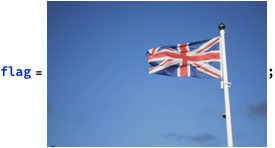
Finds the location of the flag in the image
flagPrediction=First[netevaluate[flag,{"Flag"},AcceptanceThreshold->0.5]]
Out[]=

Crops image and removes background
croppedImgRemovedBg=RemoveBackground[ImageTrim[flag,flagPrediction[[1]]]]
Out[]=

Images of flag emojis
Images of flag emojis
The resulting cropped must be compared with multiple images of flag emojis to check which emoji is most similar. These emoji images must also have their backgrounds removed so that white space does not show up in the compared image. The emoji images must also be resized to the shape of the flag image because the ImageDistance[] image will not work otherwise.
In[]:=
emojiImageList=RemoveBackground/@
,

,

,

,

,

,

,

,

,

,

,

;

In[]:=
resizeImage[emoji_Image,base_Image]:=ImageResize[emoji,ImageDimensions[base]]
In[]:=
resizedEmojiList=resizeImage[#,croppedImgRemovedBg]&/@emojiImageList;
Finds the image proximity (similarity) between the cropped British flag and all emoji images
ImageDistance[croppedImgRemovedBg,#,DistanceFunction->CosineDistance]&/@resizedEmojiList
Out[]=

This approach had multiple issues. For one, the YOLOv3 model sometimes failed to detect flag(s) in an image and sometimes returned false-positives. If the YOLO model correctly identified the image, the background removal step often removed valuable color information from the image, as it did with some emoji images as well. Finally, the ImageDistance function (even after trying all methods for distance such as Normalized Euclidean Distance and Correlation Distance) was very inaccurate. In the example shown above, ImageDistance[] determined that the image of the British flag was most similar to the image of the German flag.
Second Approach: Nearest Neighbor Classifier
Second Approach: Nearest Neighbor Classifier
The 2nd approach had much-improved accuracy rates. The ImageDistance[] function was very unreliable even when using Cosine Distance, so this new approach trained a custom classifier. The method specified was the Nearest Neighbor (K-NN) algorithm, which groups images into clusters.
Using the WebImageSearch[] function, 100 images were pulled for each class (country flag). Per class, 50 images were extracted by passing the search query "*country name* flag flying" to gather images of the flag in a hoisted state. An additional 50 images were extracted by passing the search query “*country name* flag.” The images were then passed into an association with the flag emoji as a key and the image list as the value.
The code below works on a small sample size of 10 countries' flags. Quality was prioritized over other metrics such as inference time.
Using the WebImageSearch[] function, 100 images were pulled for each class (country flag). Per class, 50 images were extracted by passing the search query "*country name* flag flying" to gather images of the flag in a hoisted state. An additional 50 images were extracted by passing the search query “*country name* flag.” The images were then passed into an association with the flag emoji as a key and the image list as the value.
The code below works on a small sample size of 10 countries' flags. Quality was prioritized over other metrics such as inference time.
In[]:=
countries={"US","UK","Russia","China","Germany","France","India","Brazil","Mexico","Japan"};
In[]:=
emojiList=🇺🇸,🇬🇧,🇷🇺,🇨🇳,🇩🇪,🇫🇷,🇮🇳,🇧🇷,🇲🇽,🇯🇵;
countryEmojiAssoc=Join@@(<|countries[[#]]->emojiList[[#]]|>&/@Range[10])
Out[]=
US🇺🇸,UK🇬🇧,Russia🇷🇺,China🇨🇳,Germany🇩🇪,France🇫🇷,India🇮🇳,Brazil🇧🇷,Mexico🇲🇽,Japan🇯🇵
Queries 100 images for 10 classes, stored in association
imageList=Join@@Map[Join[WebImageSearch[StringJoin[#," flag flying"],50],WebImageSearch[StringJoin[#," flag"],50]]&,countries];
In[]:=
imageList=Table[images[[i]],{i,10}];
imageList=Join@@imageList;
The labels will be emojis, since the images are grouped in contiguous groups of 100 flags per country, the same will be done for emojis: 10 groups of 100 images.
knnLabels=Join@@(Table[#,{i,100}]&/@emojiList);
knnFlags=Classify[imageList->knnLabels,Method->"NearestNeighbors",PerformanceGoal->"Quality"]
Out[]=
ClassifierFunction


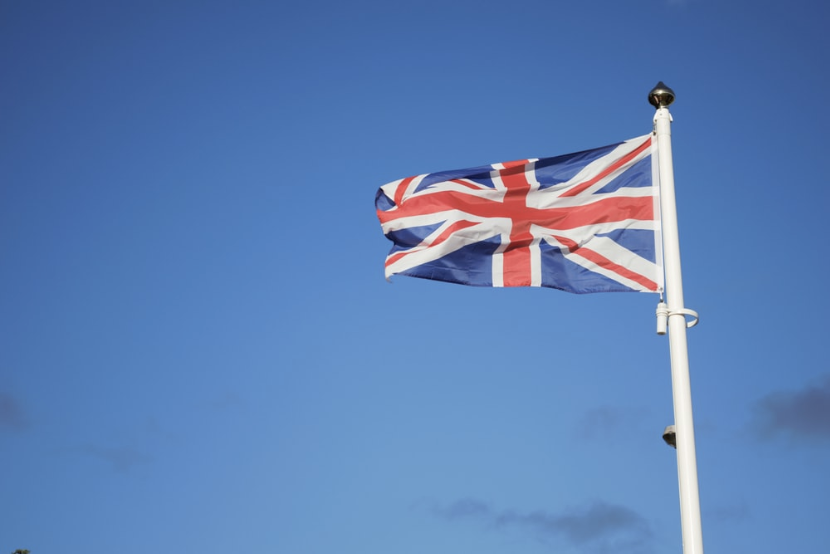
knnFlags/@
,

,
,

,


Out[]=

The K-Nearest Neighbor classifier had an accuracy rate of around 77% when trained on 10 images. This was certainly an improvement from ImageDistance but I wanted a higher accuracy rate for a small sample size.
Third Approach: Logistic Regression/Random Forest
Third Approach: Logistic Regression/Random Forest
This section looks at the most promising approach: training a classifier using an unspecified method and letting the classifier decide which method to use. This approach used a similar data gathering method as the second approach: querying 100 images per class. Quality is prioritized once again.
With Edge Detection
With Edge Detection
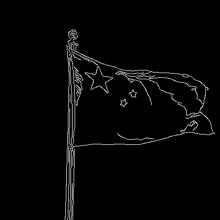
The first approach pre-processed the dataset using edge detection, an algorithm that binarizes the image into black and white and highlights the edges. The possible advantage of edge detection is that the model can focus on the shape of the flag's features instead of color similarities.
EdgeDetect

Out[]=
dataSet=Join@@<|countryEmojiAssoc[#]->Join[WebImageSearch[StringJoin[#," flag flying"],50],WebImageSearch[StringJoin[#," flag"],50]]&,countries|>;
A minor difference in dataset collection is that images are now stored in an association in which the keys (emojis) represent classes and the values hold images for training the classifier.
dataSet=EdgeDetect/@dataSet;
edgeDetectedFlagModel=Classify[dataSet,PerformanceGoal->"Quality"]
The 50% accuracy on a small sample size of 10 images was less than impressive and inferior to the KNN model. Leaving out color probably made it next to impossible for the model (or any human) to distinguish between flags with similar patterns, such as the Russian flag and Germany's flag.
Without Edge Detection
Without Edge Detection
The second sub-approach used no image preprocessing before feeding the dataset into the model. As with all the other models, it was trained on a small sample size of 10 flags first. I then increased the dataset size to include more flags.
The final iteration of the model was trained using the RandomForest algorithm, although previous iterations were trained using Logistic Regression. The 100 countries in the dataset were the 100 most populous countries, as shown below.
The code below walks you through the training process, but you can alternatively load the model directly from the cloud.
The final iteration of the model was trained using the RandomForest algorithm, although previous iterations were trained using Logistic Regression. The 100 countries in the dataset were the 100 most populous countries, as shown below.
The code below walks you through the training process, but you can alternatively load the model directly from the cloud.
largestCountries=EntityList["Country"];
In[]:=
populationCompare=-1*#["Population"]&;
sortedCountries=SortBy[largestCountries,populationCompare];
The 100 most populous countries' flags are used. The first 2 countries are removed from the list because they are Antarctica and Bouvet Island
In[]:=
mostPopulousCountries=Drop[Take[sortedCountries,102],2];
To save time, the pre-loaded image of a country's flag was used as the class label instead of the actual emoji, so the model doesn't return an emoji. However, it is easy to return an emoji if an association is made with the flag's image and the corresponding flag emoji.
In[]:=
emojiLabels=Join@@(<|#["Name"]->#["Flag"]|>&/@next50countries);
Data was fetched the same way as with the previous classifier approaches.
dataSet=Join@@(<|emojiLabels[#]->Join[WebImageSearch[StringJoin[#," flag flying"],50],WebImageSearch[StringJoin[#," flag"],50]]|>&/@mostPopulousCountries);
Alternatively, you can download the model directly from the cloud.
On a small training set size of 10 countries, the model performed exceptionally well, with an 89% accuracy rate. However, as the number of classes increased, the model's performance decreased. With 50 classes, the accuracy rate decreased to 75%. With 100 classes, it was 67%. Some inference examples are shown below.
In general (with a few exceptions), this model performed reasonably well when the flag image wasn't darkened or bent but accuracy decreased when the flag was more distant or warped in some way. A partial fix for this problem is to use the YOLOv3 model from Section 1 to isolate the flag and pass the cropped image into the model. In theory, this technique could be extended to detect multiple flags in an image. However, as mentioned before, the YOLO model didn't always correctly detect the flag, so this solution isn't perfect.
Model fails to detect Dutch flag on un-processed image:
YOLO model is used to crop flag, which is then fed into the model :
Model correctly detects Dutch flag:
Conclusion
Conclusion
The most effective way to match images of flags to their emojis is by training a Logistic Regression classifier. However, as the number of classes increase, Random Forest may be optimal. In general, more classes lead to decreased accuracy of the model. However, a semi-effective solution is to preprocess images using a YOLO model to isolate areas of interest, and pass these into the model. The next most-effective solution is a NearestNeighbors classifier. Finally, the least-effective solution was to find the Cosine Distance between two images, which was very inaccurate.