The idea for this post arose from a question posed by Vitaliy Kaurov on the Mathematica Stack Exchange Forum: “Can we make a human skeleton walk, attaching a natural human gait model or data?” This exploration builds upon that question and integrates motion capture data with anatomical models in Mathematica to create a dynamic and realistic animation of a walking human skeleton.
The following steps outline the process, including key elements such as motion capture data acquisition, data parsing, transformation functions, and animation.
The following steps outline the process, including key elements such as motion capture data acquisition, data parsing, transformation functions, and animation.
1. Acquiring Motion Capture Data
1. Acquiring Motion Capture Data
The first step involves obtaining a BVH (Biovision Hierarchical Data) file, which encapsulates 3D skeletal motion data.
The BVH data was retrieved from the following archive: https://accad.osu.edu/sites/accad.osu.edu/files/Female1_bvh.zip .
BVH files include:
The BVH data was retrieved from the following archive: https://accad.osu.edu/sites/accad.osu.edu/files/Female1_bvh.zip .
BVH files include:
◼
Hierarchical Structure: Describes the skeleton’s structure and relationships between joints.
◼
Motion Data: Encodes the time-series data of joint transformations during the motion.
2. Parsing BVH Data
2. Parsing BVH Data
The BVH data parsing approach was borrowed and adapted from this insightful Mathematica Stack Exchange answer How to build a bvh player by Sjoerd C. de Vries .
Key steps include:
◼
Hierarchy Parsing: Extracting the relationships and structure of joints as defined in the BVH file.
◼
Motion Parsing: Accessing time-series data of joint rotations and positions to enable reconstruction of skeletal motion.
In[]:=
filename="Female1_B01_StandToWalk.bvh";bvh=Import[NotebookDirectory[]<>filename,"String"];bvhHierarchy=StringReplace[bvh,___~~"HIERARCHY"~~start__~~"MOTION"~~___:>start];bvhMotion=StringReplace[bvh,___~~"MOTION"~~end___:>end];tokenize[code_String]:=StringSplit[code,(" "|"\n"|"\r"|"\t")..]{frames,frameTime,data}=tokenize[bvhMotion]/.{___,"Frames:",frs_,"Frame","Time:",ft_,data__}:>{ToExpression@frs,ToExpression@ft,Partition[N[#,6]&/@{data},Length[{data}]/ToExpression[frs]]};ClearAll[channelPattern,offsetPattern,bracketPattern]bracketPattern=PatternSequence["{",Except["{"|"}"]..,"}"];channelPattern=PatternSequence["CHANNELS",n_,channels__]/;Length[{channels}]==ToExpression[n];offsetPattern=PatternSequence["OFFSET",x_,y_,z_];ClearAll[parse]parse[left___,cp:channelPattern,right___]:=expr[parse[left],offset@@({cp}[[3;;5]]),channel@@({cp}[[6;;]]),parse[right]]/;Length[{cp}]==8parse[left___,cp:channelPattern,right___]:=expr[parse[left],channel@@({cp}[[3;;]]),parse[right]]/;Length[{cp}]==5parse[left___,op:offsetPattern,right___]:=expr[parse[left],offset@@({op}[[2;;]]),parse[right]];parse[{tokens___}]:=parse[tokens];parse[tokens___]:=expr[tokens];ClearAll[parseBrackets,a]parseBrackets[left___,h1_,h2_,bp:bracketPattern,right___]:=parseBrackets[left,h1@@({bp}[[2;;-2]]),right];makeSlots[tokens_]:=Module[{i=1},Which[MatchQ[#,Alternatives["Xposition","Yposition","Zposition"]],slot[i++],#==="Xrotation",xr[slot[i++]],#==="Yrotation",yr[slot[i++]],#==="Zrotation",zr[slot[i++]],Head[#]==String&&StringMatchQ[#,NumberString],ToExpression[#],True,#]&/@tokens]xRot[x_]:=RotationMatrix[xDegree,{1,0,0}];yRot[y_]:=RotationMatrix[yDegree,{0,1,0}];zRot[z_]:=RotationMatrix[zDegree,{0,0,1}];channelToRotation[c_channel]:=Dot@@(c/.{xr->xRot,yr->yRot,zr->zRot})ClearAll[ROOT,JOINT]ROOT[os_List,d_List,r_List,rest___]:=ROOT[os+d,r,rest]ROOT[os_List,r_List,p:PatternSequence[__JOINT,___END]]:=ROOT[os,r,#]&/@{p}/;Length[{p}]>1ROOT[os_List,r_List,p_JOINT]:={Line[{os,os+r.p[[1]]}],ROOT[os+r.p[[1]],r.p[[2]],Sequence@@p[[3;;]]]}ROOT[os_List,r_List,p_END]:=Line[{os,os+r.p[[1]]}]bodyFunction=Function[parseBrackets@parse@makeSlots@tokenize@bvhHierarchy/.{expr->Sequence,slot->Slot}//Evaluate];
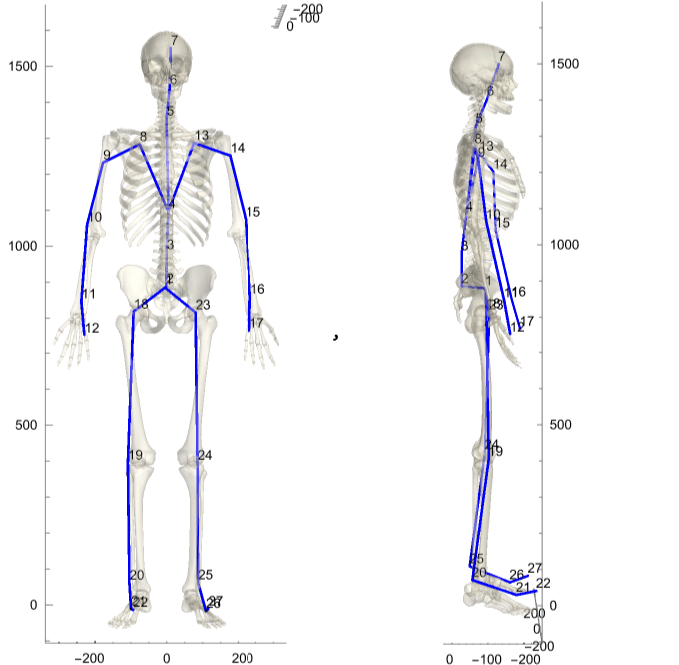
3. Aligning BVH data with the anatomical model
3. Aligning BVH data with the anatomical model
Once the BVH data is parsed, it must be aligned with the anatomical model to ensure accurate correspondence between motion capture joints and the skeleton’s structure.
1
.Mapping BVH Joints to Skeleton Bones:
◼
Each joint in the BVH file corresponds to a specific bone in the anatomical model.
◼
A mapping is established between BVH joint names and anatomical landmarks in the Mathematica skeleton model (e.g., aligning the “hip” joint from the BVH file with the pelvis in the skeleton).
2
. Adjusting Coordinate Systems:
◼
Transformations are applied to reconcile differences in orientation and coordinate systems.
3
.Verifying Proportionality:
◼
The scale and proportions of the BVH skeleton may not match the anatomical model.
◼
Rescaling and proportional adjustments ensure that the BVH motion is faithfully transferred to the skeleton without distortion.
ClearAll[align](*manuallyadjustedforthespecificinputfileFemale1_B01_StandToWalk.bvh*)align[point_]:=Threaded[{300,200,-1100}]+ScalingMatrix[{-10,10,10}].RotationMatrix[90Degree,{1,0,0}].pointClearAll[bvhPoints]bvhPoints[i_]:=DeleteDuplicates@Flatten[List@@@Flatten[bodyFunction@@(ToExpression/@data[[i]])/.{offset->List,c_channel:>channelToRotation[c]}/.{"ROOT"->ROOT,"JOINT"->JOINT,"End"->END}/.{parseBrackets[a:___]:>a}],2]ClearAll[center]center[1]=Identity;center[i_]:=FindGeometricTransform[{bvhPoints[1][[1]]},{bvhPoints[i][[1]]}][[2]]ClearAll[graphPoints,scaledPoints]graphPoints[i_]:=<|MapIndexed[Rule[#1,First@#2]&]@bvhPoints[i]|>scaledPoints[i_]:=<|MapIndexed[Rule[First@#2,#1]&]@(align@*center[i]/@bvhPoints[i])|>ClearAll[graph,f]graph[i_]:=Flatten[f@@@Flatten[bodyFunction@@(ToExpression/@data[[i]])/.{offset->List,c_channel:>channelToRotation[c]}/.{"ROOT"->ROOT,"JOINT"->JOINT,"End"->END}/.{parseBrackets[a:___]:>a}],2]/.f[List[x_,y_]]:>UndirectedEdge[graphPoints[i][x],graphPoints[i][y]]Show[Graph3D[graph[1],VertexCoordinates->(align@*center[1]/@bvhPoints[1]),VertexShapeFunction->(Sphere[#1,1]&),VertexLabels->Automatic,EdgeStyle->Blue,ImageSize->{250,500}],AnatomyPlot3D[{Opacity[.3],Entity["AnatomicalStructure","SetOfBones"]},ImageSize->{250,500}],Axes->True,ViewPoint->#]&/@{Front,Left}
4. Transforming functions
4. Transforming functions
To animate the skeleton, BVH motion data is applied using transformation functions:
◼
Coordinate Transformations
◼
Rotation and Translation
◼
Model-Specific Adjustments
In[]:=
ClearAll[component,transform]component[from_,to_,iteration_]:=component[from,to,iteration]={{scaledPoints[1][from],scaledPoints[1][to]},{scaledPoints[iteration][from],scaledPoints[iteration][to]}}transform[{from_,to_}][structure_]:=Module[{fromVector,toVector,rotationAxis,rotationAngle,rotationMatrix,translationVector,translated,rotated},fromVector=Subtract@@from;toVector=Subtract@@to;rotationAxis=Cross[fromVector,toVector];rotationAngle=VectorAngle[fromVector,toVector];rotationMatrix=RotationMatrix[rotationAngle,rotationAxis];translationVector=First[to]-rotationMatrix.First[from];rotated=GeometricTransformation[structure,rotationMatrix];translated=TransformedRegion[rotated,TranslationTransform[translationVector]]]
5. Animating the Skeleton
5. Animating the Skeleton
After parsing, transforming, and aligning the BVH data, the motion can be applied to the anatomical model.
References
References
Mathematica Stack Exchange Forum: “Can we make a human skeleton walk, attaching a natural human gait model or data?”
CITE THIS NOTEBOOK
CITE THIS NOTEBOOK
Animating a human skeleton using motion capture data
by Catalin Popescu
Wolfram Community, STAFF PICKS, November 25, 2024
https://community.wolfram.com/groups/-/m/t/3327934
by Catalin Popescu
Wolfram Community, STAFF PICKS, November 25, 2024
https://community.wolfram.com/groups/-/m/t/3327934