The THX Deep Note Chord is the iconic movie theater sound created by Lucasfilm sound engineer Dr. James ‘Andy’ Moorer. It is meant to stimulate excitement in a person through sound, and is comprised of randomized glissandi and a large range of dynamic contrast. This sound has been worked and reworked over the years forming many variations, which is the general premise of this project. The idea was to recreate a THX sound, and create modifications that experiment with the sound. Warning: You may not want to have your volume all the way up.
Aspects of the THX Deep Note
Aspects of the THX Deep Note
The THX Deep Note consists of notes which randomly rise and fall throughout the duration of the audio clip. There are 30 overlapping voices which each have their own unique structure. In order to generate the sound, it was visualized in pieces: the voices initially stay between 200 and 400 Hz, followed by a large crescendo which leads to their separating from each other and becoming their own defined notes.
One of the constantly changing aspects used are glissandi. I created a function that takes two frequency inputs and one time input and and produces an audio object of a slide (or glissando) between the two given frequencies that lasts for the specified time:
In[]:=
Glissando[{sHz_,eHz_},glissSec_]:=AudioGenerator[{"Sin",sHz+((eHz-sHz)/glissSec)#&},glissSec,SampleRate->96000]
The sound starts with 30 randomized voices between 200 and 400 Hz (the first frequency definition uses SetDelayed since it needs to be reevaluated for each of the 30 voices):
In[]:=
firstFreqGenerator[]:=RandomInteger[{200,400}]
In order to continue the audio, I added a more frequency destinations for each of the 30 voices to follow (the second and third frequency definitions use Set because they happen multiple times within each voice):
In[]:=
secondFreqList=RandomInteger[{200,400},30];thirdFreqList=RandomInteger[{200,400},30];
The ending of the audio has explicit frequency goals—note that these aren't true "notes", as they are meant to be detuned:
In[]:=
endFreqList={1600,1500,1450,1400,1400,1200,1200,1200,900,900,900,600,600,600,470,440,400,300,300,290,250,200,160,150,120,120,80,70,40,30};
It is also important to set time parameters. These time segments are partially randomized, as they random at the beginning but predetermined at the end in order to get all 30 voices to come together:
In[]:=
times[]:=Flatten[{RandomChoice[IntegerPartitions[8,{2}]],{4,10}}]
The Recreation of the THX Deep Note
The Recreation of the THX Deep Note
Once the separate pieces of the THX sound are generated and tested, they can be combined in order to mimic the Deep Note. Some precautions did need to be taken in order to get a decent enough quality sound, and due to the many voices overlapping, the audio can occasionally get muddied.
The Glissando function is mapped onto the 30 different voices, and each voice is produced in sections. These sections are then joined joined together with AudioJoin, producing 30 full audios which will later be superimposed:
In[]:=
allAudios=Table[AudioJoin[MapThread[Glissando,{Partition[{firstFreqGenerator[],secondFreqList[[n]],thirdFreqList[[n]],endFreqList[[n]],endFreqList[[n]]},2,1],times[]}]],{n,30}];
The sound also increases in dynamics over time, so a crescendo—implemented via the increaser multiplier—was needed to reach forte and fortissimo late in the audio. This multiplier then gets applied to each of the 30 voices:
In[]:=
increaser=AudioGenerator[&,22];aincrease=(1+increaser)*allAudios;
3+(0.08)#
2
The 30 voices are still separate, so they need to be combined into one audio with AudioChannelCombine. I also modified it with WienerFilter to make the sound somewhat smoother and AudioNormalize to adjust the range of frequencies for the human ear:
In[]:=
aTotal=AudioNormalize[WienerFilter[AudioChannelCombine[aincrease],50],1];
In order to complete the sound, some final tweaking was needed on dynamics, including the addition of a decrescendo at the end with AudioFade, and making the overall sound louder with AudioAmplify:
In[]:=
aamplify=AudioAmplify[aTotal,2];analogueTHX=AudioFade[aamplify,{0,3},Method"Exp"]
Out[]=
Visualizing the sound with Spectrogram shows its vast dynamic and frequency range. All of the overlapping noise is visible, along with the extra noise produced by the digitized sound:
In[]:=
SpectrogramanalogueTHX,MaxPlotPointsInfinity,ImageSize->700,PlotRange->{20,30000},Method->"MelFrequency",
Out[]=
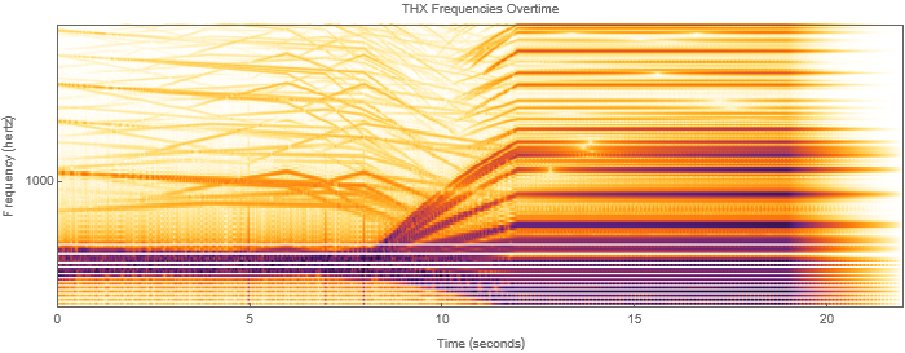
Since this sound has randomized elements, it will come out a little bit different each time you re-run the steps.
Middle C Modification
Middle C Modification
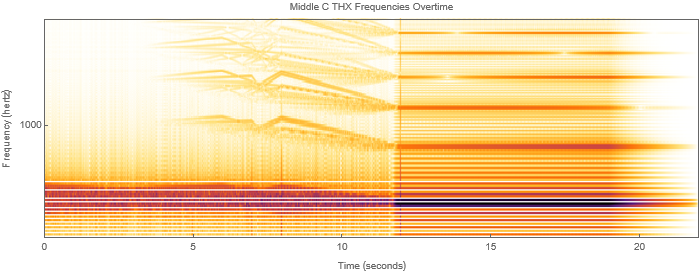
Along with the classic THX Deep Note replication, I made two more variations; the first one is a situation where instead of the sound ending on a large range of notes, the voices all come together and play at Middle C, or 261.63 hertz, ending the sound at the center of the large note range that was in the original.
There are still functions from above in use in this case, but the ending frequency slot was changed to the hertz measurement that produces Middle C, instead of the original long frequency list:
In[]:=
allAudios2=Table[AudioJoin[MapThread[Glissando,{Partition[{firstFreqGenerator[],secondFreqList[[n]],thirdFreqList[[n]],261.63,261.63},2,1],times[]}]],{n,30}];aincrease2=(1+increaser)*allAudios2;aTotal2=AudioNormalize[WienerFilter[AudioChannelCombine[aincrease2],50],1];aamplify2=AudioAmplify[aTotal2,2];analogueTHX2=AudioFade[aamplify2,{0,3},Method"Exp"]
Out[]=
We can again visualize using Spectrogram and compare this sound output to the original recreation of the THX Deep Note:
In[]:=
SpectrogramanalogueTHX2,MaxPlotPointsInfinity,ImageSize->700,PlotRange->{20,26000},Method->"MelFrequency",
Out[]=
Backwards Frequencies
Backwards Frequencies
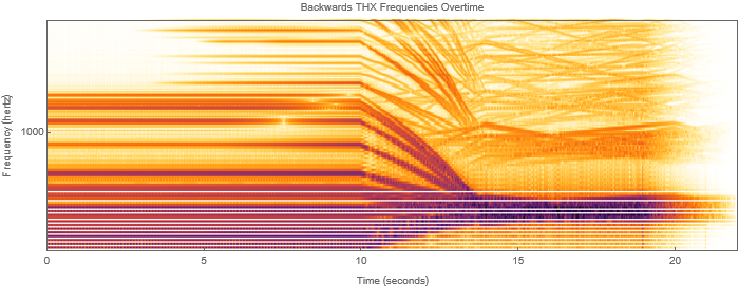
The second variation I created has the same dynamics as the original, but the order of the frequencies has been reversed. This starts the sound with the large range of specified frequencies, and ends it with the randomized ones between 200 and 400 Hz. The function used to discern the times has also been changed so that the time section for each segment still matches up with the previous sound (e.g. the long note that was at the end is still 10 seconds, even though it now takes place in the beginning).
Within the Partition, the previous order has been reversed, and the new timesbackwards function was created to additionally reverse the times:
In[]:=
timesbackwards[]:=Flatten[{{10,4},RandomChoice[IntegerPartitions[8,{2}]]}]backwardsallAudios=Table[AudioJoin[MapThread[Glissando,{Partition[{endFreqList[[n]],endFreqList[[n]],thirdFreqList[[n]],secondFreqList[[n]],firstFreqGenerator[]},2,1],timesbackwards[]}]],{n,30}];backwardsaincrease=(1+increaser)*backwardsallAudios;backwardsaTotal=AudioNormalize[WienerFilter[AudioChannelCombine[backwardsaincrease],50],1];backwardsaamplify=AudioAmplify[backwardsaTotal,2];backwardsanalogueTHX=AudioFade[backwardsaamplify,{0,3},Method"Exp"]
Out[]=
The Spectrogram for this case shows an almost-backwards version of the original recreation, save for the differences caused by randomness:
In[]:=
SpectrogrambackwardsanalogueTHX,MaxPlotPointsInfinity,ImageSize->700,PlotRange->{20,26000},Method->"MelFrequency",
Out[]=
Conclusion
Conclusion
I was not able to perfectly replicate the THX sound due to its random variations, but I believe I was able to to make something recognizable and that achieved the same desired effect. By creating a musical function to properly perform a glissando the different aspects THX could be better achieved, and this lead to a continuous movement throughout the audio that was able to reach an intensity that can be compared to the original THX sound. Observing the final Spectrograms of the different variations I made, and listening to the audios provided expresses the different intensities achieved through experimenting with my original THX recreation, and how important the dynamics and hertz range are for recreating this famous sound.
Future Work
Future Work
In the future I would like to see if I can modify the sound to match the original THX audio even more. It would also be nice to create a version that can be manipulated through volume or frequency through a manipulator.
References
References
◼
Terminology (Glossary)
Terminology (Glossary)
In case you aren’t well versed in musical terminology, there are some words used and are important for understanding this project, but if you have music terminology knowledge, then feel free to skip this.
◼
crescendo - a gradual increase in the sound's volume
◼
decrescendo - a gradual decrease in the sound's volume
◼
dynamics - the types of words used to describe the volume levels of a sound
◼
forte - loud in volume
◼
fortissimo - very loud in volume
◼
glissando - a slide from one note to another, while hearing the smooth progression of micro-notes in between
◼
hertz - unit of frequency, specific increments in hertz make up the differences and spaces between musical notes