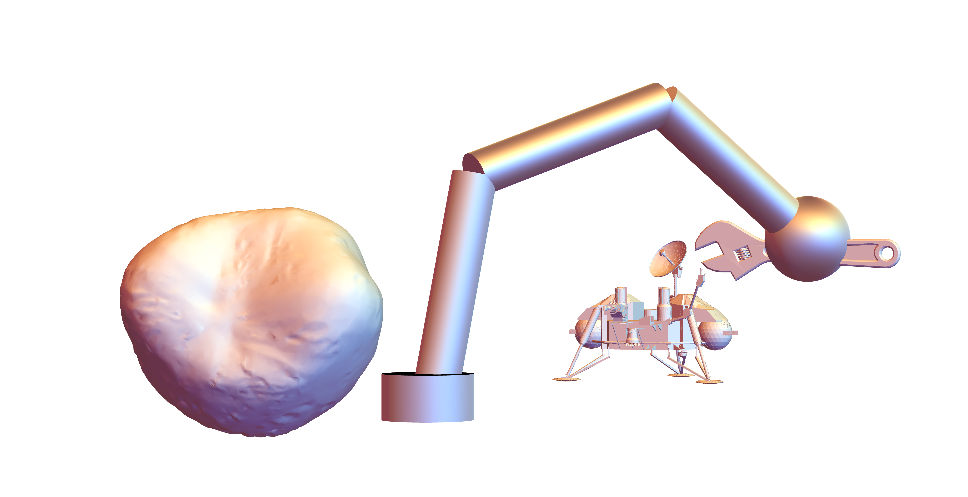
The use of large language models (LLMs) can add natural language comprehension and reasoning abilities to a robot control system. This project uses the capabilities of large language models to enable a robotic arm to follow natural language instructions. The arm is simulated in Mathematica in an environment containing other objects. First, a 2D model of the arm is constructed. Then, the arm is extended into 3D. Functionality is added to allow the arm to be used in different environments. Each environment contains a collection of 3D objects. Finally, functionality is added to allow the LLM to guide the movement of the arm by specifying a list of sequential target positions.
Implementing an LLM Controlled Robot Arm in Mathematica
Implementing an LLM Controlled Robot Arm in Mathematica
The purpose of this project is to create a workflow and code that allows a user to control a simulated robot arm with natural language instructions. The natural language instructions will be passed to a large language model (LLM) which will interpret the instructions and determine the positions to which the arm will be moved. The LLM specifies points in space for the arm to move to, but the inverse kinematics must be handled in a separate process.
The inputs to the LLM are a prompt from the user, a string description of the arm’s environment, and a template string to enclose this data. The LLM returns a path of points whose trajectory the arm should follow. Inverse kinematics is used to determine the joint angles the robot arm must have to reach these positions. An interpolation function is created between the sets of joint angles corresponding to the points along the path. This leads to a continuous path between the sets of points. A graphic showing the arm travelling along its path is displayed.
This process should work in a similar manner for any LLM whose API is directly accessible by Wolfram, but testing has been performed exclusively with GPT-4 by OpenAI.
2D Kinematics
2D Kinematics
The 2D model of the robot arm, which we will extend to the 3D case, has two degrees of freedom. The angle between the base and the arm’s first segment will be referred to as θ1. The angles between the first and second segment and the angle between the second and third segment are identical and referred to as θ2. If the length of each segment is 1, the position of the hand in terms of the joint angles is as follows.
x = (1+2cos(θ2))cos(θ1+θ2)
y = (1+2cos(θ2))sin(θ1+θ2)
The analysis of robotic arms involves both forward kinematics and inverse kinematics. A robot arm has a number of degrees of freedom, each of which is a variable that typically specifies an arm segment’s angular position around an axis or the angle that it forms with another segment. These degrees of freedom can be specified as a set of angles that together completely describe the arm’s position at a given time. Forward kinematics is the process of using these joint angles to find the position of the robot’s hand. Inverse kinematics is the opposite procedure, finding the joint angles from the position of the hand. Although forward kinematics is a function such that every input is mapped to a unique output, inverse kinematics is not a function since there may be multiple possible sets of angles that map to a given position.
x = (1+2cos(θ2))cos(θ1+θ2)
y = (1+2cos(θ2))sin(θ1+θ2)
The analysis of robotic arms involves both forward kinematics and inverse kinematics. A robot arm has a number of degrees of freedom, each of which is a variable that typically specifies an arm segment’s angular position around an axis or the angle that it forms with another segment. These degrees of freedom can be specified as a set of angles that together completely describe the arm’s position at a given time. Forward kinematics is the process of using these joint angles to find the position of the robot’s hand. Inverse kinematics is the opposite procedure, finding the joint angles from the position of the hand. Although forward kinematics is a function such that every input is mapped to a unique output, inverse kinematics is not a function since there may be multiple possible sets of angles that map to a given position.
2D Forward Kinematics
2D Forward Kinematics
Determine the point in 2D that the robot’s hand reaches when its arm joints are bent at specified angles:
In[]:=
ClearAll[robotArmForwardKinematics2D]robotArmForwardKinematics2D[θ1_?NumericQ,θ2_?NumericQ]:=With[{base={0,0}}, RotationTransform[θ1,base][{1,0}]+RotationTransform[θ1+θ2,base][{1,0}]+RotationTransform[θ1+2θ2,base][{1,0}]]
2D Inverse Kinematics
2D Inverse Kinematics
Determine the angles at which the arm’s joints must bend in order for its hand to reach a specific point specified with 2D Cartesian coordinates:
In[]:=
ClearAll[robotArmInverseKinematics2D]robotArmInverseKinematics2D[{x_?NumericQ,y_?NumericQ}]:=(NSolve[{ RotationTransform[θ1,{0,0}][{1,0}]+RotationTransform[θ1+θ2,{0,0}][{1,0}]+RotationTransform[θ1+2θ2,{0,0}][{1,0}]=={x,y}, 0<=θ1<=π,-π/2<=θ2<=0},{θ1,θ2}]//If[Length[#]>0&&y>=0,Values[First[#]],Failure["PositionUnreachable","MessageTemplate"->"This point is unreachable."]]&)
2D Graphics
2D Graphics
Make a visual representation of the 2D cross section of the arm at specified joint angles:
In[]:=
ClearAll[robotArmAnglePlot2D]robotArmAnglePlot2D[{θ1_,θ2_}]:=Module[{base={0,0},elbow,elbow2,hand}, elbow=RotationTransform[θ1,base][{1,0}]; elbow2=elbow+RotationTransform[θ1+θ2,base][{1,0}]; hand=elbow2+RotationTransform[θ1+2θ2,base][{1,0}]; Graphics[{Circle[],Line[{base-{2,0},base+{2,0}}],Arrow[{base,elbow}],Arrow[{elbow,elbow2}],Arrow[{elbow2,hand}]}]];
In[]:=
Row[{robotArmAnglePlot2D[{0,0}],robotArmAnglePlot2D[{π/3,-π/4}]}]
Out[]=


Make a visual representation of the 2D cross section of the arm with joint angles automatically calculated such that the hand reaches a specified set of (x,y) coordinates:
In[]:=
ClearAll[robotArmPositionPlot2D]robotArmPositionPlot2D[handCoords_List]:=Module[{θ1,θ2,base={0,0},elbow,elbow2,hand},If[FailureQ[#],#, {θ1,θ2}=#; elbow=RotationTransform[θ1,base][{1,0}]; elbow2=elbow+RotationTransform[θ1+θ2,base][{1,0}]; hand=elbow2+RotationTransform[θ1+2θ2,base][{1,0}]; Graphics[{Circle[],Line[{base-{2,0},base+{2,0}}],Arrow[{base,elbow}],Arrow[{elbow,elbow2}],Arrow[{elbow2,hand}]}]]&@robotArmInverseKinematics2D[handCoords]];
3D Kinematics and Graphics
3D Kinematics and Graphics
To extend this model into the third dimension, we define an additional angle, swivelθ. This variable represents the rotation of the arm around the axis that is perpendicular to the arm’s base and passes through the center of the base. The 3D model can be visualized as follows.
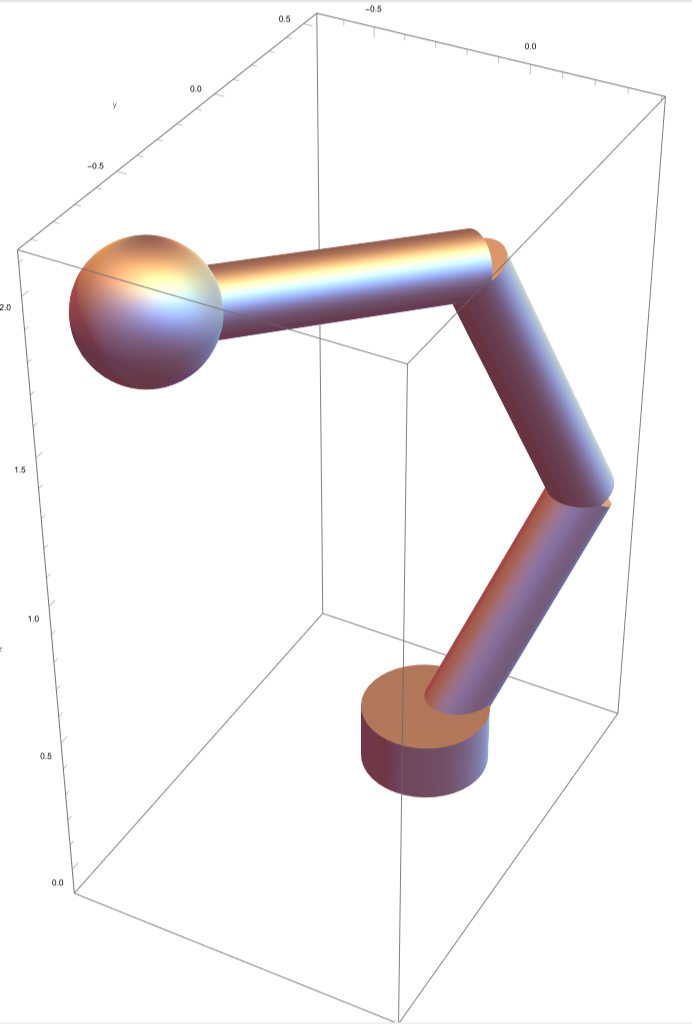
This leads us to the 3D extension of the equations described in the section on 2D kinematics.
x = (1+2Cos(θ2))(Cos(θ1+θ2))Cos(swivelθ)
z = (1+2Cos(θ2))Sin(θ1+θ2)
x = (1+2Cos(θ2))(Cos(θ1+θ2))Cos(swivelθ)
y = (1+2Cos(θ2))(Cos(θ1+θ2))Sin(swivelθ))
z = (1+2Cos(θ2))Sin(θ1+θ2)
3D Forward Kinematics
3D Forward Kinematics
Determine the location of the robot’s hand given its joint angles:
In[]:=
ClearAll[robotArmForwardKinematics3D]robotArmForwardKinematics3D[swivelθ_?NumericQ,θ1_?NumericQ,θ2_?NumericQ]:=RotationTransform[swivelθ,{0,0,1}][Insert[robotArmForwardKinematics2D[θ1,θ2],0,2]]
3D Inverse Kinematics
3D Inverse Kinematics
Determine a set of joint angles that will cause the robot’s hand to reach the specified position:
In[]:=
ClearAll[robotArmInverseKinematics3D]robotArmInverseKinematics3D[{x_?NumericQ,y_?NumericQ,z_?NumericQ}]:=Module[{swivelθ}, swivelθ=If[x>0,ArcTan[y/x],ArcTan[y/x]+π]; swivelθ=Mod[swivelθ,2π,-π]; If[FailureQ[#],#,Prepend[#,swivelθ]]&@robotArmInverseKinematics2D@Delete[RotationTransform[-swivelθ,{0,0,1}][{x,y,z}],2] ]
3D Graphics
3D Graphics
Plot the robot position in 3D given given angle specifications:
In[]:=
ClearAll[robotArmAnglePlot3D]Options[robotArmAnglePlot3D]={Axes->True,AxesLabel->{"x","y","z"},PlotRange->3.2{{-1,1},{-1,1},{-.01,1}},ImageSize->Medium};robotArmAnglePlot3D[swivelθ_:0,θ1_:0,θ2_:0,OptionsPattern[]]:=Module[{base={0,0,0},swivelVector,swivelVectorNormal,elbow,elbow2,hand}, swivelVector=Append[AngleVector[swivelθ],0]; swivelVectorNormal=Append[AngleVector[swivelθ-],0]; elbow=RotationTransform[θ1,swivelVectorNormal][swivelVector]; elbow2=elbow+RotationTransform[θ1+θ2,swivelVectorNormal][swivelVector]; hand=elbow2+RotationTransform[θ1+2θ2,swivelVectorNormal][swivelVector]; Graphics3D[{ (*Robot base: (lazy zusan)*) FaceForm[Opacity[.1]],Cylinder[{base,base+{0,0,.2}},1],Dashed,Arrow[{base,swivelVector}],Dashing[None], (*Robot upper arm:*) Blue,Cylinder[{base,elbow},.1], (*Robot middle arm:*) Cylinder[{elbow,elbow2},.1], (*Robot lower arm:*) Cylinder[{elbow2,hand},.1], (*Robot hand:*) Ball[hand,.2]}, Axes->OptionValue[Axes],AxesLabel->OptionValue[AxesLabel], PlotRange->OptionValue[PlotRange],ImageSize->OptionValue[ImageSize]]]
π
2
Creates a simple 3D graphic of the robot arm with the hand at specified Cartesian coordinates:
This shows the robot arm moving to a valid position.
This demonstrates how errors are caught if an invalid position is entered.
Plotting a path for the arm in 3D
Plotting a path for the arm in 3D
Converts a discrete list of target positions, specified by the arm’s joint angles, to a continuous function that outputs joint angles for any point along the arm’s path:
Generates a list of random 3D points on the ground that are reachable by the arm:
Defining the Environment
Defining the Environment
We will define each environments for the arm as a dataset that includes three columns: position, descriptions, and geometry. The LLM will receive the position and description of each object from the prompt. The geometry will be used to visualize the object in 3D.
Creating Environment Datasets
Creating Environment Datasets
Generate roughly equally spaced positions for objects in the environment:
Helper function: Translate 3D objects:
Helper function: Scale 3D objects:
Get a 3D object’s dimensions:
Get the centroid of the base a 3D object:
Center the base of a 3D object at the origin, and scale it so it’s largest dimension is equal to length:
An example environment is generated here. It uses objects from the built-in Geometry3D data.
Define some example objects to include in the robot’s environment:
Associate each object with a description:
Generate an environment with n objects for the LLM+Arm system:
Accessing Data from an Environment Dataset
Accessing Data from an Environment Dataset
Retrieve geometry from the environment for visualizations:
Retrieve information from the environment for the LLM:
Graphing the Robot Arm in 3D with an Environment
Graphing the Robot Arm in 3D with an Environment
Plots the robot arm in its environment:
Controlling the Arm with an LLM
Controlling the Arm with an LLM
We desire for the LLM to provide coordinate points for the arm to travel to sequentially. The prompt uses an identical prompt template for each command. The template is modified by adding the environment of the arm and the user’s instructions. However, the LLM cannot accept the environment objects directly as 3D graphics objects due to maximum prompt size. For detailed objects, especially those imported from 3D object files, this might overwhelm the maximum number of tokens in the prompt and provide data that is not understandable to the LLM.
A template for a prompt that will instruct the LLM to return a list of points for the arm to move to in sequence:
Informs the LLM of the arm’s environment and its natural language instructions and returns the raw LLM output:
Creates an animation of the arm’s joint angles moving between a list of specified values, changing the position of the hand:
Simulates the robot arm following natural language instructions from the user in a specified environment:
Demonstrations and Testing
Demonstrations and Testing
GPT-4 was used for this project’s tests.
The arm was successfully able to perform the most basic task, touching all objects in the environment.
However, when we request that it select only a specific type of object, it initially failed to do so. An example of this follows.
Making it clearer that objects not fitting the specification should be excluded from the analysis resolved this issue.
When prompted to select an object of a specific color, the arm was able to recognize the correct object despite color not being present in the graphics component of the simulation.
The LLM could generate its own prompts to simulate the user’s commands. It favored generating prompts that commanded the arm to touch the objects in a specific sequence. The LLM’s instructions to the arm were correct regardless of whether the environment was sparse (5 objects) or relatively dense (15 objects).
Concluding Remarks
Concluding Remarks
In this project I have created a basic model of a robotic arm that can be controlled by an LLM. It can serve as a novel proof of concept of an LLM’s ability to identify characteristics of objects and control a simulated physical system in response to natural language prompting.
The LLM was able to identify objects in the environment by their properties, such as color. However, it sometimes defaulted to touching all objects in the environment rather than the ones specified in the prompt unless a keyword such as “only” was used. It was able to perform instructions sequentially and functioned in both sparse environments where there were few objects in reach and dense environments where there were many. The testing process could be partially automated by allowing the LLM itself to invent prompts. However, its imagination in inventing prompts was somewhat limited in this test.
Future work for this project is likely to include a mechanism to allow the arm to move objects within its environment. More robust prompting of the LLM and handling of its output to allow the arm to perform actions other than moving to the locations of specified objects is another goal. Further experimentation on the LLM prompt templates could provide insight into which behaviors of the LLM are prompt specific and which are inherent to the model. Finally, implementing the LLM control pipeline in Wolfram System Modeller would allow for more realistic object dynamics.
Acknowledgments
Acknowledgments
I would like to thank the Wolfram Summer School staff and students who provided advice and assistance to me throughout the project.
◼
My mentors Phileas Dazeley-Gaist and Alejandra Ortiz for assistance throughout the project on planning and implementation
◼
Glen Halley and Ankit Naik for offering assistance with Wolfram System Modeller
◼
Jofre Espigule for providing reference materials
◼
Dr. Stephen Wolfram for high-level guidance on project direction
References
References
1
.Yamada, Y., Bao, Y., Lampinen, A. K., Kasai, J., & Yildirim, I. (2023). Evaluating spatial understanding of large language models. arXiv preprint arXiv:2310.14540.
2
.Zeng, F., Gan, W., Wang, Y., Liu, N., & Yu, P. S. (2023). Large language models for robotics: A survey. arXiv preprint arXiv:2311.07226.
Cite This Notebook
Cite This Notebook