In this short guide, I demonstrate one way to create an animation of plant health in Mexico using NASA MODIS Aqua raster time series imported using the RemoteSensing paclet.
Install the RemoteSensing paclet if running this code for the first time:
In[]:=
PacletInstall["PhileasDazeleyGaist/RemoteSensing"]
Out[]=
PacletObject

Import the RemoteSensing paclet:
In[]:=
Needs["PhileasDazeleyGaist`RemoteSensing`"]
Search for available GIBS remote sensing layers containing the string "NDVI":
In[]:=
Select[GIBSData[],StringContainsQ[#,"NDVI"]&]
Out[]=
{MISR_Land_NDVI_Average_Monthly,Landsat_WELD_NDVI_Global_Annual,MODIS_Aqua_L3_NDVI_16Day,MODIS_Terra_L3_NDVI_16Day,MODIS_Terra_NDVI_8Day,MODIS_Terra_L3_NDVI_Monthly,MODIS_Aqua_L3_NDVI_Monthly}
Fetch information about the "MODIS_Aqua_L3_NDVI_Monthly" product:
In[]:=
Dataset[GIBSData["MODIS_Aqua_L3_NDVI_Monthly"]]
Out[]=
Fetch MODIS Aqua L3 NDVI imagery for a region, specifying the month to fetch imagery for:
In[]:=
GeoImage,GeoServer->GIBSGeoServer"MODIS_Aqua_L3_NDVI_Monthly","Date"->
Out[]=
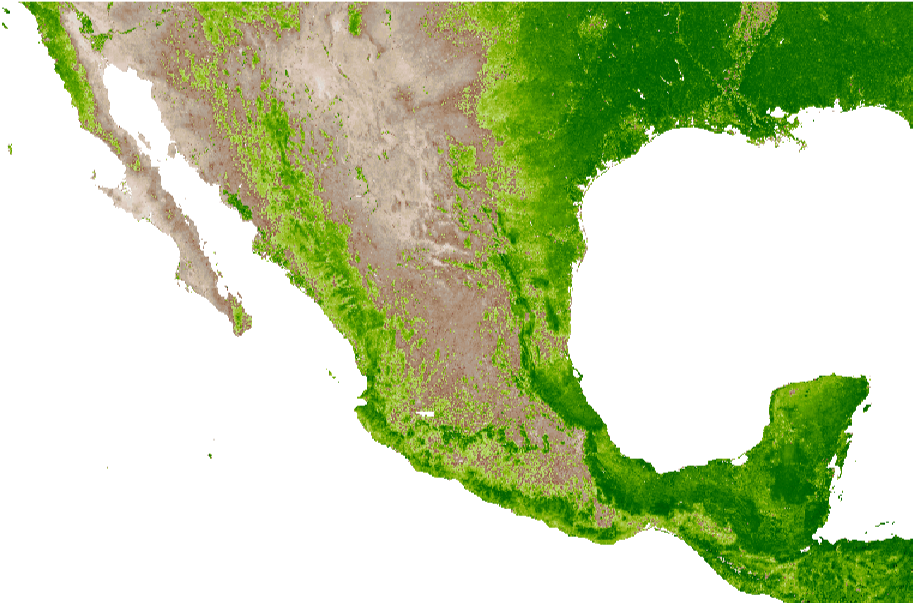
To make a smooth animation, we’ll fetch imagery for a sequence of dates, and linearly interpolate between them. The linear interpolation helps to produce a pleasant animation, but we must remember that the interpolated images are rough estimates of the variation between true monthly data frames.
Make an animation of MODIS Aqua L3 NDVI imagery of Mexico from January 2023 to October 2024:
In[]:=
animation=ModuledateRange=DateRange,,trueFrames,subframes=10,trueFrames=MapQuiet@GeoImage,GeoServer->GIBSGeoServer["MODIS_Aqua_L3_NDVI_Monthly","Date"->#],GeoZoomLevel->5,ImageSize->1024&,dateRange;ImageCompose[#1,#2,{850,450}]&@@@Thread[{Join[Values[TimeSeriesResample[TimeSeries[trueFrames],1/subframes]],Table[Last[trueFrames],subframes-1]],Map[Framed[Text[Style[DateString[#,{"MonthName"," ","Year"}],2*12]],Background->White,FrameMargins->2,FrameStyle->None]&,Flatten[Map[Table[#,subframes]&,dateRange]]]}]//FrameListVideo
Out[]=
As we’ve seen, Wolfram Language offers a powerful and flexible environment for handling and visualizing satellite data. With these tools, we can create insightful animations like the one above. I hope this guide serves as a useful starting point for your own projects, and don’t forget to share your own findings and creations!
CITE THIS NOTEBOOK
CITE THIS NOTEBOOK
Smooth animation of plant health in Mexico using MODIS Aqua raster time series from NASA
by Phileas Dazeley-Gaist
Wolfram Community, STAFF PICKS, December 23, 2024
https://community.wolfram.com/groups/-/m/t/3342986
by Phileas Dazeley-Gaist
Wolfram Community, STAFF PICKS, December 23, 2024
https://community.wolfram.com/groups/-/m/t/3342986