Introduction
In this project, we studied the decomposition of isotopes that are created as a result of supernovae. We graphed decay rates of iron, created a highlight graph of uranium to visualize half-life as a function of time, and plotted heat maps to find the difference of binding energy between the Wolfram Database and Bethe-Weizsäcker’s formula.This project is intended to help future researchers and scientists know more about decay rates, half lives, and binding energies of isotopes created in supernovae.
Supernovae
Supernovae
Supernova research provides a big window into the cosmic cycle of creation, destruction, and rebirth since most heavy elements come from supernovae. Supernovae, the powerful explosion of stars, create and distribute material that can be used for the creation of stars. Radioactive isotopes, with their distinct half-lives and decay rates, are among some of the materials that are produced during this process, and they offer vital information about some of these stars. These isotopes possess unstable nuclei that undergo different types of decay, emitting particles and radiation as they transform into more stable configurations over time.
Half-Life
Half-Life
Analyzing the decay of radioactive materials from supernovae involves understanding the fundamental principles of the process of decay. The concept of half-life is crucial in determining the stability and longevity of isotopes. Some isotopes are extremely stable with a half-life longer than the current age of the universe, while some isotopes decay relatively quickly. Graphical representation of radioactive decay over time illustrates exponential decay curves, where the number of radioactive nuclei decreases exponentially as they transform into more stable configurations.
Beta and Gamma Decays
Beta and Gamma Decays
Beta and gamma decays are one of the most fundamental processes in nuclear physics. A neutron is transformed into a proton through beta decay, which is the emission of a beta particle—either an electron (e−) or positron (e+)—as well as an antineutrino (vˉe) or neutrino (νe) by the nucleus. In order to create a more stable arrangement, this mechanism works to balance the quantity of protons and neutrons in the nucleus. On the other hand though, gamma decay is an emission of a gamma ray photon (γ) from an excited nucleus. High-energy photons known as gamma rays are released when a nucleus changes from a higher energy state to a lower energy one, usually as a result of beta decay. Although the nucleus’s atomic number and mass number are unaffected by gamma decay, it does assist in bringing the nucleus into a more stable lower energy state. The difference between gamma and beta decays though, is in how they affect the nucleus. The element and isotope identities are affected by beta decay, which also modifies the neutron number (N) and alters the nucleus’ atomic number (Z) by ±1. However, gamma decay does not alter the atomic or mass numbers of the nucleus, instead, it modifies the energy state of the nucleus. These decays are important when studying the decomposition of radioactive material because they can help understand the radioactive decay process and the number of energy released.
Graphing and Analyzing: Iron
The distribution of decay products throughout time can be seen by graphing the radioactive isotope decay from supernovae. The following graphs will show the half-life of the element below.
Find the Half-Life of Specific Elements
Find the Half-Life of Specific Elements
The table below lets us visualize the half-life, the average time it takes for half the mass to decay, for specific isotopes by taking the isotope data from the Wolfram Database and then putting it into a table. The table heading gives labels of the title and the specific elements that it is finding the half life for.
In[]:=
TableForm[{{IsotopeData["Iron56","HalfLife"]},{IsotopeData["Iron57","HalfLife"]},{IsotopeData["Iron60","HalfLife"]},{IsotopeData["Cobalt56","HalfLife"]},{IsotopeData["Cobalt57","HalfLife"]},{IsotopeData["Cobalt60","HalfLife"]},{IsotopeData["Nickel56","HalfLife"]},{IsotopeData["Nickel57","HalfLife"]},{IsotopeData["Nickel60","HalfLife"]}},TableHeadings->{{"Iron56","Iron57","Iron60","Cobalt56","Cobalt57","Cobalt60","Nickel56","Nickel57","Nickel60"},{"Half-Life for Specific Isotopes"}}]
Out[]//TableForm=
Half-Life for Specific Isotopes | |
Iron56 | ∞ |
Iron57 | ∞ |
Iron60 | |
Cobalt56 | |
Cobalt57 | |
Cobalt60 | |
Nickel56 | |
Nickel57 | |
Nickel60 | ∞ |
Using the data given from the Wolfram database, let’s graph all of these elements to visualize them on a graph. Using the half-life that we got from the previous function, the decay constant that we can calculate using λ=log(2)/half-life, and the initial number of atoms, we can graph it out. To get the number of atoms in a specific element, graphed as the y-axis, we can use the mass of a supernova.
Before we continue, let us make a pie chart based on the how prevalent these iron elements are. Using the graph, we can see that most of the iron is Iron-56. The code below defines all four of the elements in the pie chart and then plots them based off of their percentage in the first line.
In[]:=
supernovaeIronIsotopes={{"Iron-56",98.8},{"Iron-57",0.1},{"Iron-60",0.1},{"Other Iron",1}};PieChart[supernovaeIronIsotopes[[All,2]],PlotLabel->"Distribution of Iron Isotopes from Supernovae",ChartStyle->"Pastel",GridLines->Automatic,AxesLabel->{"Isotopes","Percentage"}, ChartLegends->{"Iron-56", "Iron-57","Iron-60","Other Iron"}]
Out[]=
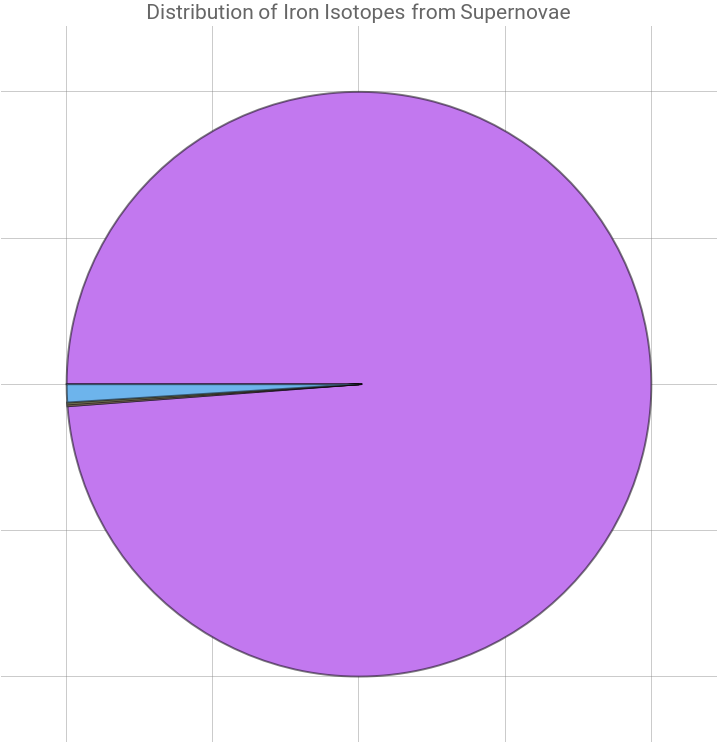


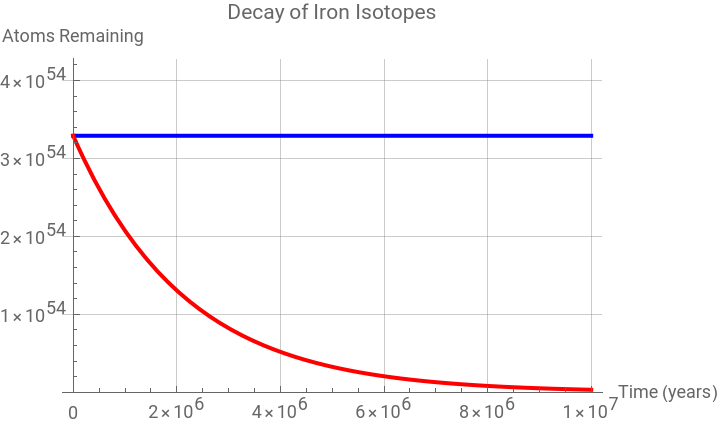
For example, consider a supernova whose progenitor star has a mass of fifteen solar masses, which has a weight of 2.983*10^31 kilograms. Let us also consider that the initial mass of the supernova is made for 33% of Fe, and Iron-60 is about 1% of all iron that comes from supernovae, so the mass is 9.8439*10^28 kilograms. Then we will have to convert this big number of atoms by first converting it into grams: we just simply multiple by 1000 and get 9.8439*10^31. From there we have to convert the grams to moles, and get 5.4643*10^30 rounded. For our last step, we will have to convert the moles to atoms using Avogadro’s number. To do this, we will have to multiply the number of moles by 6.022 * 10^2. In the end, we should get 3.2908*10^54 atoms, which we can use as the starting point on the y-axis. From there, we will graph the decay rate of the three elements to visualize them better. Here are the graphs for the decay rates. For these graphs, I gave each element a half-life, their decay constant, their initial quantity, and then plots an exponential graph of both isotopes with the ranges showing from 0 to 1.3 times the initial quantity. For some graphs though, there will be a straight line because some of these isotopes will have a stable half-life, which is a really large numbers, so we will just put infinity. All of these three code blocks are really similar with different values.
Now let us define some constants: half life of Iron-56, decay constant for Iron-56, and the initial starting point for the graph of Iron-56. Some more constants that are the half life of Iron-60, decay constant for Iron-60, the initial starting point for the graph of Iron-60.
In[]:=
halfLifeFe56=Infinity;decayConstantFe56=0;initialQuantityFe56= 3.2908*10^54;halfLifeFe60=1.5*^6;decayConstantFe60=Log[2]/halfLifeFe60;initialQuantityFe60= 3.2908*10^54;
Making the graph line for Iron-56 using a function and making the graph line for Iron-60 using a function.
In[]:=
decayFunctionFe56[t_]:=initialQuantityFe56*Exp[-decayConstantFe56 * t]decayFunctionFe60[t_]:=initialQuantityFe60*Exp[-decayConstantFe60*t]
Plot the data.
In[]:=
ironPlot=Plot[{decayFunctionFe56[t],decayFunctionFe60[t]},{t,0,1*^7},PlotRange->{0,1.3*initialQuantityFe56},AxesLabel->{"Time (years)","Atoms Remaining"},PlotLabel->"Decay of Iron Isotopes",GridLines->Automatic,PlotLegends->{"Iron-56/Iron-57 (stable)","Iron-60 (1.5 million years)"},PlotStyle->{Blue,Red}]
Out[]=


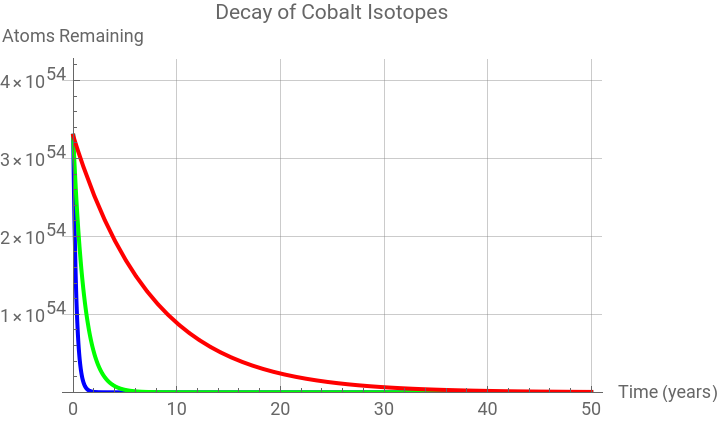
Let us define some constants: half life, decay constant, and the initial starting point for the following isotopes: Cobalt-56, Cobalt-57, and Cobalt-60.
In[]:=
halfLifeCo56=77/365.25;decayConstantCo56=Log[2]/halfLifeCo56;initialQuantityCo56= 3.2908*10^54;halfLifeCo57=272/365.25;decayConstantCo57=Log[2]/halfLifeCo57;initialQuantityCo57= 3.2908*10^54;halfLifeCo60=5.3;decayConstantCo60=Log[2]/halfLifeCo60;initialQuantityCo60= 3.2908*10^54;
Making the graph line for Cobalt-56, Cobalt-57, and Cobalt-60 using a function.
In[]:=
decayFunctionCo56[t_]:=initialQuantityCo56*Exp[-decayConstantCo56*t]decayFunctionCo57[t_]:=initialQuantityCo57*Exp[-decayConstantCo57*t]decayFunctionCo60[t_]:=initialQuantityCo60*Exp[-decayConstantCo60*t]
Plot the data.
In[]:=
cobaltPlot=Plot[{decayFunctionCo56[t],decayFunctionCo57[t],decayFunctionCo60[t]},{t,0,50},PlotRange->{0,1.3*initialQuantityCo56},AxesLabel->{"Time (years)","Atoms Remaining"},PlotLabel->"Decay of Cobalt Isotopes",GridLines->Automatic,PlotLegends->{"Cobalt-56 (77 days)","Cobalt-57 (272 days)","Cobalt-60 (5.3 years)"},PlotStyle->{Blue,Green,Red}]
Out[]=

Define some constants: half life, decay constant, and the initial starting point for the following isotopes: Nickel-56, Nickel-57, and Nickel-60.
Making the graph line for Nickel-56, Nickel-57, and Nickel-60 using a function.
Plot the data.
Graphing and Analyzing: Uranium
Daughter Nucleotide’s Graph
Daughter Nucleotide’s Graph
Another example that I can graph and visualize is Uranium-235. Here with the code below, I made a graph that takes in the half-life of Uranium-235 and its daughter nucleotides, and graphs it in a chain plot. In this plot though, I made it so that after every time the isotope decays into its daughter nucleotides, it turns red, making it show how long it takes for some isotopes to decay. Using the HighlightGraph function in Wolfram Language, I was able to make this graph. This graph takes in an entity and returns a flattened list of its daughter nucleotides, then it creates a chain plot based off of the main isotope with labels. After this, it shows an interactive slider that allows us to change the time, and after an isotope decays, it turns red, although some isotopes will not turn red since they are stable, and have a tremendously long half-life. Props to Sheldon Rego[4], as I used his code as inspiration.
Gives a list of all daughter nuclides that are not missing for a given element .
Creates a flattened list of nuclides starting from ‘subs’ applying ‘dNuclides` function and creates a graph in the second line.
Define ‘g’ as the chain plot for Uranium-235.
Maps each isotope based off of its half life.
Gives back a list of the isotopes in the graph whose half-lives are shorter than the time.
Plot the graph with the slider that turns the isotopes red after they decay into other isotopes.
Binding Energy
Finding the Binding Energy
Finding the Binding Energy
For this part of the project, I will be computing the binding energy of specific isotopes and then finding the difference between the Bethe-Weizsäcker’s formula and the Wolfram Dataset. The Bethe-Weizsäcker’s formula is a formula used to compute the binding energy for specific isotopes. In this formula, there are five parameters that are constants, which change based on the situation you are using them in. This formula has five parameters, which are constants(listed below in the code), and two variables, which we plug in. These variables are the mass number(A) and atomic number(Z) respectively. In order to accomplish this goal, I will create a function myself by using the Bethe-Weizsäcker formula. The code below uses the formula, and some variables like avol, asur, aC, asym, and apair and calculates the binding energy based off of the variables and the number of protons and neutrons.
Make a function of the Bethe-Weizsäcker’s formula.
Define the constants from Statistical Learnability of Nuclear Masses[5].
Gets he element name and returns the A and Z value corresponding to the isotope.
Finds the binding energy of the isotope using the A and Z values, and then returns the binding energy for that isotope.
Now, let’s get the data from the Wolfram Dataset. Using IsotopeData[], we can search the Wolfram Dataset and get the binding energy for the wanted isotope. But we would also need to multiply the resulting data by the atomic number because the Wolfram Database calculates the binding energy for only one nucleoid, and since we used the Bethe-Weizsäcker’s formula to find the binding energy for the whole element, we would need to do the same with this function.
Use the Wolfram Database to find the binding energy for Uranium-235.
Using the data we found from the Bethe-Weizsäcker formula and the Wolfram Database, we could compare them to find the difference and the percentage error. We would first have to subtract the two. There is a slight problem though: in order to subtract these two, they have to be the same type. What this means is that the formula’s result is written as a number, but the database’s result is written in MeV(MegaelectronVolts). To counter this problem though, we can use a Quantity[] function to change the value to MeV.
Subtract the binding energy of the Bethe-Weizsäcker formula and the Wolfram Database.
Here the difference between the Bethe-Weizsäcker’s formula and the Wolfram Database is 1.92145.
To find the percentage error, we take the difference, subtract binding energy of the element, and then take the absolute value of it.
Plotting Heat Maps
Plotting Heat Maps
Let us visualize the heat maps of both the Wolfram and the Bethe-Weizsäcker formula’s binding energy. This background code will help us visualize the steps we took to make the graphs.
To start off, let us define all the isotope data as a variable named isotope. This little block lets us see the names of all the isotopes in the Wolfram Database.
Next, we will need to create a function that is the Bethe-Weizsäcker formula because we will use this later on for plotting and finding binding energies.
In the code below, the biningEnergy function takes in 7 parameters, 5 of which are constants in the equation. A and Z though, are the atomic mass and the atomic number respectively. When numbers are used in this function, it will output the binding energy.
This next line defines all the constants in the Bethe-Weizsäcker formula. This function returns the binding energy for the whole isotope.
Now let us make a function that takes in an isotope and returns the mass number, atomic number and the binding energy. This function though, unlike the one above, only return the binding energy for each single nucleoid, so we will have to multiply by the mass number to get the binding energy for the whole isotope.
But we still have an issue, some isotopes do not have a binding energy in the Wolfram Database, and some isotopes do not exist for the atomic number versus the mass number, so we must remove all of them or else our lengths will be different and we will not be able to plot our graph properly. In the code below we combine both datasets together to make the format look like this: mass number, atomic number, the Wolfram Database’s binding energy, and the Bethe-Weizsäcker formula’s binding energy. We also decided to remove the missing values, and since they do not properly multiply, they have a head of ‘Times’, so we call to remove the values that have that.
Remove all the missing and unknown values.
For this variable, I decided to get my whole matrix above, and take the first, second and fourth part of each list. These are the mass number, atomic number, and the Bethe-Weizsäcker formula’s binding energy.
This variable is the matrix for the Bethe-Weizsäcker formula.
For this variable though, I decided to get my matrix named myDataSet, and take the first, second and third part of each list. These are the mass number, atomic number, and the Wolfram Database’s binding energy.
This variable is the matrix for the Wolfram Database’s binding energy.
Let us plot the graph for the Wolfram Database’s binding energy by simply graphing the variable and adding some labels.
This map takes the calculatedBE variable and plots it with a title, a legend, and grid lines.
This map takes the impericalBE variable and plots it with a title, a legend, and grid lines.
This variable finds the difference in binding energy for each isotope. It takes the two variables, A and Z, and finds the corresponding binding energy for both the Wolfram Database’s binding energy, and the Bethe-Weizsäcker formula’s binding energy. It then takes the absolute value and subtracts them.
Now we simply graph this variable to get a beautiful graph of the difference in binding energy.
We subtract the two variables and give a legend, a title, and grid lines for a cleaner look.
Before we continue, I want to talk about an issue I had with plotting the difference in my graphs. When trying to run the graph, the legend would be an insanely high number. I assumed it was because the binding energy was high, but when I looked into it I realized that my mass number(A) and atomic number(Z) values were flipped in some equations and code cells. To fix this though, I had to completely redo my functions and start over. Unexpectedly though, another error arose: the graph’s binding energy was normal, but the graph’s background was blue, and on the legend blue was labeled as zero. I dug a little deep into my code and realized that I put all the values that were missing or unknown to zero, meaning that all the values who did not have a binding energy in the Wolfram Database were zero. To fix this, I removed the missing or unknown values completely so that all the values with zero were gone.
Finding the Values for the Bethe-Weizsäcker Formula Parameters
Finding the Values for the Bethe-Weizsäcker Formula Parameters
When looking at the Bethe-Weizsäcker formula, we can see there are five constants, avol,asur, aC,asym,apair. These values are constants in the equation that have values of 15.4, 16.71, 0.701, 22.56, 11.88 respectively. We want to find values to are best values for these constants. Let us start off by defining a variable called isotopes, as all the data in the Wolfram Database.
Set the variable isotopes to all the isotope data in the Wolfram Database.
In this cell, we made a lists of lists, or a matrix, of all the IsotopeData with the MassNumber, Atomic Number, and Binding Energy.
We made a variable dataset which removes all the missing values so that only useful matrices exist in the form of {Mass Number, Atomic Number, Binding Energy(in MeV)}
Just before we continue though, I decided to clear the five parameters just in case I have defined the variables before or anything else that may have been defined by these names previously.
Now let us define the Bethe-Weizsäcker formula as a variable named model.
Let us plot our FindFit function and see what the parameters are. Below is the estimate, and it seems that they are pretty accurate as the parameters from the formula are 15.4, 16.71, 0.701, 22.56, 11.88, respectively. When comparing these values to Statistical Learnability of Nuclear Masses[5], we can see that our numbers are really close to the numbers given. These constants though, change value depending on where it is used since different numbers are used for different analyses. We got these numbers to see and check the isotope data functions.
In the code block before, we use find fit to plot our estimates for the five parameters and plot it nicely as a table. The find fit function finds numerical values of the parameters that make the expression give a best fit to dataset as a function of the variables.
Finding Percent Error in the Values
Finding Percent Error in the Values
Here we made another fit named fit2, which we used in order to find extra information because NonlinearModelFit stores additional information that is not used or shown in FindFit. After finding our model, we will try and find the standard error.
This NonlinearModelFit function takes in 4 parameters: the dataset we will use, a model, parameters, and variable where the nonlinear model depends on the variables.
Here we do exactly this by by plotting a table with different values, that once again are not shown in FindFit. In this case, we want to find the error in parameters, so we can type in a simple block of code that does exactly that. We use grid to format the output better and flatten the list because we want it to be one list of items, not two lists.
Above we can see the percent errors, which is essentially the plus or minus seen in the article. They are very similar as the values that the article estimated is ± 0.014, ± 0.042, ± 0.001, ± 0.037, and ± 0.823 respectively.
Finding the Energy Loss
Finding the Energy Loss
Before we start, let us copy down some formulas that we had from before: the Bethe-Weizsäcker formula and the newBindingEnergy function.
To find the binding energy ourselves, we will have to use the formula below. This is a function we created in order to estimate the binding energy lost over time, also known as the Q-value. The Q-value is the energy lost as a result of decay, from the initial isotope to the final product. We also have another formula we will use to compute the half life.
Function to estimate the binding energy loss over time.
Formula to compute the half life.
To start off, we will need to visualize our Uranium-235 graph from before. This uses essentially the same code, except the slider and the highlighting part of the graph is removed to just see the arrows and what each isotope leads to. From the graph below, we can see arrows coming out of most isotopes, so we can say that the isotopes with zero lines coming out of them are the isotopes that are stable. Again, thanks to Sheldon Rego[4].
Gives a list pf all daughter nuclides that are not missing for a given element.
Creates a flattened list of nuclides starting from ‘subs’ applying ‘dNuclides` function and creates a graph in the second line.
Plots the graph of Uranium-235 and the isotopes it goes into with arrows.
In this line of code, we use a function that finds how many arrows point out of an isotope, meaning the ones that have zero lines coming out of them are the final product of the inputted isotope.
Here, this code allows us to see all of the isotopes in the graph above and compare them to see how many lines are coming out of each.
In the code below, we find all of the points in where the outward vertex degree, or the number of outward pointing arrows, is zero. Then we flatten the matrix to make it one list, which will be easier for us to find the corresponding isotope in the following line of code.
In this line of code we take the parts out of the vertex list where it matches the 0 of outward pointing arrows and print them.
Here we make a function with one input, the name of the isotope, which does the steps above in one code block: takes the graph, sees how many outward pointing arrows there are, shows the values which have 0 outward pointing arrows and list them out. On the second line of code we can see an example where we plug in an isotope and see that the final products are printed.
This simple function allows us to take an input of an isotope and give us back the mass number and atomic number, which we will use in the next couple lines of code.
In the code cell below, we combine the two previous functions that map the mass number and the atomic number to the four corresponding elements that are a final product of Uranium-235.
Here we flatten the matrix and make it four lists of each isotope, five values in each of the four lists. We basically complied all the data we need to import into our function Q, also known as formulaForQ.
Now we apply our old function, bindingEnergyDefined, to the function above the get the energy lost for each of the four rows.
This code uses natural language input to find all of the final decay products of urnaium235 and their percentage. The next line though, builds on this and finds the largest percent of Uranium-235. The line after that transforms the entity name to the standard text name.
This is just a little test run of the formula to compute the biding energy loss for Uranium-235 to lead.
Conclusion and Applications
Conclusion and Applications
Future Improvements
Future Improvements
Some improvements I believe can be done with my project is studying the Sargent’s rule. The Sargent’s rule is a rule that suggests that when choosing from two or more datasets, we should choose the dataset with less parameters because they are easier to understand, give a better fit with better accuracy, and they reduce the risk of overfitting. Another improvement that can be done is instead of using the function for half life with the inputs Z and Q, we can study the fermi model in detail and see the equation it generates.
Keywords
Keywords
◼
Isotope
◼
Binding Energy
◼
Half-Life
◼
Decay
◼
Atomic Number
◼
Mass Number
◼
Bethe-Weizsäcker Formula
◼
Matrix
◼
Supernova
Acknowledgments
Acknowledgments
I would like to give a special thanks to all the mentors, especially Danielle Ceravolo, and all the mentors, especially Zoya Brahimzadeh, Sophie Chen, and Alisa Zaitseva, for helping me out with my project by giving me guidance, instructions, and feedback throughout my project. During project time, their advice would be important in developing my project to how it is right now. I would also like to thank Stephen Wolfram for suggesting me this project, which turned out to be a wonderful idea.
Citations
Citations
◼
[1] Supernovas and the periodic table of elements. ELWYN’S BIG BANG PAGE. (n.d.). https://elwynsbigbangpage.weebly.com/supernovas-and-the-periodic-table-of-elements.html
◼
◼
[3] AL26 and FE60 from massive star supernova from cococubed. (n.d.). https://cococubed.com/research_pages/al26_fe60.shtml
◼
[4] Message boards. [WSC20] Computing Radioactive Decay Products as a Function of Time - Online Technical Discussion Groups-Wolfram Community. (n.d.). https://community.wolfram.com/groups/-/m/t/2034014
◼
[5] Idini, A. (2020, December 14). Statistical learnability of nuclear masses. Physical Review Research. https://journals.aps.org/prresearch/abstract/10.1103/PhysRevResearch.2.043363
◼
[6] King, B. (2016, August 22). Iron found in fossils suggests supernova role in mass dying. Phys.org. https://phys.org/news/2016-08-iron-fossils-supernova-role-mass.html
◼
[7] Wolfram Alpha Calculator
◼
[8] Wolfram Alpha Database
CITE THIS NOTEBOOK
CITE THIS NOTEBOOK
Studying the decomposition of radioactive material from supernovae
by Pavel Pomozov
Wolfram Community, STAFF PICKS, July 12, 2024
https://community.wolfram.com/groups/-/m/t/3216914
by Pavel Pomozov
Wolfram Community, STAFF PICKS, July 12, 2024
https://community.wolfram.com/groups/-/m/t/3216914