A few years ago, at the Wolfram Summer School, I worked on Import/Export functions for Twine projects. One of the goals ended up being styling the passage’s markdown. As I began to look into the task, I realized it would be a great exercise to try parsing markdown into a symbolic form, formalizing the structure of the document before I work on styling. And so I did just that! With the parser in a decent enough state I thought I’d share it with the community!
Usage
Usage
After downloading the repo and installing the package:
Get the package
In[]:=
<<MarkdownParse`
Parse a Markdown file and display it in a Column
In[]:=
mdp=MarkdownParse;ColumnTake[mdp,10],
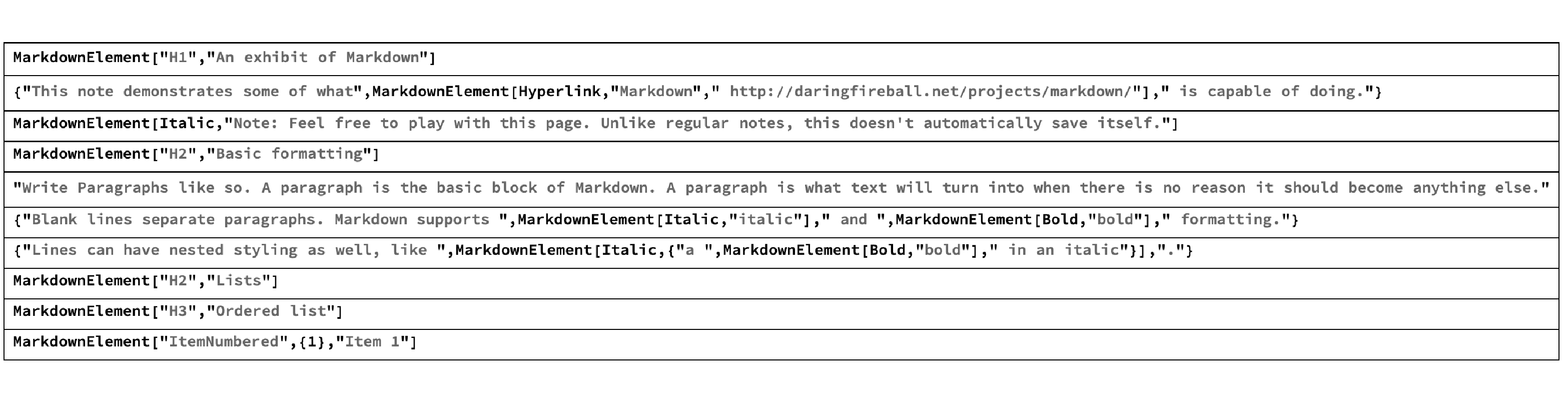
The parser returns a list, containing a mixture of MarkdownElements, Lists, and Strings. You’ll notice the general structure of MarkdownElement’s is:
MarkdownElement[tag,data]
Common markdown syntax is supported, and below is a list of supported symbolic forms.
Supported MarkdownElements
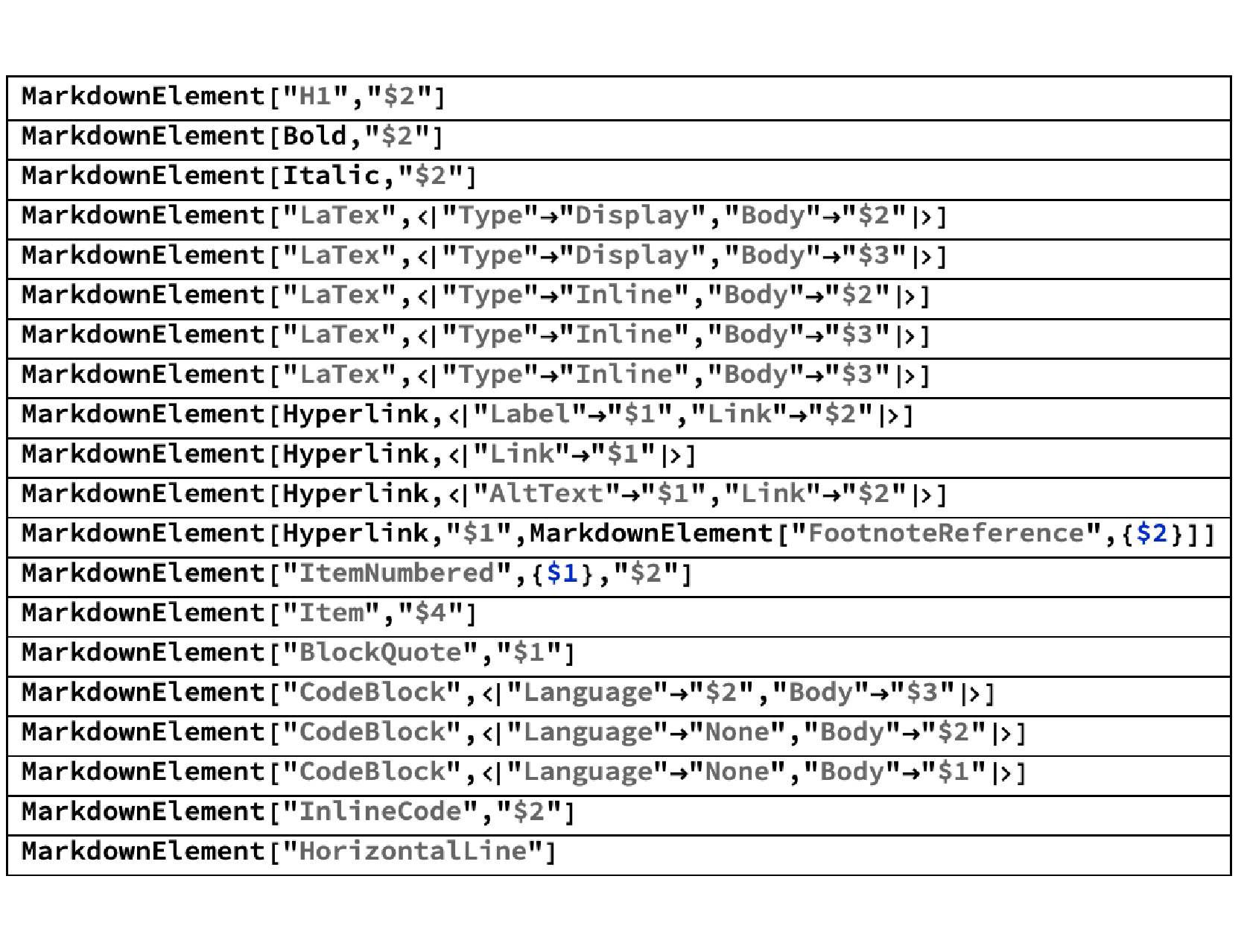
Note: In several places there’s a , this is because the displayed list contains the right hand sides of my replacement rules. In each replacement rule, the left hand side contains a regex with capture groups, whose index corresponds to the after the dollar sign. This is how I slot the data into the MarkdownElement! The blue dollar-n symbols are blue because I apply ToExpression to them; in practice, they correspond to digit strings which become numbers after applying ToExpression.
"$n"
n
The Parser Process
The Parser Process
Here’s what the MarkdownParse function does:
1
.Extract footnotes from the file
2
.Isolate and parse tables
3
.To handle different cases in step 3, I’ve set up several DownValues to guide the behavior of the parser. Here’s what happens when the MarkdownParser comes into direct contact with a MarkdownElement.

Let’s look at the first definition:

If the MarkdownParser encounters a MarkdownElement whose tag is a String (that’s not ), and the data is a List, then keep the tag as is, and apply MarkdownParser to the list of data.
"TableHeader"
Testing
Testing
Throughout the process were moments of toiling over esoteric and complicated regular expressions wondering why, for example, my inline code regex was picking up pairs of back-ticks that were meant for a code-block. What helped me get a sort of tractable view of regex and what patterns I was writing, was Taliesin Beynon’s WFR entry ToRegularExpression. If you find writing String patterns with StringExpression’s much easier, or nicer, but encounter regex in the wild more often than you’d like, this function can help bridge the gap between what you know and what you see. I highly recommend playing around with it.
At any rate, there were some patterning issues I ran into time after time. It was at that point I decided to start writing parser tests. After a cumbersome attempt at DIYing a testing workflow, VerificationTest came to the rescue!
It’s a simple way to check if an expression evaluates how you expect it to. In my case, it’s set up like this:
At any rate, there were some patterning issues I ran into time after time. It was at that point I decided to start writing parser tests. After a cumbersome attempt at DIYing a testing workflow, VerificationTest came to the rescue!
It’s a simple way to check if an expression evaluates how you expect it to. In my case, it’s set up like this:

For example, here’s how I can check my Italics parsing:
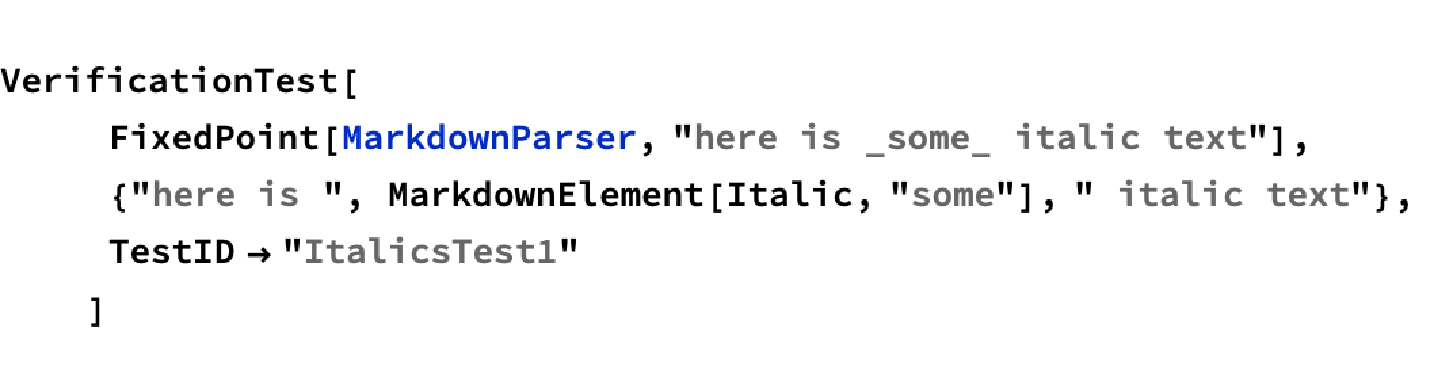
And, so! I made a separate package to hold these verification tests and a function to run TestReport on them. Writing these tests was instrumental in focusing my debugging time, allowing me to pinpoint breakages in the parser.
Heading VerificationTests

After installing the MarkdownParserTests package, here’s how to run the tests:
Get the MarkdownParserTests package
In[]:=
<<MarkdownParserTests`
Run the parser tests
In[]:=
MarkdownParserTestReport
Out[]=
TestReportObject


And they all work as expected! (for now at least ;) )
What can I do with this?
What can I do with this?
I think a potentially interesting application is analyzing document structure, for example, here’s a graph of the test file included in the repository (linked below)
In[]:=
ExpressionGraph[mdp,VertexLabelsPlaced[Automatic,Tooltip]]
Where can I get the parser?
Where can I get the parser?
Future
Future
◼
The following are works in progress which I expect to have ready relatively soon.
◼
Implement Import/Export Converters for Markdown files
◼
Render the parse list as a list of styled Cells, as well as
◼
Generate a Notebook from it
◼
Wrap the parse list with a MarkdownObject head
◼
Of lesser priority, but still keen on
◼
Highlighting Subgraphs of Symbolic Markdown
◼
Adding HTML support
◼
Adding YAML front matter support
◼
Adding support for more flavors of markdown