This is the source code in C language with functions to create a LIB, .dll on Windows or .so on Linux and Mac.
We can create functions in C language, compile and load them in Wolfram Language. Wolfram Language is very friendly by design, it can communicate very well with other languages such as C, Python, SQL, Java, and so on, to call those programming languages or to be called by then.
There is an iconic function from Doom game from ID Software, to calculate a fast inverse square root, below. There are other functions too just for tests, all the 3 functions are made available in the same LIB.
This kind of heuristic algorithm implementation is error-prone, but it is fast, and so, depending on the context, we can tolerate the risk of errors in favor of faster computation.
We can create functions in C language, compile and load them in Wolfram Language. Wolfram Language is very friendly by design, it can communicate very well with other languages such as C, Python, SQL, Java, and so on, to call those programming languages or to be called by then.
There is an iconic function from Doom game from ID Software, to calculate a fast inverse square root, below. There are other functions too just for tests, all the 3 functions are made available in the same LIB.
This kind of heuristic algorithm implementation is error-prone, but it is fast, and so, depending on the context, we can tolerate the risk of errors in favor of faster computation.
In[]:=
fastSqrtDoomLibSrc="// This function computes 1 / sqrt(number) using iterations of precision// Attributed to Doom (the video game).// More info: https://en.wikipedia.org/wiki/Fast_inverse_square_rootfloat Q_rsqrt(float number) { long i; float x2, y; const float threehalfs = 1.5F; x2 = number * 0.5F; y = number; i = * ( long * ) &y; // evil floating point bit level hacking i = 0x5f3759df - ( i >> 1 ); // MAGIC! y = * ( float * ) &i; y = y * ( threehalfs - ( x2 * y * y ) ); return y;} //Q_rsqrt// float test functionfloat getInvSquare(float val) { float square = (val*val); if (square == 0) return 1; else return 1/square; } // getInvSquare// int test functionint getHeuristic(int val) { int output = 0; if (val % 2 == 0) output = (val-1)+1000; else output = (val+1)-1000; return output;} //getHeuristic";
Loading the WL tools needed:
In[]:=
Needs["CCompilerDriver`"]
Compile the C code in the string above, it gonna show errors at C code if it do not compile as a LIB:
In[]:=
doommath=CreateLibrary[fastSqrtDoomLibSrc,"doom-math"]
Out[]=
/home/fito/.Wolfram/SystemFiles/LibraryResources/Linux-x86-64/doom-math.so
Checking in the Linux terminal (Bash) the LIB file created:
In[]:=
file /home/fito/.Wolfram/SystemFiles/LibraryResources/Linux-x86-64/doom-math.so
/home/fito/.Wolfram/SystemFiles/LibraryResources/Linux-x86-64/doom-math.so: ELF 64-bit LSB shared object, x86-64, version 1 (SYSV), dynamically linked, BuildID[sha1]=aad08eefbfb813786f69faca504de6e85c2955d2, not stripped
Out[]=
Success

Checking other LIBs in the standard folder for Wolfram Language:
In[]:=
ls -l /home/fito/.Wolfram/SystemFiles/LibraryResources/Linux-x86-64/*
-rwxrwxr-x 1 fito fito 15264 Apr 23 15:05 /home/fito/.Wolfram/SystemFiles/LibraryResources/Linux-x86-64/doom-math.so
-rwxrwxr-x 1 fito fito 15248 Apr 22 03:26 /home/fito/.Wolfram/SystemFiles/LibraryResources/Linux-x86-64/ml-ann.so
-rwxrwxr-x 1 fito fito 15216 Apr 22 03:18 /home/fito/.Wolfram/SystemFiles/LibraryResources/Linux-x86-64/ml-decisiontree.so
-rwxrwxr-x 1 fito fito 15184 Apr 22 03:06 /home/fito/.Wolfram/SystemFiles/LibraryResources/Linux-x86-64/ml-mlperceptron.so
-rwxrwxr-x 1 fito fito 1048576 Apr 23 00:56 /home/fito/.Wolfram/SystemFiles/LibraryResources/Linux-x86-64/ml-som.so
-rwxrwxr-x 1 fito fito 25165824 Apr 23 00:54 /home/fito/.Wolfram/SystemFiles/LibraryResources/Linux-x86-64/ml-stats.so
-rwxrwxr-x 1 fito fito 15216 Apr 22 03:16 /home/fito/.Wolfram/SystemFiles/LibraryResources/Linux-x86-64/ml-svm.so
Out[]=
Success
Now we can load the C language LIBs and make it available at this notebook, and use it as a standard Wolfram Language function:
In[]:=
getHeuristic=ForeignFunctionLoad[doommath,"getHeuristic",{"CInt"}->"CInt"]
Out[]=
ForeignFunction
Testes:
In[]:=
getHeuristic[33]
Out[]=
-966
In[]:=
getHeuristic[10]
Out[]=
1009
In[]:=
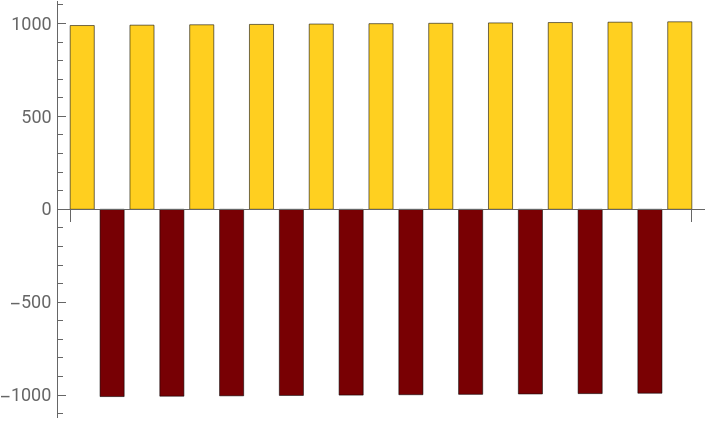
getHeuristic/@Range[-10,10]BarChart[%,ColorFunction->"SolarColors"]
Out[]=
{989,-1008,991,-1006,993,-1004,995,-1002,997,-1000,999,-998,1001,-996,1003,-994,1005,-992,1007,-990,1009}
Out[]=
Testing another function with float values, notes how we set the function signature for C Language:
In[]:=
getInvSquare=ForeignFunctionLoad[doommath,"getInvSquare",{"CFloat"}->"CFloat"]
Out[]=
ForeignFunction
In[]:=
getInvSquare[33.33]
Out[]=
0.00090018
In[]:=
getInvSquare[11.5]
Out[]=
0.00756144
In[]:=
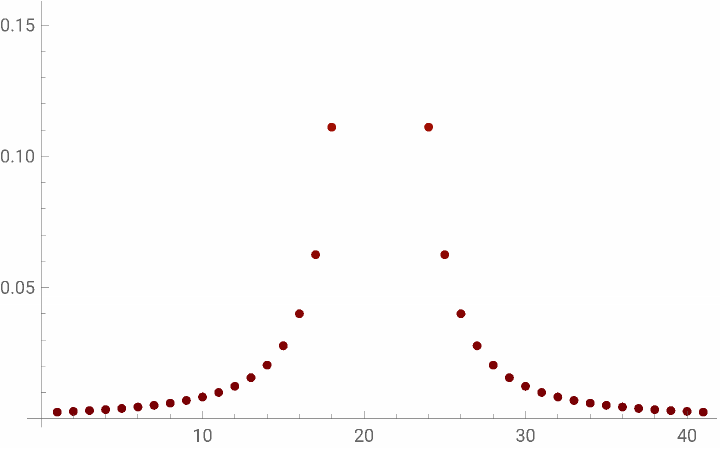
getInvSquare/@Range[-20,20]ListPlot[%,ColorFunction->"SolarColors"]
Out[]=
{0.0025,0.00277008,0.00308642,0.00346021,0.00390625,0.00444444,0.00510204,0.00591716,0.00694444,0.00826446,0.01,0.0123457,0.015625,0.0204082,0.0277778,0.04,0.0625,0.111111,0.25,1.,1.,1.,0.25,0.111111,0.0625,0.04,0.0277778,0.0204082,0.015625,0.0123457,0.01,0.00826446,0.00694444,0.00591716,0.00510204,0.00444444,0.00390625,0.00346021,0.00308642,0.00277008,0.0025}
Out[]=
In[]:=
ArrayPlot[Table[getInvSquare[x*y],{x,-10,10},{y,-10,10}],ColorFunction->"SolarColors"]
Out[]=

And now the iconic solution for fast inverse square root from Doom:
Tell me about the inverse square root C implementation for the Doom game.

References
References
https://en.wikipedia.org/wiki/Fast_inverse_square_root
https://gist.github.com/Vodkacannon/c658cbf2f2e7ba2c5bae5b2f2f2392c0
https://www.youtube.com/watch?v=0xyycrTekc4&t=200s
https://reference.wolfram.com/language/CCompilerDriver/ref/CreateLibrary.html
https://reference.wolfram.com/language/CCompilerDriver/tutorial/Overview.html
https://gist.github.com/Vodkacannon/c658cbf2f2e7ba2c5bae5b2f2f2392c0
https://www.youtube.com/watch?v=0xyycrTekc4&t=200s
https://reference.wolfram.com/language/CCompilerDriver/ref/CreateLibrary.html
https://reference.wolfram.com/language/CCompilerDriver/tutorial/Overview.html
CITE THIS NOTEBOOK
CITE THIS NOTEBOOK
Doom's fast inverse square root: legacy optimization trick for vector normalization
by Daniel Carvalho
Wolfram Community, STAFF PICKS, April 23, 2025
https://community.wolfram.com/groups/-/m/t/3448959
by Daniel Carvalho
Wolfram Community, STAFF PICKS, April 23, 2025
https://community.wolfram.com/groups/-/m/t/3448959