Introduction
Introduction
In[]:=
AnimationVideohatTilingGraphics15,15,0.1+0.8Cosθ,0.04+0.92Sinθ,{θ,0,20,1/30},FrameRate->30
π
10
π
20
Out[]=
In their recent paper , Sébastien Labbé and Peter Selinger introduce a new constructive method to generate hat tilings. Their construction method is different from the existing methods of substitution. And it allows to dynamically shift the underlying dual grid. This way, transitions between different hat tile configurations can be observed as shown in the video of the introduction.
This is in close resemblance to the dynamic version of the Penrose tiling that naturally arises from de Bruijn’s method, which can be understood as a shift projection of a five-dimensional cubic lattice. There is a community post by Dugan Hammock and more references listed at the end2,3.
1
This is in close resemblance to the dynamic version of the Penrose tiling that naturally arises from de Bruijn’s method, which can be understood as a shift projection of a five-dimensional cubic lattice. There is a community post by Dugan Hammock and more references listed at the end2,3.
What makes this so appealing is that the hat — the celebrated aperiodic monotile discovered in 2023 — turns out to be governed by something surprisingly tidy: a flat triangular grid and a fractal texture on a torus. Sliding that grid is a little like slowly turning a kaleidoscope; the local arrangement of tiles never settles into a repeat, yet it reorganizes itself continuously and predictably. The rest of this post unpacks the machinery one step at a time and ends with an interactive Manipulate so you can shift the grid yourself.
Summary
Summary
There are three important steps for the construction of the these hat tilings :
◼
The anchor points for each hat tile form a regular triangular grid (usually called the dual grid)
◼
The orientation of the hat tile at each anchor point can be obtained from the position of the image of the anchor point, when it is mapped into the fundamental domain of a torus
◼
This fundamental domain is divided into 13 regions. Each regions represents one possible orientation of the hat tile (6 rotations for the unreflected hat tile, 6 rotations for the reflected hat tile and 1 domain for no hat tile)
In one sentence: a triangular lattice decides where the tiles go, a deterministic map decides which of the 13 orientations each tile takes, and the fractal subdivision of that region is what does all the real work. Keep these three ideas in mind — everything that follows is just filling in the details.
Details of the Construction
Details of the Construction
The Dual grid
The Dual grid
The anchor points are all of the form , where ∈ and is the sixth root of unity. Let’s quickly visualize a portion of this lattice.
m+nξ
m,n
ξ
6
1
Because ξ is a sixth root of unity, this is nothing more exotic than the ordinary triangular lattice — the same equilateral grid the hats themselves are built on. The two integers m and n are the coordinates we keep coming back to: every hat in the finished picture is tagged by exactly such a pair or complex number.
In[]:=
ξ=+;lattice=Flatten@Outer[{#1+#2ξ}&,Range[-5,5],Range[-5,5]];Graphics[{EdgeForm[Black],Gray,Disk[ReIm[#],0.1]&/@lattice,hatTile[Darker[Red],ξ],hatTile[Lighter[Green],-2+3ξ],hatTile[Darker[Blue],-3-ξ]},Axes->True]
1
2
√3
2
Out[]=
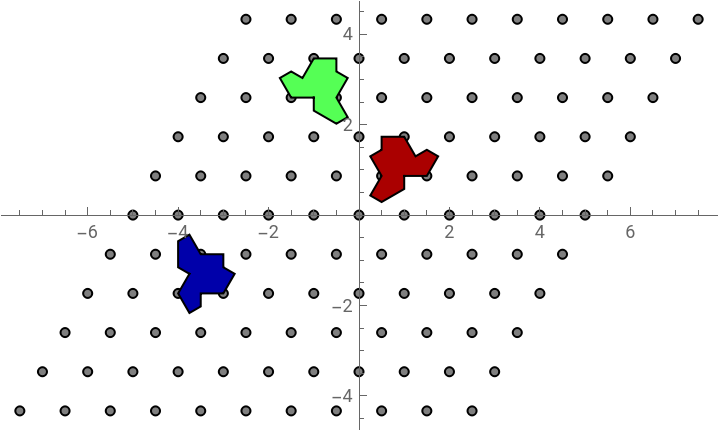
The hat tiles are attached at these anchor point and we use colors to indicate the different orientations:
There are thirteen colors for a concrete reason: six for the unreflected hat in its six rotated positions, six more for its mirror image, and one extra color marking the anchor points where no hat sits at all. It pays to keep an eye on these colors throughout — every later picture is, at bottom, just another way of working out which color belongs to which anchor point.
In[]:=
cols={Darker[Red],Darker[Orange],Darker[Yellow],Darker[Green],Darker[Blue],Darker[Purple]};reflectedCols={Lighter[Red],Lighter[Orange],Lighter[Yellow],Lighter[Green],Lighter[Blue],Lighter[Purple]};Graphics[{EdgeForm[Black],{#[[1]],hatTile[#[[1]],#[[2,1]]-6+#[[2,2]]],Gray,Disk[#[[2]]-{6,0},0.1]}&/@Transpose[{cols,CirclePoints[2,6]}],{#[[1]],hatTile[#[[1]],#[[2,1]]+#[[2,2]]],Gray,Disk[#[[2]],0.1]}&/@Transpose[{reflectedCols,CirclePoints[1.6,6]}]}]
Out[]=
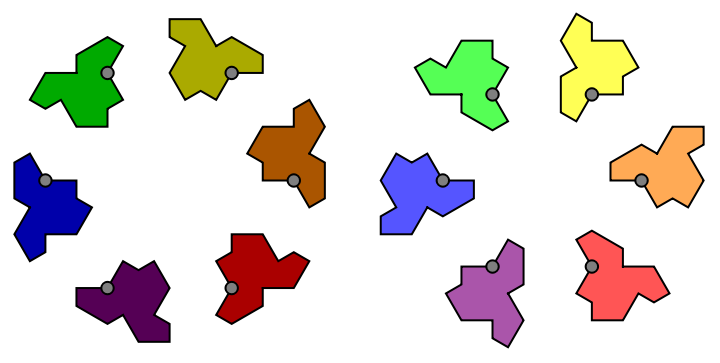
For a successful tiling, we need to find an algorithm that maps a color to each lattice point to establish the orientation. There is a very beautiful web page4 by the authors of the paper that let’s you interactively construct a hat tiling. You should definitely give it a try.
Spending a few minutes on that page first is genuinely worthwhile, because it builds exactly the right intuition for what follows. Notice how the choice it offers is global and local at once: you fix one continuous parameter, a shift, and instantly every tile in the plane knows its orientation. Reproducing that single, self-consistent rule is precisely the goal of the next few sections.
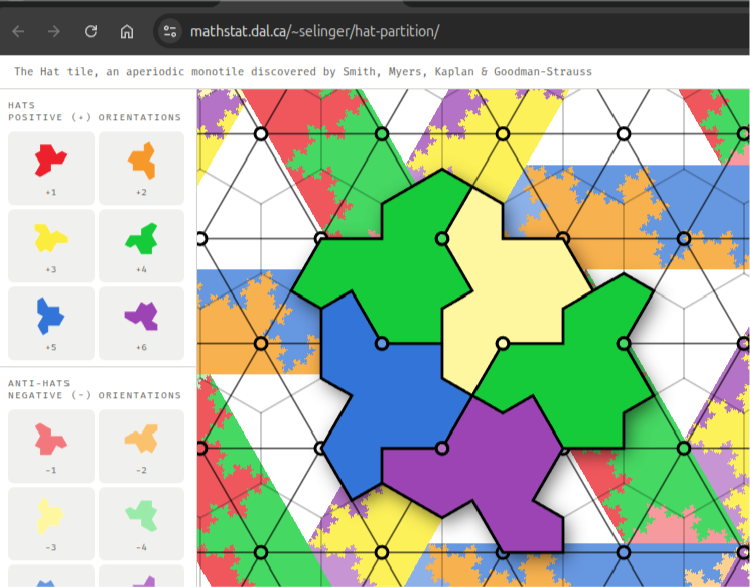
In the background of this web page, you can see the 13 different regions arranged in a periodic pattern. This periodicity allows to only consider a fundamental domain, which we discuss in the next section.
That periodicity is the whole reason the construction stays manageable: instead of reasoning about an infinite plane, we only ever need to understand one small repeating tile of it. So the plan from here is short — describe that fundamental domain, dissect its inner structure, and then use it as a lookup table.
The Fundamental domain
The Fundamental domain
The size of the fundamental domain is determined by to spanning vectors and :
u
v
Concretely, u and v are built out of the golden ratio and the sixth root of unity, so the fundamental domain carries the same blend of five-fold and six-fold flavor that gives the hat tiling its peculiar character. The cell below defines the two vectors and draws the parallelogram they span — that parallelogram is the stage on which everything else plays out.
In[]:=
ξ=N[Exp[PiI/3]];ϕ=N[GoldenRatio];u=ϕ+1+ξ;v=ξu;With[{imUV=Im[uv],imUVc=Im[uv]},backTranslation[pos_,t_]:=Block[{fa=FractionalPart[Im[posv]/imUV],fb=FractionalPart[Im[posu]/imUVc]},pos(1-t)+t(If[fa<0,fa+1,fa])u+t(If[fb<0,fb+1,fb])v]];
In[]:=
Manipulate[Graphics[{Red,Arrow[{{0,0},ReIm[u]}],Arrow[{{ReIm[v],ReIm[u+v]}}],Green,Arrow[{{0,0},ReIm[v]}],Arrow[{{ReIm[u],ReIm[u+v]}}],EdgeForm[Black],Gray,Disk[ReIm[backTranslation[#,t]],0.1]&/@lattice},Axes->True,PlotRange->{{-5,5},{-5,5}}],{t,0,1,0.01},SaveDefinitions->True]
Out[]=


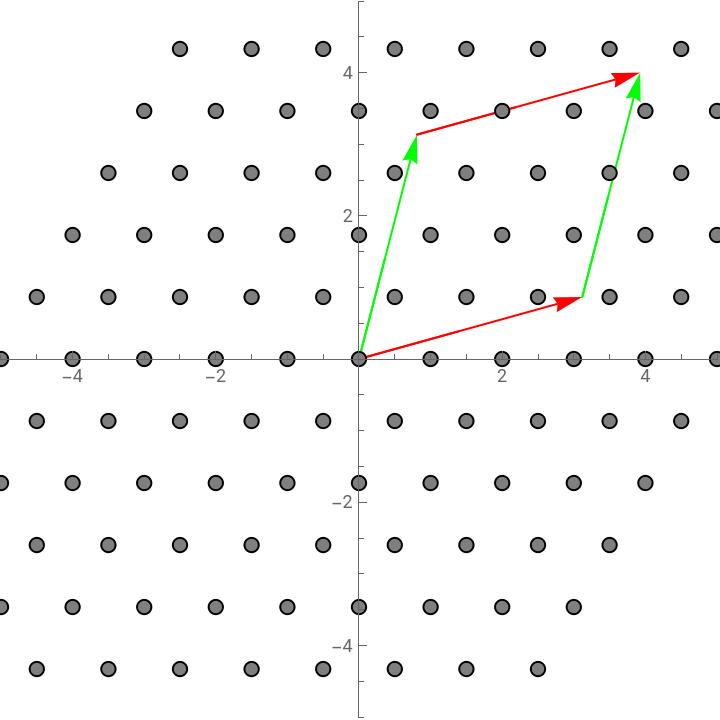
In the animation, you can observe, how the fundamental domain and the dual lattice relate to each other and how each lattice point is mapped into the fundamental domain. Alternatively, you could layout the full two-dimensional plane with copies of the fundamental domain as it is shown on the web page.
The key to the construction of the hat tiling is the substructure of this fundamental domain, which we are going to describe next.
The key to the construction of the hat tiling is the substructure of this fundamental domain, which we are going to describe next.
The image to hold onto is wrapping: rolling the plane up onto a torus collapses the entire dual lattice down to a cloud of points inside this one parallelogram, and where each point lands is the only information the construction needs. Everything that remains is bookkeeping — deciding, for any landing spot, which of the thirteen regions it fell into.
The Substructure of the Fundamental domain
The Substructure of the Fundamental domain
In[]:=
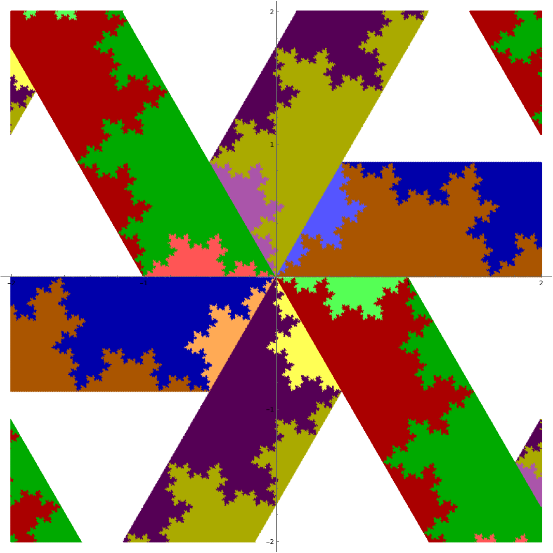
The substructure of the fundamental domain is of fractal nature. It is constructed by a substitution process. We start with an elementary trapezoid that exists in six different states of rotation.
Substitution here is the same idea behind the Penrose tiling or the Koch curve: take a small set of proto-tiles, replace each one by a scaled arrangement of proto-tiles, and repeat. After a few rounds the borders between color regions become a genuine fractal, but — crucially — any single point stops jumping between regions after finitely many steps, and that is what makes the coloring computable at all.
You can see that the trapezoids partially overlap. This overlap defines a parallelogram. And this overlap is confirmed, when you look at the preview image at the beginning of this sub section. There are pairs of trapezoids that show the same pattern in the overlapping region. We are now going to construct this pattern by two kinds of substitution rules.
So the parallelogram is not a separate ingredient bolted on: it is forced on us by the geometry, as the shared seam between neighboring trapezoids. That is also why two substitution rules suffice — one says how a trapezoid splits, the other how a parallelogram splits, and agreement along the seam then takes care of itself.
Substitution rules
Substitution rules
Each trapezoid is divided into six disjoint regions. These regions are defined by four similarity transformations of the trapezoid and the parallelogram. Four of these six regions are again trapezoids and parallelograms for which the subdivision can be repeated. Similarly, the parallelogram is divided into five regions, three of which can be divided further.
We create a structure that collects the trapezoids, parallelograms and the other regions shown in green and yellow. Folding both rules into one iterator pays off twice: the code stays short, and we can literally watch the fractal sharpen by drawing the result after one, two, three and more applications. The pictures below are exactly those successive levels — read them, if you like, as frames of a slow zoom into the structure.
Now we arrive at the most technical part of this construction. We have to assign colors to different regions. But Do not let the word technical put you off, because the underlying idea is simple. To color a point you ask which of the small regions it lies in; if the answer is a trapezoid or a parallelogram, you zoom in one level and ask again. The recursion is guaranteed to stop, and the color you finally land on is the orientation of the hat at that anchor point.
The Color Function
The Color Function
The two sample points are chosen to show the two outcomes side by side: one of them settles almost at once, while the other has to be chased through several rounds of subdivision before it commits to a color. Following A and B together in the next images is the clearest way to see why the recursion always halts — the undecided strip they live in shrinks geometrically at every step. And for each point, we only have to keep track of the polygon that contains the point. At each level of iteration, we have to check five or six regions, where the point of interest is located.
Hidden in that last sentence is a small cost estimate: five or six point-in-polygon tests per level, and only a few levels for a typical point, so coloring one anchor point is cheap. Multiply that by the few hundred of anchor points on screen and you still get a picture in real time — which is exactly what makes the interactive version at the end possible.
We describe the process for the color function for one trapezoid. The trapezoid with no rotation shows three different regions of color: 1.) Darker[Orange] (below)
2.) Darker[Blue] (above)
3.) Lighter[Blue] (to the left)
We write two analyzer functions, one for the trapezoid and one for the parallelogram that hold the current polygon, the point of interest and the three colors in a specific order. When the point lies inside a particular region, either the color is returned or the function is recursively called again with the smaller polygon.
2.) Darker[Blue] (above)
3.) Lighter[Blue] (to the left)
We write two analyzer functions, one for the trapezoid and one for the parallelogram that hold the current polygon, the point of interest and the three colors in a specific order. When the point lies inside a particular region, either the color is returned or the function is recursively called again with the smaller polygon.
The specific order of those three colors is doing real work: it is what tells one rotated copy of the trapezoid apart from another, so the analyzer itself never has to reason about rotations — it simply trusts the order it was handed. That separation of concerns is what keeps the recursion clean: geometry lives in the polygon argument, identity lives in the color argument.
The image shows the result of the analyzer for 500 random points. The distribution of colors clearly matches the three different regions traced by the fractal boundary. This has to be repeated for every trapezoid with the colors according to the image of the fundamental domain at the beginning of the last sub section.
With that, the color function is complete: hand it any complex number and it returns the orientation of the hat sitting there. Everything from the dual grid onward now collapses into one callable rule, and the only freedom left is the shift of the grid — which is where the dynamics come from.
Results
Results
The manipulate function below generated the image from the beginning of this community post. The dynamics arises, when the dual grid is shifted with respect to the fundamental domain. This shift changes the color values of some of the anchor points. The corresponding hat tiles have to rotate, flip or even disappear.
Try dragging the shift sliders slowly: most of the tiling stays perfectly still while thin fronts of tiles rotate, flip, or wink out and reappear. Each moving front is the visible shadow of a point crossing a region boundary deep inside the fundamental domain — the fractal we built earlier, now set in motion. It is a quiet little miracle that something this intricate stays globally consistent at every instant of the slide.
References
References
[1] Sébastien Labbé, Peter Selinger (2026), https://arxiv.org/abs/2604.20964
[2] Dugan Hammock, Dynamic visualization of Penrose Tilings, https://community.wolfram.com/groups/-/m/t/2992310
[3] Johannes Martin, Penrose Tilings from Five Dimensions, https://youtu.be/jJOTM2UGx70
[4] Peter Selinger, https://www.mathstat.dal.ca/~selinger/hat-partition/
[2] Dugan Hammock, Dynamic visualization of Penrose Tilings, https://community.wolfram.com/groups/-/m/t/2992310
[3] Johannes Martin, Penrose Tilings from Five Dimensions, https://youtu.be/jJOTM2UGx70
[4] Peter Selinger, https://www.mathstat.dal.ca/~selinger/hat-partition/
Code
Code
Constants
Constants
Compiled point-in-polygon
Compiled point-in-polygon
Substitution maps (numeric, constants folded)
Substitution maps (numeric, constants folded)
Recursive region analyzers (depth-capped for safety)
Recursive region analyzers (depth-capped for safety)
Lattice back-translation (pure machine arithmetic)
Lattice back-translation (pure machine arithmetic)
Which fundamental-domain trapezoid / shift a point falls in
Which fundamental-domain trapezoid / shift a point falls in
Top-level color of a point
Top-level color of a point
The 12 hat-tile shapes, precomputed
The 12 hat-tile shapes, precomputed
The picture (Manipulate body, factored out)
The picture (Manipulate body, factored out)
CITE THIS NOTEBOOK
CITE THIS NOTEBOOK
Hat tile dynamics from dual-grid projection onto a fractal-subdivided torus
by Johannes Martin
Wolfram Community, STAFF PICKS, May 12, 2026
https://community.wolfram.com/groups/-/m/t/3715016
by Johannes Martin
Wolfram Community, STAFF PICKS, May 12, 2026
https://community.wolfram.com/groups/-/m/t/3715016