Schelling’s model of segregation is an agent-based method for simulating population movement. The traditional model features two differently-colored agent groups on a square grid, with each agent seeking to achieve a baseline percentage of same-colored neighbors. Even if the baseline is low, the model typically separates the agent groups into same-colored sections. This computational essay examines how asymmetric tolerance thresholds, the amount of empty space, and the number of agent groups affects the model’s results when more colors are added. In addition, it extends the model to a hexagonal grid and analyzes the resulting changes.
Introduction
Introduction
Schelling’s model of segregation, named after Thomas Schelling, is a way to simulate population movement between different groups. The model begins with agents of different colors randomly placed on a square grid. An agent’s color distinguishes the group it is a part of. This could represent a number of things, including race, religion, or political views.
Each agent has a slight preference for agents in their own group over differently-colored agents. This takes the form of a minimum tolerance threshold, which is the lowest ratio of same-colored neighbors to total neighbors that will satisfy an agent. Empty spaces do not count towards this total; a neighborless agent will be satisfied. If an agent is unsatisfied, it will move to a destination that meets or exceeds its tolerance threshold, if such a location is available. Otherwise, it stays put. Agent moves are not limited to neighboring squares, they can go anywhere on the board.
In the classic two-color version of Schelling’s model, it takes a surprisingly low tolerance threshold for the different groups to separate into different regions. Even if agents have a threshold of roughly 1/3, meaning that they are willing to tolerate a large number of differently-colored neighbors, they often still end up surrounded by members of their own group. This demonstrates how a desire to avoid being in the minority can cause people of different groups to self-segregate, despite a willingness to be exposed to others.
This essay shall explore whether such behavior holds for models with greater than two colors, and will examine how changing the shape of the board impacts the results.
Each agent has a slight preference for agents in their own group over differently-colored agents. This takes the form of a minimum tolerance threshold, which is the lowest ratio of same-colored neighbors to total neighbors that will satisfy an agent. Empty spaces do not count towards this total; a neighborless agent will be satisfied. If an agent is unsatisfied, it will move to a destination that meets or exceeds its tolerance threshold, if such a location is available. Otherwise, it stays put. Agent moves are not limited to neighboring squares, they can go anywhere on the board.
In the classic two-color version of Schelling’s model, it takes a surprisingly low tolerance threshold for the different groups to separate into different regions. Even if agents have a threshold of roughly 1/3, meaning that they are willing to tolerate a large number of differently-colored neighbors, they often still end up surrounded by members of their own group. This demonstrates how a desire to avoid being in the minority can cause people of different groups to self-segregate, despite a willingness to be exposed to others.
This essay shall explore whether such behavior holds for models with greater than two colors, and will examine how changing the shape of the board impacts the results.
As an example, here is an animation of a 3-color Schelling model, where each agent has a tolerance threshold of 0.5:
In[]:=
frames=Import[CloudObject[
https://www.wolframcloud.com/obj/f5b65353-d9e5-478a-82d2-325c1dd64483
]];Animate[Row[{frames[[move]]}],{{move,1,"Step"},1,Length[frames],1},SaveDefinitions->True]Out[]=
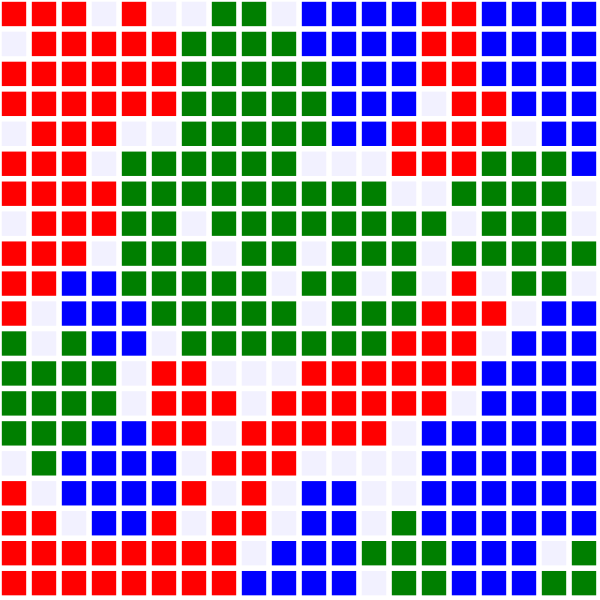
Note how the agents are largely clumped together by the end of the simulation.
Laying the Groundwork
Laying the Groundwork
The first step of making a Schelling segregation model is to set up a grid representing the locations of each agent. For the square map, agents will be represented by colored rectangles. There are several basic properties to decide upon, including the dimensions of the grid and the colors of the rectangles.
Assign variable names to colored rectangles; store the grid’s side length as a variable:
blueRect=Graphics[{Blue,Rectangle[]}];redRect=Graphics[{Red,Rectangle[]}];whiteRect=Graphics[{,Rectangle[]}];greenRect=Graphics[{Darker[Green,0.5],Rectangle[]}];purpleRect=Graphics[{Darker[Purple,0.1],Rectangle[]}];orangeRect=Graphics[{Darker[Orange,0.1],Rectangle[]}];magentaRect=Graphics[{Magenta,Rectangle[]}];cyanRect=Graphics[{Cyan,Rectangle[]}];sideLength=20;

Next, I made a list to keep track of each agent’s tolerance. Later on, different agent groups will have different tolerance values, but for now they are all the same.
Define a list where tolerance[[n]] corresponds to the tolerance threshold of agent type n.
In[]:=
tolerance={0.5,0.5,0.5,0.5,0.5,0.5,0.5};
Once these variables had been established, I created a matrix to represent the type of agent at each location on the grid. Each number in the matrix corresponds to a different type of agent, with 0 denoting an empty space. Each number is associated with a different color.
Set up an association that links numbers to colored rectangles, generate the board’s starting position.
In[]:=
alter=<|0->whiteRect,1->blueRect,2->redRect,3->greenRect,4->purpleRect,5->orangeRect,6->magentaRect,7->cyanRect|>;setup=Table[RandomChoice[{0.9,1,1,1}->{0,1,2,3}],{i,sideLength},{j,sideLength}]
Out[]=
{{1,3,0,1,0,3,2,3,1,1,3,3,3,0,1,3,1,3,2,2},{1,0,1,2,0,1,3,2,2,2,3,1,2,1,2,0,0,1,2,2},{0,0,2,0,0,1,1,3,1,0,0,1,1,2,0,0,3,1,3,3},{2,2,1,2,0,2,0,0,1,3,1,3,0,3,2,2,3,0,3,3},{1,2,1,3,3,1,1,0,1,1,2,0,2,2,1,2,3,3,1,3},{3,1,0,1,3,2,1,0,1,3,0,3,0,3,3,0,1,1,1,2},{3,3,3,0,0,3,1,2,3,1,2,3,0,1,1,2,0,1,2,0},{1,0,3,0,0,2,2,0,0,1,1,1,0,3,3,1,3,3,2,0},{2,1,0,0,3,3,3,0,0,2,1,2,3,0,2,2,3,1,1,1},{1,2,0,3,1,3,3,2,2,3,3,2,0,1,2,1,0,0,3,1},{3,1,1,3,3,1,3,2,3,2,2,2,3,2,1,1,1,1,1,0},{3,3,3,0,0,2,3,0,2,2,0,2,2,3,0,2,0,2,0,0},{1,2,3,1,0,3,0,1,3,2,1,1,1,1,0,2,2,2,1,1},{1,3,1,0,2,2,0,1,1,3,1,1,1,3,3,3,2,3,1,3},{1,1,3,1,2,3,1,3,3,3,2,3,2,0,2,0,0,1,2,2},{1,0,1,3,1,0,2,3,3,2,0,1,2,1,1,2,1,2,0,3},{2,3,2,1,1,0,3,1,3,0,2,2,2,1,2,0,1,1,0,2},{2,3,2,0,1,2,1,3,0,2,3,1,1,1,0,2,2,3,0,1},{0,2,2,2,0,3,1,3,3,2,0,2,3,1,0,1,1,2,0,2},{0,0,1,2,0,0,2,0,1,1,1,1,2,0,3,1,1,0,0,3}}
Now, it is possible to visually display the grid. By swapping out each number in the matrix with its corresponding colored square, I created a visual display of the grid’s initial state. The top row of the grid corresponds to the first list in the matrix, the second row to the second list, and so on.
Convert each number to its corresponding color; display them in a grid:
In[]:=
colorTable=setup/.alter;interface=GraphicsGrid[colorTable]
Out[]=
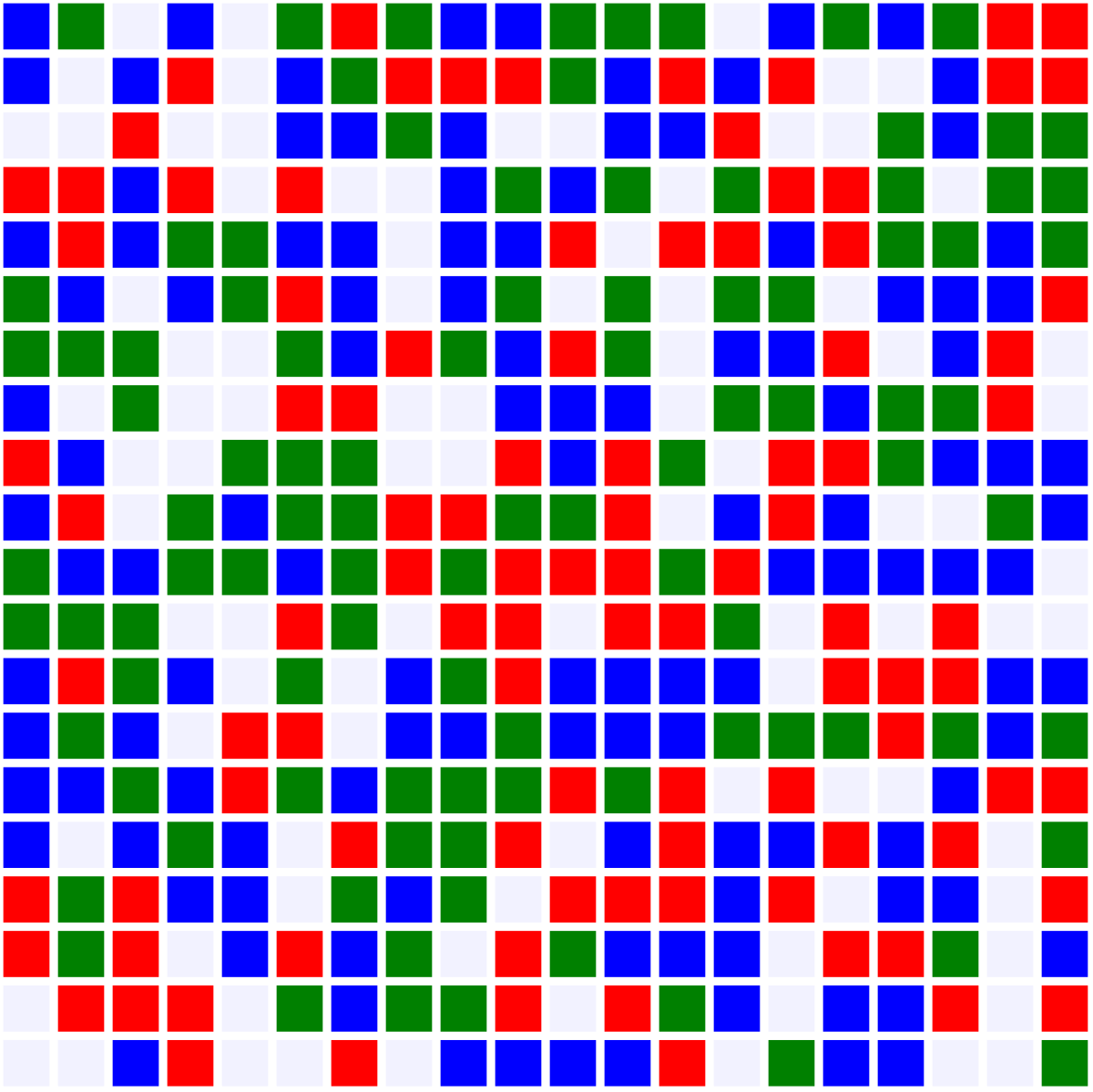
The coordinates of an agent on the grid is denoted by (x, y), with (1,1) at the top left. The first level of an agent’s location in the matrix is specified by y, and the second level is x.
When an agent moves, it is important to know the coordinates of its neighbors, as well as the neighbors of its potential destination. This way, the ratio of same-colored to total neighbors can be calculated, and can be checked against the agent’s tolerance to determine where it wants to go. The following functions accomplish this. The first is relatively straightforward:
When an agent moves, it is important to know the coordinates of its neighbors, as well as the neighbors of its potential destination. This way, the ratio of same-colored to total neighbors can be calculated, and can be checked against the agent’s tolerance to determine where it wants to go. The following functions accomplish this. The first is relatively straightforward:
Take in a point’s coordinates and return a list of all adjacent locations; with special cases for points in the corners and on the edges:
In[]:=
getNeighbors[x_,y_]:=Module[{coordsList},Which[x>1&&x<sideLength&&y>1&&y<sideLength,coordsList={{x,y+1},{x,y-1},{x+1,y},{x+1,y+1},{x+1,y-1},{x-1,y},{x-1,y-1},{x-1,y+1}},x==1&&y==1,coordsList={{x+1,y},{x+1,y+1},{x,y+1}},x==sideLength&&y==sideLength,coordsList={{x-1,y},{x-1,y-1},{x,y-1}},x==1&&y==sideLength,coordsList={{x+1,y},{x,y-1},{x+1,y-1}},x==sideLength&&y==1,coordsList={{x-1,y},{x-1,y+1},{x,y+1}},x==1,coordsList={{x,y+1},{x,y-1},{x+1,y},{x+1,y-1},{x+1,y+1}},y==1,coordsList={{x-1,y},{x+1,y},{x-1,y+1},{x,y+1},{x+1,y+1}},x==sideLength,coordsList={{x,y+1},{x,y-1},{x-1,y-1},{x-1,y},{x-1,y+1}},y==sideLength,coordsList={{x+1,y},{x-1,y},{x-1,y-1},{x,y-1},{x+1,y-1}}];coordsList]
The second function returns the ratio of same-colored neighbors to total neighbors, unless the input point is entirely surrounded by empty spaces. In this case, the function will return 1, because agent satisfaction is determined by checking whether neighborRatio meets the tolerance threshold, and an agent will always be satisfied if it has no neighbors.
Return the neighbor ratio of a given point, taking in the optional parameter minusSame. This is useful if we want to swap a colored agent with an adjacent spot, and want to avoid counting the agent that will move from its destination’s neighbor ratio:
neighborRatio[x_,y_,type_Integer,minusSame_:0]:=Module[{sameNeighbors=0,diffNeighbors=0,w=0,coordsList,retVal},coordsList=getNeighbors[x,y];Which[setup[[#[[2]]]][[#[[1]]]]==type,sameNeighbors++,setup[[#[[2]],#[[1]]]]>0,diffNeighbors++,True,w++]&/@coordsList;If[sameNeighbors-minusSame+diffNeighbors>0,retVal=(sameNeighbors-minusSame)/(sameNeighbors-minusSame+diffNeighbors),retVal=1];retVal]
Once these functions have been defined, they can be used to determine if an agent is satisfied where it is. If an agent’s neighbor ratio meets its tolerance threshold, the agent will be satisfied and will not want to move. Otherwise, it is unhappy and will seek a different square.
Return True if the coordinates are empty or contain a satisfied agent, return False otherwise:
In[]:=
satisfiedQ[x_,y_]:=Which[setup[[y,x]]==0,True,neighborRatio[x,y,setup[[y,x]]]<tolerance[[setup[[y,x]]]],False,True,True]
Tracking which agents are and aren’t satisfied makes it easier to see which agents want to move.
Store each agent’s status in a matrix:
In[]:=
agentStates=Table[satisfiedQ[j,i],{i,sideLength},{j,sideLength}];
In order to determine the percentage of agents that have met their tolerance threshold, we can subtract the total number of empty spaces from the number of satisfied spaces. Then, we can divide it by the total number of agents, which is the number of squares in the grid minus the empty spaces. This is a useful index of satisfaction that tells us a lot about the graph.
Return the number of satisfied agents divided by the total number of agents.
In[]:=
satisfactionPercentage[agentStates_,setup_,sideDimensions_]:=Module[{numAgents=0,numSatisfied=0,w=0},w=Count[Flatten[setup],0];numAgents=sideDimensions*sideDimensions-w;numSatisfied=Count[Flatten[agentStates],True]-w;N[numSatisfied/numAgents]]
Movement
Movement
Now that I have created the structure of a Schelling model, I can begin to think about adding movement. Since agents can move to any empty space on the board, it is useful to keep a list of these. This way, it is not necessary to scan the board for potential destinations each time an agent it being moved -- instead, the available spaces can quickly be looked up.
Create a list of the locations of all empty squares:
whiteCoords=Position[Transpose[setup],0]
Out[]=
{{3,1},{5,1},{14,1},{2,2},{5,2},{16,2},{17,2},{1,3},{2,3},{4,3},{5,3},{10,3},{11,3},{15,3},{16,3},{5,4},{7,4},{8,4},{13,4},{18,4},{8,5},{12,5},{3,6},{8,6},{11,6},{13,6},{16,6},{4,7},{5,7},{13,7},{17,7},{20,7},{2,8},{4,8},{5,8},{8,8},{9,8},{13,8},{20,8},{3,9},{4,9},{8,9},{9,9},{14,9},{3,10},{13,10},{17,10},{18,10},{20,11},{4,12},{5,12},{8,12},{11,12},{15,12},{17,12},{19,12},{20,12},{5,13},{7,13},{15,13},{4,14},{7,14},{14,15},{16,15},{17,15},{2,16},{6,16},{11,16},{19,16},{6,17},{10,17},{16,17},{19,17},{4,18},{9,18},{15,18},{19,18},{1,19},{5,19},{11,19},{15,19},{19,19},{1,20},{2,20},{5,20},{6,20},{8,20},{14,20},{18,20},{19,20}}
I then implemented a function that swaps the agents at two different locations.
Switch the location of two agents, adjusting the location matrix, graphics interface, agentStates matrix, and list of empty coordinates accordingly:
Before moving on to a complete simulation, I needed two more helper functions. First, I developed a way to quantify the segregation of the overall board. I decided to base this on the average percentage of same-colored neighbors an agent has. An index of 1, the highest possible degree of separation, would mean that there are n islands of same-colored agents, separated by empty spaces so no two unlike colors touch.
Compute a segregation index by averaging the neighbor ratio of all non-empty coordinates:
I also wanted a simple way to reset everything in between running simulations. The following function redefines all major variables, creating a fresh setup.
Reset everything to its default state, unless a change has been specified:
Finally, movement is ready to be simulated. In a Schelling segregation model, this process begins by selecting an unsatisfied agent. This agent considers all empty squares, makes a list of those with neighbor ratios that satisfy its tolerance threshold, then randomly chooses to move to one of them. If no satisfactory destinations are available, the agent does not move. The following function executes this rule, given the coordinates of the moving agent.
Check that there is an agent at the given coordinates, the moves it to an eligible destination, if possible:
To complete the simulation, the model’s rule must be applied many times. This makes it useful to have a function that makes multiple moves at once. The function simulateMovement2 does this, completing an entire “round” of motion in one run. It iterates through each point in the agent matrix, and checks agentStates to see which ones are unsatisfied. If an agent is not happy where it is, the function calls simulateMovement1 on it, which will relocate it to a spot that meets its tolerance threshold. The agent’s destination is then put on a blacklist for the rest of the round, meaning that no agent will move more than once.
Facilitate one round of movement, then return the number of moves made:
This function is useful for quickly seeing the state a setup will reach after most agents have gotten what they want.
Display the interface before and after simulateMovement2 has been run:
Note that after just one round of movement, the agents are extremely segregated.
User Interface
User Interface
In this section, I implement the functions I have previously defined to create an interactive interface, in which the user can run a Schelling model to their specifications. The final product is a model with 3 colors, where the user can adjust each color’s tolerance threshold. There are also graphs that track the segregation index and percentage of agents satisfied over time, and a button that resets the simulation. To move a random point, I created a specialized function that applies simulateMovement1 to a random item in a list of points.
Pick a random entry in points and simulate movement; repeat this process until an agent has been moved or a certain number of attempts have been made:
The entire user interface is encased in a DynamicModule. On the left are sliders that can adjust the tolerance thresholds for Blue, Red, and Green agents. Below these are plots of the agents’ satisfaction and the segregation index at each move. These values are stored in lists that are updated each time an agent is moved. There are two ways to move agents: the first button moves a random agent once, while the second initiates a “speedrun” that makes 100 moves. There is also a button that resets the display and clears both graphs.
Implement the features mentioned above into a DynamicModule; keep track of a list of points to move:
Analysis
Analysis
Since the Schelling segregation model is now fully functioning, I can run tests on it to determine how different factors affect the end state. To accurately observe the effects of these, I will have to keep all variables but one constant, and must run a number of simulations to reduce experimental error.
Set up the model based on given specifications, then run some number of simulations (50 by default) and return relevant information:
Function to organize this into a dataset:
First, I will study the effect the number of colors has on the model.
Run 50 simulations for 2, 3, 4, 5, 6, and 7 colors:
Note that we change the value that corresponds to how many empty spaces there are. This is because adding colors decreases the number of agents in a given group, and the number of white spaces is relative to how many agents are in one group, not how many there are in total.
Turn the trials into datasets and generate a tab view of the raw data; each row is a different trial:
To get a more accurate idea of what happens in each trial, I can take the mean value of each quantity.
Create a data table to display the average values for each number of colors:
As the number of colors increases, the initial segregation indices and satisfaction percentages both decrease. This is intuitive, as adding more colors shrinks the size of each agent group, so each agent type takes up a smaller fraction of the grid. It follows that the average agent has fewer same-colored neighbors, lowering the segregation index while decreasing the agent’s likelihood of being satisfied.
Another notable trend is the effect the number of colors has on the total moves made. At the current set of agent tolerances, the graph will almost always be able to achieve complete agent satisfaction. The more colors that exist, however, the longer it takes to reach this state. Meanwhile, the final segregation index decreases as more colors are added, despite the agents having the same tolerances each time.
The first part of this makes sense: because fewer agents are initially satisfied, more of them will want to change location, increasing the total number of moves made. To understand why the final segregation index decreases, while all agents retain their tolerances in the different trials, consider the reason for a lower initial segregation index. Since there are more colors, it becomes less and less common for there to be a square surrounded by agents of the same color. While an agent can still be satisfied, there will be fewer extremely segregating moves available, forcing it to settle for a slightly more integrated square, while still reaching its objective.
Having determined the effect of the number of agent groups on the model, we shall now explore the impact of the number of empty spaces.
Another notable trend is the effect the number of colors has on the total moves made. At the current set of agent tolerances, the graph will almost always be able to achieve complete agent satisfaction. The more colors that exist, however, the longer it takes to reach this state. Meanwhile, the final segregation index decreases as more colors are added, despite the agents having the same tolerances each time.
The first part of this makes sense: because fewer agents are initially satisfied, more of them will want to change location, increasing the total number of moves made. To understand why the final segregation index decreases, while all agents retain their tolerances in the different trials, consider the reason for a lower initial segregation index. Since there are more colors, it becomes less and less common for there to be a square surrounded by agents of the same color. While an agent can still be satisfied, there will be fewer extremely segregating moves available, forcing it to settle for a slightly more integrated square, while still reaching its objective.
Having determined the effect of the number of agent groups on the model, we shall now explore the impact of the number of empty spaces.
Run trials with a fixed number of colors (3), while altering the proportion of agents to blank spaces:
Organize this information into one big dataset:
Create a final table that displays the average values for each proportion of blank spaces.
In the first row, there are very few open spaces. Because there is such a limited number of potential destinations, premature gridlock occurs and not all agents end up satisfied. Recall that an agent will only move to a destination that meets its tolerance threshold, and when there are so few empty spaces, these ideal locations do not exist for all agents.
In the second row, the number of moves increases. This might seem counterintuitive, since if there are more open spaces, agents should be less likely to move next to and disturb other agents. However, checking the final satisfaction percentage explains this: since gridlock does not occur and all agents are able to move until satisfied, the simulation takes slightly longer.
In the later rows, there is a decent amount of open space. This means that agents have many more options to move to and will almost always be able to satisfy themselves. After the simulation is run, the final model looks something like this:
In the second row, the number of moves increases. This might seem counterintuitive, since if there are more open spaces, agents should be less likely to move next to and disturb other agents. However, checking the final satisfaction percentage explains this: since gridlock does not occur and all agents are able to move until satisfied, the simulation takes slightly longer.
In the later rows, there is a decent amount of open space. This means that agents have many more options to move to and will almost always be able to satisfy themselves. After the simulation is run, the final model looks something like this:
Run a simulation with a blank to agent group size ratio of 3:
There is so much open space that the majority of agents end up moving to locations either surrounded by empty space, or to locations with only same-colored neighbors. Thus, one agent’s movement rarely makes another dissatisfied, reducing the move count. The agents’ tendency to move to blank spaces also increases the extent of segregation.
Finally, it is time to look at asymmetric tolerance ratios. The number of colors and proportion of blank agents will be fixed, while varying tolerance thresholds are tried.
Finally, it is time to look at asymmetric tolerance ratios. The number of colors and proportion of blank agents will be fixed, while varying tolerance thresholds are tried.
Make a list of different tolerances, then run trials on them:
Create a dataset with the returned information:
When all agents colors have very low tolerance thresholds, most of them start off satisfied. After a few swaps, all agents are content, and the simulation ends with everyone in their desired state. The board remains relatively integrated, with a comparatively low segregation index.
When two or more agents have extremely high thresholds, and the other agents have low ones, a similar phenomenon occurs for different reasons. Although many agents are unsatisfied and want to move, their high thresholds make them very picky. No destination is good enough to match their ideal state, so they stay where they are. Meanwhile, the tolerant agents are essentially stationary. The simulation ends due to early gridlock, without much change in segregation.
The largest number of moves, and biggest increase in segregation, occurs when the tolerances are closer to the middle of the spectrum. Here, the agents are willing to move, but not too selective to rule out all potential destinations. Generally, these simulations end with the greatest agent satisfaction, but they are much less integrated.
When two or more agents have extremely high thresholds, and the other agents have low ones, a similar phenomenon occurs for different reasons. Although many agents are unsatisfied and want to move, their high thresholds make them very picky. No destination is good enough to match their ideal state, so they stay where they are. Meanwhile, the tolerant agents are essentially stationary. The simulation ends due to early gridlock, without much change in segregation.
The largest number of moves, and biggest increase in segregation, occurs when the tolerances are closer to the middle of the spectrum. Here, the agents are willing to move, but not too selective to rule out all potential destinations. Generally, these simulations end with the greatest agent satisfaction, but they are much less integrated.
Hexagonal Grid
Hexagonal Grid
Now that I have designed and analyzed a multicolor version of the traditional Schelling Segregation model, I will move on to a hexagonal version. I will then run the same simulations on it, and compare the results to those from the square grid. The main ideas behind the hexagonal model are similar to those behind the grid, but a new coordinate system is required. For the most part, the functions designed in this section mirror those from the original model.
Define an associations of numbers to colors and create a list of tolerances for each color:
Instead of being a square, the map is a large hexagon with six sides.
Define the dimensions of the map:
Since the number of agents in a row is no longer constant, each row in our matrix of agent values has a different length.
Create a list of row lengths, then use it to set up the start position:
GraphicsGrid, the function that displays the square map, is not compatible with hexagons. Instead, the visual interface is represented with a singular Graphics object.
Turn the values in hexSetup into hexagons, then format them into a grid:
The map is no longer a square, so the (x,y) coordinate system from the previous model will not work on it. From this point forward, the coordinate system will be (row, col), where the first row is at the top of the hexagon, and the first column is at the leftmost point on each row.
To help visualize the coordinates, here is an empty map with the coordinates of each hex written on it:
With this new system in mind, I designed a repurposed getNeighbors function, called hexGetNeighbors. In general, functions used for the hexagonal model will share the same name as those from the square grid, but with the prefix “hex.” In general, an agent will have six neighbors, but it has fewer when it is on the edge of the map. The column number of an agent’s upper and lower neighbors depend on the agent’s position in the map. Consider the points (2, 2) and (6, 2), let’s call them Point A and Point B. The column-coordinates of Point A’s upper neighbors are 1 and 2, while those of Point B’s are 2 and 3. Even though both points have the same column number, one is located on the top half of the map, and the other is at the bottom. If the current row length is larger than the previous one, the hexagon at column c will be a little to the left of its upper, same-columned counterpart; if the row lengths are decreasing, the hexagon will be a little to the right. This makes the column-coordinates of its upper neighbors variable, necessitating a check of the row length. The same principle applies for finding a hexagon’s lower neighbors. This is all achieved in a specialized function.
Return the neighbors of a hexagon, accounting for corner and edge cases:
Now that there is a way to get an agent’s neighbors, it is easy to update the previous model’s basic functions to a hexagonal grid.
Return the number of like-colored neighbors, divided by the total number of neighboring agents:
Check an agent’s neighbor ratio against its minimum tolerance threshold:
Keep track of which positions have unsatisfied agents:
Return the ratio of satisfied agents to total agents:
Movement
Movement
Simulating motion in the hexagonal grid is also analogous to motion in the traditional model. First, a list of potential destinations is needed.
Compile the coordinates of all empty hexes into a list:
The swap function is also quite similar, but instead of switching the positions of two values, the interface is entirely regenerated.
Swap the values of the input coordinates:
The hexagon’s helper functions accomplish the same thing as their square grid counterparts.
Compute the extent of segregation:
Reset the simulation, with a default side length of 10:
The two hexSimulateMovement functions are also identical to their predecessors, but updated to the hexagon grid.
Move an agent to an improving position, if a destination that meets its tolerance is available:
Move agents in a “round,” where each agent moves at most once; return the number of moves made:
Hexagonal User Interface
Hexagonal User Interface
Here, I use the updated functions to create an interface that allows users to run a hexagonal Schelling model. They can control various values, including the number of colors, the side length of the map, and the tolerance of each agent type. There are also graphs that track the extent of agent satisfaction and segregation over time. The user can choose between moving one agent at a time and “speedrunning” a large number of moves.
First, I must once again create a function that moves a random agent:
First, I must once again create a function that moves a random agent:
Attempt to move a point in the list provided, keep trying until successful or a certain number of attempts have been reached:
The display below contains all of the features detailed in the “User Interface” section. There are also variables to track the side length and number of colors to use in the next round. These are linked to popup menus that the user can select values from.
Incorporate the abovementioned features into a DynamicModule:
Hexagon Analysis
Hexagon Analysis
The hexagonal model is now entirely working, and is ready to be analyzed. First, a function is created to generate to extract information from a number of trials.
Run a certain number of trials based on user specifications, return relevant information:
Now, simulations can be run with a varying number of colors. The information from these trials can be stored in a data table.
Run color-based trials:
Turn the information into a table:
Displaying the mean values for each experiment makes the data easier to analyze.
Create a dataset of the average experiment, for each number of colors, and display alongside the data from the square simulation:
These results are quite similar to those from the first round of simulations. As the number of colors increases, both initial satisfaction and the final segregation go down. The initial segregation indices for each row on the hexagonal data table are within 0.004 of their counterparts in the grid data, and it takes roughly the same number of moves for each model to reach an end state. Likewise, the total number of moves made increases with color.
This consistency suggests that the map’s new layout has no effect on the simulation’s outcome, at least with the current parameters. To test this hypothesis, I tried changing the amount of empty space in the hexagonal model to see if the resulting trends mirrored the traditional model’s.
This consistency suggests that the map’s new layout has no effect on the simulation’s outcome, at least with the current parameters. To test this hypothesis, I tried changing the amount of empty space in the hexagonal model to see if the resulting trends mirrored the traditional model’s.
Run simulations for various amounts of empty space:
Organize the information into a table, and compare to the square findings:
Once again, the data from the two models matches up nicely. There is only one minor difference, namely that the hexagonal model takes roughly 10 fewer moves to reach its end state when the blank ratio is between 0.2 and 0.8. This supports the conjecture that the style of the map does not affect the end result of a Schelling segregation model, at least in the case of a hexagonal vs. square grid.
Conclusion
Conclusion
In this essay, I have analyzed Schelling’s model of segregation and simulated population movement with it. By increasing the number of agent groups and changing the layout of the grid, I was able to determine the effects different parameters have on the behavior of the model. The two grid layouts I tried, hexagons and squares, did not appear to have much of an effect on the model. The greater the number of colors, the longer it takes for the simulation to complete, and the lower the final segregation index. When there are very few empty spaces, or when agents have too high of a tolerance threshold, the simulation often ends in a gridlock where not all agents are satisfied. When the thresholds are lower, however, the model can become highly segregated, even if agents are relatively open to having diverse neighbors. This can be applied to real-world population dynamics, exhibiting how a desire to avoid being in the minority can lead to intentional or unintentional self-segregation of different groups.
Future Directions
Future Directions
In the future, the hypothesis that grid layout does not affect the model’s outcome could be further tested. For instance, the model could be run with a triangular map, and the resulting data could be compared to the other models’ results. Additionally, the model from this project could be used to determine the minimum tolerance threshold that results in segregation. It could be determined how various parameters, such as the number of colors in the simulation, affect this threshold. Finally, one could experiment with movement constraints to see how they impact the model. What if an agent could only move to squares a certain distance away from it, instead of the whole grid? These extensions would add more depth to the project and would facilitate a more nuanced analysis of Schelling’s model.
Acknowledgements
Acknowledgements
I am extremely grateful for my mentor, Felipe Amorim, for his continued support throughout my project’s development, helping me when I needed it and offering constructive feedback. I am also thankful for Arnay Garhyan for taking the time to proofread my essay. Finally, I would like to thank the Wolfram Summer Research Program directors (Rory Foulger, Megan Davis, Cyrus Taylor, and Eryn Gillam) and Stephen Wolfram for making this essay possible.
References
References
◼
(2026). Schelling’s model of segregation. Wikipedia. https://en.wikipedia.org/wiki/Schelling%27s_model_of_segregation
◼
Lu, P. S. (2010). Schelling’s Model of Residential Segregation. Wolfram Demonstrations Project. https://demonstrations.wolfram.com/SchellingsModelOfResidentialSegregation/
◼
Luca, M. (2021, Aug 31). Schelling’s Model of Racial Segregation. Medium. https://medium.com/data-science/schellings-model-of-racial-segregation-4852fad06c13
◼
Philippe, C. & Teodor, G. (2016). Segregation Landscape: A New View on the Schelling Segregation Space. Complex Systems, 25(3), 169-193. https://content.wolfram.com/sites/13/2018/02/25-3-1.pdf
CITE THIS NOTEBOOK
CITE THIS NOTEBOOK
Analyzing an extended Schelling segregation model
by Theo Archer
Wolfram Community, STAFF PICKS, July 9, 2026
https://community.wolfram.com/groups/-/m/t/3750820
by Theo Archer
Wolfram Community, STAFF PICKS, July 9, 2026
https://community.wolfram.com/groups/-/m/t/3750820