The Modes of a drum can be found by taking the eigenvalues of the Laplacian of a shape. Using the function NDEigenvalues, I synthesized and dampened these modes to get a pitch. Although the various drums didn't show any prominent cluster, I got a realistic sounding drum emulation based off of the shape of a drum.
Introduction
Introduction
A basic understanding of sound is that it is a wave that needs a medium to move in. Different waves can have different frequencies or waves per second. Drums have a combination of different frequencies that are layered into one final pitch.
Inside the field of acoustics, a mode is defined as the frequency at which the different sections of the membrane vibrate.
There are phenomena called room modes which are caused by sound reflecting off of various room surfaces. A drum is mathematically similar to a room; the calculations would be the same. Inside a drum, the final pitch that you will hear is a layering of all these modes. I found through documentation that you can find these modes through the function NDEigenValues.
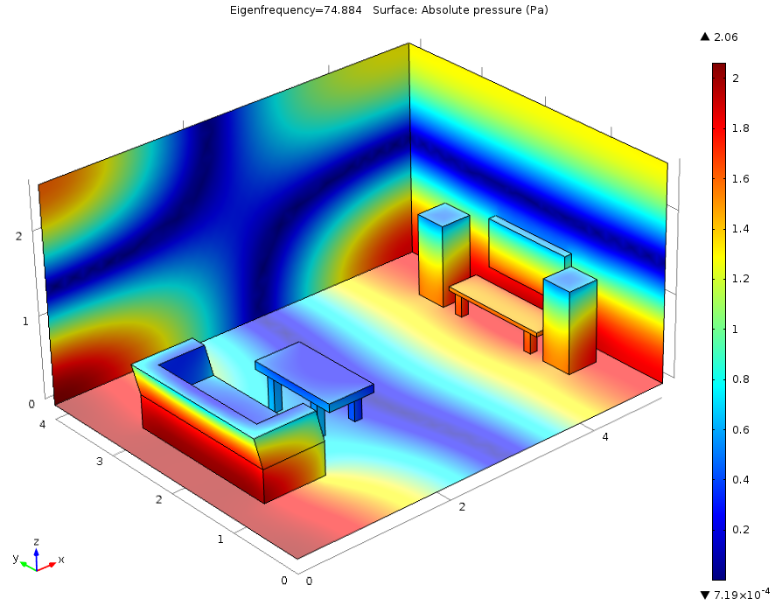
A basic understanding of the function NDEigenValues is that it takes the most prominent points from a matrix. The matrix in question is the Laplacian of a wave inside shape. The Laplacian takes the lowest points inside of a shape and so when you take the eigenvalues of a Laplacian of a wave you get the modes/frequencies. Using these ideas, you can find the modes of an arbitrarily shaped drum.
Some more important terms include:
◼
Derivative: A derivative is described as either the rate of change of a function, or the slope of the tangent line at a particular point on a function.
◼
The Laplace Operator: In mathematics, the Laplace operator or Laplacian is a differential operator given by the divergence of the gradient of a scalar function on Euclidean space.
◼
Eigenvalues are a special set of scalars associated with a linear system of equations.
These terms are important as they are the basis of the math behind my project.
Finding The Modes
Finding The Modes
In mathematics, the Laplace operator or Laplacian is a differential operator given by the divergence of the gradient of a scalar function on Euclidean space. This essentially means that it looks for the lowest points of an object; in this case the object is a wave and the lowest points are the modes. I found that it was the frequency squared (user NTK on Audio Science Review).
2D Shapes
2D Shapes
My first steps inside of this project were to find the right functions that allowed me to get the key parts of a sound such as the frequency. I found many great ideas from the documentation but the most simplistic way was to use NDEigenvalues.
This is a sample shape:
In[]:=
shape=Rectangle[{0,0}]
Out[]=
Rectangle[{0,0}]
This takes 50 eigenvalues from the defined shape, in this case a rectangle.
In[]:=
frequencySquared=NDEigenvalues[{-Laplacian[u[x,y],{x,y}]},u[x,y],{x,y}∈shape,50];
Since frequencies cannot be negative in real life, the first value of the eigenvalues being negative implies machine error. I fixed this fact by removing the first value from my list.
In[]:=
removeFirst=Take[frequencySquared, -49];
I then had to convert my wavelengths into frequencies. I was able to do this using this formula which I found from both NTK on Audio Science Review and an article on GIK acoustics.
In[]:=
frequecies=;
343
removeFirst
2Pi
I then was able to set up a bank of each individual frequency in the drum.
Using Table and AudioGenerator to set up the frequency bank:
In[]:=
sineBank=Table[AudioGenerator[{"Sin",i}],{i,frequecies}];
Then to get the predicted final sound of the drum, I used Total to collect the layer of all the individual pitches like this. Sound warning!!!!
In[]:=
as=Total[sineBank]
Out[]=
3D Shapes
3D Shapes
My next big step inside of finding the modes was to allow for more than just two dimensional shapes. Usually when transforming something from two dimensional to three dimensional the process is very difficult. Luckily for me it just required changing the axis of the Laplacian. A 3D drumhead would be almost like a bell. this function would calculate how the drumhead would resonate.
Sample shape:
In[]:=
shape3D=Cube[{0,0,0}];
This function adds a z axis to the Laplacian to allow for the eigenvalues of three dimensional shape.
In[]:=
frequencySquared3D=NDEigenvalues[{-Laplacian[u[x,y,z],{x,y,z}]},u[x,y,z],{x,y,z}∈shape3D,50];
Full Function
Full Function
I realized after I figured out how to get two dimensional and three dimensional sounds of a drum head I should merge them together into one big function. My biggest challenge in doing so is that I needed to tell the difference between shapes with different dimensions.
This function takes a shape and checks which one to use based on the volume of the input:
In[]:=
drumModes[n_]:=Module[{as,plt3D,as3D,plt},If[RegionDimension[n]!=3,as=Total[Table[AudioGenerator[{"Sin",i}],{i,((343*Sqrt[Take[NDEigenvalues[{-Laplacian[u[x,y],{x,y}]},u[x,y],{x,y}∈n,20],-19]])/(2Pi))}]];plt=Graphics[n];,as3D=Total[Table[AudioGenerator[{"Sin",i}],{i,((343*Sqrt[Take[NDEigenvalues[{-Laplacian[u[x,y,z],{x,y,z}]},u[x,y,z],{x,y,z}∈n,20],-19]])/(2Pi))}]];plt3D=Graphics3D[n];];If[RegionDimension[n]==3,{plt3D,as3D},{plt,as}]]
In[]:=
drumModes[Cube[]]
This is a cube and a sound of the resonance of the cube.
 ,
,
In[]:=
drumModes[Rectangle[]]
This is a square drumhead and the sound that it would produce.
,
Decaying audio
Decaying audio
After I got a basic model of audio, I decided to expand and add a more realistic effect of decay. I found that the sound wasn’t realistic because the frequencies didn’t decay, particularly because they didn’t decay based off of their respective values. I first started by simplifying the original function in order to reduce runtime, which was achieved by taking away extra steps, as making a mean of the audio generated sounds used excessive computational power.
This function takes 20 of the eigenvalues of a specified shape n:
In[]:=
drumModes[n_]:=DeleteCases[((343*Sqrt[NDEigenvalues[{-Laplacian[u[x,y],{x,y}]},u[x,y],{x,y}∈n,20][[2;;20]]])/(2Pi)),Null]
This function produces the actual sound of the drums based off of drumModes:
In[]:=
soundsTestnes[n_]:=Module[{a=Total[Sin[2*Pi*drumModes[RegularPolygon[n]]*t]*Exp[-(drumModes[RegularPolygon[n]]/55.5)*t]]},{Play[a,{t,0.3,4}],Plot[a,{t,0.3,4}]}]
This was my code for the dataset I used for the graph:
Finding and Classifying Clusters
Finding and Classifying Clusters
I realized that the next big step after creating the sounds was to see if there were similarities between any shapes of drums. There were no new mathematical concepts added during this section; I continued to use ideas like eigenvalues and the Laplace operator.
Defining Functions and Parameters
Defining Functions and Parameters
The functions for clustering are very similar to previous functions; they are applied to the entire dataset instead of a single shape.
These are the parameters for a three Dimensional plot:
These are the parameters for a two Dimensional plot:
This function takes the eigenvalues of shape n, in this case it is going to be each shape of the dataset:
This converts the frequencies found above into the sounds that can be conformed into main audio features:
Getting the Data
Getting the Data
As I was making it myself, the process for obtaining data was very different compared to a normal process, as it got rid of most of the cleaning process. That extra time allowed me to expand the graphs into multiple dimensions.
This variable creates the dataset:
This creates graphics of each shape in the dataset:
Graphing in Two Dimensions
Graphing in Two Dimensions
The next big step was to actually form and graph my data. I realized that I could convert the sounds of each drum into values for a plot using functions like AudioMeasurements.
After getting the data, I found that I could classify it through AudioMeasurements like this:
Once I checked that the data was formatted correctly I made it into a full function allowing me to change the function/type of sound used if wanted.
I then ran the data completely beforehand to allow myself to change parameters on the final plot faster.
Then the final step was to plot the data and change the plot points to be the shape of the drum.
This is a graph using the same code with more data and drum shapes. It took much longer to run.
Graphing in Three Dimensions
Graphing in Three Dimensions
I decided to work up to a three dimensional plot; the first step was to get my data into a list of coordinates based off of the audio measurements.
I then wanted to visualize the graph into a three dimensional space. Once I checked that the data was formatted correctly in three dimensions, I made it into a full function allowing me to change the function/type of sound used if wanted.
Conforms data into coordinates:
I then preloaded the finalized data :
Then the final step was to plot the data and change the plot points to be the shape of the drum:
This graph shows the differences between each drum. It is crucial to have this in a three dimensional space as it displays how different some of the drums are in a way that a two dimensional graph cannot do.
Results
Results
I found that there was no clear clustering of the data. This could be from a lack of data or a lack of parameters. These results are not quite accurate based on my prior knowledge; as a percussionist, I had been hoping to see some clear correlations between shapes of drums but unfortunately did not see any clear pattern. I feel that the process for gathering data and conforming it was very convoluted and could have been improved. My process for finding data used more operations onto the sounds than were necessary and could be optimized.
I was very happy and impressed with how well the decayed audio worked and how similar it could sound to a real drum. I feel that my process for finding the modes was very refined with a simple equation. As a little bonus, I was able to find the pitch of any drum with a little modification.
Extensions
Extensions
Seeing how changing materials will change sound(dampening of sound using different surrounding conditions)
Seeing how changing materials will change sound(dampening of sound using different surrounding conditions)
Changing the material of a drum in real life can dramatically change the sound of it and I would have loved to emulate this inside of Mathematica. I believe a starting point could be the AcousticAbsorbingValue function.
Reversing the process
Reversing the process
I believe that a great extension would be to reverse the original process to be able to input a pitch and output a drum that would roughly play the pitch.
Seeing how the striking material effects the sound/adding a striking object
Seeing how the striking material effects the sound/adding a striking object
Currently, my model doesn’t specify what the striking material is. In percussion, you can have different materials like yarn, nylon, wood, metal, and much more. I believe that the sound changes might be slightly less than changing the material of the drumhead but you would still be able to hear lots of differences.
Acknowledgments
Acknowledgments
◼
Thank you to my mentor Anika
◼
Thank you to Joseph, Logan, Daniele, Athanasios
References
References
Williams, S. (2017, December 6). What are room modes. Gik Acoustics. https://www.gikacoustics.com/what-are-room-modes/
Ntk. (2022, November 27). Arbitrary shape room mode simulator. Audio Science Review (ASR) Forum. https://www.audiosciencereview.com/forum/index.php?threads%2Farbitrary-shape-room-mode-simulator.20805%2F
Smith, A. (n.d.). Wolfram Demonstrations Project. Normal Modes of a Circular Drum Head. https://demonstrations.wolfram.com/NormalModesOfACircularDrumHead/
CITE THIS NOTEBOOK
CITE THIS NOTEBOOK
Creating and classifying shapes of drums that have a particular series of modes
by Niko Moustakas
Wolfram Community, STAFF PICKS, July 13, 2023
https://community.wolfram.com/groups/-/m/t/2963071
by Niko Moustakas
Wolfram Community, STAFF PICKS, July 13, 2023
https://community.wolfram.com/groups/-/m/t/2963071