One of the most elusive properties an object can have is its coefficient of restitution. Simply put, the coefficient of restitution is an object’s “bounciness”. This is calculated by dividing its velocity just after hitting a surface by its velocity right before hitting the surface. What makes this trait so difficult to calculate is because of a plethora of factors that influence the final calculation, including air resistance, the material of the ball and surface, and even how the ball is released. The purpose of this project is to analyze videos of bouncing balls and extract data to calculate its coefficient of restitution.
The process of finding a ball's restitution coefficient computationally can be narrowed down to three steps:
◼
Video Processing
◼
Data Extraction
◼
Calculations
Traditional Solution
Traditional Solution
Video Processing
Video Processing
In order to begin processing a video, we must first import the video. To do this, we use the Import function to separate the video into individual frames and extract some basic data:
Imports the video and splits it into a list of each frame, and extracts data from it including its framerate and duration for later purposes:
In[]:=
images = Import["https://joshliu.net/wolfram/1.mp4","ImageList"];fps = QuantityMagnitude[Import["https://joshliu.net/wolfram/1.mp4","FrameRate"]];duration = Import["https://joshliu.net/wolfram/1.mp4","Duration"];
Now that we have the list of frames and data stored, we can begin performing some calculations on each frame. To find the location of the ball in each frame, we traverse our images and use the ImagePosition function. Note that because all cameras are not created equal, the ball may appear blurry in several frames so the AcceptanceThreshold option has been set to 0.2 in order for the filter to be more 'lenient' with what may be considered a ball. The position tracking of the ball can be visualized with the HighlightImage function:
The position of the ball in each frame is stored, and the SlideShowVideo function creates a visual representation of how the computer processes the ball
In[]:=
box = ImageBoundingBoxes[#, "ball", AcceptanceThreshold->0.2] &/@images;SlideShowVideo[MapThread[HighlightImage[##,ImageSize->All]&,{images,box}], DefaultDuration->duration];
Data Extraction
Data Extraction
positions gets the position of the ball in each frame and stores it in {x,y} format. Flatten combines the coordinates and the semicolons grab every y-coordinate.
In[]:=
positions = ImagePosition[#, "ball", AcceptanceThreshold->0.2]&/@images;yPositions = Flatten[positions][[2;;;;2]];
Now that all of the vertical positions are in a neat list, we can calibrate the distance of 1 meter by calculating for a local maximum and local minimum using the FindPeaks function:
FindPeaks with a negative list finds the smallest values, and takes the first one. After reversing the list, FindPeaks is used again to find the closest local maximum to the local minimum. After that we can calculate for how many screen pixels take up 1 meter:
In[]:=
firstLocalMin = Abs[FindPeaks[-yPositions,0,10,-Infinity][[1]]];back = Reverse[Take[yPositions,firstLocalMin[[1]]]];firstLocalMax = FindPeaks[back,0,0,0][[1]];pixelsPerMeter = firstLocalMax[[2]]-firstLocalMin[[2]]
Out[]=
1646.3
Calculations
Calculations
To calculate an object's coefficient of restitution, we must divide its velocity after bouncing by its velocity before bouncing. We can calculate displacement by subtracting the lowest position from its closest surrounding positions. Dividing that value by the pixelsPerMeter will give us how many meters the ball was displaced in one frame. Finally, by multiplying its single frame displacement by the framerate, we can obtain how fast the ball was travelling right before and right after it hit the ground (see shortcomings) and thus calculate its restitution coefficient:
In[]:=
velocityBefore = ((yPositions[[firstLocalMin[[1]]-1]]-firstLocalMin[[2]])/pixelsPerMeter)*fps;velocityAfter = ((yPositions[[firstLocalMin[[1]]+1]]-firstLocalMin[[2]])/pixelsPerMeter)*fps;coefficient = velocityAfter/velocityBefore
Out[]=
0.638239
Please note that because we are solving for a constant, as long as all units cancel out, the value will remain the same:
In[]:=
velocityBefore = yPositions[[firstLocalMin[[1]]-1]]-firstLocalMin[[2]];velocityAfter = yPositions[[firstLocalMin[[1]]+1]]-firstLocalMin[[2]];coefficient = velocityAfter/velocityBefore
Out[]=
0.638239
Alternate Solutions
In comparison to online results, our final calculation seems a bit lackluster. Because we are dropping the ball from precisely one meter, the ball gains considerable speed before its bounce, and because most cameras shoot at 24-60 frames per second, it is highly unlikely that the camera will capture the ball's bounce. To combat this we can target both areas of weakness.
Dropping the ball from a lower height
Dropping the ball from a lower height
Now that we know that real-life units have no effect on calculations, we can drop the ball from lower heights so the ball travels at a lower speed near the ground, putting less strain on the camera:
In[]:=
images=Import["https://joshliu.net/wolfram/2.mp4","ImageList"];positions=ImagePosition[#,"ball", AcceptanceThreshold->0.2]&/@images;yPositions = Flatten[positions][[2;;;;2]];firstLocalMin = Abs[FindPeaks[-yPositions,0,0,-Infinity][[1]]];back = Reverse[Take[yPositions,firstLocalMin[[1]]]];firstLocalMax = FindPeaks[back,0,0,0][[1]];velocityBefore = yPositions[[firstLocalMin[[1]]-1]]-firstLocalMin[[2]];velocityAfter = yPositions[[firstLocalMin[[1]]+1]]-firstLocalMin[[2]];coefficient = velocityAfter/velocityBefore
Out[]=
0.784245
In the above example, the ball dropped from a lower height and as a result had a lower velocity before hitting the ground. This method gets closer to the expected value, but still suffers from potentially missing the crucial bounce.
Shooting at high frame rates
Shooting at high frame rates
Finally, we can shoot the video at blisteringly high frame rates in order to capture the moments right before and after the bounce for the most accurate values.
The following video has been shot at 240 frames per second, and the program samples frames slightly farther away from the minimum to maximize movement. A large majority of the video has been cut out to save on processing time due to the high framerate.
In[]:=
images=Import["https://joshliu.net/wolfram/3.mp4","ImageList"];positions=ImagePosition[#,"ball", AcceptanceThreshold->0.2]&/@images;yPositions = Flatten[positions][[2;;;;2]];firstLocalMin = Abs[FindPeaks[-yPositions,0,10,-Infinity][[1]]];back = Reverse[Take[yPositions,firstLocalMin[[1]]]];firstLocalMax = FindPeaks[back,0,0,0][[1]];velocityBefore = yPositions[[firstLocalMin[[1]]-2]]-firstLocalMin[[2]];velocityAfter = yPositions[[firstLocalMin[[1]]+2]]-firstLocalMin[[2]];coefficient = velocityAfter/velocityBefore
Out[]=
0.76618
Mathematical Solution
Mathematical Solution
One final way to determine the instantaneous velocities before and after impact is with mathematics. We can use polynomial regression to make accurate estimations from the ball's path and predict the ball's instantaneous velocities.
Import the video and split it like normal, this time create two new lists: One from the peak of the first drop to the bounce and one from the bounce to the second peak.
In[]:=
images=Import["https://joshliu.net/wolfram/1.mp4","ImageList"];positions=ImagePosition[#,"ball", AcceptanceThreshold->0.2]&/@images;yPositions = Flatten[positions][[2;;;;2]];firstLocalMin = Abs[FindPeaks[-yPositions,0,0,-Infinity][[1]]];back = Reverse[Take[yPositions,firstLocalMin[[1]]]];firstLocalMax = FindPeaks[back,0,0,0][[1]];nextLocalMax = {(firstLocalMin[[1]]-1),0}+ FindPeaks[Take[yPositions,{firstLocalMin[[1]], Length[yPositions]}], 0,0,0][[1]];minToMax = Take[yPositions,{firstLocalMin[[1]]+1,nextLocalMax[[1]]}];maxToMin = Take[yPositions,{firstLocalMin[[1]]-firstLocalMax[[1]]+1, firstLocalMin[[1]]-1}];
In the above code, note how we ignore the frame where the ball is at its lowest. This is because it's state is inconclusive; it could be right before a bounce, it could be during its bounce, or it could be right after its bounce. Either way, it will likely have a negative effect on our calculations, so it is omitted.
Now that we have our two sections, we can make two different predictions of the ball's trajectory:
Now that we have our two sections, we can make two different predictions of the ball's trajectory:
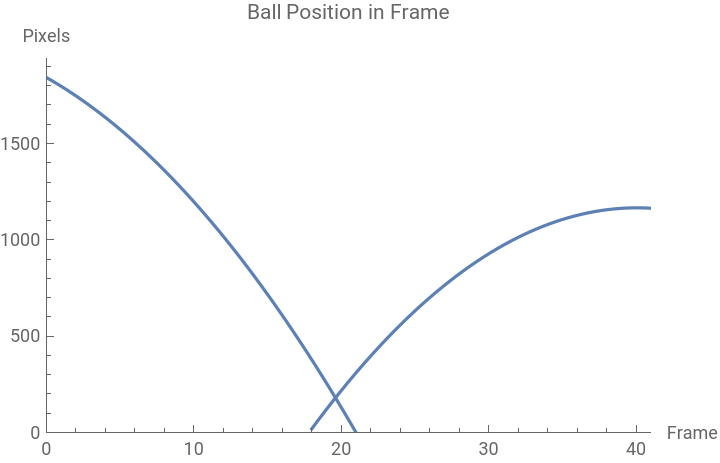
Estimate two different parabolas for the ball's position before and after the bounce, and expand them out to see where they intersect:
In[]:=
para = Fit[maxToMin,{1,x,x^2},x];para2 = Fit[minToMax,{1,x,x^2},x]/.x->(x-(firstLocalMin[[1]]-1));Show[Plot[para,{x,firstLocalMax[[1]]-firstLocalMin[[1]],firstLocalMin[[1]]+3},AxesLabel{"Frame","Pixels"},PlotLabel"Ball Position in Frame",PlotRange ->{{0,nextLocalMax[[1]]},{0,Automatic}}],Plot[para2,{x,nextLocalMax[[1]]-firstLocalMin[[1]]-3,nextLocalMax[[1]]}]]intersect = FindRoot[para == para2, {x,0}]
Out[]=
Out[]=
{x19.6075}
Now that we have two estimates for the ball's trajectory and where it would mathematically bounce rather than where the camera thinks it bounced, we can take the derivatives of the position parabolas to get the ball's velocity right before and after the bounce:
By referencing online sources, we find that this method produces the most reliably accurate results on all of our test videos (see shortcomings). This is because it does not deal with the lowest position of the ball captured by the camera like the other methods, but instead mathematically predicts where the ball would have bounced and working with that value. It also does not use individual frame sampling, which may have been a common source of error, since the ball's position may not align with how the video was shot.
Postface
Shortcomings
Shortcomings
Most of these example videos have been handpicked for optimal results. In truth, it was unlikely to capture the ball hitting the ground. With the ball travelling at such a high speed and camera recording at a relatively low framerate, most videos missed that crucial moment and had skewed calculations. Recording at higher frame rates would increase time to compute and require larger frame sampling. To combat this, we mathematically predicted where the ball would have hit the ground and based our future calculations on that. However, even this method suffers from the drawback that plagues all other methods as well. If the ball appears too blurry or distorted in a frame, the detection function will either misplace its position, or not locate it at all. This error causes the program to sample incorrect frames or make a poor prediction, leading to a skewed result. Additionally, because we are analyzing each video's frame individually, this program requires a lot of computing power and a lot of time to run.
Conclusion
Conclusion
In this project, we imported several videos and split them into frames to locate the position of a ball in each one. Afterwards, we experimented with various solutions to try to accurately predict the coefficient of restitution of the ball. In all of the examples, no two values were identical when, in theory, they should have been. This is because the ball's path can be affected by the most trivial things like air resistance or even any spin on the ball as it falls. Additionally, the ball’s lowest captured position is usually meaningless because most cameras don't naturally shoot at high speeds. We then switched to a mathematical approach to calculate when the ball hit the ground and saw much better results, even from videos that were shot at lower frame rates. In the future, this program can be used to find the restitution coefficient of other materials outside of sports balls. For example, this program could potentially pick an optimal metal alloy for a robotic part that experiences lots of contact by studying how various metals bounce.
References and Acknowledgements
References and Acknowledgements
◼
Video visualization adapted from https://www.wolfram.com/language/12/machine-learning-for-images/object-recognition-and-tracking-in-videos.html?product=mathematica
◼
HUGE thank you to my mentor Eryn for their help in finding the small details I wouldn't have found on my own, and for always keeping me interested and engaged