Introduction
Introduction
Governments are tasked with defining administrative divisions for cities/subdivisions that determine factors that affect day to day life in a city, from infrastructure to utilities and services. However, it’s often true that the boundaries of administrative divisions do not necessarily reflect a real-world division in the way that people residing geographically; more so with the expanding population base. This project aims to compare cities’ administrative division with real-world characteristics of cities such as population and street density, to highlight gaps which could assist administrations in improved data-led planning.
Goal
Goal
Classify cities/subdivisions based on quantitative data and overlay it on Administrative boundaries to evaluate how real-world characteristics of cities over-or underflow their administrative divisions.
Approach
Approach
Capacity optimization for the administration to deliver its services is critical to driving efficiency. Governments define the administrative boundaries, however on occasions, one finds that the population resides in just certain pockets (called real-world boundaries), leading to a mismatch in effectiveness and efficiency of the resources deployed for administration. To compare the administrative boundaries with real-world characteristics I used two data sets for evaluation to assess their extent of relevance:
- Population density data from NASA Earth Data
- Street density data from Open Street Map
- Population density data from NASA Earth Data
- Street density data from Open Street Map
STEP 1: Method 1-Extract population Density data for selected City/Subdivision from NASA Earth and plot the same on a Map
STEP 1: Method 1-Extract population Density data for selected City/Subdivision from NASA Earth and plot the same on a Map
To get a real-world population density of how the population is geographically spread in a city/subdivision, I used population density dataset for the year 2020 (GPW_Population _Density _ 2020) from NASA Earth.
Importing data from NASA' s site :
Importing data from NASA' s site :
Plotting NASA data on map:
Plotting NASA data on map:
I extracted and plotted the extracted NASA data on the map for the state (Haryana, India) I was working on.
Data Extraction and Map plot:
In[]:=
state="Haryana";statemap=GeoGraphics[{EdgeForm[{Thick,Black}],AdministrativeDivisionData[Entity["AdministrativeDivision",{state,"India"}],"Polygon"]},GeoServerlayerGeoServer["GPW_Population_Density_2020"]];
Out[]=
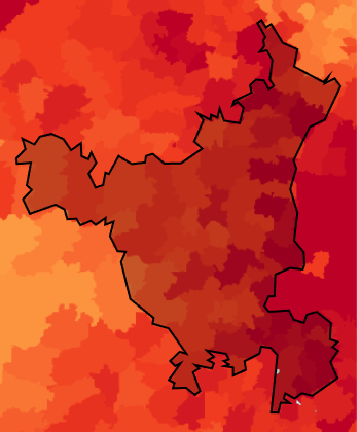


The above map shows the population density split across the state as per the legend (No. of People per square kilometer). This data showcases the real-world characteristics in terms of the population residing across the state. This density may or may not sync with the administrative polygons of cities/subdivisions which I will evaluate in the next section.
STEP 2: Method 1-Compare the administrative polygons of cities/subdivisions with real word characteristics (Population Density as in STEP1)
STEP 2: Method 1-Compare the administrative polygons of cities/subdivisions with real word characteristics (Population Density as in STEP1)
The next step was to draw real-world boundaries based on density clusters to earmark the subdivisions based on density. To achieve that Wolfram has to detect the color changes across the clusters (in the map above), to be able to draw the boundaries. To achieve that I first increased the contrast of the image which helped in differentiating the colors of the various clusters which in turn would make it easier to detect a colour difference (i.e. density) and plot the boundaries.
Identifying and plotting real-world boundaries on map (Based on population density):
Identifying and plotting real-world boundaries on map (Based on population density):
Map image contrast adjust :
In[]:=
populationgraph=Image[GeoGraphics[{AdministrativeDivisionData[Entity["AdministrativeDivision",{"Haryana","India"}],"Polygon"]},GeoServerlayerGeoServer["GPW_Population_Density_2020"],GeoZoomLevel7]];ImageAdjust[ImageAdjust[populationgraph],0.8]
Out[]=
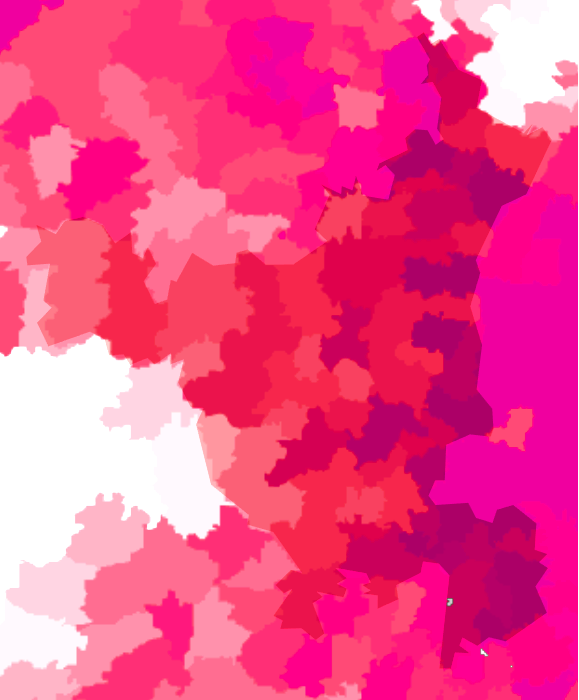
As one sees the contrast of the image has improved from the original image in the earlier step. I then used the edge detect function to identify clusters based on color shades and draw boundaries around them.
Edge detect to identify clusters:
In[]:=
EdgeDetect[ImageAdjust[ImageAdjust[populationgraph],0.8]]
Out[]=
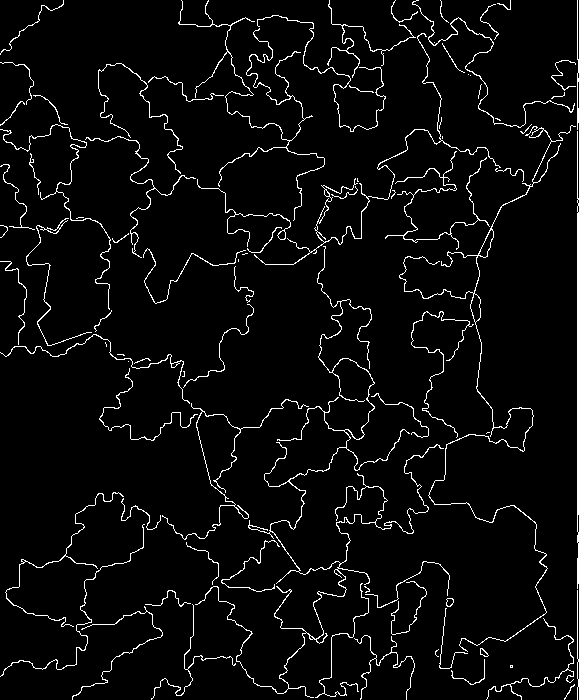
In the image above, the boundaries have been drawn basis the density clusters (by using color differences). The next step was to overlay these boundaries on the original Population density map for which I converted the boundaries to black. The reason for converting the boundaries to black is to then convert the background to white and then transparent, so the boundaries can then be overlayed on the density map.
Color negate to black boundaries:
In[]:=
realborder=ColorNegate[EdgeDetect[ImageAdjust[ImageAdjust[populationgraph],0.8]]];
Convert white pixels to transparent pixels :
In[]:=
finalrealborder=ImageRecolor[realborder,{WhiteTransparent}]
Out[]=

The image above has been converted to a transparent background with black boundaries. The final step was now to overlay these real-world boundaries (i.e. population density clusters) on the population density map (initially drawn from NASA data).
The image above has been converted to a transparent background with black boundaries. The final step was now to overlay these real-world boundaries (i.e. population density clusters) on the population density map (initially drawn from NASA data).
Overlay the boundaries :
The above map shows the cluster of subdivisions based on the Density population. This map now shows logical clusters of the real-world based on how the population resides in cities/subdivisions. As the next step, I need to compare this map with the actual geographic boundaries of the Cities/subdivisions as defined by the administration to see if there is synergy or not. To derive the Geographical boundaries I extracted the boundaries from Wolfram Repository as shown below. As step 1, the code below first generates a list of cities/subdivisions in the state.
Comparing administrative boundaries with real world boundaries (Map overlay):
Comparing administrative boundaries with real world boundaries (Map overlay):
Generate city/subdivision list:
Once the list of cities/subdivisions is derived the next step is to get the administrative polygon data of the city/subdivision. The following code is an association of the city/subdivision with their administrative polygon data, which is used to derive geographical boundaries.
Association of city/subdivision with administrative polygons:
Having derived the polygon data, the next step was to plot the administrative polygon of cities/subdivision onto a map.
Plot administrative polygon :
As one sees in the map above, we have the administrative boundaries as defined by the Government for cities/subdivisions. The next step was to overlay the administrative polygon of cities/subdivision (as shown above) on the map I got by overlaying the real boundaries on the population density map. This is to compare the real boundaries as per population density with administrative boundaries.
Plot administrative polygon on density map :
The black lines in the map above show the Real World boundaries (based on density data) and the white lines show the Geographical boundaries as defined by the Government. This overlay map helps to visualize the differences between the administrative boundaries and real-world boundaries.
STEP 3: Method 1-Calculate the population deviation for each of cities/subdivision for further analysis
STEP 3: Method 1-Calculate the population deviation for each of cities/subdivision for further analysis
Having arrived at the visualization of differences between the administrative boundaries and real-world boundaries I quantified the deviation. To arrive at that analysis the first step was to generate a list of the population of each city/subdivision and its corresponding physical area. This data was imported from the wolfram repository using the below code.
Import population and area data :
After collecting the data, the next step was to calculate the population density for each city/subdivision by dividing the city's population by its area. This was done to put a number to the density graph plotted above.
Calculate population density :
The next step was to link the population density data with their respective city/subdivision for easy access, this was done by creating an association.
Associate population density data :
I then calculated the deviation percentage between the average population density of the state and the population density of each city/subdivision. This was then represented in graphical format.
Calculate deviation percentage :
As one can see in the graph above, the population density is very nonuniform across the cities/subdivisions. It is now important to analyze if Governments factor this difference while planning their resources. Accordingly, to undertake this analysis I picked up one parameter i.e. street density in each of these cities/subdivisions.
STEP 4: Method 2-Derive street Density data for selected City/Subdivision from Open Street Map and plot the same on a graph
STEP 4: Method 2-Derive street Density data for selected City/Subdivision from Open Street Map and plot the same on a graph
Continuing with the analysis above I used the second parameter of Street Density to draw a comparison between the density of population to the density of street in the city/Subdivision. The first step was to calculate the percentage of coverage of streets by area in the total geographical area coverage of a city/subdivision. To do this I pulled the street maps of the selected city/subdivision from Open Street Maps. Once extracted, I converted all the streets to one color and the rest of the map to another to uniquely identify all streets and the rest of the city/subdivision.
Function to convert all streets to one color:
The above images depict the map of each city/subdivision, wherein the white lines are the streets and the black background is the city/subdivision geographic area. The next step was to calculate the percentage of the total area in the city/subdivision covered by the streets. The same has been done by calculating the number of white pixels in the map image (which depicts the Streets) as a percentage of the total city/subdivision area. The data was then plotted on a graph.
The above images depict the map of each city/subdivision, wherein the white lines are the streets and the black background is the city/subdivision geographic area. The next step was to calculate the percentage of the total area in the city/subdivision covered by the streets. The same has been done by calculating the number of white pixels in the map image (which depicts the Streets) as a percentage of the total city/subdivision area. The data was then plotted on a graph.
Calculate percentage of area covered by streets :
Plot street data on graph
As one can see the Street density varies from as low as 3% in some cities/subdivisions to highest of 17.8% in another. The street density data of city/subdivision will now be used in the next step to calculate the per capita street area for each city/subdivision. This has been done to understand how much infrastructure development has happened in the form of streets in the city/sub-division, which is then compared to the population density in that specific city/subdivision in the next step.
STEP 5: Method 2-Calculate the per capita street area for each city/ subdivision and and plot the same on a Map
STEP 5: Method 2-Calculate the per capita street area for each city/ subdivision and and plot the same on a Map
To arrive at the per capita street area, I divided the street density percentage by the population density
Plot per capita street area on graph
The next step was to plot the per capita street area on the administrative boundary map
Plot per capita street area on map :
The above maps show the outcome of the 2 approaches used to compare the administrative boundaries with real-world boundaries of city/subdivisions. It is clear from the outcome that the administrative boundaries are not drawn keeping the population density in view. Further with time while the population of cities/subdivisions has increased, the administrative boundaries have remained the same in most cases which puts stress on the resources.
The second approach used in the project of street density also throws up interesting insights and one finds no direct linkage between population density and street density, which reflects that the administrations are not being efficient in planning the Infrastructure development in line with real population zones.
The second approach used in the project of street density also throws up interesting insights and one finds no direct linkage between population density and street density, which reflects that the administrations are not being efficient in planning the Infrastructure development in line with real population zones.
Conclusion & Future Enhancements
Conclusion & Future Enhancements
Conclusion
Conclusion
◼
While the Government has defined administrative boundaries of states, if one visualizes the data of real-world population (as in Step 2) we can see the difference between the Real-World boundaries (pockets in which people stay) as against the administrative boundaries (as defined by the Government). This on occasion leads to inequitable division and deployment of resources.
◼
If one evaluates the deviation of the population (as in Step 3) even in the Geographical boundaries of cities/subdivisions, one sees that the population is concentrated in certain segments, which is leading to over-exploitation of resources in those cities/subdivisions.
◼
The Infrastructure development in the city/subdivision is not scaled to the population residing in the city/subdivision. As can be seen from the street density map (step 5) has no direct correlation with the population density.
◼
In today’s world, several data sources (including satellite images) are available which can help administrations plan their resources and infrastructure development in a more systematic and data-driven approach. This project is only an exhibit of how data can be used for simple analysis to drive the right intelligence for decision making. Applications like street planning, water supply, sanitation, public transport planning are classic examples where this approach could come in handy.
Project Limitations:
Project Limitations:
◼
Availability of administrative polygon data at city/sub-division/municipality level
◼
Availability of NASA data on Population density at the lowest administrative level
Future Enhancements:
Future Enhancements:
◼
Create a function which takes any Location and generates an output with a population density Map and a Street per Capita Map. (This couldn't be done because of lack of Data)
◼
Include more factors like terrain, infrastructure, etc in the process which will help plot more accurate boundaries
◼
The final goal is to suggest a computational standard for drawing administrative boundaries
Keywords
Keywords
◼
Real World Boundaries
◼
NASA Earth
◼
Cities
◼
Subdivision
◼
Population Density
◼
Street Density
◼
Image Processing