Affecting nearly 4% of the world population, synesthesia is a condition in which you experience one sense through another. Data from Hamada et al., 2020 and Japanese characters were imported and used for my final function. My function categorizes an input string, then plots the appropriate colors on the ChromaticityPlot.
Introduction and Background
Introduction and Background
Synesthesia is a condition in which you experience one sense through another (e.g., hear colors, see sounds etc...). Approximately 4% of the population is diagnosed with synesthesia. Even though Synesthesia is mostly inherited, it can be acquired through brain injury or drug overdose. Although there are several segments of synesthesia, my function primarily focuses on the visual portion of it, particularly about characters. There are up to 80 different categories of synesthesia, including: grapheme-color, number-form, lexical-gustatory, spacial sequence synesthesia, chromesthesia, mirror-touch, ticker-tape, and auditory-tactile synesthesia (Kirkpatrick, 2018).
The most common type of synesthesia is grapheme-color synesthesia, which is what my project in based on. My function uses the dataset from Hamada et al., 2020 I had analyzed the data and converted it into inputs that my function would process. From the dataset I used the colors associated with the Alphabet, Digits, Hiragana, Kanji, and Katakana Characters. I also used the information for u' and v' coordinates for the Chromaticity Plot.
The function I have created detects strings as inputs and outputs a chromaticity plot using the data from Hamada et al., 2020. This chromaticity plot shows what colors a synesthetes perceives when seeing a certain character.
Project Steps
Project Steps
Dataset for characters & colors
Dataset for characters & colors
Data for colors that synesthetes see is necessary for plotting the chromaticity plot. The dataset for the characters and colors were obtained in Hamada et al., 2020.
Import the colordata:
In[]:=
colorData=;
Transform the dataset into LAB colors:
In[]:=
colorChoices=Map[LABColor,Divide[colorData[[1,All,7;;9]],90]];
In[]:=
colorChoices[[2]]
Out[]=

Japanese characters that will be used in the final model:
In[]:=
katakanaCharacters=;kanjiCharacters=;hiraganaCharacters=;
In[]:=
{katakanaCharacters[[1]],kanjiCharacters[[1]],hiraganaCharacters[[1]]}
Out[]=
゠,㐀,ぁ
Data processing
Data processing
The code below defines the elements within the dataset (colorData). The variables below: characterColors defined the colors for the alphabet, numberColors defined colors for digits, chromaColors showed if the colors where clustered or not, the next three variables displayed the colors for different characters, and u and v show the coordinates for the chromaticity plot .
Separate data from colorData:
In[]:=
characterColors=Flatten@colorData[[All,All,4]];numberColors=Flatten@colorData[[All,All,5]];chromaColors=Flatten@colorData[[All,All,6]];lightnDark=Flatten@colorData[[All,All,7]];rednGreen=Flatten@colorData[[All,All,8]];bluenYellow=Flatten@colorData[[All,All,9]];u=Flatten@colorData[[All,All,11]];v=Flatten@colorData[[All,All,12]];
Convert the data colors for characters into LAB colors:
In[]:=
colorsDataset=Thread[characterColors->colorChoices];actualColors=Delete[DeleteCases[colorsDataset,""->_],1];alphabetDataColors=Cases[actualColors,("alphabet"->LABColor_)->(LABColor)];digitDataColors=Cases[actualColors,("digit"->LABColor_)->(LABColor)];hiraganaDataColors=Cases[actualColors,("hiragana"->LABColor_)->(LABColor)];katakanaDataColors=Cases[actualColors,("katakana"->LABColor_)->(LABColor)];kanjiDataColors=Cases[actualColors,("kanji"->LABColor_)->(LABColor)];
In[]:=
alphabetDataColors[[5]]
Out[]=
Convert “u” and ”v” into coordinates for the Chromaticity Plot:
In[]:=
coordinates1=Thread[{u,v}];coordinates2=Delete[Thread[colorChoices->coordinates1],{{1},{-1},{-2}}];
Displaying my chromaticity plot
Displaying my chromaticity plot
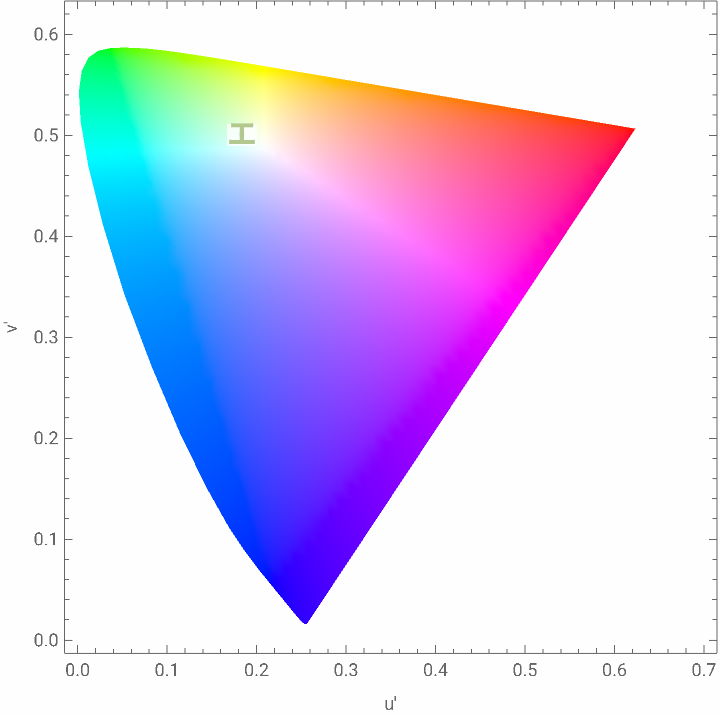
My function determines if the inputted string is in the dictionary or not and then decides if it is a integer or a word. If the string is not in the dictionary, “Not a word!” is printed. Next, it plots the appropriate colors of the word on a chromaticity plot. The word is plotted with the appropriate colors of the dataset on the plot. Any word in the dictionary can be used for this, as well as Japanese characters, as long as it is a string.
Take all the data and apply it to the chromaticity plot:
In[]:=
colorGenerator[word_String]:=Which[ContainsAny[katakanaCharacters,{word}],generator[word,katakanaDataColors],ContainsAny[kanjiCharacters,{word}],generator[word,kanjiDataColors],ContainsAny[hiraganaCharacters,{word}],generator[word,hiraganaDataColors],DictionaryWordQ[word]&&StringMatchQ[word,DigitCharacter..],generator[word,digitDataColors],DictionaryWordQ[word]&&(!StringMatchQ[word,DigitCharacter..]),generator[word,alphabetDataColors],True,"Not a word!"]
The function below was used to prevent repetitive actions in my first function. This allows the same action to be commenced using fewer lines of code.
In[]:=
generator[word_,color_]:={Manipulate[col=RandomChoice[color,StringLength[word]];Show[ChromaticityPlot[col,{"CIE76",COLOR}],ListPlot[col/.coordinates2,PlotMarkers->Style[word,color,Bold,FontSize->15,Background->GrayLevel[1,0.5]]]],{COLOR,0,1},SaveDefinitions->True],Table[Style[word,RandomSample[color]],{i,color}]}
Input word in the between the quotations in the function below:
In[]:=
katakanadatacolors
Out[]=
{,,,,,,,,,}
In[]:=
katakanaCharacters
Out[]=
゠,ァ,ア,ィ,イ,ゥ,ウ,ェ,エ,ォ,オ,カ,ガ,キ,ギ,ク,グ,ケ,ゲ,コ,ゴ,サ,ザ,シ,ジ,ス,ズ,セ,ゼ,ソ,ゾ,タ,ダ,チ,ヂ,ッ,ツ,ヅ,テ,デ,ト,ド,ナ,ニ,ヌ,ネ,ノ,ハ,バ,パ,ヒ,ビ,ピ,フ,ブ,プ,ヘ,ベ,ペ,ホ,ボ,ポ,マ,ミ,ム,メ,モ,ャ,ヤ,ュ,ユ,ョ,ヨ,ラ,リ,ル,レ,ロ,ヮ,ワ,ヰ,ヱ,ヲ,ン,ヴ,ヵ,ヶ,ヷ,ヸ,ヹ,ヺ,・,ー,ヽ,ヾ,ヿ
In[]:=
colorGenerator["ア"]
Out[]=
,ア,ア,ア,ア,ア,ア,ア,ア,ア,ア


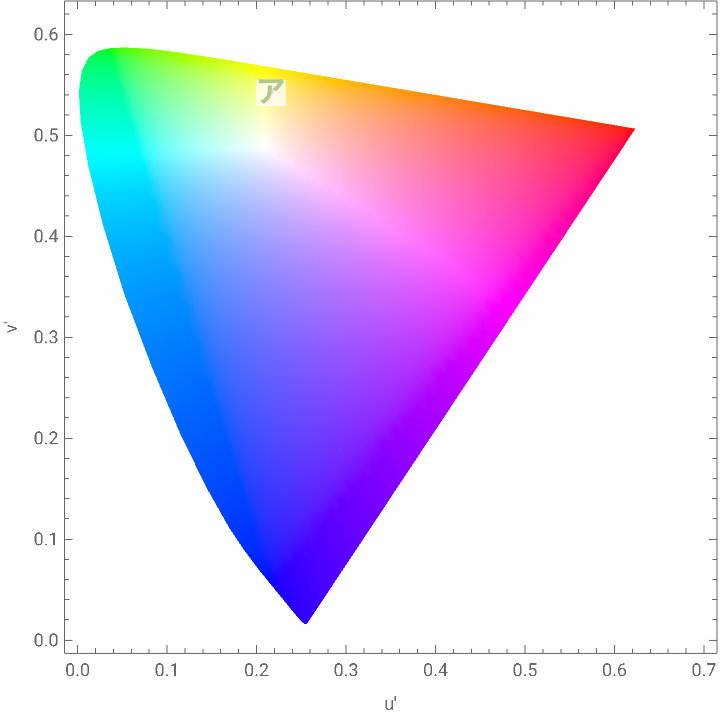
It also creates the chromaticity plots for Japanese characters.
In[]:=
colorGenerator["エ"]
Out[]=
,エ,エ,エ,エ,エ,エ,エ,エ,エ,エ
Conclusion
Conclusion
Grapheme-Color synesthesia is the most common type of synesthesia affecting millions of people worldwide. The function I had created shows colors for certain characters, such as Kanji, Hiragana, Katakana, the Alphabet and numbers. In the future, I hope to improve the data accuracy by using data from a more diverse and larger dataset. With more time and effort, I’m positive there is room for improvement by researching other types of synesthesia relating to different senses.
The chromaticity plot also had a long way from being perfect, but allow you understand what synesthetes see in their everyday life. The words displayed with the appropriate characters give a great visualization of how synesthetes would see the word. Further research in this topic can lead to a better living condition for synesthetes by portraying how they experience the world, and allow others to relate.
Acknowledgements
Acknowledgements
I owe my outstanding time in the Wolfram High School Summer Research Program to everyone, my friends, Bentley Staff, my TAs, my mentor Anika Patel, my directors, and especially my roommates because they consistently woke me up on time.
Citations
Citations
References Hamada, D., Yamamoto, H., & Saiki, J. (2020). Association between synesthetic colors and sensitivity to physical colors changed by type of synesthetic experience in grapheme-color synesthesia. Consciousness and Cognition, 83, 102973. https://doi.org/10.1016/j.concog.2020.102973
Herman, L. (2020). Synesthesia | psychology | Britannica. In Encyclopædia Britannica. https://www.britannica.com/science/synesthesia
Kirkpatrick, N. (2018, August 6). The Many Types Of Synesthesia Explained | Betterhelp. Betterhelp.com; BetterHelp. https://www.betterhelp.com/advice/synesthesia/the-many-types-of-synesthesia-explained/
CITE THIS NOTEBOOK
CITE THIS NOTEBOOK
Create a synesthesia simulator
by Chanu Yang
Wolfram Community, STAFF PICKS, July 13, 2023
https://community.wolfram.com/groups/-/m/t/2962536
by Chanu Yang
Wolfram Community, STAFF PICKS, July 13, 2023
https://community.wolfram.com/groups/-/m/t/2962536