Billiards/Pool is a cue sport that is enjoyed by players of varying age groups, and it is a great activity for players to enjoy and connect with one another. The objective of the game is to hit the ball into pockets to clear the board before the opponent. The game includes various physics factors, including deflection and friction, and by considering these factors into the equation, we can mathematically calculate various potentially efficient moves that a player can make. Using Wolfram Mathematica, we will compute these factors and calculate efficient moves so that we can find the minimum number of plays to clear balls from a Billiard/Pool table starting from a random orientation after breaking.
Inspiration
Inspiration
Last year during a physics class, my teacher explained the laws of physics on a pool table and jokingly claimed that we all should be "prepared" for college, as in we should practice playing pool beforehand. As I have been a math guy for my entire life, I jokingly thought about whether it would be possible to cheat in this game by calculating using a computer, but did not have much success. Upon realizing the computational power of Wolfram Mathematica, however, I got interest in this project once again, and decided to attempt to satisfy my rekindled interest during Wolfram Summer Camp.
Setting Up The Board and Basic Constants
Setting Up The Board and Basic Constants
Before any of the programming, some constants need to be saved in order to make computations possible later. The Billiard table is a standard 4-feet by 8-feet table, which is scaled to fit in the coordinate system, from (0, 0) to (4, 2). The playable space is 44 inches by 88 inches (i.e. every 22 inches scales to one unit on the coordinate plane). Friction was calculated using μ = 0.06, which is the typical roughness of the surface of a pool table (friction on a flat surface with no other forces involved is -μ*gravity using Newton's Second Law, and then converted to coordinates). The coordinate variables will be saved in the list of {x, y} format throughout the entire project.
In[]:=
radiusCornerPocket=0.1446;radiusMiddlePocket=0.1136;radiusBall=0.051135;friction=-1.05332855;
After setting up the constants, I set up the board itself so that we can have a graphic table for reference and final product at the end. The pockets are made by disks, and the edges are created by line segments. The association p saves the positions of the pockets on the board, and the displaying methods are for displaying the table.
In[]:=
pockets= Disk[{4,2},radiusCornerPocket], Disk[{4,0},radiusCornerPocket], Disk[{0,2},radiusCornerPocket], Disk[{0,0},radiusCornerPocket], DiskSegment[{2, 2},radiusMiddlePocket,{0,π}], DiskSegment[{2, 0},radiusMiddlePocket,{π,2π}];outerlines= Line[{{radiusCornerPocket, 2},{2-radiusMiddlePocket,2},{2+radiusMiddlePocket,2},{4-radiusCornerPocket,2}}], Line[{{radiusCornerPocket, 0},{2-radiusMiddlePocket,0},{2+radiusMiddlePocket,0},{4-radiusCornerPocket,0}}], Line[{{0,2-radiusCornerPocket},{0,radiusCornerPocket}}], Line[{{4,2-radiusCornerPocket},{4,radiusCornerPocket}}];p=<|{0,0}->{radiusBall,radiusBall},{0,2}->{radiusBall,2-radiusBall},{4,0}->{4-radiusBall,radiusBall},{4,2}->{4-radiusBall,2-radiusBall},{2,0}->{2,radiusBall},{2,2}->{2,2-radiusBall}|>;displayBall[coords__List]:=Graphics[{pockets,outerlines,Disk[coords,radiusBall]}];displayEntireTable[coords__List]:=Graphics[Flatten[{pockets,outerlines,Red,Disk[coords[[1]],radiusBall],Black,Table[Disk[coords[[i]],radiusBall],{i,2,Length[coords]}]}]]
Creating Calculation Functions For Computation
Creating Calculation Functions For Computation
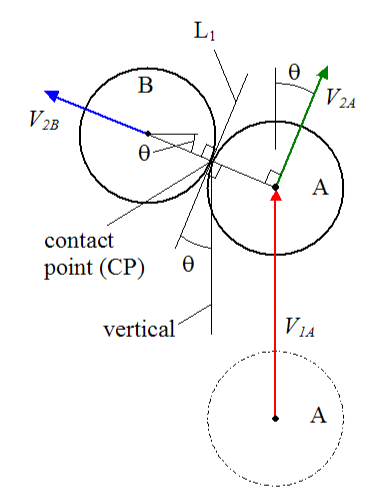
As seen in the diagram, no matter where the initial ball is travelling from, there is only one specific location in which it makes the second ball travel at a certain direction, calculated by the slope of the line between the two centers (through two points lies one unique line in any situation). Using this fact, I created a method to find the contact point of the first ball. This is done by first finding the slope of the line between the two balls, and then using trigonometry to calculate the center of the moving ball.
◼
There is a brief moment of friction upon contact between the balls and a small amount of energy is lost through sound; however, because this happens for such a short period of time, this is negligible during calculations.
In[]:=
findangle[ball_List,target_List]:=ArcTan[Abs[ball[[1]]-target[[1]]],Abs[ball[[2]]-target[[2]]]]//N;findhitlocation[ball_List,target_List]:= If[ball[[1]]<target[[1]], If[ball[[2]]<target[[2]], {ball[[1]]-2*radiusBall*Cos[findangle[ball,target]],ball[[2]]-2*radiusBall*Sin[findangle[ball,target]]}, {ball[[1]]-2*radiusBall*Cos[findangle[ball,target]],ball[[2]]+2*radiusBall*Sin[findangle[ball,target]]}], If[ball[[2]]<target[[2]], {ball[[1]]+2*radiusBall*Cos[findangle[ball,target]],ball[[2]]-2*radiusBall*Sin[findangle[ball,target]]}, {ball[[1]]+2*radiusBall*Cos[findangle[ball,target]],ball[[2]]+2*radiusBall*Sin[findangle[ball,target]]}] ];
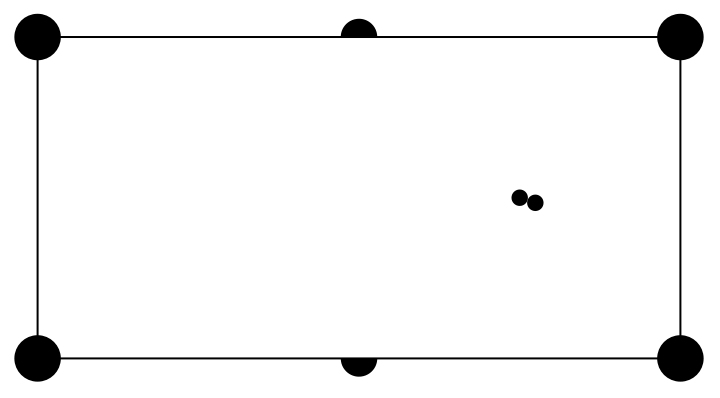
For example, shown below is the orientation required to hit the ball on the left to the top left pocket, regardless of where the initial moving ball started.
In[]:=
Graphics[{pockets,outerlines,Disk[{3,1},radiusBall],Disk[findhitlocation[{3,1},p[{0,2}]],radiusBall]}]
Out[]=
Momentum is defined as the quality of motion on a moving body, represented as mass multiplied by velocity of the object. When balls collide on a pool table, their momentum values are conserved. By computing the specific angles and setting up the system of equations, we can derive the important values in {Velocity of A, Slope of A, Velocity of B, Slope of B} format, though it's to be noted that since there is friction between the ball and the table cloth, the input velocity is the velocity value right before contact (A and B are as described in the above image):
In[]:=
velocityAfterCollision[ball1_List,ball2_List,initialslope_Real,velocity_Real]:= Flatten@Module {slope,θ}, Ifball1[[1]]==ball2[[1]]||ball1[[2]]==ball2[[2]], {0.,0.,velocity,initialslope}, slope=(ball2[[2]]-ball1[[2]])(ball2[[1]]-ball1[[1]]); θ=Abs[ArcTan[1+initialslope*(-1/slope),(-1/slope)-initialslope]]; If[θ>=π/2,θ=π-θ,True]; factor=1; If[velocity>=0, Which[slope<0,If[initialslope<slope||initialslope>-1/slope,factor=-1,True], slope>=0,If[initialslope>-1/slope&&initialslope<slope,factor=-1,True]];, Which[slope<0,If[initialslope<-1/slope&&initialslope>slope,factor=-1,True], slope>=0,If[initialslope>slope||initialslope<-1/slope,factor=-1,True]];]; Whichvelocity>0&&-1slope<0,{-factor*Abs[velocity*Cos[θ]],-1/slope,Abs[velocity*Sin[θ]],slope}, velocity>0&&-1slope>0,{factor*Abs[velocity*Cos[θ]],-1/slope,Abs[velocity*Sin[θ]],slope}, velocity<0&&-1slope<0,{-factor*Abs[velocity*Cos[θ]],-1/slope,-Abs[velocity*Sin[θ]],slope}, velocity<0&&-1slope>0,{factor*Abs[velocity*Cos[θ]],-1/slope,-Abs[velocity*Sin[θ]],slope}
Flatten[velocityAfterCollision[findhitlocation[{2.2,1.4},p[{4,0}]],{2.2,1.4},-2.,3.]]
Out[]=
{1.29437,1.28571,2.7064,-0.777778}
To make displaying the trajectory easier, I created a function to find the endpoint of a movement vector, given initial point, slope, and velocity using coordinate geometry.
◼
For shots in which the balls are perfectly lined up, the initially-stationary ball receives all of the velocity from the initiating ball.
◼
Because the velocity is not constant due to negative acceleration caused by friction, integration is utilized during this calculation.
In[]:=
endpoint[ball_List,slope_Real,velocity_Real]:=Flatten@ If[velocity>=0, dist=Integrate[velocity+friction*t,{t,0,-velocity/friction}]; {ball[[1]]+dist*Cos[ArcTan[slope]],ball[[2]]+dist*Sin[ArcTan[slope]]}, dist=Integrate[-velocity+friction*t,{t,0,velocity/friction}]; If[slope>=0,{ball[[1]]-dist*Cos[ArcTan[slope]],ball[[2]]-dist*Sin[ArcTan[slope]]}, {ball[[1]]-dist*Cos[ArcTan[slope]],ball[[2]]+dist*Sin[ArcTan[slope]]}]]
Using the above method, I created a visual representation of how the balls travel upon contact, with lines representing their trajectory. Note that the hit is targeted at the top right pocket, so it goes right through the hole.
The above method can be used to find the path of the balls upon collision, though there is also a minimum velocity required to get from one point to another, which can be calculated using integration with covered distance and friction (this function was simplified afterwards). This method, although it is not used in this project, is necessary for an optimization algorithm extension.
Generating The Random Board / Creating Methods To Keep Track Of Ball Movement
Generating The Random Board / Creating Methods To Keep Track Of Ball Movement
In the conventional game of pool, the first player starts off by breaking a cluster of balls; however, the breaking process is too inconsistent and impractical to calculate an optimal move for . Therefore, for this project, started off with 16 randomly generated balls on the table (including the cue ball at index 1) and start the total move count at 1. The conditions for the random sample are that randomly generated balls should not overlap and must stay within the table.
Now that the board and computation functions are created, I need to create methods that will track ball movement that implements the methods created above. Given the initial coordinates, the slope of the movement vector, and the initial velocity, a method can be created to check whether there are collisions within the path. Here, I defined collision to be either with a ball or a wall. If such collision exists, the function will return the location of the collision, and if it collided with a ball, it will return the location of the collided ball as well. Point-slope equation and point-to-line distance formula have been used for the computation.
View Code
With this method in hand, I created a recursive function to hit the ball at a certain direction, saving the important coordinates (points of collision, stopping point of every ball that gets movement initiated) along the way. This function stops when all the balls are stationary (when no further collisions occur).
◼
Initial velocity of the cue ball and the velocity of cue ball right before contact is different, and thus new velocity had to be calculated before passing in the value into the velocityAfterCollision method. This was done using constant acceleration kinematic equations.
◼
This method accounts for any number of collisions, regardless of how many balls are involved.
Here is a visualization of the progress, with the game of pool fully set-up. For this simple visual, only three balls are used to show the collision. The association output consists of a list of coordinate movement for each ball. As shown in the visual below, by adjusting the velocity, we can strategically set up the next move, directly lined up with a target.
Using above methods, we can calculate ideal trajectories for the cue ball to travel: with precise calculation using a computer, every situation has at least one possible potting angle and velocity pairing, and with further optimization has the possibility to hit more than one ball per turn. By creating a method to compute ideal slopes starting from the pockets using findhitlocation and hitBall, we can consistently get two or three balls per move, and efficiently set up the board for future moves.
Conclusion
Conclusion
My math-oriented project based on a pool game conducted using Wolfram Mathematica was primarily divided into three parts: initializing the game with necessary constants and methods, simulating the game, and creating an output of the process to clearing.
◼
Successes
◼
I created the entire billiard game on Mathematica.
◼
I successfully calculated most of physics equations involved on a pool table, and set them up as methods on Mathematica.
◼
I created a board of random indices of balls that eventually got cleared by the cue ball.
◼
My minimization method worked to an extent, though there are certainly areas of improvement possible with more time and experience.
◼
My visual output makes it easier to observe the moves.
◼
Potential Improvements
◼
My optimization process did not involve machine learning using a reinforcement learning agent, which was the intended goal but was incomplete due to time constraints and insufficient experience with Mathematica.
◼
I underestimated the time it would take to set up the game itself before the optimization method: most of my work was initially done on paper, and implementing the calculations to code took a while and the debugging process also took a long time. I overcomplicated the methods to try to create an advanced setup, and ended up not having enough time for some others.
◼
Moving balls colliding with one another were not accounted for in the algorithm: this calculation could make the project a lot more complex.
◼
I initially planned on creating a moving visual for every step, but due to time limitations this was not implemented for a full 15-ball table. The optimizing algorithm needed a bit more time as well, as it had a few bugs—though not present in this notebook, I can revisit this project to finish up the algorithm, as the computational methods are all set up.
◼
Possible Extensions
◼
For more experienced players, hitting a cue ball isn't solely about direction and velocity; other variables, such as front spin and backspin, are included in the equation. Implementing such variables could minimize the moves further and make the project more complex.
◼
Each pool game usually consists of two players—setting limitations to available moves depending on type may add more complexity.
◼
The ball does not need to enter the exact center of the pockets to score. By adding a margin of error, this could likely be minimized further.
◼
Humans obviously cannot precisely calculate exact slope and velocity per turn. Human error can also be an exciting implementation to further explore.
I am extremely thankful for all the support I received throughout the camp experience this year from all the mentors. I would like to thank Rory Foulger for administrating such an amazing camp with lots of dedicated people, Stephen Wolfram for suggesting project ideas as well as potential extensions, and my mentor, Simeon Buttery, for keenly providing me aid from start to finish, from helping me with Mathematica itself to debugging and providing potential solutions to my problems.