Sudoku or Suguru: Sugu
Sudoku or Suguru: Sugu
Many newspapers and magazines publish sudoku and/or suguru puzzles on a daily or weekly basis; the latter are also known as tectonic puzzles. They are also widely available on the internet.
A standard sudoku consists of a 9×9 grid, divided into nine 3×3 blocks. The goal is to fill each cell with a digit from 1 to 9 so that each digit appears exactly once in every row, every column, and every block. In other words, all digits in each row, column, and block must be different. To ensure a unique solution, some digits are given at the start.
Out[]=
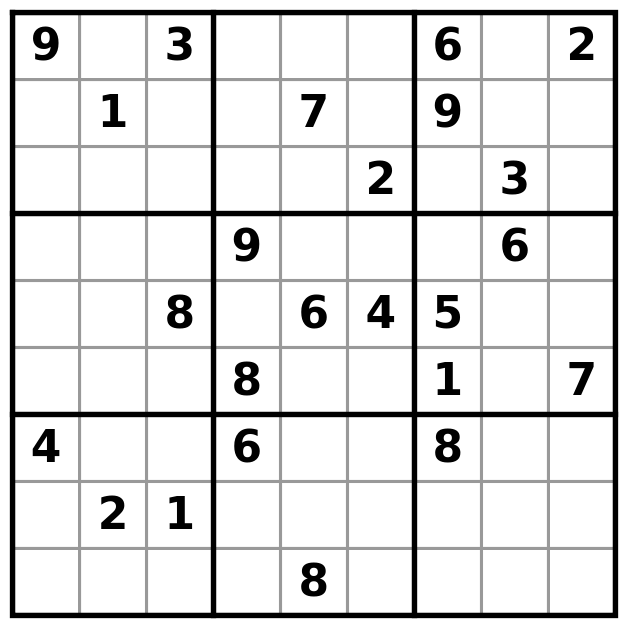
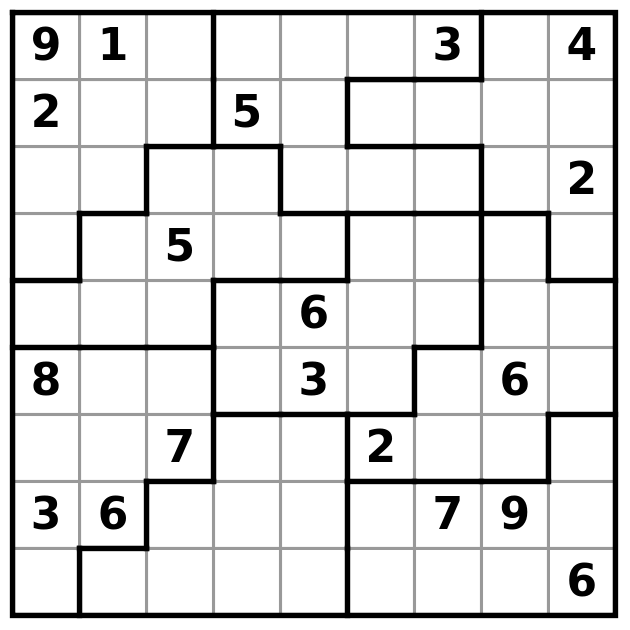
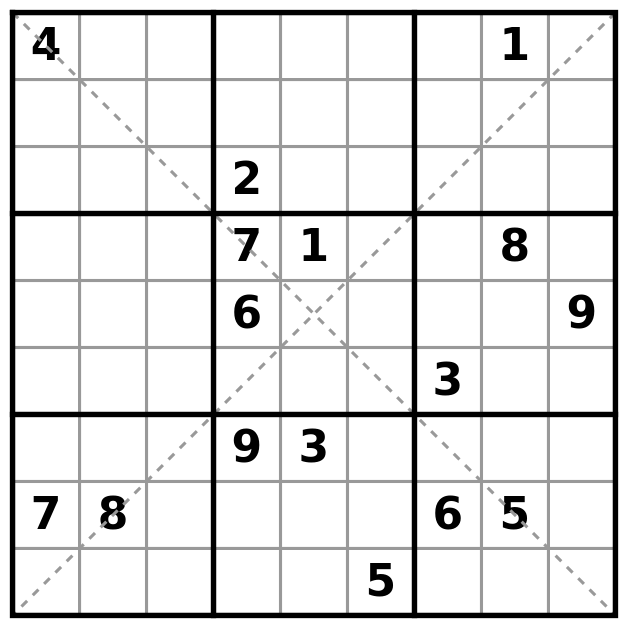
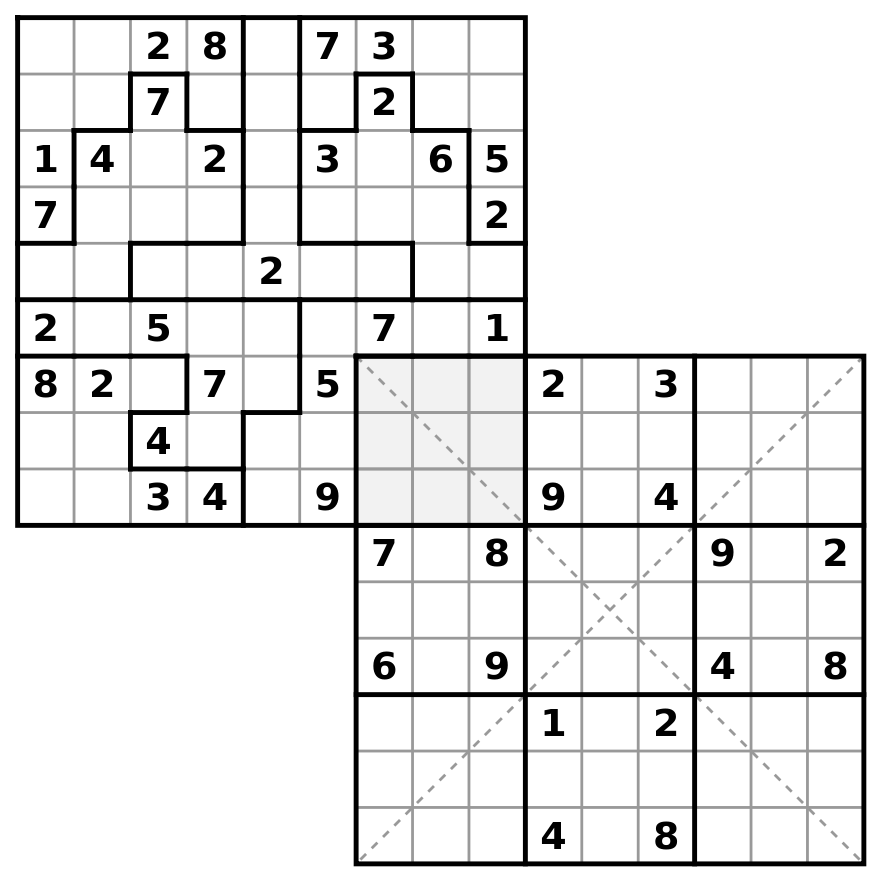
There are many variants. For example, a jigsaw sudoku uses irregular blocks instead of 3×3 squares, and a diagonal sudoku adds two extra blocks formed by the main diagonals; these diagonals must also contain all digits without repetition.
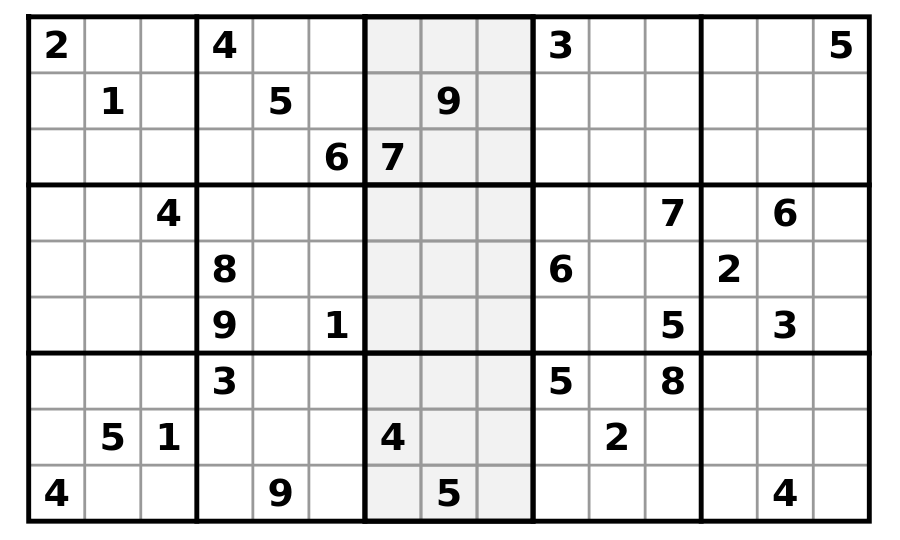
Single sudokus can be combined into multi-sudoku puzzles:
Out[]=
Out[]=
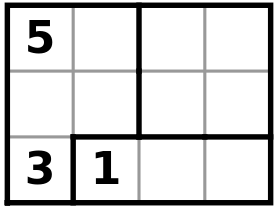
Like sudoku, a suguru or tectonic puzzle consists of a grid divided into regions, typically containing up to 5 cells. Each region of n cells must contain the digits 1, …, n, so that every digit appears exactly once per region. There are no row or column constraints, but every pair of neighboring cells (horizontally, vertically, or diagonally) must have different digits. As with sudoku, some digits are usually given to guarantee a unique solution. Suguru puzzles can have grids of any size.
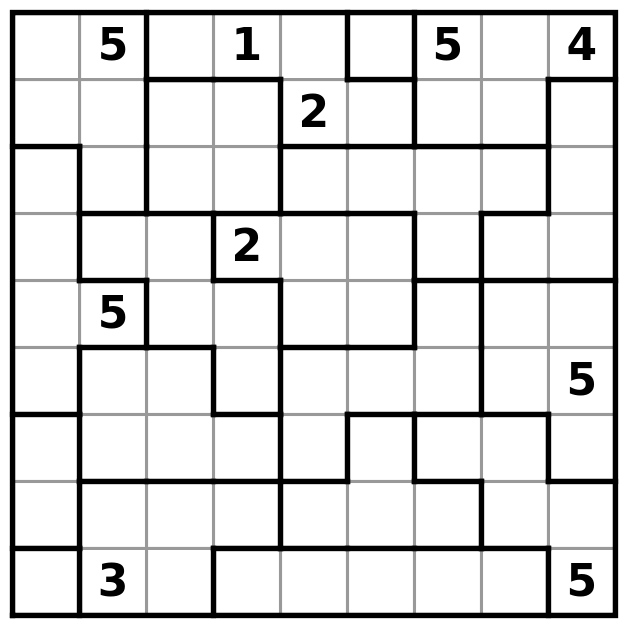
Although these puzzles have clear differences, these differences are essentially irrelevant. In fact, every standard, variant, or multi-sudoku, as well as every suguru, can be seen as a special case of a general type of puzzle that we will refer to as a sugu puzzle.
A sugu puzzle consists of a list of cells. For each cell, we have:
- a list of candidate digits for that cell,
- a list of other cells; we say that these cells are 'seen' by this cell.
Solving a sugu puzzle means assigning one candidate to each cell such that any two cells that see each other have different values.
- a list of candidate digits for that cell,
- a list of other cells; we say that these cells are 'seen' by this cell.
Solving a sugu puzzle means assigning one candidate to each cell such that any two cells that see each other have different values.
All sudokus and all sugurus are indeed sugus. In sudoku, a cell sees all other cells in its row, column and block; in suguru, a cell sees all other cells in its region and all its neighbors.
In sugu, grids, rows, columns, blocks and regions no longer matter. Every solving technique is expressed in terms of 'seeing', making it directly applicable to both all types of sudokus and all sugurus.
Solving a Sugu
Solving a Sugu
There are many functions available that can instantly compute the solution to a sudoku or a suguru puzzle. But the solution itself is rarely the interesting part. The real appeal of puzzles such as sugus lies in working out the answer yourself by logical reasoning.
The strategy is to look for arguments showing that a candidate cannot be placed in a cell, and to keep doing this until we find a cell with only one candidate left; that candidate must then be placed in that cell.
Most of these arguments are based on the following obvious observation: If, within a group of cells, a candidate must appear in one of those cells, then that candidate can be eliminated from every cell that sees the entire group.
A key part of manual sugu solving is therefore to find such groups of cells where it is certain that a candidate must occur. The most common example of this is a tuple, which we will now discuss.
A tuple is a group of n cells that see each other and together have n candidates. It follows that every candidate in a tuple has to be placed in one of the cells of the tuple, for if not, another candidate of the tuple has to be placed in more than one cell of the tuple, which violates the condition that the cells see each other and therefore must have different values. Consequently, every candidate of a tuple can be eliminated from all cells that see all cells in the tuple.
Typical examples of tuples include the unsolved cells in a region of a suguru puzzle and the unsolved cells in a sudoku row, column, or block. But in general, tuples can arise in many other configurations, not just within a single region, row, column, or block. We also refer to tuples according to their size: single, pair, triple, quadruple, and so on.
Let us see some examples.
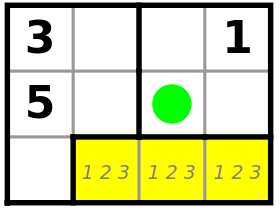
In the suguru above, the three yellow cells R3C2, R3C3, and R3C4 with candidates 1, 2, and 3 form a region and therefore a triple. Each of the three candidates must be placed in one of these cells. All three cells are seen from the green cell R2C3, so candidates 1, 2, and 3 can be eliminated there, leaving only candidate 4. Thus the digit 4 can be placed in R2C3.
The next suguru example is slightly more advanced:
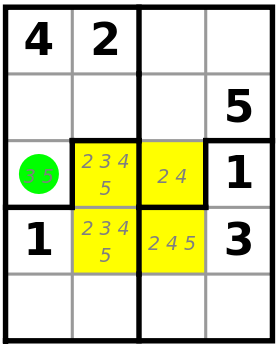
The four yellow cells R3C2, R3C3, R4C2, and R4C3 with candidates 2, 3, 4, and 5 see each other and therefore form a quadruple. In the green cell R3C1 only candidates 3 and 5 are possible. Because this cell sees all cells of the quadruple containing candidate 3, candidate 3 can be eliminated from the green cell, leaving only candidate 5.
Note that this quadruple is not a region.
Note that this quadruple is not a region.
A similar example from a partially solved sudoku:
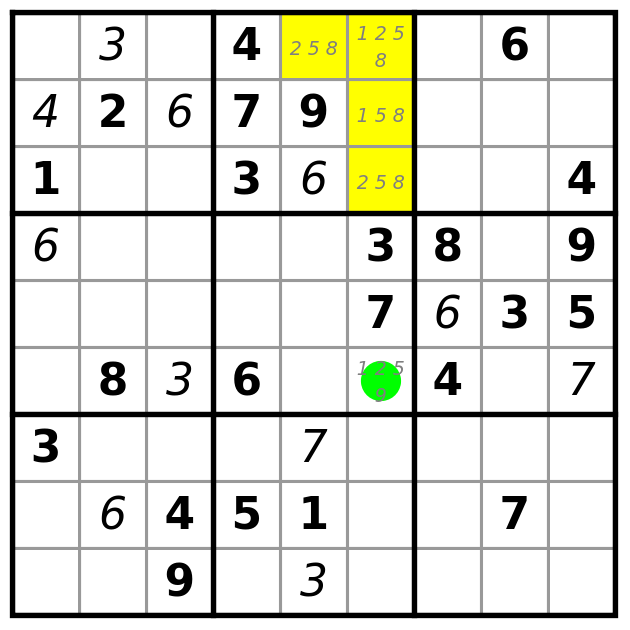
The yellow cells R1C5, R1C6, R2C6, R3C6 with candidates 1, 2, 5 and 8 are the open cells of a block and therefore form a quadruple. The green cell R6C6 sees all cells with candidate 1 from this quadruple, and therefore the candidate 1 can be removed from the green cell. (That gives a triple 2,5,9 in row 6 and then a single 1 at R6C8.)
The rule tuple encompasses many classical sudoku techniques that have their own names. In this case, it corresponds to the locked candidates rule, producing a hidden single in row 6.
The vast majority of published sudoku and suguru puzzles can be solved using the tuple rule alone. For more difficult puzzles, more advanced rules are needed, and not every puzzle can be solved by pure logic without backtracking. The logical rules available in SudokuSuguruAssistant are explained in a dedicated notebook. When the assistant is opened, this notebook can be accessed from the action menu in the interface under Documentation.
Using the resource function SudokuSuguruAssistant
Using the resource function SudokuSuguruAssistant
The function SudokuSuguruAssistant provides an interface in which you can try to solve a sudoku or suguru puzzle in much the same way you would do with pencil and paper in a magazine. Two extra features make it more convenient: the function checks for user errors, and at any point you can request a hint on how to proceed.
Which arguments you pass to the function depends on the type of puzzle you want to solve. For a suguru, supply a list of its dimensions as the argument, for a standard sudoku, no arguments are needed and for other (multi-)sudokus, see the documentation.
The result is an interface where you can enter the puzzle. Entry is fast: if needed, draw the region or block boundaries by clicking on the cell edges, and type the given clues directly into the cells.
Once the puzzle is entered, click the Manual Solve button to start solving it by hand. Information about the puzzle you entered will also be displayed.
Example: a 6x6 suguru
Example: a 6x6 suguru
Suppose we want to solve a given 6×6 suguru. We call:
That gives:
Click on the cell borders and enter the clues to reproduce the desired suguru:
Then press the Manual Solve button.
The mode of the interface has now changed from Enter to Manual Solve, and information about the puzzle appears below it. We have here a 6×6 suguru with 8 clues, and the assistant invoked the Tuples rule 8 times and the LinkedCells rule twice for finding the solution — suggesting a rather tricky puzzle. The string displayed can be used to enter the puzzle directly.
In Manual Solve mode you can work on the puzzle just as with pencil and paper: you can enter numbers in empty cells and also make notes about which candidates are possible there. If you do something inconsistent with the solution, an error message appears.
The most important feature of the function, however, is the Hint button below the puzzle. Pressing it gives you a sequence of hints which, when followed step by step, lead to placing a number. You can click any hint to see the cells used by that logical rule highlighted in color on the puzzle.
Example: a hint for a 6x6 suguru
Example: a hint for a 6x6 suguru
When manually solving the 6×6 suguru shown earlier, we placed numbers successively in R1C2 and R1C1 and found that in the second 2×2 region candidate 4 could only go into cells R3C5 and R4C5. To get advice on how to continue, press the Hint button.
We have to use the quadruple rule twice to arrive in in a situation where the rule pair yields a single at R5C1.
Clicking on any of the steps shows color information for that step. This is what we see if we clicked on the first step:
Example: a hint for a standard sudoku
Example: a hint for a standard sudoku
This is the result of pressing the Hint button when solving a standard sudoku and clicking on the first hint item.
As a consquence of the logical rule XYChain, we can eliminate the candidate 5 in cell R5C4. That gives a pair R5C4, R6C4 in the fourth column, which yields a single in cell R8C4.
Finally, if you want to solve a puzzle but don’t have one available, for standard sudokus and sugurus up to size 9×9 you can generate one. For doing so, call SudokuSuguruAssistant with the arguments for the desired puzzle type and, if needed, enter the region boundaries. Instead of filling in the clues, press the Generate button.
Example: generating a sudoku
Example: generating a sudoku
Open the assistant for a standard sudoku:
Press the Generate button:
You can solve this sudoku directly, or generate another one by pressing Regenerate.
Example: generating a 9x9 suguru
Example: generating a 9x9 suguru
When opening the assistant for a 9×9 suguru you must enter the regions before you can generate a puzzle. Regions that we entered can be stored in a string for later reuse. With the following command a saved 9×9 suguru without clues is opened at random.
Now you can press Generate directly:
This suguru cannot be solved with the available rules. It may be better to press Regenerate repeatedly until you find a puzzle you would like to solve by hand.
CITE THIS NOTEBOOK
CITE THIS NOTEBOOK
Assisted solving a Sudoku or Suguru puzzle
by Fred Simons
Wolfram Community, STAFF PICKS, September 19, 2025
https://community.wolfram.com/groups/-/m/t/3546660
by Fred Simons
Wolfram Community, STAFF PICKS, September 19, 2025
https://community.wolfram.com/groups/-/m/t/3546660