CITE THIS NOTEBOOK: Exploring Relief Maps on Ancient Earth by Jeff Bryant. Wolfram Community FEB 10 2023.
DATASET: Scotese, Christopher R, & Wright, Nicky M. (2018). PALEOMAP Paleodigital Elevation Models (PaleoDEMS) for the Phanerozoic. https://doi.org/10.5281/zenodo.5460860.
DATASET: Scotese, Christopher R, & Wright, Nicky M. (2018). PALEOMAP Paleodigital Elevation Models (PaleoDEMS) for the Phanerozoic. https://doi.org/10.5281/zenodo.5460860.
When exploring paleogeography, its necessary to recognize that the continental plates move with time. This has been explored in previous posts using polygons representations for the continental plates. The downside to this representation is that it treats each plate as completely flat (in a global sense) and immune to the effects of marine transgressions and regressions onto the continents. Just because its continental crust doesn’t mean that the seas can’t transgress onto it when sea levels rise, or regress from it when sea level drops. Public data is available for exploring global data in relief so such effects of sea level change can be explored on the ancient continents.
Setup
Setup
The data explored here was initially learned about from:
The above has a link to a larger dataset (Scotese_Wright_2018_Maps_1-88_6minX6min_PaleoDEMS_nc.zip):
This data is global in scope and has a resolution of .1 degrees (6 arc minutes). As a result, the data is relatively memory intensive.
In order to explore this data, create a new folder and then download the ZIP file into this folder, unzip it there, and place this notebook in the new folder you created (one level up from the unzipped results).
Single Map
Single Map
Set the working directory to be the notebook directory:
In[]:=
SetDirectory[NotebookDirectory[]];
The data in this example is for a given time slice (300 million years ago) and is a NetCDF file containing three separate data chunks:
In[]:=
cdf=Import["Scotese_Wright_2018_Maps_1-88_6minX6min_PaleoDEMS_nc\\Map57_PALEOMAP_6min_Late_Pennsylvanian_300Ma.nc","Data"]
Out[]=
/latitudeNumericArray,/longitudeNumericArray,/zNumericArray

For the explorations here, I’m only interested in the elevation (z) values:
In[]:=
data=Normal[cdf["/z"]];
To avoid throwing off the ColorFunction with potential bathymetry data (available in some of the more recent data slices), the PlotRange is restricted to sea level up to 4500 meters. ReliefImage provides an equirectangular projection of the data as an image.
In[]:=
ri=ReliefImage[data,PlotRange->{0,4500},ClippingStyle->{Automatic,White},ColorFunction->ColorDataFunction["HypsometricTints","Physical",{-11000,9000},Blend["HypsometricTints",#1]&],ColorFunctionScaling->False];
The resulting image can be fed into GeoGraphics as a custom GeoBackground and then reprojected as follows:
In[]:=
GeoGraphics["World",GeoBackground->GeoStyling[{"GeoImage",ri}],GeoProjection->"Mollweide",ImageSize->650,GeoGridLines->Automatic]
Out[]=
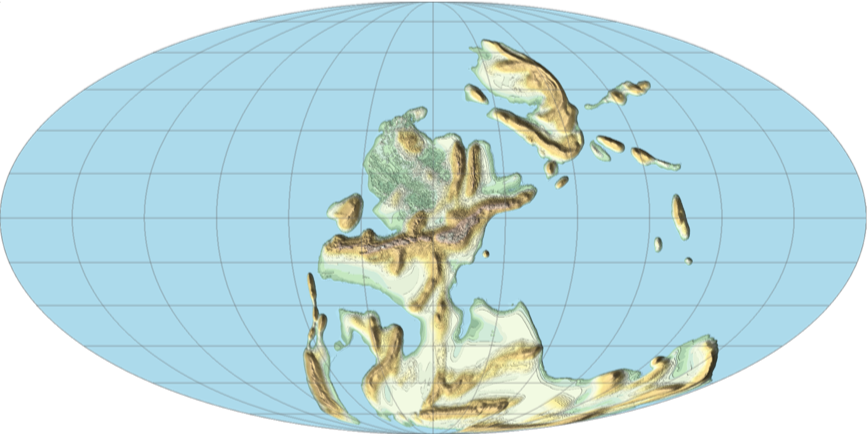
Compare the new results to the vector based results that were already available:
In[]:=
ResourceFunction["ContinentalPlateMaps"][Quantity[300,"Megayears"],ImageSize->650,GeoGridLines->Automatic]
Out[]=
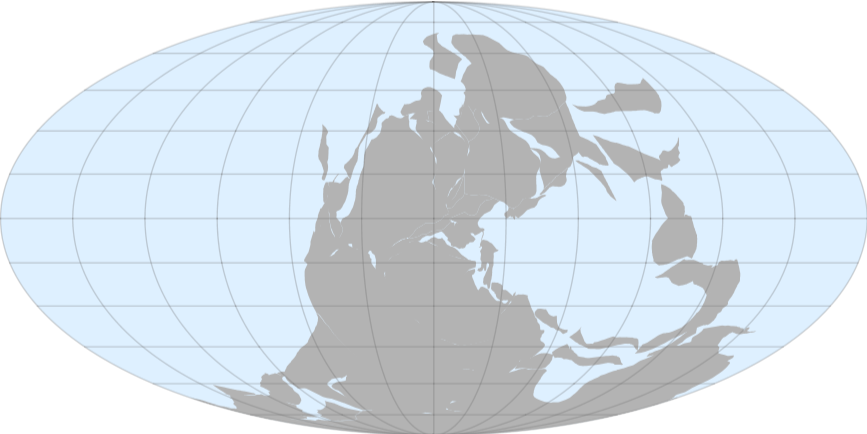
The relief data shows that not all of the continental plates were above sea level.
Animation
Animation
To create an animation, its necessary to import multiple data files. Since the individual files are relatively large, loading all of them can consume quite a bit of memory so make sure to close any unnecessary applications for a nicer experience.
Get all of the NetCDF files:
In[]:=
fns0=FileNames["Scotese_Wright_2018_Maps_1-88_6minX6min_PaleoDEMS_nc\\*.nc"];
Sort the data files according to the dates:
In[]:=
fns=ReverseSortBy[fns0,ToExpression[StringSplit[StringSplit[#,"_"][[-1]],"Ma"][[1]]]&];
Extract the dates on their own (useful for plot labels later):
In[]:=
dates=ReverseSort[ToExpression[StringSplit[StringSplit[#,"_"][[-1]],"Ma"][[1]]]&/@fns0];
Import the data from the NetCDF files:
In[]:=
cdfs=Import[#,"Data"]&/@fns;
Pair the elevation data with the dates:
In[]:=
data=Transpose[{Normal[#["/z"]]&/@cdfs,dates}];
There are 109 maps, each at a different time:
In[]:=
data//Length
Out[]=
109
Find the full range of data elevations:
In[]:=
{Min[#[[All,1]]],Max[#[[All,2]]]}&@(MinMax[Flatten[#]]&/@data[[All,1]])
Out[]=
{-11000.,10500.}
As a test, generate a map from the data for the present day (the last one in the sequence):
In[]:=
GeoGraphics["World",GeoBackground->GeoStyling[{"GeoImage",ReliefImage[data[[-1,1]],PlotRange->{0,4500},ImageSize->650,ClippingStyle->{Automatic,White},ColorFunction->ColorDataFunction["HypsometricTints","Physical",{-11000,9000},Blend["HypsometricTints",#1]&],ColorFunctionScaling->False]}],GeoProjection->"Mollweide",ImageSize->650,GeoGridLines->Automatic,PlotLabel->ToString[data[[-1,2]]]<>" MYa"]
Out[]=
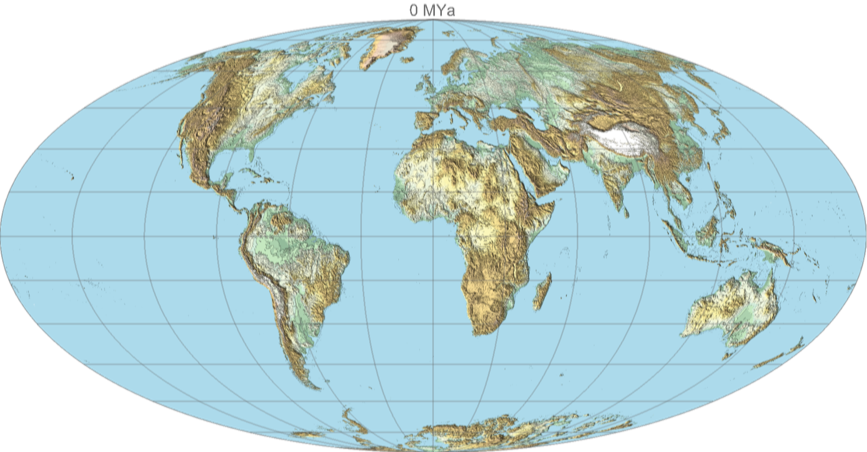
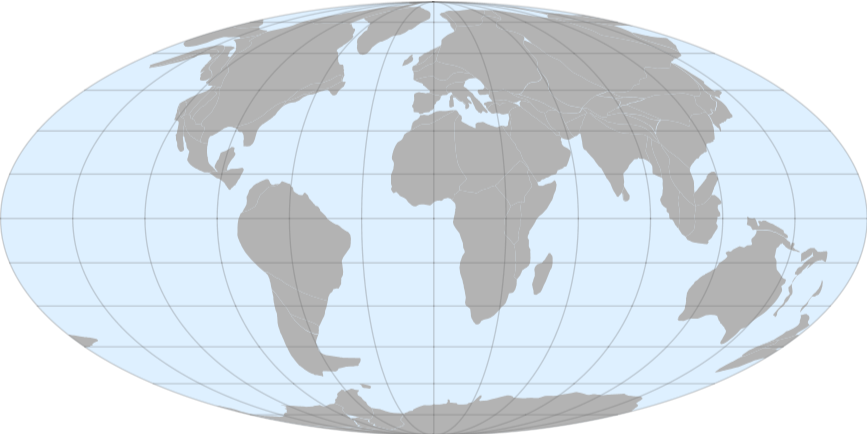
Compare to the vector version:
In[]:=
ResourceFunction["ContinentalPlateMaps"][Quantity[0,"Megayears"],ImageSize->650,GeoGridLines->Automatic]
Out[]=
Generate another map for the Late Ordovician Epoch:
Compare to the vector version (slightly different time):
Notice how the relief map provides critical information about which areas were under water at the time. The simple vector versions lack this information, focusing only on the latitude and longitude of the continental plates.
Create pairs of the ReliefImage and date for each map:
Feed the ReliefImage results into GeoGraphics and use a Mollweide projection and the date as a PlotLabel:
Resulting MP4 file is stored here:
Copy the mp4 file into the cloud: