Introduction
Introduction
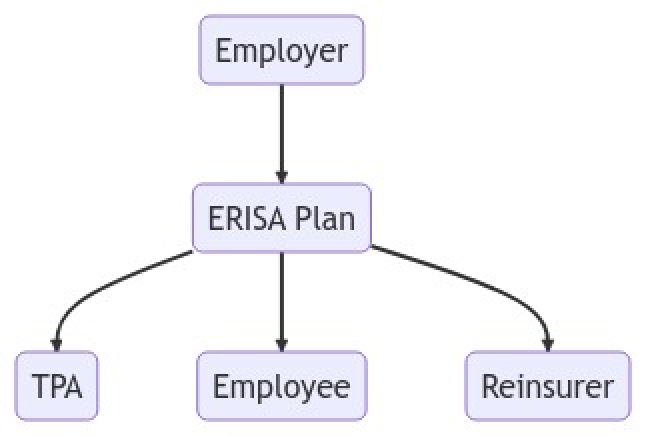
One of the lovely things about the new AIAssistant ResourceFunction is that you can combine it with other Wolfram Language functionality and both get excellent results and teach yourself new things. Here’s an example in which I combine AIAssistant the new MermaidInk ResourceFunction to generate a graphic that is useful in my insurance law class. The point isn’t about insurance law; the point is that without knowing ANYTHING about Mermaid, I can now start to learn how it works and harness its powers.
Below is my session in AIAssistant prompt notebook
AIAssistant prompt notebook
AIAssistant prompt notebook

Create mermaid-js code for a graph showing that employers provide an ERISA plan which is administered by a TPA. The ERISA plan serves employees. The employer employs employees. A reinsurer reinsures the ERISA Plan. Remember to use node designators such as A, B and C. Make it a top down diagram. Don't separate lines of the mermaid-js code with a semi-colon. Take the Mermaid code and wrap it in a string. Then wrap the string in a Wolfram Language ResourceFunction called MermaidInk
mermaidgraphTD;A(Employer)-->B(ERISAPlan);B-->C(TPA);B-->D(Employee);B-->E(Reinsurer);
MermaidInk
ResourceFunction["MermaidInk"]["graph TD; A(Employer)-->B(ERISA Plan); B-->C(TPA); B-->D(Employee); B-->E(Reinsurer);"]
In[]:=
ResourceFunction["MermaidInk"]["graph TD; A(Employer)-->B(ERISA Plan); B-->C(TPA); B-->D(Employee); B-->E(Reinsurer);"]
Out[]=
CITE THIS NOTEBOOK
CITE THIS NOTEBOOK
Combining AIAssistant and new MermaidInk ResourceFunctions
by Seth Chandler
Wolfram Community, STAFF PICKS, April 20 2023
https://community.wolfram.com/groups/-/m/t/2902317
by Seth Chandler
Wolfram Community, STAFF PICKS, April 20 2023
https://community.wolfram.com/groups/-/m/t/2902317