BaseCamp Map Instructions
BaseCamp Map Instructions
These notebooks can create KMZ maps which can be used in Google Earth, Garmin BaseCamp, and in Garmin GPS receivers which can import custom maps. The attached Mathematica notebooks need to be placed into a folder which contains two empty folders named Maps and KMZ.
The notebook, PNGQuadToBaseCamp.nb, will create a KMZ map using free USGS topographic maps from https://viewer.nationalmap.gov/basic/
The notebooks are set up to use the 7.5 minute U.S. topographic quadrangle maps. The geo.pdf version and the .xml Metadata file with the same map name should be downloaded and both files put into the Maps folder.
The geo.pdf file needs to be modified and saved in PNG format for the programs. Mathematica cannot handle the conversion. I have been using Adobe Acrobat Standard XI to do the conversions to a file with pixel dimensions of {4800,5800}. But the free Acrobat Reader can do lower resolution copies - see below.
Once the geo.pdf file is opened in Acrobat, the map layers need to be adjusted. The Map Collar needs to be hidden and the Map Frame > Projection and Grids, needs to be hidden to create a clean map with white border. If you want the ortho-photo image, that can be unhidden. The file is then saved as PNG with the default parameters without changing the name.
The free Acrobat Reader can get a lower resolution version of the file by using copy file to clipboard, then pasting the map into “map = “ rather than importing the PNG file. A snapshot of the file could also be copied, but resolution might be lower. The mapFileName is still needed to get XML file with the latitude and longitude information.
The notebooks are set up to use the 7.5 minute U.S. topographic quadrangle maps. The geo.pdf version and the .xml Metadata file with the same map name should be downloaded and both files put into the Maps folder.
The geo.pdf file needs to be modified and saved in PNG format for the programs. Mathematica cannot handle the conversion. I have been using Adobe Acrobat Standard XI to do the conversions to a file with pixel dimensions of {4800,5800}. But the free Acrobat Reader can do lower resolution copies - see below.
Once the geo.pdf file is opened in Acrobat, the map layers need to be adjusted. The Map Collar needs to be hidden and the Map Frame > Projection and Grids, needs to be hidden to create a clean map with white border. If you want the ortho-photo image, that can be unhidden. The file is then saved as PNG with the default parameters without changing the name.
The free Acrobat Reader can get a lower resolution version of the file by using copy file to clipboard, then pasting the map into “map = “ rather than importing the PNG file. A snapshot of the file could also be copied, but resolution might be lower. The mapFileName is still needed to get XML file with the latitude and longitude information.
Once things are set up, the whole notebook can be evaluated and the resulting KMZ file should be in the KMZ folder. If everything worked this file can be opened with Google Earth or the Garmin free BaseCamp program. Tracks from any Garmin device that uses BaseCamp, including watches, can then be viewed on the map and edited.
A date time stamp is added to the file name and the internal file names in the KMZ file so that BaseCamp will import all the internal information. The external KMZ file name can be changed so the time stamp can be removed. The time stamp in the program allows creation of different versions of the image with or without the ortho satellite image without file name conflicts in the KMZ folder.
The trimWhite function removes the white border giving a file with dimensions about {3785, 4550} for a file with a little more than 16 mega pixels. The final resolution of the map will have a square pixel with a side representing about 2.5 feet on the earth’s surface if a full PNG file is used.
A date time stamp is added to the file name and the internal file names in the KMZ file so that BaseCamp will import all the internal information. The external KMZ file name can be changed so the time stamp can be removed. The time stamp in the program allows creation of different versions of the image with or without the ortho satellite image without file name conflicts in the KMZ folder.
The trimWhite function removes the white border giving a file with dimensions about {3785, 4550} for a file with a little more than 16 mega pixels. The final resolution of the map will have a square pixel with a side representing about 2.5 feet on the earth’s surface if a full PNG file is used.
One MegaPixel files for Garmin handheld GPS receivers
One MegaPixel files for Garmin handheld GPS receivers
The notebook, PNGQuadToMontana, will convert the PNG file described above to 16 KMZ map files and save them into a folder with the mapFileName into the KMZ folder.
The KMZ maps can be opened by Google Earth or imported into BaseCamp and moved to a Garmin receiver which handles one megapixel maps. The 16 maps cover the full 7.5 minute topographic quadrangle. The program adjusts the file size to close to the 1 megapixel limit. If the initial PNG or copied file resolution is significantly less than 16 megapixels the image quality will be degraded. With the full resolution, the maps look very nice in the handheld receiver. I don’t have a GPS watch which handles maps, but it would be interesting to try.
Getting KMZ data back into Mathematica
Getting KMZ data back into Mathematica
Mathematica will try to import a KMZ file with its own proprietary system, but it will not work correctly for these files.
In[]:=
smallMapName=FileNameJoin[{NotebookDirectory[],"KMZ","OxbowMountain20200711T103656map15.kmz"}];
In[]:=
Import[smallMapName]
Out[]=
The KMZ files made by the programs are Zipped KML files with a folder containing the JPG image. The following code will retrieve the data in the KMZ maps for use in Mathematica.
In[]:=
kmzNames=Import[smallMapName,{"ZIP","FileNames"}]
Out[]=
{files\map15.jpg,doc.kml}
In[]:=
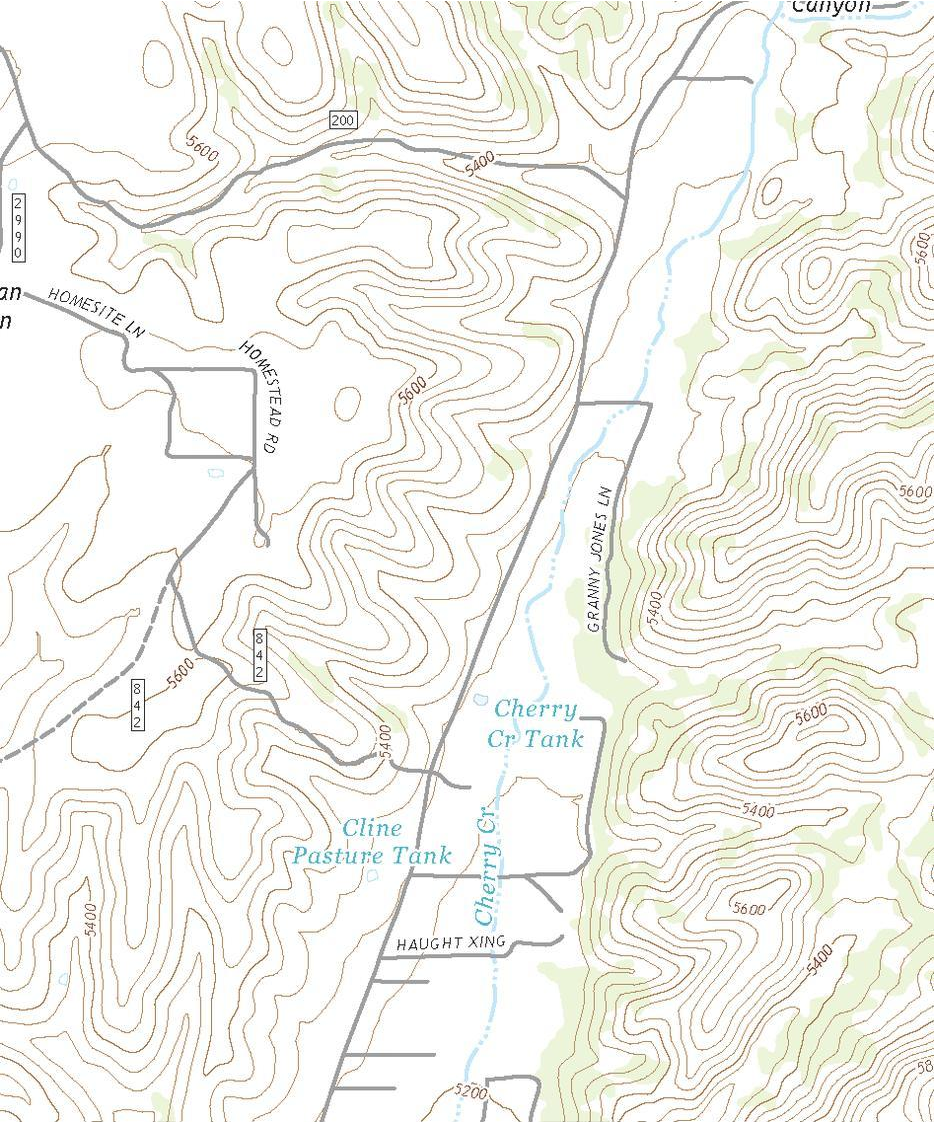
img=Import[smallMapName,{"ZIP",kmzNames[[1]]}]ImageDimensions@imgTimes@@%1024.^-2(*megapixels*)
Out[]=
Out[]=
{934,1122}
Out[]=
0.999401
In[]:=
Import[smallMapName,{"ZIP",kmzNames[[2]],"XML"}]
Out[]=
XMLObject[Document][{XMLObject[Declaration][Version1.0,EncodingUTF-8]},XMLElement[kml,{{http://www.w3.org/2000/xmlns/,xmlns}http://www.opengis.net/kml/2.2,{http://www.w3.org/2000/xmlns/,gx}http://www.google.com/kml/ext/2.2,{http://www.w3.org/2000/xmlns/,kml}http://www.opengis.net/kml/2.2,{http://www.w3.org/2000/xmlns/,atom}http://www.w3.org/2005/Atom},{XMLElement[GroundOverlay,{},{XMLElement[name,{},{map15}],XMLElement[Icon,{},{XMLElement[href,{},{files/map15.jpg}],XMLElement[viewBoundScale,{},{0.75}]}],XMLElement[LatLonBox,{},{XMLElement[north,{},{34.1563}],XMLElement[south,{},{34.125}],XMLElement[east,{},{-110.906}],XMLElement[west,{},{-110.938}]}]}]}],{}]
Next project getting custom background maps into Mathematica, anybody have any ideas how to do it?