Chrysalis is my self-scaffolding data science agent aiming to transform the data science workflow through recognizing column importance from a dataset and producing an appropriate visualization in Wolfram Language. In addition to its custom agentic tools, Chrysalis operates as a collaboration between two LLMs: one native to the Wolfram Notebook via API key (responsible for carrying out CAG-related operations through tool calls) and the other through a MCP server (responsible for the self-scaffolding function). What makes Chrysalis unique is this partnership between parent-child LLMs, and the self-scaffolding system architecture.
Introduction
Introduction
Data science analysis and exploration is often a busy and time consuming exercise, with data visualization as a cornerstone of communicating the findings of the science itself. When combining both the power of Wolfram Language CAG (Computer Augmented Generation) with LLMs to create an agent, you get a highly capable, adaptive, and effective assistant. Especially if the agent’s area of expertise is data science and visualization. The significance lies in the ability to have an agent adapt to your habits and customized to your workflow -- not only just speeding up data analysis and employing efficient problem solving, but also simply being the perfect answer to your analytical needs.
For Chrysalis, a scaffold can be a code pattern/template or problem solving approach/method. In a technical sense, this allows the agent to use Retrieval Augmented Generation (RAG) to not just store but to ingest problem solutions and patterns. In an application sense, it means that the agent learns how to solve problems, and its knowledge base and efficiency will only grow. The self-scaffolding system I designed is a straightforward but effective way to introduce reinforcement learning to the agent, meaning that it learns from its own actions over time. When you combine the might of my self-scaffolding system with the raw power of Wolfram Language in the form of tool calls (technically referred to as Computer Augmented Generation [CAG]), the result is a cogent, robust agent ready to assist anyone in any possible task.
For Chrysalis, a scaffold can be a code pattern/template or problem solving approach/method. In a technical sense, this allows the agent to use Retrieval Augmented Generation (RAG) to not just store but to ingest problem solutions and patterns. In an application sense, it means that the agent learns how to solve problems, and its knowledge base and efficiency will only grow. The self-scaffolding system I designed is a straightforward but effective way to introduce reinforcement learning to the agent, meaning that it learns from its own actions over time. When you combine the might of my self-scaffolding system with the raw power of Wolfram Language in the form of tool calls (technically referred to as Computer Augmented Generation [CAG]), the result is a cogent, robust agent ready to assist anyone in any possible task.
Implementation
Implementation
Setting Up the Agentic Process
Setting Up the Agentic Process
Model Context Protocol (MCP) Server Configuration
Model Context Protocol (MCP) Server Configuration
To begin, there needs to be an MCP server created and configured to give the parent LLM the access it needs to provide code, tool calls, and run the self-scaffolding process. In order to make sure that all code provided by the parent LLM is in Wolfram Language and evaluatable by the child LLM residing natively in the Wolfram Notebook, the MCP server especially needs to be passed these default tools: Read Notebook, WriteNotebook, and WolframLanguageEvaluator. The MCP Server gives ClaudeCode (or any other agent client) access to custom tools I’ve written, as well as default Wolfram tools.
Select the desired default Wolfram tools and equip the LLM with them in the configuration:
wolframTools=$DefaultMCPTools//KeyTake[{"ReadNotebook","WriteNotebook","WolframLanguageEvaluator"}]
Out[]=
ReadNotebookLLMTool,WriteNotebookLLMTool,WolframLanguageEvaluatorLLMTool

In[]:=
config=LLMConfiguration[<|"Tools"->Values[wolframTools],"Model"-><|"Service"->"GoogleGemini","Name"->"gemini-3.1-flash-lite"|>|>]
Out[]=
LLMConfiguration

Create the MCP server (which overwrites itself if it already exists) and install the server:
In[]:=
chrysalisServer=CreateMCPServer["Chrysalis Scaffolds",config,OverwriteTarget->True]
Out[]=
MCPServerObject
In[]:=
InstallMCPServer["ClaudeCode",chrysalisServer]
Out[]=
Success
Coding Tools for the LLM
Coding Tools for the LLM
The user may choose to write tools for the native agent to run in the Notebook and the parent agent in the MCP to tool call on. This is typically done by writing an LLMFunction and wrapping it in an LLMTool. Issues that may occur include reaching maximum input token limits and LLMs may disobey prompts or fail to provide adequate results. The former depends on the task, the latter on the age or power of the model. If a paid API key that provides higher input tokens or a more capable model is not in the cards, architecting around these restraints is recommended. For Chrysalis, I had to change models a few times, eventually choosing to use the free Gemini 3.1 Flash Lite API key, which has a 1 million maximum token input and was smarter than Gemma 4. I had initially planned to use Gemma 4 as it is open source and could run it on my laptop, but, unfortunately, there were strange issues with installation, so I switched to using an API key. Overall, this was best as it allowed for me to use more powerful models than originally intended, which was absolutely necessary. Gemini 3.1 Flash Lite obeyed prompting, worked quickly, and provided quality results.
Import the dataset and assign it to variable name “tabular”:
In[]:=
tabular=Tabular[Import["/Users/Yuuki/Desktop/Chrysalis Master/Cosmic Rays (summary)/dataSummaryInclined.csv","Dataset"]];
Calling Graphing Tool will have Gemini agentically generate a graph using Wolfram Language CAG like so:
Out[]=
LLMTool
In[]:=
graphingToolCall=ToExpression[graphingFunction[columnKeysandDimension[Dimensions[tabular],StringRiffle[ColumnKeys[tabular],","]]]]
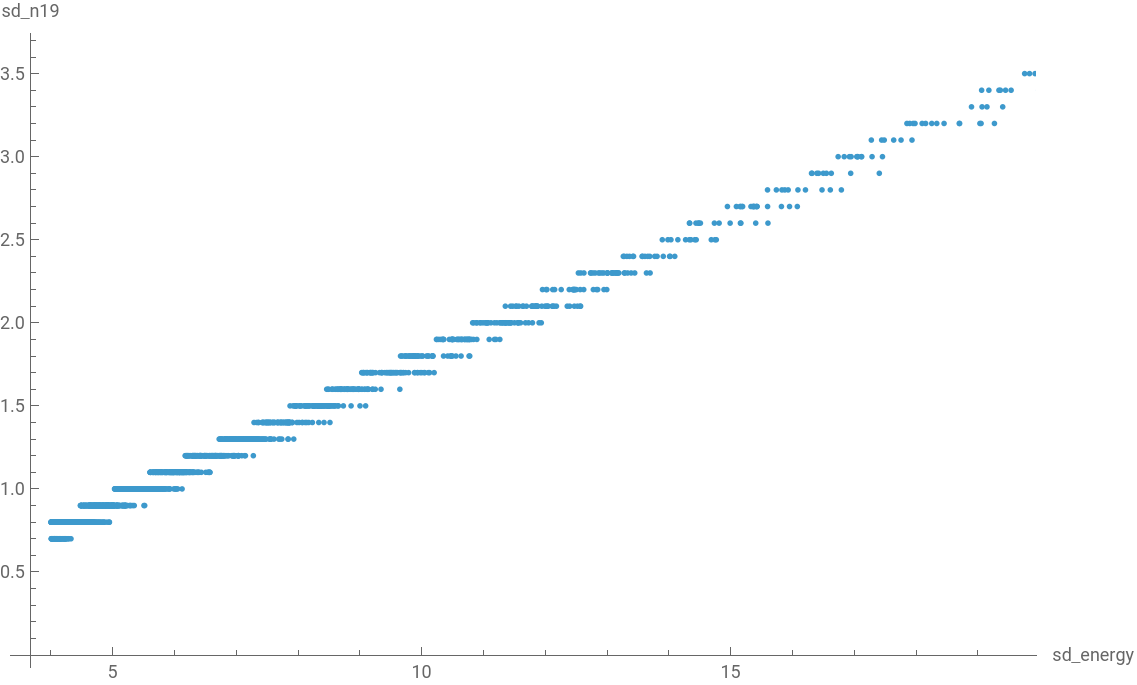
It is important to note that the dataset must always be a tabular dataset given the variable name “tabular.” This is important for tool calls to work properly, as unfortunately, Chrysalis architecture requires hard-encoding the variable name to something consistent to work. Once the tabular dataset is saved to “tabular,” you may write and call LLM Tools.
Sending Tools to the MCP Server
Sending Tools to the MCP Server
Similarly to how we configured the MCP server to have Wolfram Language tools, we can pass custom tools to the server as well. The parent LLM receiving these tools in the MCP server is Claude Code in my case. When passing tools to the MCP, once you inform it, Claude will save the variable name the tool is saved to in the scaffolding for future tool calls. As we configured the MCP server to overwrite itself, every time a tool is added to the configuration and the MCP is reinstalled to push the updated tools to the parent LLM, it will not create multiple servers. Thus, only one MCP server will be required no matter how many tools the user would like to include. Claude only needs the ReadNotebook, WriteNotebook, and WolframLanguageEvaluator default tools we passed to it earlier, in addition to a custom tool I’ve written called Data Permanence to function properly. (Data Permanence is a tool that Claude will use to ingest datasets found in the notebook and will allow the data to persist in the kernel.) Any other tool passed to it is auxiliary and will be used to support agentic processes and utilizing CAG.
Let’s append the Data Permanence, Graphing Tool, Column Names (unified String) and Basic Dataset Diagnostics tool to the configuration we made previously and pass it to the MCP server:
In[]:=
AppendTo[wolframTools,<|"Graphing Tool"->graphingTool,"Column Names (unified string)"->columnNamesUnifiedString,"Basic Dataset Diagnostics"->BasicDatasetDiagnostics,"Data Permanence"->dataPermanence|>]
Out[]=
LLMConfiguration
Now, if you re-run the CreateMCPServer and InstallMCPServer lines of code we previously established, the MCP server will update with all the new tools recently passed to it upon a fresh startup.
The Self-Scaffolding Process
The Self-Scaffolding Process
The component that enables Chrysalis to be agentic and utilize CAG is the relationship between the parent-child LLMs between the MCP server and the Wolfram Notebook. The final component to allow the agent to truly become a capable problem solver is to implement the self-scaffolding system. I designed a self-scaffolding system as well as the CLAUDE.md (markdown file) that contains crucial prompting for Claude’s behavior, self-scaffolding functions, and performance. Claude Opus 4.8 implemented the system under my instruction for directories, agent behavior, scaffolding tags, and “User Satisfaction” score. The self-scaffolding system is fully implemented and operation; ready to adapt to the user and reinforce the parent LLM’s learning and abilities. Here is the general architecture:
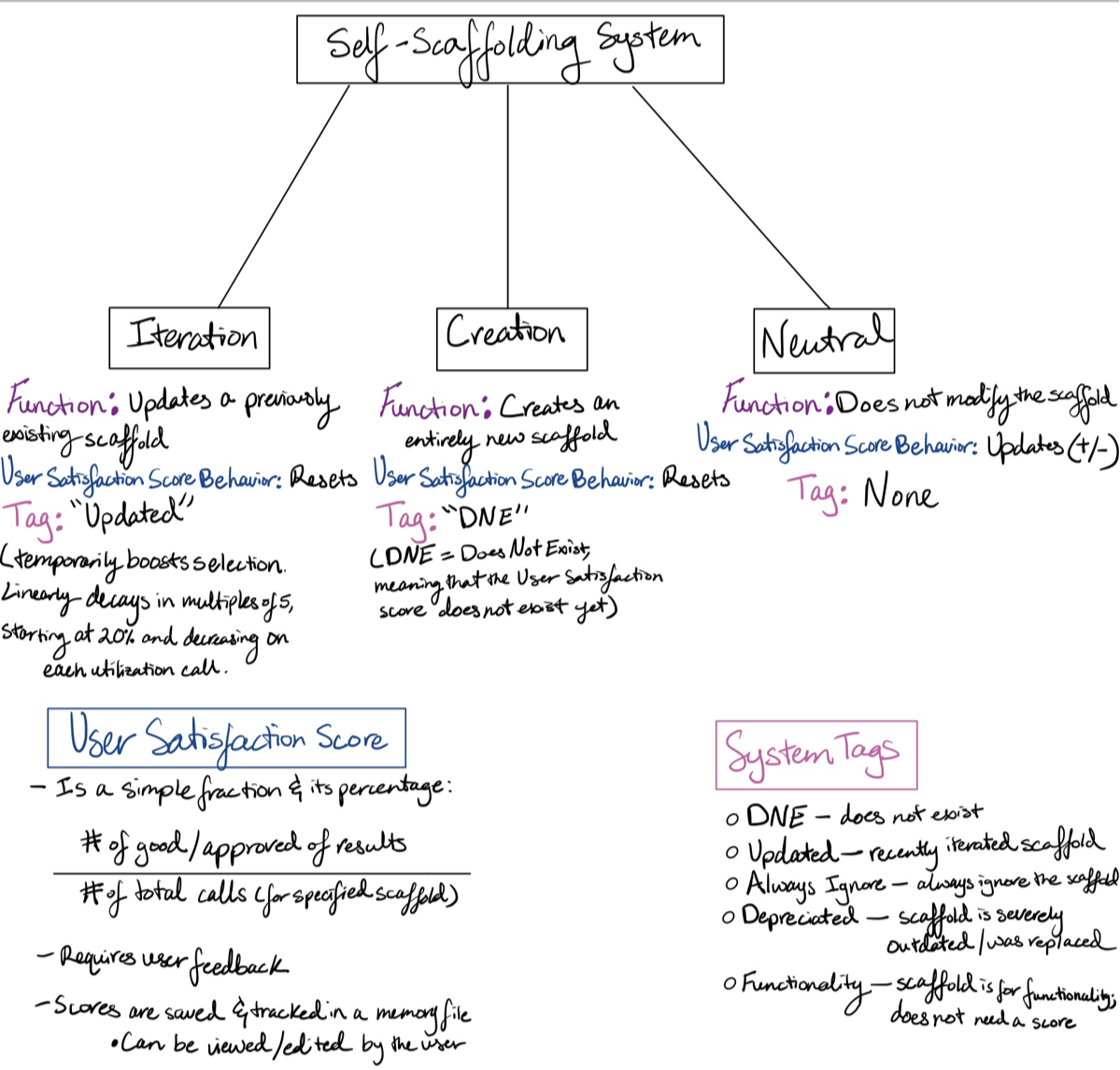
Here is Claude’s priority ranking for scaffold selections:
1. “Functionality” scaffolds (utility scaffolds)
2. Scaffolds with “Updated” tag (recently improved, temporarily boosted)
3. Highest satisfaction percentage among relevant scaffolds
4. Scaffold with DNE (if no relevant scaffold has score history)
5. “Always Ignore” scaffolds (excluded from consideration)
1. “Functionality” scaffolds (utility scaffolds)
2. Scaffolds with “Updated” tag (recently improved, temporarily boosted)
3. Highest satisfaction percentage among relevant scaffolds
4. Scaffold with DNE (if no relevant scaffold has score history)
5. “Always Ignore” scaffolds (excluded from consideration)
A few things to note is that Claude is not allowed to delete scaffolds. This is to prevent any accidental deletion of important files. To combat the need to manage scaffolding size and to not use scaffolds that do not satisfy the user during problem solving, the “Depreciated” tag was created. This informs Claude that, as noted in the flowchart, that the scaffold is severely outdated/ was replaced. The user will then have the option to keep the scaffold or manually delete it. The DNE tag will disappear and be replaced with a User Satisfaction score upon first completed use in an output by the agent. Claude is also allowed to create scaffolds on the fly to have the native Notebook agent carry out, and will always present the scaffolds at the end of the output for approval. If approval is not given, Claude will tag the scaffold “Always Ignore” so that the scaffold will never be used. The user may delete these as well.
The self-scaffolding system is designed to enable the agent to learn (as it is a small scale version of reinforcement learning) as well as become customized and adapted to user preferences and workflow. In tandem with the parent-child relationship between the MCP server LLM and the native Notebook LLM, the self-scaffolding system is really what invests power into Chrysalis as an agent. Chrysalis is able to adapt and solve any problem to the user’s satisfaction, even without explicit CAG tools coded and passed to the MCP. With time, the agent will only improve at effectiveness and enhance its ability to do exactly what the user needs. The reason for this is that -- as Chrysalis is a data science agent -- not every data scientist has the same workflow or ideology, method, or approach to solving data science problems. Even exploratory data analysis conducted on new datasets are almost never carried out in the exact same way as it all depends on preference. Chrysalis is a solution to agentically solving data science problems to a scientist’s preferences with less prompting and more doing.
Challenges During Implementation
Challenges During Implementation
Future Work
Future Work
I would like to improve upon architecture to be more generalized, seamless, and optimized (ex: LLMGraph usage, passing more data to GraphTool). I would also like to make a front end UI with high quality UX. As mentioned before, I would like to ensure all graphs produced have labels. Furthermore, expanding the agent’s CAG capabilities past data visualization to include solving more data science problems would be a great addition to its agentic capabilities. Lastly, implementing proper, full-scale reinforcement learning in addition to upgrading the harness to be specialized in stead of the current self-scaffolding system. I would like it to be more robust. These improvements will also help data visualization quality, agent adaptability, agent effectiveness, output excellence, and user experience.
Code
Code
Concluding Remarks
Concluding Remarks
Overall, Chrysalis is made up of two components: the parent-child relationship between MCP server LLM and Notebook LLM and the self-scaffolding system. Chrysalis is capable of adapting and learning quickly, and excels upon receiving user feedback thanks to the architecture of this self-scaffolding system. It is able to assist anyone in any task, and do so effectively and helpfully. A chrysalis is the shell that metamorphoses a caterpillar into a butterfly, and it is designed to do just that with a dataset or anyone’s data scienc e workflow: metamorphosis. Chrysalis is capable of evolving difficult, complex, time-consuming tasks into quick, effortless, and useful results so that any user can get the results they need.
Acknowledgements
Acknowledgements
I want to acknowledge Faizon (Fez) Zaman, Max Piskunov, and Philéas Dazeley-Gaist for their guidance and aid. Furthermore, I’d like to thank Xerxes Arsiwalla for words of encouragement and advice on this computational essay. Additionally, deep heartfelt thanks to my main mentor, Fez, for all the support, assistance, and the data science agent idea. I would also like to thank Dr. Stephen Wolfram for suggesting and pushing me to tackle agentic data visualization in this project.
References
References
Cosmic Rays Dataset Citation:
The Pierre Auger Collaboration. (2024). Pierre Auger Observatory Open Data (Version 3) [Dataset]. Zenodo. https://doi.org/10.5281/zenodo.10488964
AI Disclosure
AI Disclosure
The following generative AI tools were used in this project: Claude Sonnet 5 and Opus 4.8. Sonnet was used for assistance in debugging issues surrounding data permanence, and for suggesting the code for the Data Permanence tool, which was edited and then implemented. Opus 4.8 was used to implement the self-scaffolding system for the parent LLM in the MCP server. All code and written content were reviewed, understood and approved by the author.
CITE THIS NOTEBOOK
CITE THIS NOTEBOOK
Chrysalis: A Self-Scaffolding Data Science Agent
by Setayesh Montazeri
Wolfram Community, STAFF PICKS, July 16, 2026
https://community.wolfram.com/groups/-/m/t/3762896
by Setayesh Montazeri
Wolfram Community, STAFF PICKS, July 16, 2026
https://community.wolfram.com/groups/-/m/t/3762896