This notebook accompanies a presentation delivered at Indiana University, Bloomington, as part of their Quantum Technologies for Everyone series. It serves as a brief introduction to spiders and ZX formalism within the Wolfram quantum framework. Exploring key concepts such as tensors, ZX diagrams, and tensor networks, it highlights their relevance to quantum computing applications.
This is the documentation page of Wolfram quantum framework: https://resources.wolframcloud.com/PacletRepository/resources/Wolfram/QuantumFramework/
This is the GitHub page: https://github.com/sw1sh/QuantumFramework
This is the GitHub page: https://github.com/sw1sh/QuantumFramework
If any bug or issues, please report it here:
Install the Quantum Framework paclet:
In[]:=
PacletInstall["https://wolfr.am/DevWQCF",ForceVersionInstall->True]<<Wolfram`QuantumFramework`
Out[]=
PacletObject

Some ZX features call external Python libraries. If you have V14 of Mathematica, everything will be taken care of automatically. Otherwise, you may need to install some Py packages manually.
If you are a student or a faculty member, you can check the following link to download Mathematica using your institutional email: https://www.wolfram.com/siteinfo/
This notebook is prepared by Wolfram quantum team. You can contact us at: quantum AT wolfram.com
Visualization of circuit
Visualization of circuit
For visualization purposes, we will use this sequence of options repeatedly:
In[]:=
viz=Sequence["ShowWireDimensions"->True,"ShowExtraQudits"->True,"GateBackgroundStyle"->{"ZSpider"->Green,"XSpider"->Red}];
If an action is planned to be done repeatedly, defining a function is preferred:
In[]:=
showDiagram[qc_QuantumCircuitOperator]:=qc["Diagram","ShowWireDimensions"->True,"ShowExtraQudits"->True,"GateBackgroundStyle"->{"ZSpider"->Green,"XSpider"->Red}]
Input and Output for a quantum process
Input and Output for a quantum process
States and Operators as Tensors
States and Operators as Tensors
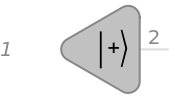
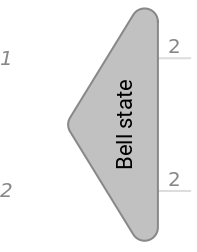
An initial state (shown by a combination of kets in bra-ket notation) has no input wire shown in its diagram. The diagram has only output.
In[]:=
QuantumCircuitOperator[{"+"}]["Diagram",viz]
Out[]=
In[]:=
QuantumCircuitOperator[{QuantumState["Bell","Label"->"Bell state"]}]["Diagram",viz]
Out[]=
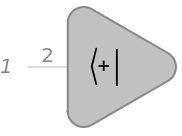
Dual states (those represented by a combination of bras in bra-ket notation) have only input wires and no output.
In[]:=
QuantumCircuitOperator[{}]["Diagram",viz]
†
"+"
Out[]=
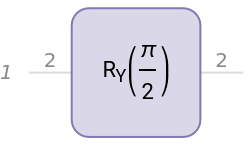
Operators have both input and output wires. (Recall they are traditionally represented as ket-bra combinations)
In[]:=
QuantumCircuitOperator[{"RY"}]["Diagram",viz]
Out[]=
The input and output of operators may be on different wires
In[]:=
QuantumCircuitOperator[{"I"->{1}->{2}}]["Diagram",viz]
Out[]=
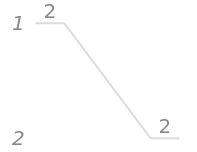
Bra-ket notation does not immediately contain all the info one might want about an operator:
In[]:=
QuantumOperator[{"I"->{1}->{2}}]
Out[]=
|0〉〈0|+|1〉〈1|
This is one of many reasons for summary boxes:
In[]:=
QuantumOperator[{"I"->{1}->{2}}]
Out[]=
QuantumOperator


Spiders are a way to represent specific tensors.
ZSpider
ZSpider
ZSpider
In[]:=
QuantumCircuitOperator["ZSpider"[α]]["Diagram",viz]
Out[]=
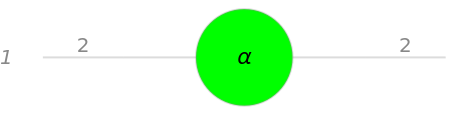
Dirac notation of ZSpider
In[]:=
QuantumOperator["ZSpider"[α]]
Out[]=
|〉〈|+|〉〈|
+
+
α
−
−
A ZSpider with one input wire of dimension 2 and one output wire of dimension 2 corresponds to a Phase operator on a qubit.
In[]:=
QuantumOperator["ZSpider"[α]]==QuantumOperator["P"[α]]
Out[]=
True
A ZSpider can have different numbers of input and output wires.
In[]:=
QuantumCircuitOperator["ZSpider"->{1,2}->1]["Diagram",viz]
Out[]=
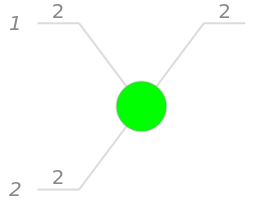
This ZSpider behaves like a copy tensor.
In[]:=
QuantumCircuitOperator["ZSpider"->{1}->{1,2}]["Diagram",viz]
Out[]=
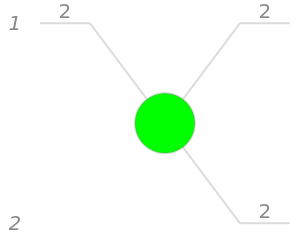
Note the copy tensor entangles qubits on different wires, which is distinct from from cloning a qubit to a different wire.
In[]:=
QuantumCircuitOperator["ZSpider"->{1}->{1,2}][QuantumState[{a,b}]]
Out[]=
a|〉+b|〉
+
+
−
−
In Wolfram Language, the copy spider is similar to a measurement operation.
In[]:=
QuantumCircuitOperator[{{1}}]["Diagram",viz]
Out[]=
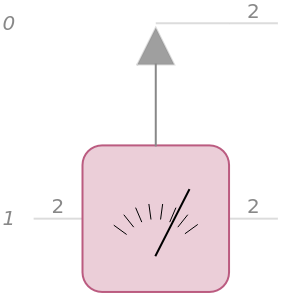
The action of measurement (in our representation) is like copying the result in another quantum system (call it detector or environment). This means the state of the detector is correlated with the state of the qubit, as one wants with a measurement.
In[]:=
QuantumCircuitOperator[{{1}}][QuantumState[{a,b}]]["State"]
Out[]=
a|0〉+b|1〉
ℰ
0
ℰ
1
XSpider
XSpider
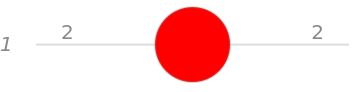
An XSpider can be specified in much the same way as a ZSpider.
In[]:=
QuantumCircuitOperator["XSpider"]["Diagram",viz]
Out[]=
In[]:=
QuantumOperator["XSpider"[α]]
Out[]=
QuantumOperator

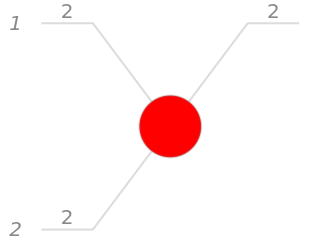
Different numbers of input and output wires can be specified as before.
In[]:=
QuantumCircuitOperator["XSpider"->{1,2}->1]["Diagram",viz]
Out[]=
General Spiders
General Spiders
Use the following syntax for specifying more general spiders:
Dirac notation of above Spider:
One can set the basis used to represent each wire differently:
Dirac notations of the operator:
Recall the connection of the copy tensor with measurement. The above spider creates a copy in the computational basis, continues to represent the original qubit in the computational basis, and transforms the representation of the correlated qubit to the Pauli-X basis.
Some Common Named Spiders
Some Common Named Spiders
How Do Spiders Help Represent Quantum Computation?
How Do Spiders Help Represent Quantum Computation?
Let’s explore the idea of Double.
Doubling an operator
Doubling an operator
Consider the following rotation operator
Bend it (note the angle of rotation in the 2nd gate)
Merge inputs and outputs, into one wire, now of dimension 4:
The above circuit is the same as Double applied to the original rotation operator.
Check they are the same:
Using Double for Computation
Using Double for Computation
Create a random pure state of a qubit (using the Haar measure)
Calculate corresponding probabilities:
Measure it in the computational basis
Note since the measurement is like a copy, then tracing over first or zero-th qubit will generate the expected probabilities
Trace our qubit-1
Trace out qubit-2
But how do you do the partial tracing on paper? First, you generate the density matrix, and then trace over the relevant basis for the collection of qubits:
Let’s put together all these calculations into a circuit. Put the initial state on the first wire, its conjugate also on the first wire. Add copy spiders to correlate the appropriate wires; add cups and caps to trace over the appropriate elements.
The result of the above circuit is stored as a pure state in 2-qubits
One can un-double it and get the mixed state (which is what one expects after applying projection operators corresponding to measurement).
Another way to construct the above circuit is to use Bend on the original circuit and then trace out the extra wires using Cap:
Even better, one can directly use Double, followed by Measure. Notice the dimension of the wires before Measure is 4 and the dimension is 2 after.
Note: in the doubled circuit, the quantum probabilities are stored in the corresponding amplitudes:
ZX diagram of a circuit
ZX diagram of a circuit
You can convert circuits into tensor networks or specifically networks with tensors in the ZX calculus. You can also control what simplification steps to apply to the ZX diagram.
The tensor network is a graph annotated with tensors and contraction indices.
Here are some more details on above tensor network, with the vertex labels, the corresponding quantum object, its tensor, and its indices:
Generate the corresponding ZX tensor network
Simplify the ZX tensor network:
Apply fusion rules (you can read it as some tensor contraction, without doing direct computation for contraction):
Get the tensor representing the final outcome of the quantum circuit:
Contract the ZX-tensor network to get the final outcome:
These two tensors are the same (up to an overall constant factor that depends on the circuit).
Create the state corresponding to the tensors
CITE THIS NOTEBOOK
CITE THIS NOTEBOOK
Wolfram quantum framework: tensor networks, spiders, and ZX formalism
by Mads Bahrami
Wolfram Community, STAFF PICKS, February 7, 2024
https://community.wolfram.com/groups/-/m/t/3118205
by Mads Bahrami
Wolfram Community, STAFF PICKS, February 7, 2024
https://community.wolfram.com/groups/-/m/t/3118205