The German Aldi supermarket chains, founded by two brothers, consist of two business operations: Aldi Nord, the northern variant, and Aldi Süd, the southern variant. Here I visualise the boundary between these two using OpenStreetMap data of the supermarket locations using Wolfram language. The inspiration for this study came from my German friend who carelessly pondered if there are “enclaves” of these chains inside the “territory” of the other; spoiler alert: there don’t seem to be any. At least in Germany.
In[]:=
getOsmOverpassData="elements"/.Import[HTTPRequest[URL["https://overpass-api.de/api/interpreter"],<|"Query"->{"data"->#}|>]]&;
I query supermarkets with the brand name ALDI Nord and ALDI Süd in Germany (English name, thus name:en!) correspondingly:
In[]:=
nordData=getOsmOverpassData["[out:json][timeout:25];area[\"name:en\"=\"Germany\"];nwr[\"shop\"=\"supermarket\"][\"brand\"=\"ALDI Nord\"](area);out center;"];
In[]:=
sudData=getOsmOverpassData["[out:json][timeout:25];area[\"name:en\"=\"Germany\"];nwr[\"shop\"=\"supermarket\"][\"brand\"=\"ALDI Süd\"](area);out center;"];
This produces somewhat messy JSON data; some of the entries are positions only, some have a center with the same data. I extract these as a GeoPosition list by matching and rewriting them:
In[]:=
{nordPos,sudPos}=GeoPosition[Join[Cases[#,{___,"lat"->lat_,"lon"->lon_,___}|{___,"center"->{"lat"->lat_,"lon"->lon_},___}:>{lat,lon}]]]&/@{nordData,sudData}
Out[]=
GeoPosition,GeoPosition
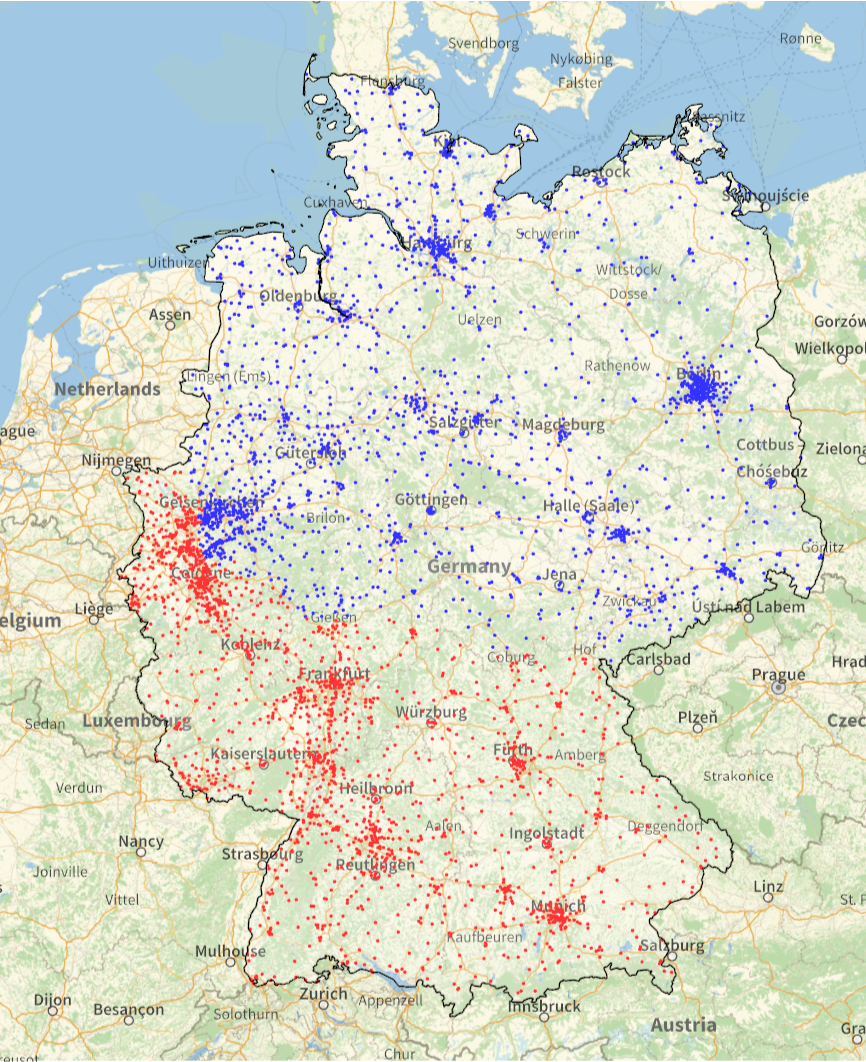
Now we can perform the first check on the data, and it seems reasonable:
In[]:=
GeoGraphics[{Blue,Point[nordPos],Red,Point[sudPos],White,EdgeForm[Black],CountryData["Germany","FullPolygon"]},ImageSize->Large]
Out[]=
Next I want to compute which areas are (geographically) closest to each supermarket. Voronoi meshes are a solution to this problem. Computing them correctly on the geoid proper is a lot of hassle, though. So I take a shortcut, and consider coordinates to lie on a flat surface. Regular latitudes and longitudes are not suitable, though, since one degree in each of those has different length on this map, and this would cause significant issues on the tessellation. Next best option after proper Voronoi mesh on a geoid is probably a using Universal Transverse Mercator coordinates on a suitable zone. Here I use zone 32, which covers the area of interest quite nicely:
In[]:=
{nordUTMPos,sudUTMPos}=GeoGridPosition[#,"UTMZone32"]["Data"]&/@{nordPos,sudPos};
The resulting mesh is recognisable as something covering Germany:
In[]:=
vmesh=VoronoiMesh[Join[nordUTMPos,sudUTMPos]]
Out[]=
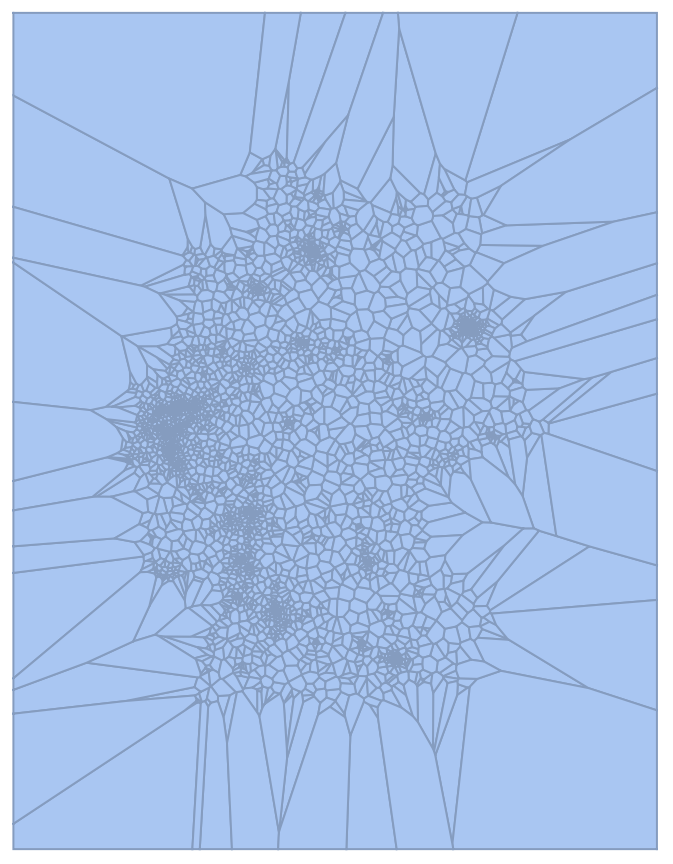
Every cell above corresponds to one supermarket. Next I want to collect and combine these cells for each of these companies, Aldi Nord and Aldi Süd. There’s a slight kink here; the order of polygons I get with MeshPrimitives is not the same as input points, and although using RegionMember to match original locations and polygons is entirely plausible, it’s rather slow. So, here I use an undocumented Region`Mesh`MeshMemberCellIndex to collect all these polygons for each list (corresponding to each company), and then combine them to lists of polygons (which end up consisting of one polygon each in this case).
In[]:=
{nordUTMPolys,sudUTMPolys}=MeshPrimitives[BoundaryMeshRegion[RegionUnion[MeshPrimitives[vmesh,2][[Region`Mesh`MeshMemberCellIndex[vmesh][#][[All,2]]]]]],2]&/@{nordUTMPos,sudUTMPos}
Out[]=
Polygon,Polygon


These polygons still have their coordinates in the UTM 32 zone format. Let’s convert them back to the more typical lat-lon format:
In[]:=
{nordPolys,sudPolys}={nordUTMPolys,sudUTMPolys}/.Polygon[utmpos_]:>Polygon[GeoPosition[GeoGridPosition[utmpos,"UTMZone32"]]["Data"]]
Out[]=
Polygon,Polygon


I don’t really care about the part of these polygons outside Germany, so I acquire country polygon for Germany and limit the polygons by intersecting to just it:
In[]:=
germanyPoly=CountryData["Germany","FullPolygon"]/.Polygon[GeoPosition[pos_]]:>Polygon[pos]
Out[]=
Polygon

In[]:=
{nordGerPoly,sudGerPoly}=RegionIntersection[germanyPoly,RegionUnion[#]]&/@{nordPolys,sudPolys}
Out[]=
Polygon,Polygon


The boundary between these polygons is the line shared by them, and can be computed rather easily also by an intersection:
In[]:=
nordSudBorder=RegionIntersection[nordGerPoly,sudGerPoly]//EchoFunction[Graphics];
»
This is a small helper function for more aesthetic layout of map labels on top of existing data:
Now I can visualise this data. It is mostly relatively simple, specifying styles before actual objects. Apart from the GeoStylingImageFunction the only kink here is converting regular polygons and lines into ones involving GeoPositions. This is done with replacement rules:
It is also possible to take a look at the western corner of Germany where the supermarkets from Aldi Nord and Aldi Süd are often quite close to each other, but none of them really form an enclave inside others’ area:
CITE THIS NOTEBOOK
CITE THIS NOTEBOOK
Aldi Nord and Aldi Süd in Germany: a well established border between supermarket chains
by Jari Kirma
Wolfram Community, STAFF PICKS, February 3, 2025
https://community.wolfram.com/groups/-/m/t/3377303
by Jari Kirma
Wolfram Community, STAFF PICKS, February 3, 2025
https://community.wolfram.com/groups/-/m/t/3377303