Inscribed Square Problem
Paul Abbott, Analytica International
Paul Abbott, Analytica International
Who cares about topology?—a very nice example of animated math presenting an unsolved conjecture, and a clever topological solution to a weaker version of the question—would make a very nice demonstration!
Basic Ideas
Basic Ideas
I have developed some basic ideas but I don’t have time to work on a full demonstration. Perhaps someone, better at topology and graphics would like to take this further?
Closed Curves
Closed Curves
In[]:=
BSplineFunction[{{0,0}{1,1},{2,-1},{3,0},{4,-2},{5,1},{3,1},{1,2},{0,1}},SplineClosedTrue]
Out[]=
BSplineFunction


Dynamic Curves
Dynamic Curves
In[]:=
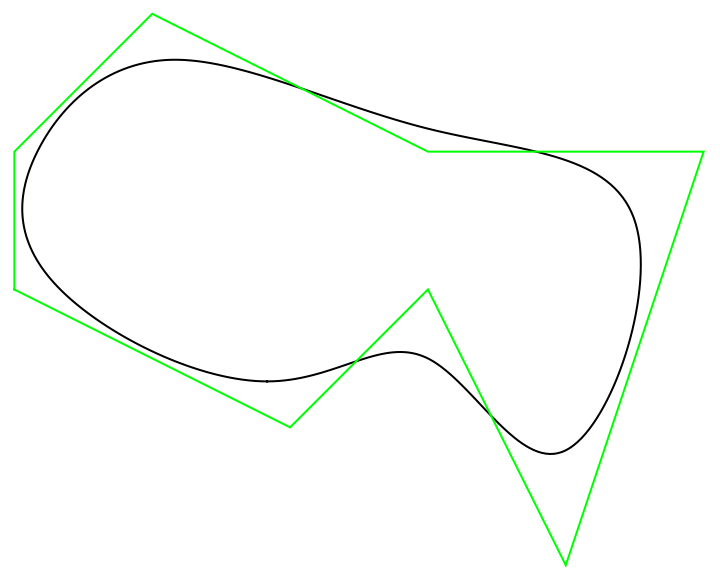
DynamicModule[{pts={{0,0}{1,1},{2,-1},{3,0},{4,-2},{5,1},{3,1},{1,2},{0,1}}},LocatorPane[Dynamic[pts],Graphics[{BSplineCurve[Dynamic[pts],SplineClosedTrue],Green,Line[Dynamic[Join[pts,{First[pts]}]]]}],AppearanceStyle["●",Medium,Red]]]
Out[]=
In[]:=
DynamicModule[{pts={{0,0}{1,1},{2,-1},{3,0},{4,-2},{5,1},{3,1},{1,2},{0,1}}},LocatorPane[Dynamic[pts],Show[{ParametricPlot[c[s],{s,0,1}],Graphics[{BSplineCurve[Dynamic[pts],SplineClosedTrue],Green,Line[Dynamic[Join[pts,{First[pts]}]]]}]},PlotRangeAll],AppearanceStyle["●",Medium,Red]],Initialization(c=BSplineFunction[pts,SplineClosedTrue])]
Out[]=
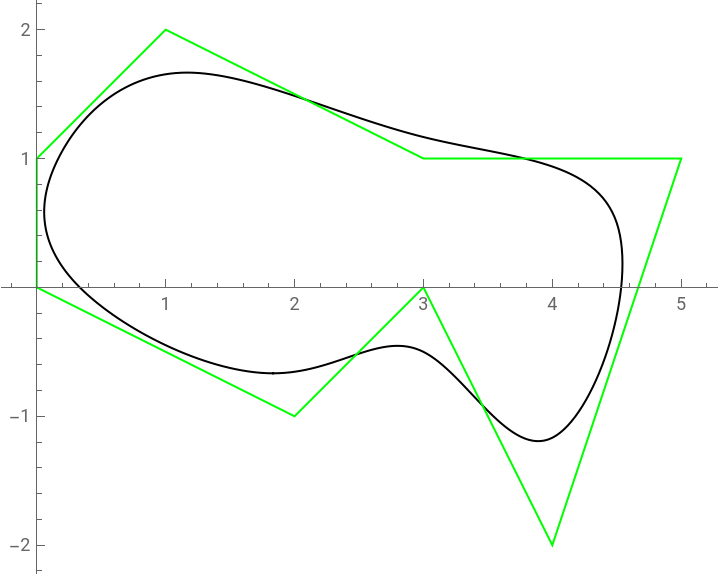
Presently, this code “exports” the current value of the spline curve .
c
Manipulation
Manipulation
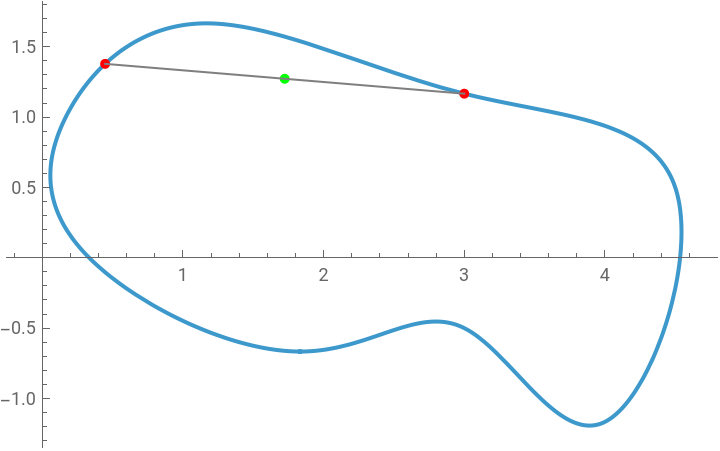
For each pair of points in we compute the midpoint:
[0,1]×[0,1]
In[]:=
Manipulate[Module[{pts,mid},pts={c[First@a],c[Last@a]};mid=Mean@pts;ParametricPlot[c[t],{t,0,1},Epilog{Red,AbsolutePointSize@5,Point@pts,Green,Point@mid,Gray,Line@pts}]],{{a,{0.7,0.5}},{0,0},{1,1}},SaveDefinitionsTrue]
Out[]=

Now allow two different pair of points in :
[0,1]×[0,1]
In[]:=
Manipulate[Module[{pts1,mid1,pts2,mid2},pts1={c[a1],c[a2]};mid1=Mean@pts1;pts2={c[b1],c[b2]};mid2=Mean@pts2;ParametricPlot[c[t],{t,0,1},Epilog{AbsolutePointSize@5,Red,Point@pts1,Point@pts2,Green,Point@mid1,Blue,Point@mid2,Gray,Line@pts1,Line@pts2,Opacity[0.3],Polygon[{c[a1],c[b1],c[a2],c[b2]}]}]],{{a1,0.244},0,1},{{a2,0.538},0,1},{{b1,0.02},0,1},{{b2,0.408},0,1},SaveDefinitionsTrue]
Out[]=

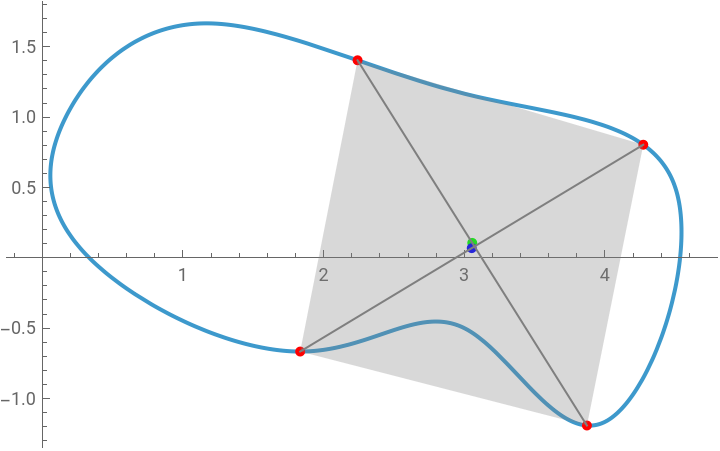
The next step would be to allow the curve to change, and the points to be moved, using .
Moving to 3D
Moving to 3D
Now we move from the 2D curve to the 3D surface:
In[]:=
To3D[{x_?NumberQ,y_?NumberQ}]:={x,y,0}
In[]:=
Manipulate[Module[{pts,mid,mid3D,hvec,pplot,prange,maxh},pts={c[First@a],c[Last@a]};mid=Mean@pts;mid3D=To3D@mid;hvec=mid3D+{0,0,EuclideanDistance@@pts};GraphicsRow[{Show[pplot=ParametricPlot[c[t],{t,0,1}],Graphics[{Red,AbsolutePointSize@5,Point@pts,Green,Point@mid,Gray,Line@pts}]],Graphics3D[{Blue,Line@Table[To3D@c[t],{t,0,1,0.01}],Red,AbsolutePointSize@5,Point@(To3D/@pts),Green,Point@To3D@mid,Gray,Line@(To3D/@pts),Line@{mid3D,hvec},Pink,Point@hvec},prange=PlotRange/.Last@pplot;maxh=1.01Norm@Flatten@(Differences/@prange);PlotRangeAppend[prange,{-0.2,maxh}]]},ImageSizeLarge]],{{a,{0.2,0.4}},{0,0},{1,1}},SaveDefinitionsTrue]
Displaying the Surface
Displaying the Surface
The self-intersections (creases) of the surface correspond to solutions to the inscribed rectangle problem.