Haiku mnemonic for 𝐕𝐨𝐫𝐨𝐧𝐨𝐢 𝐃𝐢𝐚𝐠𝐫𝐚𝐦:
Ink drops of colors
spread through paper veins and meet
at Voronoi web
Ink drops of colors
spread through paper veins and meet
at Voronoi web
The concept behind 𝐕𝐨𝐫𝐨𝐧𝐨𝐢 𝐃𝐢𝐚𝐠𝐫𝐚𝐦 (𝑽𝑫) traces back to Dirichlet in the 19th century, but it was generalized by Ukrainian mathematician Georgy Voronoy in 1908 work for higher dimensions. The word “Voronoi” (Вороной) in Ukrainian originates from the word “ворон” (voron), which means “raven” or “crow.” It is associated with the color black, often described as “raven-black” in poetic or descriptive contexts.
Applications: telecom networks use VD to define optimal coverage areas around cell towers. Meteorologists interpolate rainfall by assigning territory to nearest measuring stations. Biology relies on VD to model cell boundaries, protein packing structures, and atomic volumes. Robotics applies it to find paths maximizing clearance from obstacles. Computer graphics generate realistic textures and fracture patterns. Urban planners allocate emergency services—fire, ambulance, hospital—to minimize response distances.
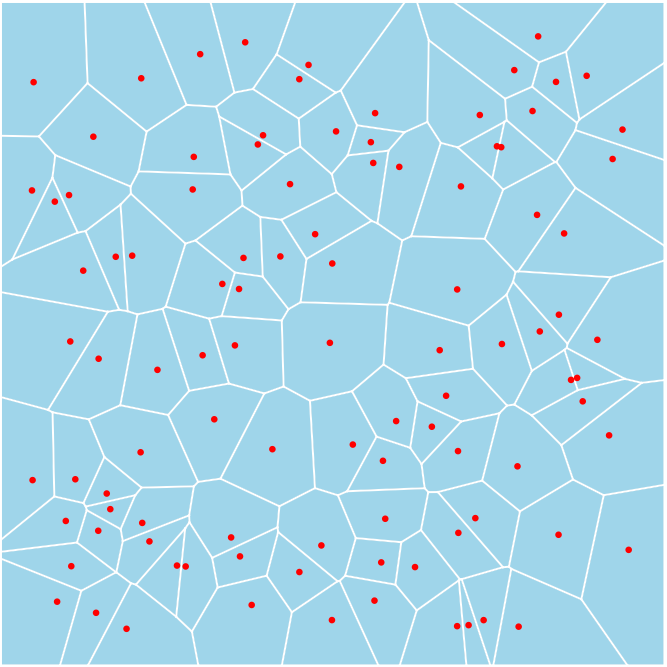
This code provides an intuitive geometric explanation of VD by constructing a dynamic 3D-2D overlay that links Voronoi regions to cones defined over a set of planar points. The visualization uses Mathematica’s Manipulate function to offer interactive control over key parameters.
The foundation of the visualization begins with a fixed random seed for reproducibility. One hundred random 2D points are generated within a bounded square region [-1, 1]^2. For each of these points, a cone is created in 3D by extending the point into the third dimension along the z-axis. Each cone is symmetric about its generating point and is defined to have a user-controlled radius.
The critical geometric insight shown here is that the upper envelope of a set of cones—when viewed from above in an orthographic projection—produces a tessellation of the plane corresponding exactly to the Voronoi diagram of the original points. Each Voronoi cell consists of the region of the plane closest to a given point; in this cone model, that region corresponds to where that point’s cone lies above all others. Hence, the top-down view of the cone arrangement reveals the Voronoi partition as the projection of the uppermost surfaces.
The visualization overlays two representations. The first is a Graphics3D rendering of the cones, viewed from above using a top-down orthographic projection to eliminate perspective distortion and align the cones directly with their planar bases. The second layer is a semi-transparent 2D Voronoi diagram, rendered using VoronoiMesh. This overlay matches the 3D plot’s coordinate frame, and its transparency is controlled interactively. Mesh cells are styled with thin white boundaries, and the original seed points are shown in red.
By adjusting the cone radius, the user alters the slope of each cone, affecting how quickly the cone rises with distance. This visualizes how distance functions define Voronoi cells: a steeper cone narrows the region in which it is dominant. The transparency control enables comparison between the abstract Voronoi structure and the geometric envelope formed by the cones.
Interactive app
Interactive app
In[]:=
Manipulate[ (* Initialize random seed for reproducibility *) SeedRandom[41]; (* Generate 100 random 2D points within [-1,1] range *) pts = RandomReal[{-1, 1}, {100, 2}]; (* Create cones at each point with adjustable radius *) cones = Table[ Cone[{Append[p, #] & /@ {-1, 1}}, r], (* Extend points to 3D along z-axis *) {p, pts}]; (* Combine 3D cones and 2D Voronoi visualization *) Overlay[{ (* 3D Cones Visualization *) Graphics3D[ {cones}, ViewPoint -> Top, (* Top-down view *) ViewProjection -> "Orthographic",(* Orthographic projection *) PlotRange -> 1.1 {{-1, 1}, {-1, 1}, {-1, 1}}, (* Slightly expanded range *) Method -> {"ShrinkWrap" -> True}, (* Crop to visible elements *) ImageSize -> 500, PlotRangePadding -> None (* Remove extra padding *) ], (* 2D Voronoi Mesh with Transparency *) SetAlphaChannel[ Show[ VoronoiMesh[pts, 1.1 {{-1, 1}, {-1, 1}}, (* Match 3D plot range *) MeshCellStyle -> {{1, All} -> {White, Thickness[.003]}}], (* Thin white edges *) Graphics[{Red, PointSize[.01], Point[pts]}], (* Red points *) ImageSize -> 500, PlotRangePadding -> None ], x (* Control transparency of Voronoi layer *) ] }, Alignment -> Center], (* Controls *) {{r, .4}, .02, .4, Appearance -> "Labeled"}, (* Cone radius *) {{x, 1}, 0, 1, Appearance -> "Labeled"}, (* Voronoi transparency *) FrameMargins -> 0, (* Clean UI frame *) SaveDefinitions->True]
Out[]=


Reusing the app to make video
Reusing the app to make video
ManipulateVideo[ (* Initialize random seed for reproducible point generation *) SeedRandom[41]; (* Generate 100 random 2D points within [-1,1] range *) pts = RandomReal[{-1, 1}, {100, 2}]; (* Create cones at each point with radius r, extending from z=-1 to z=1 *) cones = Table[ Cone[{Append[p, #] & /@ {-1, 1}}, r], {p, pts} ]; (* Combine 3D cones and 2D Voronoi visualization *) Rasterize[ Overlay[{ (* 3D cone visualization *) Graphics3D[{ cones }, ViewPoint -> Top, (* Top-down view *) ViewProjection -> "Orthographic",(* Orthographic projection *) PlotRange -> 1.1 {{-1, 1}, {-1, 1}, {-1, 1}}, (* Slightly expanded range *) Method -> {"ShrinkWrap" -> True}, (* Tight bounding box *) ImageSize -> 500, PlotRangePadding -> None ], (* 2D Voronoi mesh with points *) SetAlphaChannel[ Show[ VoronoiMesh[pts, 1.1 {{-1, 1}, {-1, 1}}, MeshCellStyle -> {{1, All} -> {White, Thickness[0.003]}} ], Graphics[{ Red, PointSize[0.01], Point[pts] (* Red points overlay *) }], ImageSize -> 500, PlotRangePadding -> None ], x (* Controls visibility of Voronoi layer *) ] }, Alignment -> Center (* Align layers precisely *) ], RasterSize -> {Automatic, 1080} (* Output resolution *) ], (* Animation controls with keyframe values *) {r, <|0 -> .4, 5 -> .4, 10 -> .02, 15 + 2 -> .4, 20 + 2 -> .4|>}, (* Cone radius animation *) {x, <|0 -> 1, 5 -> 0, 10 -> 0, 15 + 2 -> 0, 20 + 2 -> 1|>}, (* Voronoi layer opacity *) FrameMargins -> 0, (* Remove surrounding frame *) RasterSize -> {Automatic, 1080} (* Ensure consistent output size *)]
CITE THIS NOTEBOOK
CITE THIS NOTEBOOK
Voronoi diagrams as 3D cone envelopes: interactive visualization of distance-based tessellation
by Vitaliy Kaurov
Wolfram Community, STAFF PICKS, April 3, 2025
https://community.wolfram.com/groups/-/m/t/3438753
by Vitaliy Kaurov
Wolfram Community, STAFF PICKS, April 3, 2025
https://community.wolfram.com/groups/-/m/t/3438753