Overview
Overview
This notebook is another progress report on my project to develop Mathematica access to the Schwab developer API. I am currently working on the Market Data Production app as an individual developer. My previous post showed the API with daily data. This post shows the output of the API for minute data and looks at the volatility measure for each minute. The latest version of the API interface is now in a package script which can be run with Needs[“SchwabAPI`”]. The code is attached as a supplement to this post.
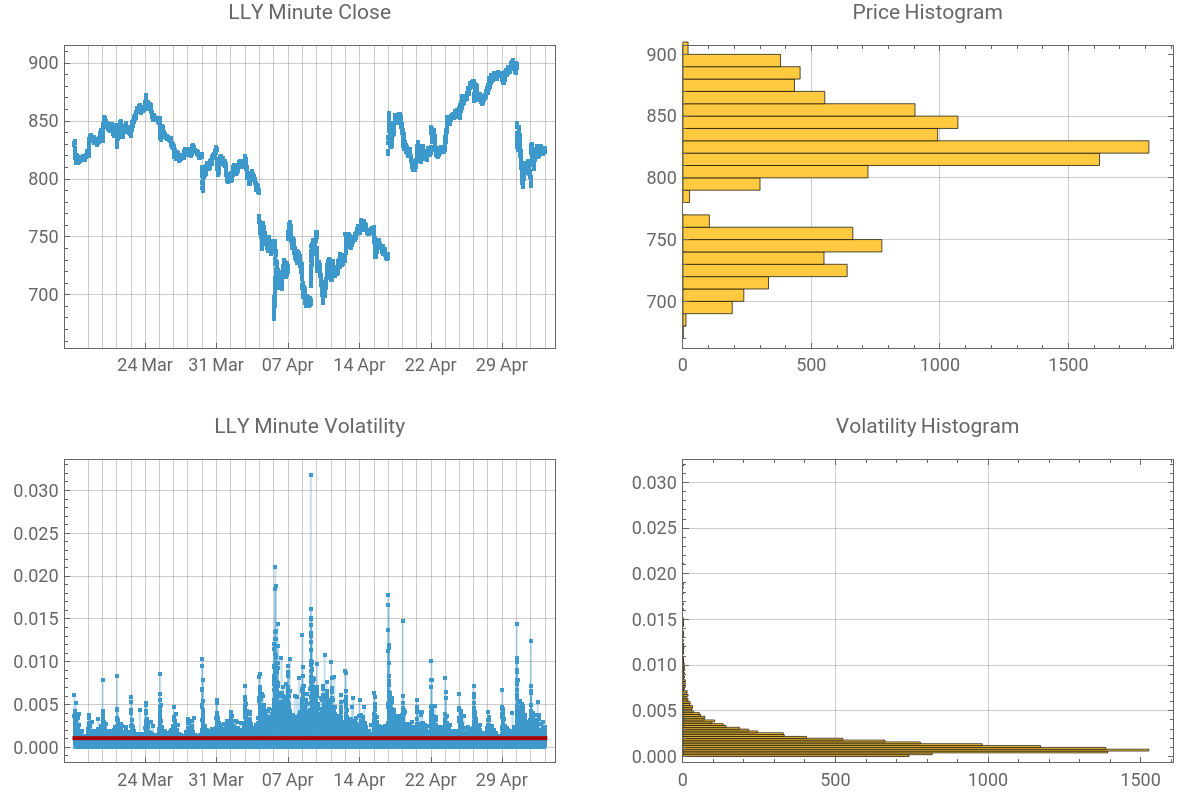
In this notebook there are some tricks to convert Unix times in a Dataset to DateObjects, and code to align graphics in a GraphicsGrid so that horizontal GridLines stay aligned. Date GridLines are shown using ListPlot for sequential days without gaps in the data for weekends and holidays.
Over the next few days I will post additional notebooks to show how the API can be used and will include updates to the code.
If anyone with a Schwab account is interested in using this interface, the first step is to use the link above to apply for access to the API. Once you get that set up, I will be happy to walk you through the appAuthorization[] function to create the token system on your computer, if you reply to this post
In this notebook there are some tricks to convert Unix times in a Dataset to DateObjects, and code to align graphics in a GraphicsGrid so that horizontal GridLines stay aligned. Date GridLines are shown using ListPlot for sequential days without gaps in the data for weekends and holidays.
Over the next few days I will post additional notebooks to show how the API can be used and will include updates to the code.
If anyone with a Schwab account is interested in using this interface, the first step is to use the link above to apply for access to the API. Once you get that set up, I will be happy to walk you through the appAuthorization[] function to create the token system on your computer, if you reply to this post
Initialization
Initialization
In[]:=
Needs["SchwabAPI`"]apiTokens=Import[tokenFile,"RawJSON"];apiTokens=refreshTokens[apiTokens["refresh_token"],appKey,appSecret];
In[]:=
(*setstartdateearlyenoughtogetallthedata.*)startDate=DatePlus[Today,-60]
Out[]=
Examine the data
Examine the data
In[]:=
(*Setthetickerfortherestofthenotebook.*)ticker="LLY";prices=getPriceHistory[ticker,apiTokens["access_token"],startDate,Now];If[prices===$Failed,Abort[]]
This step uses a Dataset structure to quickly convert the Unix time entries to DateObjects. The trick is that all the times in the structure can be found based on the fact that they are very large integers.
In[]:=
minDS=Dataset[prices["candles"]]/.bigint_Integer:>If[bigint>10^12,FromUnixTime[bigint/1000,TimeZone->"America/New_York"],bigint]//Dataset[#,MaxItems->12]&
Out[]=


Make the data available in List format with the usual order for market prices.
In[]:=
data=Values[Normal[minDS[All,{"datetime","open","high","low","close","volume"}]]];data[[-1]]
Out[]=
,823.98,825.61,823.6,823.6,130439
Examine the quality of the data. There should be 390 entries per day based on the data request, but some minutes are missing.
In[]:=
Length@data
Out[]=
12787
In[]:=
Quotient[Length@data,390]Mod[Length@data,390]
Out[]=
32
Out[]=
307
In[]:=
dayData=Split[data,DateValue[#1[[1]],"Day"]==DateValue[#2[[1]],"Day"]&];
Some Prices are missing.
In[]:=
Length/@dayData
Out[]=
{383,383,388,390,388,383,384,385,387,389,386,388,388,390,390,389,390,390,389,389,389,385,390,388,387,379,386,386,390,389,389,390,390}
In[]:=
Tally@Differences[dayData[[1]][[All,1]]]
Out[]=
,375,,7
There are a number of minutes with no price change, so the volatility measure used for the graphic, Log[ highPrice/lowPrice ] will be essentially zero for these minutes.
In[]:=
Select[data,#[[3]]==#[[4]]&]//Length
Out[]=
280
Make a graphic display
Make a graphic display
Since there are gaps between dates, DateListPlot is not useful for a nice display of the data, rather labeling is set up for ListPlot to show end points for each day in the plots.
In[]:=
endDay=Length/@dayData//Accumulate
Out[]=
{383,766,1154,1544,1932,2315,2699,3084,3471,3860,4246,4634,5022,5412,5802,6191,6581,6971,7360,7749,8138,8523,8913,9301,9688,10067,10453,10839,11229,11618,12007,12397,12787}
In[]:=
Last[#][[1]]&/@dayData;DateString[#,{"Day"," ","MonthNameShort"}]&/@%;ticks0=Transpose[{endDay,%}];ticks=Last/@Partition[ticks0,5]
Out[]=
{{1932,24 Mar},{3860,31 Mar},{5802,07 Apr},{7749,14 Apr},{9688,22 Apr},{11618,29 Apr}}
The {xrngp,yrngp} information is used to align the gridlines for the final GraphicsGrid plot.
In[]:=
padding={{30,10},{20,10}};gPrice=ListPlot[data[[All,5]],PlotRange->All,GridLines->{ticks0[[All,1]],Automatic},Frame->True,FrameTicks->{{Automatic,None},{ticks,None}},PlotLabel->ticker<>" Minute Close",ImagePadding->padding];{xrngp,yrngp}=PlotRange/.Options[gPrice,PlotRange];
In[]:=
lnhilo=Log[#3/#4]&@@@data;median=Median[lnhilo]
Out[]=
0.00108097
In[]:=
gVolatility=Show[g1=ListPlot[lnhilo,PlotRange->All,Filling->0,GridLines->{ticks0[[All,1]],Automatic},Frame->True,FrameTicks->{{Automatic,None},{ticks,None}},PlotLabel->ticker<>" Minute Volatility",ImagePadding->padding],Plot[median,{x,1,Length[lnhilo]},PlotStyle->Darker[Red]]];{xrngv,yrngv}=PlotRange/.Options[g1,PlotRange];
In[]:=
hVolatility=Histogram[lnhilo,BarOrigin->Left,Frame->True,GridLines->Automatic,PlotRange->{Automatic,yrngv},PlotLabel->"Volatility Histogram",ImagePadding->padding];hPrice=Histogram[data[[All,5]],BarOrigin->Left,Frame->True,GridLines->Automatic,PlotRange->{Automatic,yrngp},PlotLabel->"Price Histogram",ImagePadding->padding];
In[]:=
GraphicsGrid[{{gPrice,hPrice},{gVolatility,hVolatility}}]
Out[]=
CITE THIS NOTEBOOK
CITE THIS NOTEBOOK
Volatility measure using minute price data from the Schwab API
by Robert Rimmer
Wolfram Community, STAFF PICKS, May 4, 2025
https://community.wolfram.com/groups/-/m/t/3454690
by Robert Rimmer
Wolfram Community, STAFF PICKS, May 4, 2025
https://community.wolfram.com/groups/-/m/t/3454690