I had Claude Code create a small tool for writing and translating documents within Wolfram Notebook. Since it is basically designed for my own use, I am not sure how versatile it is, but thanks to the tremendous improvement in LLM capabilities, it is a wonderful thing that we can now have tools whipped up on the spot whenever we need them--what you might call 「泥縄式プログラミング」 “improvised programming.”
A document authoring environment on Wolfram Notebook
A document authoring environment on Wolfram Notebook
A small tool was created for writing documents such as academic papers in Wolfram notebooks. Or rather, it was written by Claude Code.
This tool is specifically designed to make it easier to handle deadline manuscript writing that needs to be done right now.
Since I already have a Wolfram notebook access framework called claudecode/NBAccess, I built it on top of that. As a result, for example, cells designated as confidential are automatically processed using a local LLM.
It was developed assuming Mathematica on Windows 11 and Claude Code. Since I do not have an environment to test on macOS or Linux, running it on those platforms would likely require asking an LLM such as Claude Code to make the necessary modifications.
Since I already have a Wolfram notebook access framework called claudecode/NBAccess, I built it on top of that. As a result, for example, cells designated as confidential are automatically processed using a local LLM.
It was developed assuming Mathematica on Windows 11 and Claude Code. Since I do not have an environment to test on macOS or Linux, running it on those platforms would likely require asking an LLM such as Claude Code to make the necessary modifications.
“documentation.wl”
“documentation.wl”
I have long used outline processors to compose my writing, so the way Wolfram notebooks handle paragraphs on a cell-by-cell basis suits my writing process very well. Since Japanese is my everyday language, I am not particularly skilled at writing directly in English. For this reason, all of my idea sketching and other preparatory work for writing is done entirely in Japanese.
In documentation.wl, the language set in $Language is assumed to be the user’s native language, and the language set in $DocTranslationLanguage is assumed to be the final target language in which the document is to be composed.
<<documentation`
In[]:=
{$Language,$DocTranslationLanguage}
Out[]=
{Japanese,English}
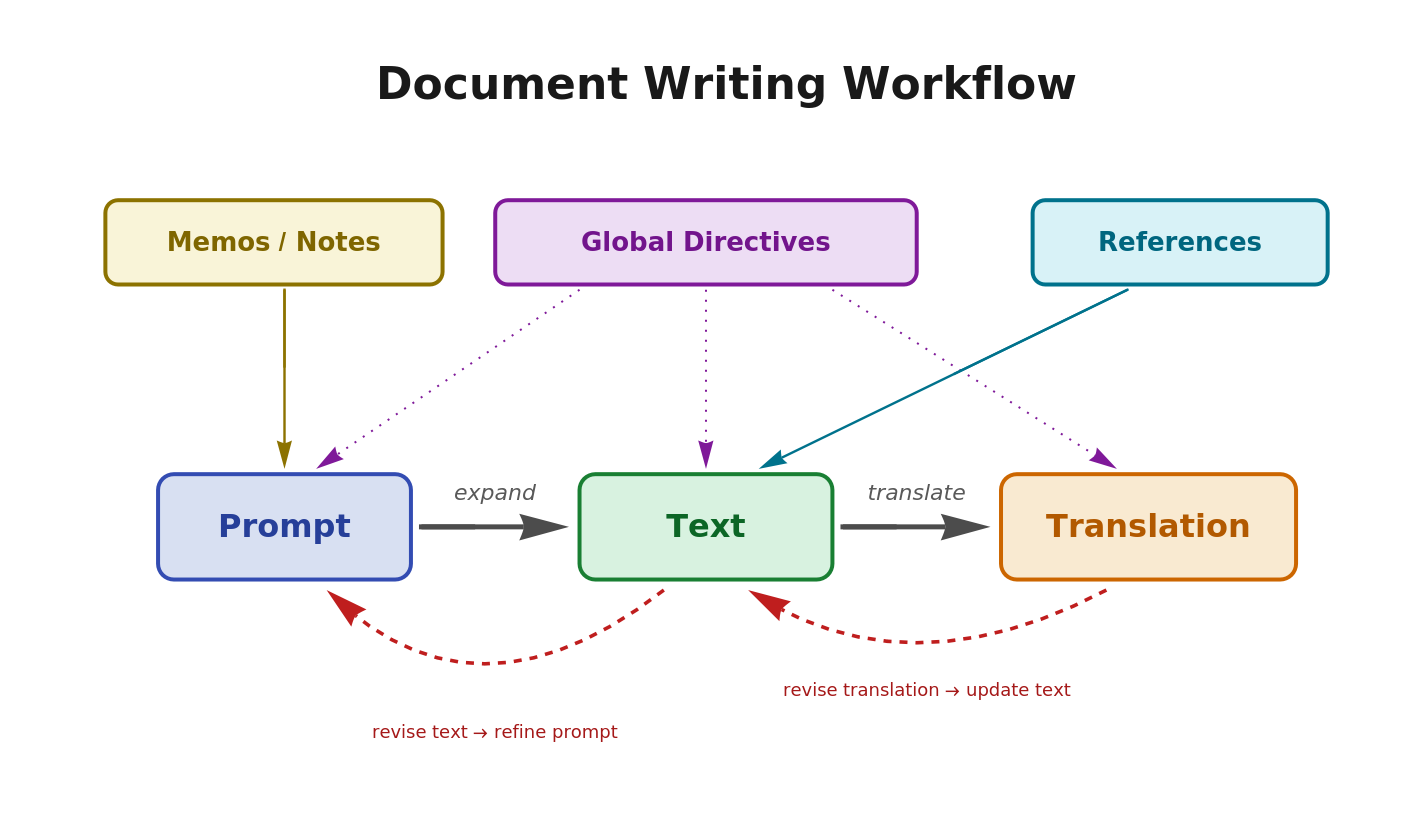
Cells have three modes: idea, paragraph, and translation. By switching among these modes and updating iteratively, the interaction between them ultimately produces a completed paragraph or translation, thereby composing the document.
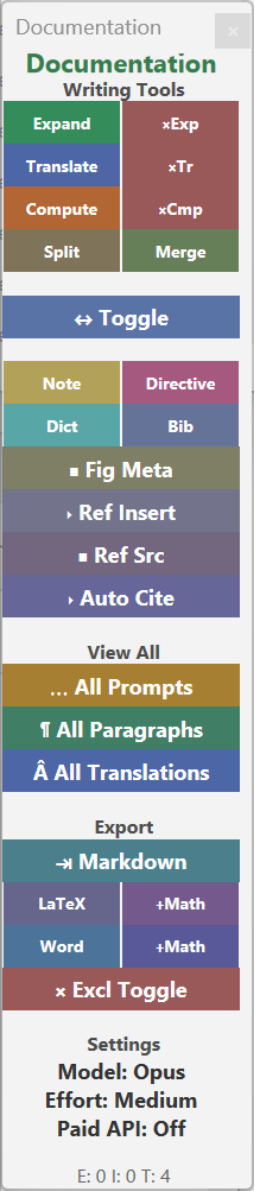
There are two special cell types: Directive cells and Dictionary cells. Directive cells can contain LLM instructions that apply to the entire notebook, such as writing style and notation rules, and these are automatically applied to all expand, translate, sync, and compute operations. Dictionary cells manage term correspondences used during translation, ensuring that technical terms and proper nouns are rendered with consistent translations. These meta-cells are excluded from export and do not appear in the final output.
The basic usage is as follows: write a prompt directed at the LLM in a text cell and press the expand button, which generates paragraph text and switches the cell’s mode to paragraph mode. Pressing the toggle button then alternates the display between idea and paragraph modes. Furthermore, pressing the translate button on a paragraph outputs a translation and switches to translation mode, with the toggle button cycling sequentially through all three modes.
The expand button is not limited to the initial expansion; pressing it again on a cell that already has an expanded paragraph performs an in-place update of the paragraph, taking into account the current paragraph content, Directive cell instructions, and context. This also makes it possible to revise existing paragraphs to align with newly added or modified Directive and Dictionary content.
The expand button is not limited to the initial expansion; pressing it again on a cell that already has an expanded paragraph performs an in-place update of the paragraph, taking into account the current paragraph content, Directive cell instructions, and context. This also makes it possible to revise existing paragraphs to align with newly added or modified Directive and Dictionary content.
◼
When outputting a program that displays text through computation, all text should be in English
Out[]=
Document Creation in Practice
Document Creation in Practice
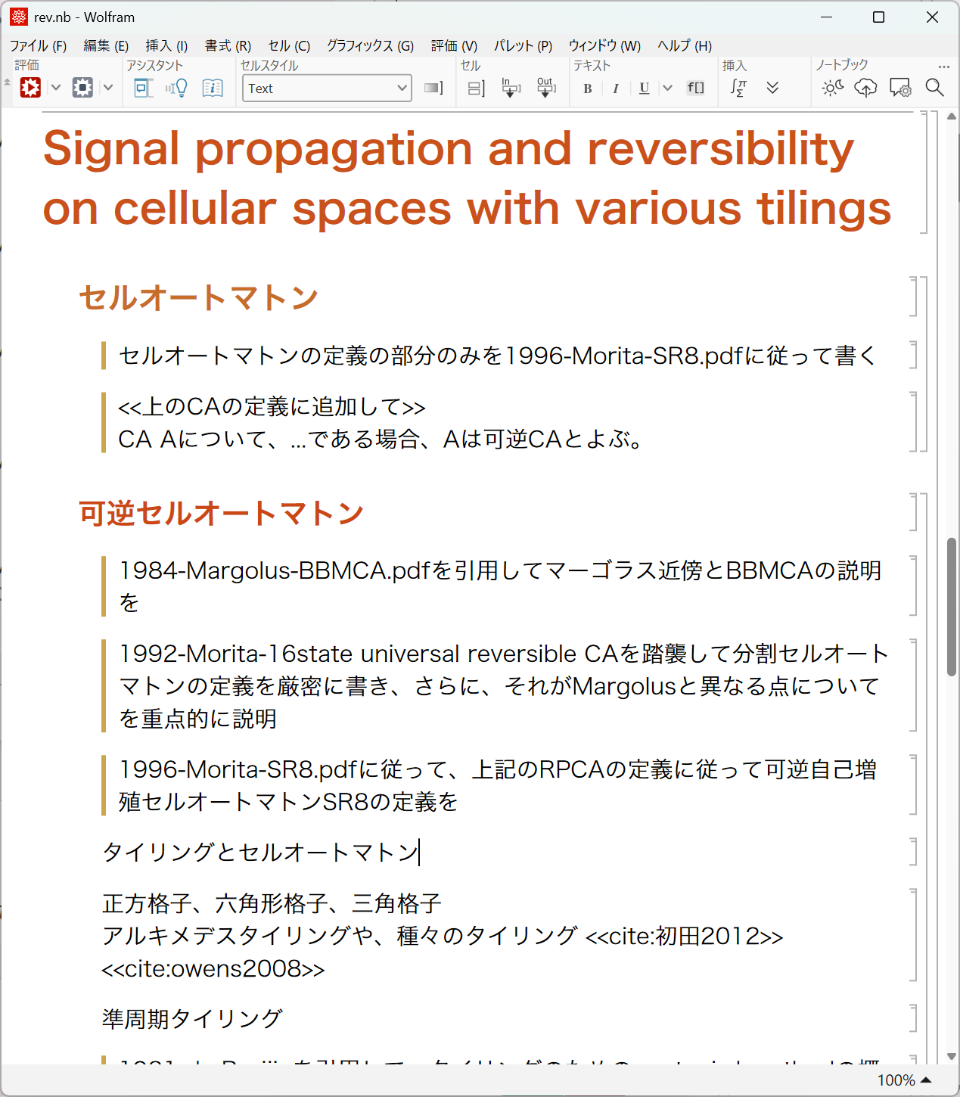
When you perform the “expand” operation on an idea or prompt written in each cell, the LLM interprets its content and generates polished paragraph text. After expansion, a colored bar appears on the left edge of the cell indicating its current mode, making it possible to visually distinguish at a glance whether a cell is in the idea, paragraph, or translation state. This color coding allows you to immediately grasp which writing stage each cell is at when surveying the document as a whole, dramatically improving the overview when refining multiple cells in parallel.
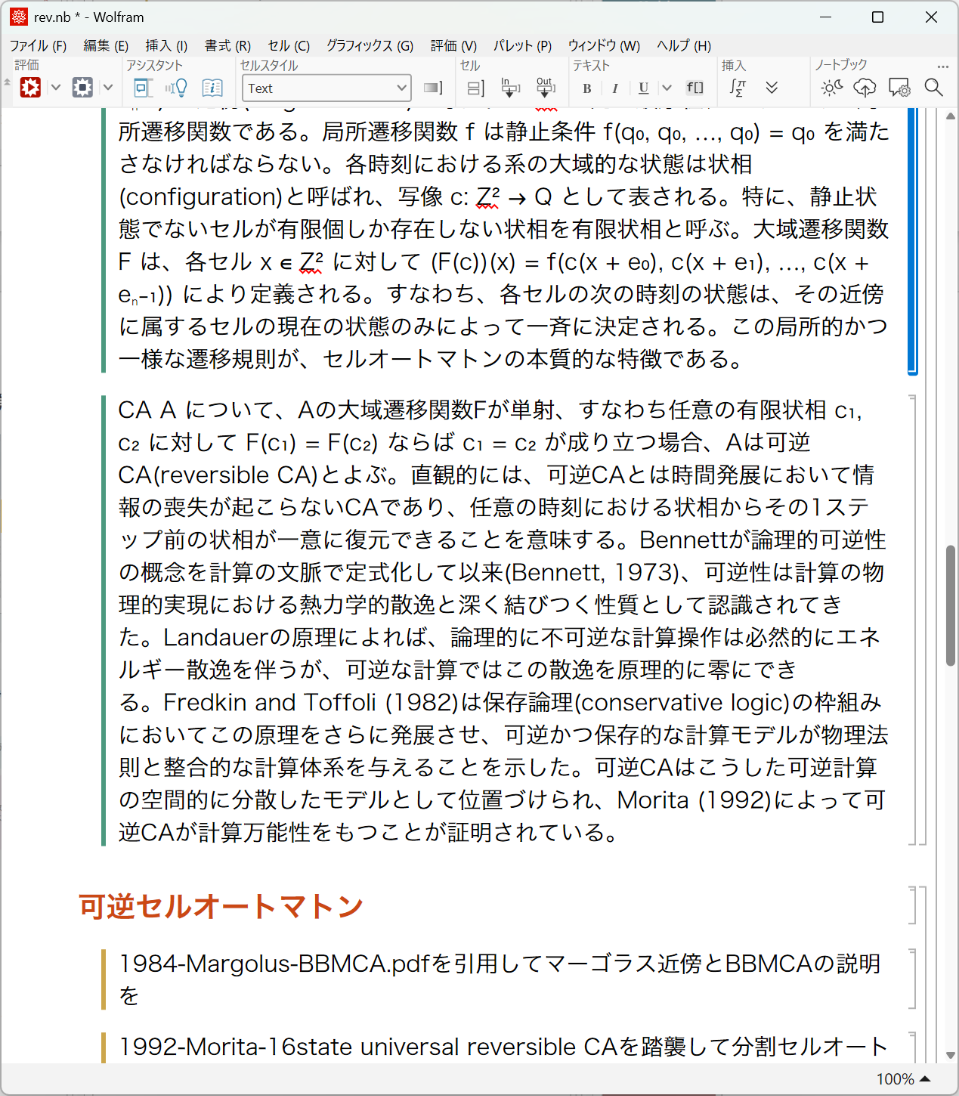
A “translation” of the paragraph text is generated. When you edit the generated paragraph text, the translation text is also updated to reflect those modifications. Conversely, when you modify the translation text and switch it back to paragraph mode, the paragraph text is automatically updated to reflect those changes as well.
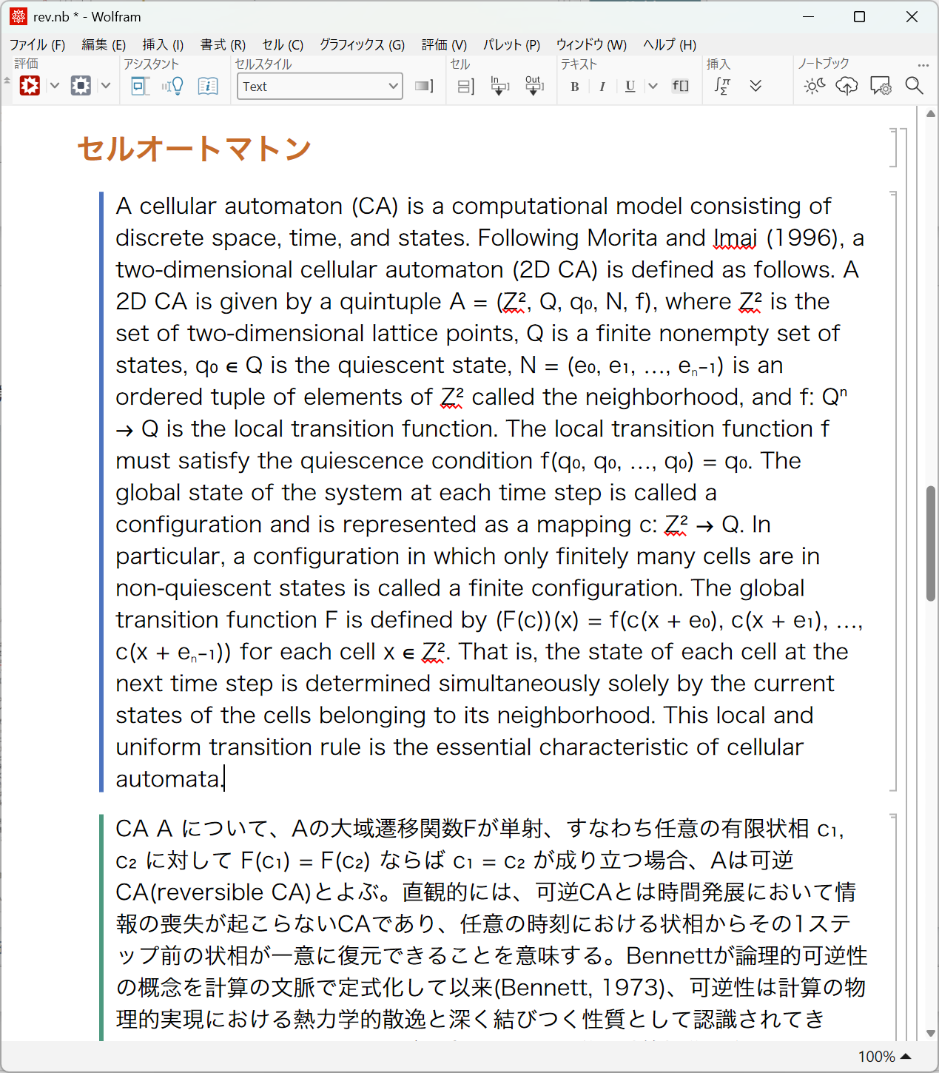
The interplay of prompts, paragraphs, and translation
The interplay of prompts, paragraphs, and translation
Not only can you switch between modes, but when you update and expand content or perform translation updates in any given display mode, the other modes are also updated accordingly to reflect those changes.
◼
Prompt Display
梅田地下街はとんでもなくでかい...
◼
Paragraph Display
大阪の梅田地下街は、日本国内はおろか世界的に見ても類を見ない規模を誇る地下空間である。複数の鉄道ターミナルを結ぶように縦横無尽に広がるその通路網は、初めて訪れる者の方向感覚を容易に奪い去るほど広大で、地元の人々ですら迷うことがあるという逸話が絶えない。ホワイティうめだ、ディアモール大阪、阪急三番街といった...
◼
Translation Display
The Umeda underground shopping district in Osaka is a subterranean space of unparalleled scale, not only within Japan but across the entire world. Its network of passageways sprawls in every direction, connecting multiple railway terminals, and is so vast that it easily strips first-time visitors of any sense of direction — and there is no shortage of stories about even locals getting lost. Several commercial zones, including Whity Umeda, Diamor Osaka, and Hankyu Sanbangai, are organically linked together underground, concentrating such a density of urban functions beneath the surface — from restaurants and specialty shops to bookstores and service facilities — that one can take care of virtually any errand without ever stepping above ground. This enormous underground city is far more than a mere collection of commercial establishments; it also serves as essential living infrastructure that allows people to move through the heart of Osaka while sheltering from rain, wind, and brutal summer heat, with hundreds of thousands of people passing through its corridors every single day. Walking through the Umeda underground is nothing less than an experience of feeling firsthand an overwhelming sense of scale, as though an entire city had simply sunk beneath the earth.
◼
Not only can you switch between modes, but when you update the content in any given display mode and perform operations such as expansion or translation, the other modes are also updated accordingly to reflect those changes.
◼
Prompt Display
梅田地下街はとんでもなくでかい...
<<少し簡潔にして短めに>>
<<少し簡潔にして短めに>>
◼
Paragraph Display
大阪の梅田地下街は、世界的に見てもとんでもない規模を誇る地下空間である。複数の鉄道ターミナルを結ぶ通路網は初めての訪問者の方向感覚をあっさり奪い去り、地元民ですら迷うという話が絶えない。ホワイティうめだやディアモール大阪など複数の商業区画が地下で連結し...
◼
Translation Display
Osaka’s Umeda underground shopping district is a subterranean space of staggering scale even by global standards. The network of passageways connecting multiple railway terminals readily strips first-time visitors of their sense of direction, and stories of even locals getting lost never cease. Multiple commercial zones such as Whity Umeda and Diamor Osaka are linked underground, packing in enough urban functionality from restaurants to speciality shops that there is no need to go above ground. This enormous underground city also serves as everyday infrastructure where people can get around while sheltered from rain, wind, and summer heat, with hundreds of thousands passing through each day. Walking through Umeda’s underground is nothing short of an experience that lets you feel firsthand the sheer scale of what seems like an entire city that has sunk beneath the earth.
Reference Management
Reference Management
With ClaudeAttach, you can specify a PDF or URL as a reference (a feature of claudecode.wl).
When you write a prompt in a cell that references an attached document—for example, “Write only the definition section of cellular automata following 1996-Morita-SR8.pdf”—the paragraph for that cell is generated with reference to that document, and the document is processed as a cited reference.
If you reference an attached file in your prompt, it will generally be cited in a reasonably appropriate manner.
◼
{{<<Key>>, <<Author>>, <<Year>>, <<Title>>}, {"morita1996", "Kenichi Morita, Katsunobu Imai", "1996", "Self-reproduction in a reversible cellular space, Theoretical Computer Science 168, pp. 337-366"}, {"owens2008", "Nick Owens and Susan Stepney", "2008", "Investigations of Game of Life cellular automata rules on Penrose Tilings: lifetime and ash statistics, Journal of Cellular Automata 5, pp. 267-297"}, {"初田2012", "Takahiro Hatsuda (初田隆宏)", "2012", "ペンローズタイリング上のセルオートマトンシミュレータの実装 (An implementation of cellular automata simulator on Penrose tilings), Master's Thesis, Hiroshima University (広島大学大学院工学研究科)"}, {"margolus1984", "Norman Margolus", "1984", "Physics-Like Models of Computation, Physica D: Nonlinear Phenomena 10D, pp. 81-95"}, {"morita1992", "Kenichi Morita, Satoshi Ueno", "1992", "Computation-Universal Models of Two-Dimensional 16-State Reversible Cellular Automata, IEICE Transactions on Information and Systems E75-D(1), pp. 141-147"}, {"5state2004", "Katsunobu Imai, Chuzo Iwamoto, Kenichi Morita", "2006", "A five-state von Neumann neighbor universal hyperbolic cellular automaton, International Journal of Unconventional Computing 2, pp. 131-141"}, {"the corona limit of penrose tilings is a regular decagon2016", "Shigeki Akiyama and Katsunobu Imai", "2016", "The Corona Limit of Penrose Tilings Is a Regular Decagon, Lecture Notes in Computer Science (AUTOMATA 2016) 9664, pp. 35–48"}, {"reversible world of cellular automata [kenichi morita]3696", "Kenichi Morita", "2025", "Reversible World of Cellular Automata: Fantastic Phenomena and Computing in Artificial Reversible Universe, Book (World Scientific, WSPC Book Series in Unconventional Computing, Volume 4) 4"}, {"bennett1973", "Charles H. Bennett", "1973", "Logical Reversibility of Computation, IBM Journal of Research and Development 17, pp. 525-532"}, {"fredkin1982", "Edward Fredkin, Tommaso Toffoli", "1982", "Conservative Logic, International Journal of Theoretical Physics 21, pp. 219-253"}, {"umc022002", "Katsunobu Imai, Kenji Fujita, Chuzo Iwamoto, Kenichi Morita", "2002", "Embedding a logically universal model and a self-reproducing model into number-conserving cellular automata, Unconventional Models of Computation (UMC 2002), Lecture Notes in Computer Science, Springer 2509, pp. 37–49"}, {"corona limits of tilings periodic case2018", "Shigeki Akiyama, Jonathan Caalim, Katsunobu Imai, Hajime Kaneko", "2019", "Corona Limits of Tilings: Periodic Case, Discrete & Computational Geometry 61, pp. 626-652"}, {"hori1999", "Takahiro Hori, Katsunobu Imai, Kenichi Morita", "1999", "3次元可逆自己増殖セル・オートマトンについて, 電子情報通信学会技術研究報告 (IEICE Technical Report), COMP98-70 98, pp. 47-54"}, {"de bruijin1981", "N.G. de Bruijn", "1981", "Algebraic theory of Penrose's non-periodic tilings of the plane. I, Indagationes Mathematicae (Proceedings) 84, pp. 39-66"}}
Handling of Mathematical Expressions During Export
Handling of Mathematical Expressions During Export
The referenced PDF page and a screenshot of the cell’s text are sent together to the LLM to reproduce mathematical expressions in TeX or Word format. These are automatically output via the LaTeX+Math button or the Word+Math button.
Because reproducing mathematical expressions is inherently difficult, the relevant page from the referenced PDF and a snapshot image of the Notebook cell are sent to the LLM, enabling it to output highly accurate LaTeX mathematical expressions.
Because reproducing mathematical expressions is inherently difficult, the relevant page from the referenced PDF and a snapshot image of the Notebook cell are sent to the LLM, enabling it to output highly accurate LaTeX mathematical expressions.
Export to Word is accomplished by first outputting in Markdown format, then having Pandoc generate the Word format.
Inserting Figures
Inserting Figures
You can paste an image, but you can also have Mathematica draw it for you.
When you write a prompt for drawing a figure and press the “Compute” button, a program that draws the figure is generated as the output of that cell. This cell can also be switched between prompt mode and compute mode.
Regarding figure captions and citations, select the figure cell and then use the figure metadata settings button to set the label and caption.
When you press the reference insertion button and select a figure label, the figure’s citation metadata is inserted into the text. <<fig:pt-shortest-worm-trajectry>>. It is also possible to leave this processing to a prompt. This citation is applied during export to LaTeX as well.
Source code
Source code
The source code is available at https://github.com/transreal/documentation . All documentation is written in Japanese, so please use machine translation. If you wish to actually install and test the system, https://github.com/transreal/claudecode and https://github.com/transreal/NBAccess must already be up and running.
For claudecode/NBAccess, I have posted an article titled “Privacy-Aware LLM integration for Wolfram,” so please refer to that as well. Of course, the expansion and translation of cells set as Confidential in this environment are automatically executed using $ClaudePrivateModel:
https://community.wolfram.com/groups/-/m/t/3670605
https://community.wolfram.com/groups/-/m/t/3670605
CITE THIS NOTEBOOK
CITE THIS NOTEBOOK
LLM-powered Wolfram Notebook authoring environment for multilingual academic documents
by Katsunobu Imai
Wolfram Community, STAFF PICKS, April 5, 2026
https://community.wolfram.com/groups/-/m/t/3674507
by Katsunobu Imai
Wolfram Community, STAFF PICKS, April 5, 2026
https://community.wolfram.com/groups/-/m/t/3674507