This is a continuation to the posts listed at: https://community.wolfram.com/web/ggoff/
Supplementary files available here: https://www.dropbox.com/s/3vb47j6xvksoaw4/data7.zip?dl=0. Included are objects in 3D , images, animations and a notebook necessary to experiment with code and instructions in this post.
Supplementary files available here: https://www.dropbox.com/s/3vb47j6xvksoaw4/data7.zip?dl=0. Included are objects in 3D , images, animations and a notebook necessary to experiment with code and instructions in this post.
Abstract
Abstract
In Example 1 a maze with additions was developed and animated. Wolfram Language was used to build a word cloud from Euclid’s books about geometry. The most frequent mathematical objects were presented in a growing spiral. Example 2 celebrates a milestone for the author (animation #100). With Wolfram Language the #100 as text was cut horizontally and vertically. Emissive material was implemented to enhance the effects.
Experiment
Experiment
Example 1: Maze
Example 1: Maze
Build up
Build up
In[]:=
path0=SetDirectory[NotebookDirectory[]<>"/data/"]
Out[]=
D:\DDocs\0-published\woco\ams19\data
A vector sketch was created in Affinity Designer. It includes the building blocks.
In[]:=
Import["maze2.svg",ImageSize->Small]
Out[]=

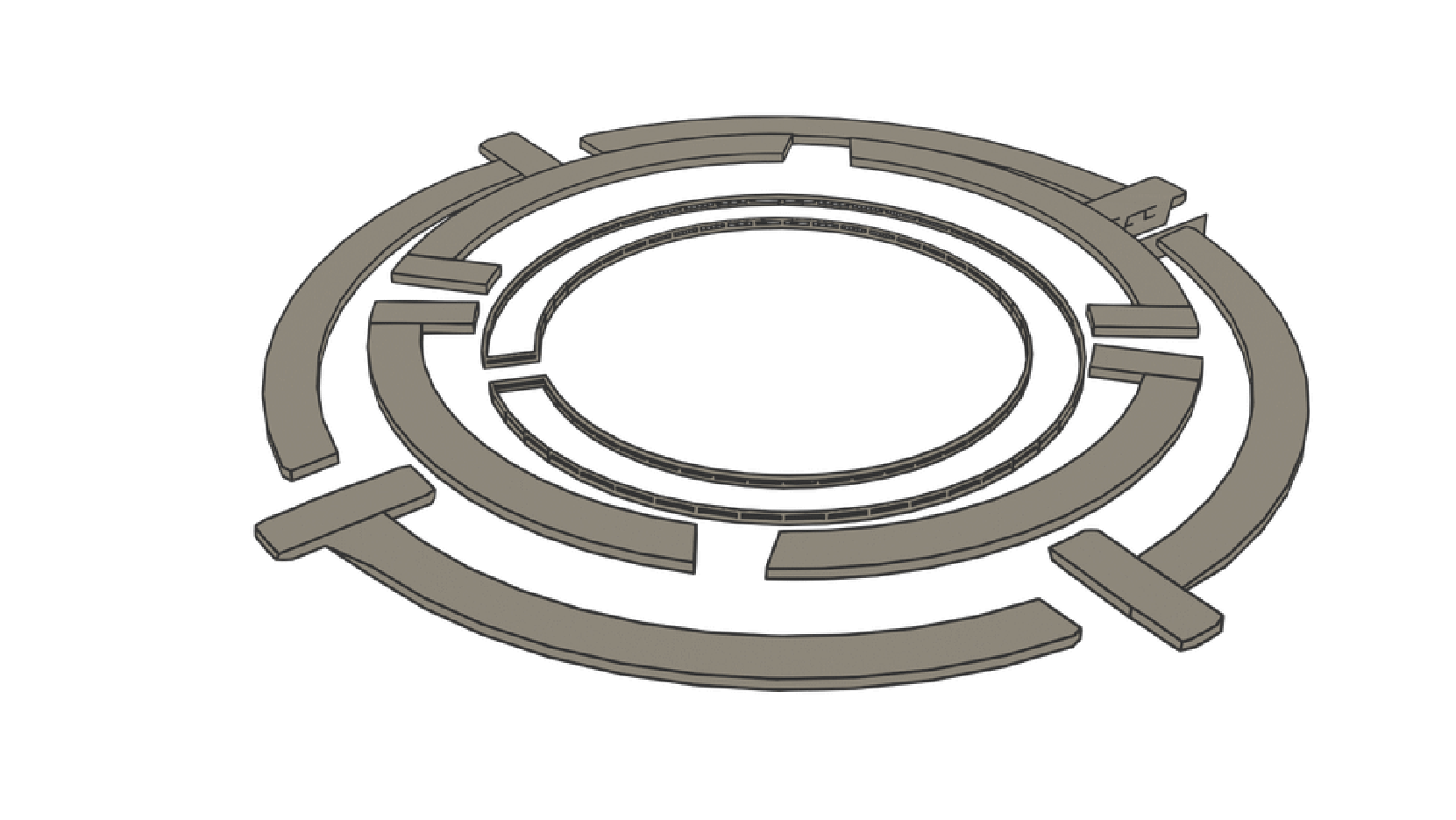
A simplified version of the maze was enhanced in Blender through line art. Five frames were rendered and placed in the data folder. They were imported and animated in Wolfram Language.
(*path0=SetDirectory[NotebookDirectory[]<>"/data/1a"]maze1=Import[#,ImageSize->1920/2]&/@{"0001.png","0002.png","0003.png","0004.png","0005.png"};ListAnimate[maze1,ImageSize->1920/8]*)
An export/re-import as gif-file followed.
(*path0=SetDirectory[NotebookDirectory[]<>"/data"]Export["maze01.gif",maze1,"DisplayDurations"->1]*)
In[]:=
path0=SetDirectory[NotebookDirectory[]<>"/data"]
Out[]=
D:\DDocs\0-published\woco\ams19\data
In[]:=
ListAnimate[Import["maze01.gif"],ImageSize->Medium]
Out[]=
Mathematical Objects
Mathematical Objects
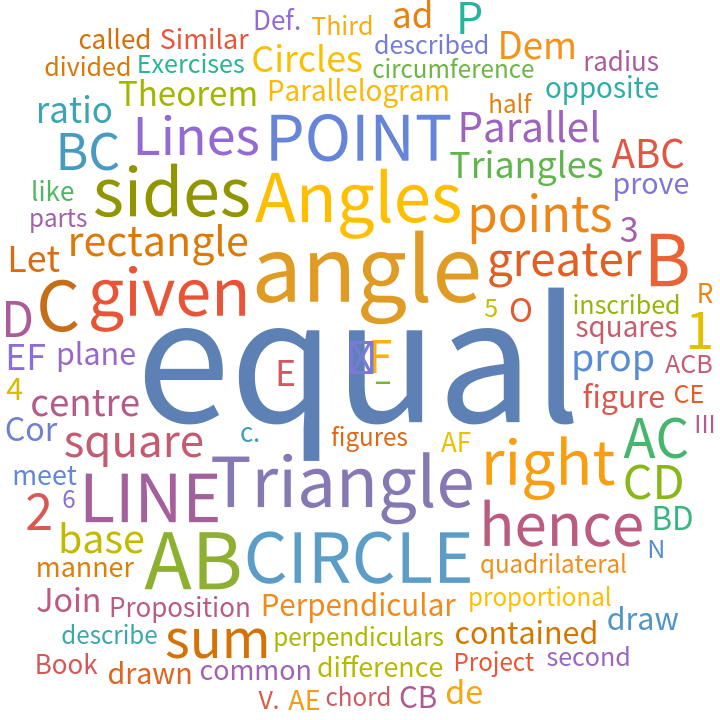
The books 1-6 of Euclid’s Elements in English were imported and evaluated as word cloud. One download-source for this ebook is listed in the references.
In[]:=
path0=SetDirectory[NotebookDirectory[]<>"/data"]euclid=Import["euclid.pdf","Plaintext"];
Out[]=
D:\DDocs\0-published\woco\ams19\data
In[]:=
WordCloud[euclid]
Out[]=
For a list of mathematical objects from the Elements the frequencies were collected.
In[]:=
geometry={"Point","Line","Line Segment","Ray","Angle","Triangle","Quadrilateral","Circle","Polygon","Arc","Polyhedron","Sphere"};wf=WordFrequency[euclid,geometry]
Out[]=
Point0.0000213493,Line0.0000533732,Line Segment0.,Ray0.0000106746,Angle0.0000213493,Triangle0.0000320239,Quadrilateral0.0000106746,Circle0.0000533732,Polygon0.0000213493,Arc0.0000106746,Polyhedron0.0000106746,Sphere0.0000533732
A rule-list was sorted by frequency.
In[]:=
rwf=Normal[Reverse[Sort[wf]]]
Out[]=
{Sphere0.0000533732,Circle0.0000533732,Line0.0000533732,Triangle0.0000320239,Polygon0.0000213493,Angle0.0000213493,Point0.0000213493,Polyhedron0.0000106746,Arc0.0000106746,Quadrilateral0.0000106746,Ray0.0000106746,Line Segment0.}
The most frequent word from the word cloud was added as first element.
In[]:=
sorted=Prepend[First[#]&/@(rwf/.RuleList),"equal"]
Out[]=
{equal,Sphere,Circle,Line,Triangle,Polygon,Angle,Point,Polyhedron,Arc,Quadrilateral,Ray,Line Segment}
In[]:=
StringRiffle[ToUpperCase[#]&/@sorted,"-"]
Out[]=
EQUAL-SPHERE-CIRCLE-LINE-TRIANGLE-POLYGON-ANGLE-POINT-POLYHEDRON-ARC-QUADRILATERAL-RAY-LINE SEGMENT
Spiral for chain of words
Spiral for chain of words
In[]:=
Out[]=
Function{r.,c.},Functiont.,r.Cost.,r.Sint.,c.t.
The helix was adapted to fit better to the scene.
In[]:=
With[{a=9},ParametricPlot3D[{-(aPi-t)Cos[t],-(aPi-t)Sin[t],t},{t,0,aPi},Axes->False]]
Out[]=

Color Management
Color Management
For the animation “Maze” the ACES color space was used.
The following graphics shows the visible spectrum, the gamuts for two camera/display-combos and the ACES color space in CIE chromaticity plots.
The following graphics shows the visible spectrum, the gamuts for two camera/display-combos and the ACES color space in CIE chromaticity plots.
In[]:=
path0=SetDirectory[NotebookDirectory[]<>"/data"]
Out[]=
D:\DDocs\0-published\woco\ams19\data
In[]:=
Import["ciePlots.png",ImageSize->500]
Out[]=
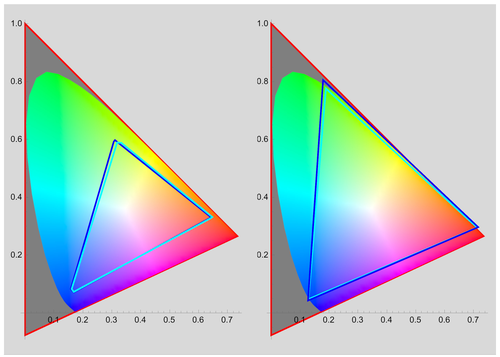
The ACES color space (red triangle, left and right plot) contains more colors than the visible spectrum. Take for example Rec.709 as input from a camera (left plot, blue). The input can be transformed to ACES color space via an IDT (input display transform). To edit/view it on a display sRGB (left, cyan) is a choice.
ACEScg (right plot, blue) is a subset of ACES used for computer graphics as source. During modeling e.g. in Blender the view transform can be set to sRGB. The file format of choice is 16/32 bit EXR/openEXR. Before rendering switch the view transform to e.g. Rec.709. For displays with a wider gamut set view transform to e.g. Rec.2020 (right, cyan) with ST2084-1000 nits.
In a video editing software e.g. DaVinci Resolve EXR-sequences can be imported and with the appropriate settings handled within ACES color space. Only when rendering out the final animation/movie the output will be compressed e.g with h.265 as codec and mp4 as container to a 10-bit HDR video.
The ACES color management is designed to be scene-referred and should be able to handle input from a variety of devices with different color gamut and displaying input/output on displays again with a variety of gamuts across multiple applications.
ACEScg (right plot, blue) is a subset of ACES used for computer graphics as source. During modeling e.g. in Blender the view transform can be set to sRGB. The file format of choice is 16/32 bit EXR/openEXR. Before rendering switch the view transform to e.g. Rec.709. For displays with a wider gamut set view transform to e.g. Rec.2020 (right, cyan) with ST2084-1000 nits.
In a video editing software e.g. DaVinci Resolve EXR-sequences can be imported and with the appropriate settings handled within ACES color space. Only when rendering out the final animation/movie the output will be compressed e.g with h.265 as codec and mp4 as container to a 10-bit HDR video.
The ACES color management is designed to be scene-referred and should be able to handle input from a variety of devices with different color gamut and displaying input/output on displays again with a variety of gamuts across multiple applications.
Hint: Above graphic was created in aces.nb. It was outsourced to folder data. A download-source for the icc-profiles is listed in the references.
Words - Spiral - Blender
Words - Spiral - Blender
Instructions & screenshots for building a scene for words following a spiral path are presented with a TabView.
Question: Have any other members of the Wolfram Community implemented “ACES” in their workflow? An exchange of experiences would be interesting.
Example 2: 100
Example 2: 100
Building up
Building up
The number 100 as text was extruded in Blender and exported as obj-file.
Lists of cuboids (horizontal, vertical) were created.
An animation for the horizontal cuts was animated .
An animation of vertical cuts followed.
Both animations as gif-files were imported and animated.
Multiple Materials - Blender
Multiple Materials - Blender
Loose instructions & screenshots for cutting the metallic object (derived from # 100) with a series of glowing slabs is presented with TabView.
References
References
Collections of animations
Collections of animations
The newest collection is animations-05, which contains the original videos for Example 2. The other one is in collection animations-04.
References
References
Maze
Scene: Modified Circles, Lines & Letters
From a Maze to an Amphitheatre & Words on a Spiral (Source: Elements)
Casey, John, and Euclid. The First Six Books of the Elements of Euclid, 2007. https://gutenberg.org/ebooks/21076.
Accessed February 27, 2023.
ACESCentral. “User Guides.” Accessed May 16, 2023. https://acescentral.com/user-guides/.
Tooms, Michael. “Colour Reproduction in Electronic Imaging Systems: Photography, Television, Cinematography | Wiley.” Wiley.com. Accessed May 16, 2023. https://www.wiley.com/en-us/Colour+Reproduction+in+Electronic+Imaging+Systems %3 A+Photography %2 C+Television %2 C+Cinematography-p-9781119021773.
“ICC Profiles — Virtual Production Indie Film Guide.” Accessed May 16, 2023. https://vpifg.com/help/icc-profiles/.
McLoone, Jon. “AMAZEing Image Processing in Mathematica”, Wolfram Blog, November 3, 2010.
https://blog.wolfram.com/2010/11/03/amazeing-image-processing-in-mathematica/. Accessed February 27, 2023.
Wolfram Language & System Documentation Center, February 27, 2023. https://reference.wolfram.com/language/.
Audio:
Stock Music & Sound Effects - Royalty Free Audio - Storyblocks
https://storyblocks.com/audio (Accessed 2023-03-27)
Orefice, Enzo. Time As Passed (30 Seconds). Accessed February 27, 2023. SBA-347445055.
Scene: Modified Circles, Lines & Letters
From a Maze to an Amphitheatre & Words on a Spiral (Source: Elements)
Casey, John, and Euclid. The First Six Books of the Elements of Euclid, 2007. https://gutenberg.org/ebooks/21076.
Accessed February 27, 2023.
ACESCentral. “User Guides.” Accessed May 16, 2023. https://acescentral.com/user-guides/.
Tooms, Michael. “Colour Reproduction in Electronic Imaging Systems: Photography, Television, Cinematography | Wiley.” Wiley.com. Accessed May 16, 2023. https://www.wiley.com/en-us/Colour+Reproduction+in+Electronic+Imaging+Systems %3 A+Photography %2 C+Television %2 C+Cinematography-p-9781119021773.
“ICC Profiles — Virtual Production Indie Film Guide.” Accessed May 16, 2023. https://vpifg.com/help/icc-profiles/.
McLoone, Jon. “AMAZEing Image Processing in Mathematica”, Wolfram Blog, November 3, 2010.
https://blog.wolfram.com/2010/11/03/amazeing-image-processing-in-mathematica/. Accessed February 27, 2023.
Wolfram Language & System Documentation Center, February 27, 2023. https://reference.wolfram.com/language/.
Audio:
Stock Music & Sound Effects - Royalty Free Audio - Storyblocks
https://storyblocks.com/audio (Accessed 2023-03-27)
Orefice, Enzo. Time As Passed (30 Seconds). Accessed February 27, 2023. SBA-347445055.
100
Scene:
# 100 as modified text is a celebration of a milestone. 100 videos with animations in 3D are now available.
Wolfram Language & System Documentation Center, May 16, 2023. https://reference.wolfram.com/language/.
Audio:
Stock Music & Sound Effects - Royalty Free Audio - Storyblocks
https://storyblocks.com/audio (Accessed 2023-04-23)
bzur. Acoustic Peace (30 Sec). Accessed April 23, 2023. Asset ID: SBA-347372532
Scene:
# 100 as modified text is a celebration of a milestone. 100 videos with animations in 3D are now available.
Wolfram Language & System Documentation Center, May 16, 2023. https://reference.wolfram.com/language/.
Audio:
Stock Music & Sound Effects - Royalty Free Audio - Storyblocks
https://storyblocks.com/audio (Accessed 2023-04-23)
bzur. Acoustic Peace (30 Sec). Accessed April 23, 2023. Asset ID: SBA-347372532
CITE THIS NOTEBOOK
CITE THIS NOTEBOOK
Animating Wolfram surfaces with Blender: Maze & 100
by Guenther Gsaller
Wolfram Community, STAFF PICKS, May 18 2023
https://community.wolfram.com/groups/-/m/t/2921342
by Guenther Gsaller
Wolfram Community, STAFF PICKS, May 18 2023
https://community.wolfram.com/groups/-/m/t/2921342