Background
One of my current research projects consists of analyzing a large, valuable dataset on the crown structure of 5 pine species. The Loblolly, Shortleaf, Longleaf, Slash, and Virginia pines have different growth habits designed to take advantage of different environmental conditions. For example, the Longleaf pine is a species that is resistant to wildfires because it goes through a grass stage where it invests heavily in deeper roots before becoming taller. The goal of this work was to assess the ability of each species to capture light efficiently for photosynthesis. Here, in North Carolina, perhaps no pine species is more competitive that the Loblolly pine, especially when considered relative to the Longleaf.
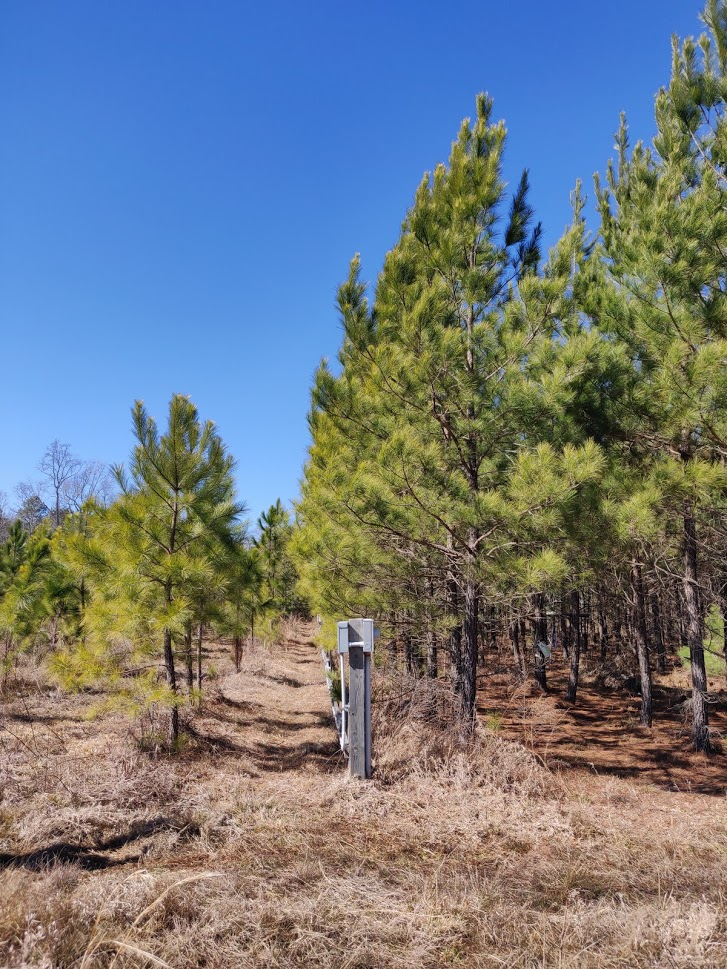
Below, you can see Longleaf pines (left) and Loblolly pine trees (right) of the same age. It is clear that one is doing much better than the other and it might have to do with how light penetrates the canopy of each tree.
Below, you can see Longleaf pines (left) and Loblolly pine trees (right) of the same age. It is clear that one is doing much better than the other and it might have to do with how light penetrates the canopy of each tree.
Challenge
The challenge with the dataset is that it is deeply hierarchical with the stem branching onto multiple first order branches, these split into segments which branch into second order branches, and so on. The dataset is huge containing properties such as branching angle, leaf angle, needle weight, segment diameter, etc. for 125 branches spanning 5 trees for each of the 5 species. See below a drawing of one sample branch
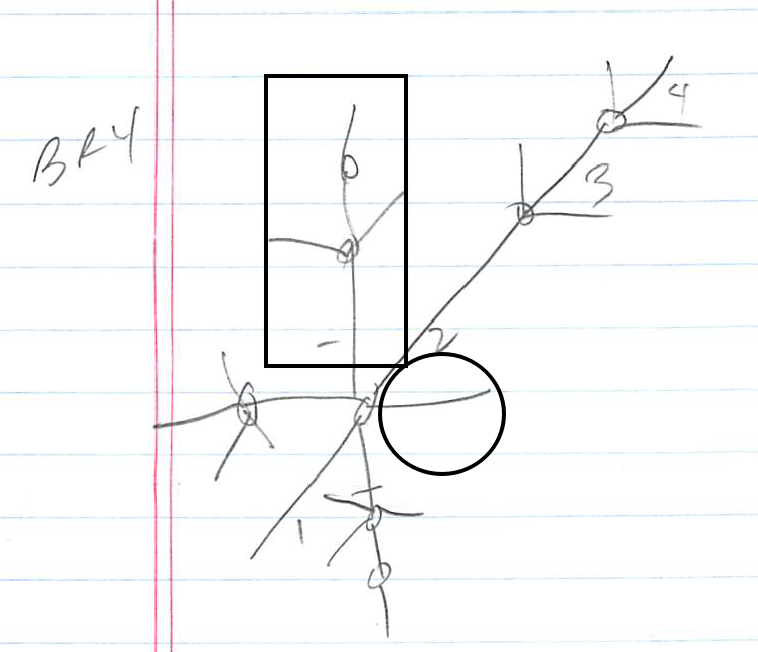
This primary branch labeled BR4 has 4 first order segments. The base of the second segment branches into 4 new second order branches each having anywhere between 1 to 3 segments. The one inside a rectangle has 3 segments while the other inside a circle has only 1 segment. Some of these branch into new third order branches and so on. I needed a convenient way to link the physiological statistics of, say, first-order branches to third-order ones.
Luckily, Mathematica' s Dataset functionality allows one to analyze such hierarchical data.
Example
Below, I’m sharing the Excel file that corresponds to the above branch. I have drawn a rectangle and circle around the secondary branches that correspond to the ones inside the rectangle and circle in the drawing above. Can you figure out which of the secondary branches above corresponds to the secondary branch 3 inside the diamond?
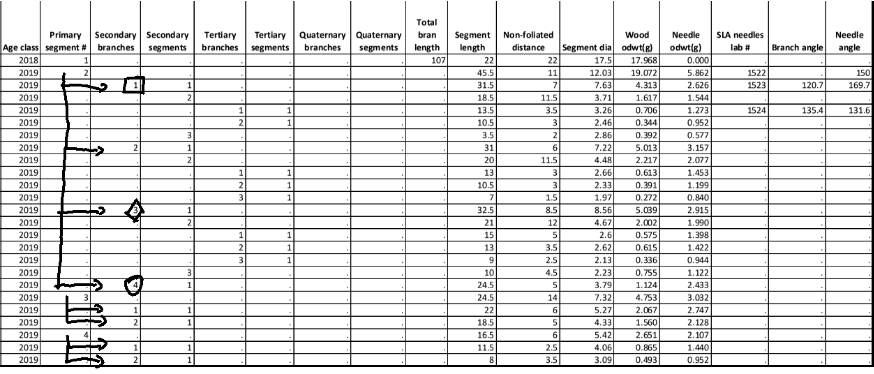
You can see how primary segment number 2 branches into 4 secondary branches. Secondary branch 1 has 3 segments of which segment 2 branches into 2 tertiary branches each having 1 segment. Confirm this is the case in the branch drawing above. The arrows in the above figure indicate the different secondary branches branching out of primary segments.
Using Datasets to analyze the data
Import dataset
Import dataset
In[]:=
branchDataTemp=Import["branch 4.xlsx",{"Dataset",1},HeaderLines1];
Make keys lowercase
Make keys lowercase
In[]:=
branchDataTemp=Query[All,Function[i,AssociationThread[ToLowerCase[i],i]]@Keys[Normal[branchDataTemp[1]]]][branchDataTemp];
Trim dataset
Trim dataset
In[]:=
branchData=branchDataTemp[Select[If[NumericQ[#["age class"]],True,!StringMatchQ[#["age class"],""]]&]];Clear[branchDataTemp];
Show keys
Show keys
Normal[First[branchData[Keys]]]
Out[]=
{age class,primary segment #,secondary branches,secondary segments,tertiary branches,tertiary segments,quaternary branches,quaternary segments,total bran length,segment length,non-foliated distance,segment dia,wood odwt(g),needle odwt(g),sla needles lab #,branch angle,needle angle,# of fascicles , sla oven dry wt(g),total needle length (cm),projected area (cm2),# needles scanned,average need length (cm),# cones,cone distance on stem,cone odwt(g), epicormic needle branches,epicormic odwt(g)}
The Keys containing the strings “segment” and “branch” are used to specify where each row of the dataset fits in the hierarchy. All the other Keys are physiological measurements of the branches and segments.
Define Keys that characterize the hierarchical position of each row
Define Keys that characterize the hierarchical position of each row
In[]:=
segBrId={"primary segment #","secondary branches","secondary segments","tertiary branches","tertiary segments"};
Visualize dataset hierarchy columns
Visualize dataset hierarchy columns
branchData[All,segBrId]
Out[]=
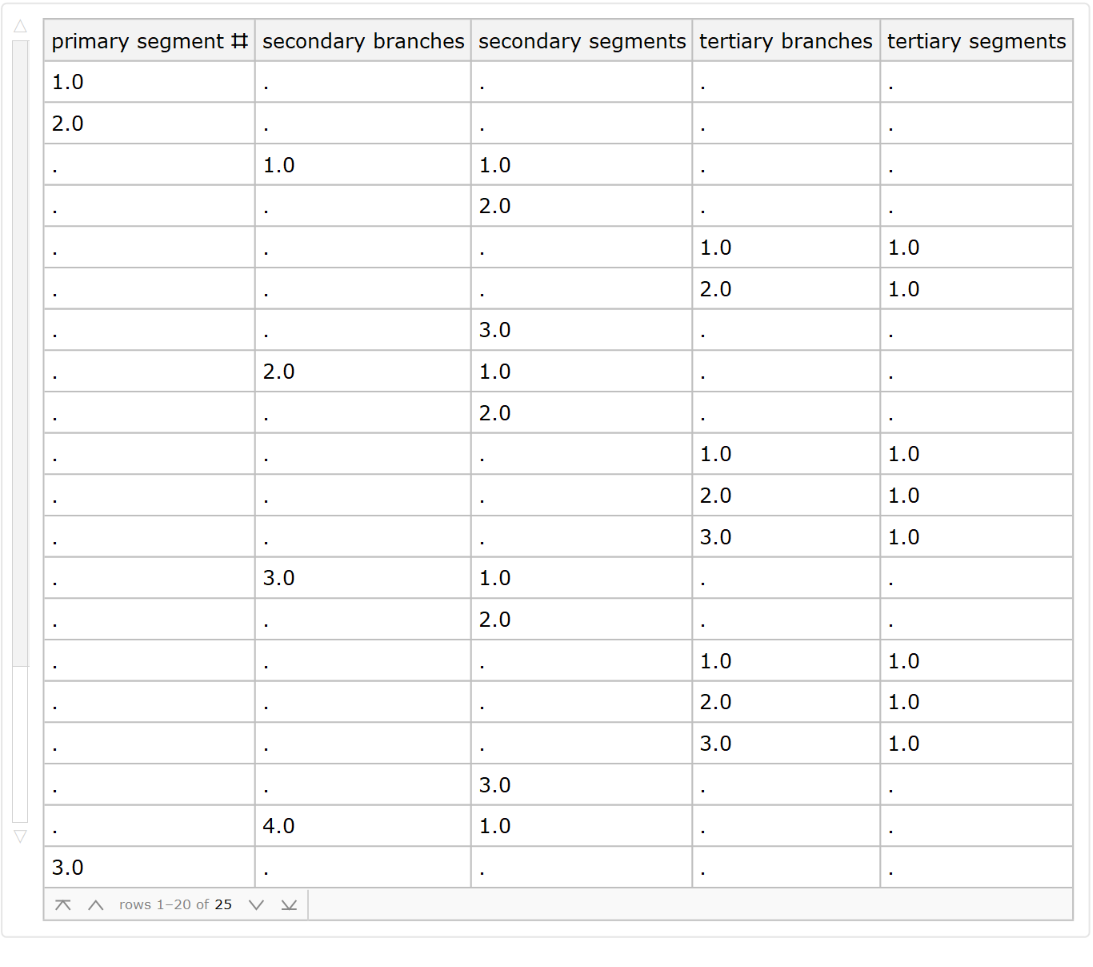
This doesn’t look great: the table contains both strings and decimal numbers. This was the easiest way for the data collectors to create this kind of dataset. However, the ultimate goal is to group the rows that belong to the same segment together in a nested dataset. Doing this requires the use of the powerful GroupBy function. To use GroupBy, we need to fill the above columns by integers indicating where each row fits in the hierarchy. Below, I define functions that do this. Nothing is special about these; they go through every row and check how to fill the above column values based on certain conditions. These can be checked below, but it is not necessary as this is not the main point of this post. Therefore, I have minimized it.
Tidy up the hierarchy columns
Tidy up the hierarchy columns
Display filled dataset in full
Display filled dataset in full
branchData
Out[]=
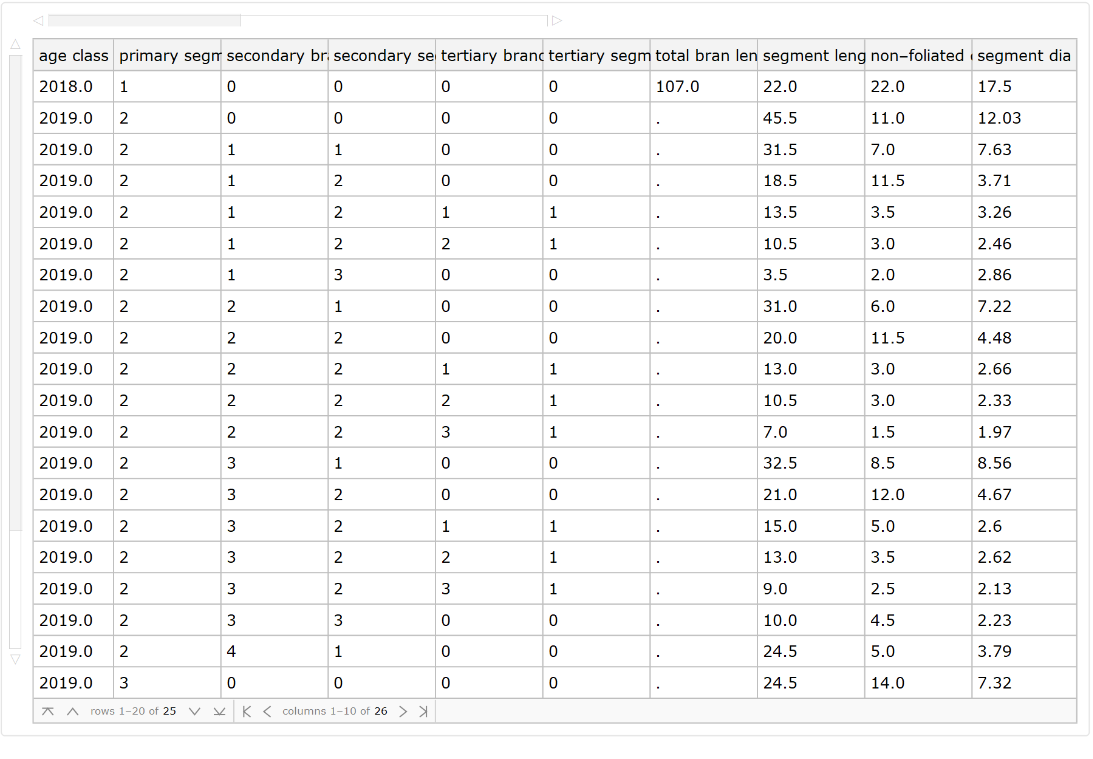
Observe how the important columns denoting where each row fits in the hierarchy are now filled. Scroll through the columns to take a peak at all the data collected.
Transform single-hierarchy dataset to a nested, multi-hierarchy dataset
Transform single-hierarchy dataset to a nested, multi-hierarchy dataset
Define the normal version of the dataset for stability
Define the normal version of the dataset for stability
I haven’t used all the data in this set, so let’s do a little clean up
I haven’t used all the data in this set, so let’s do a little clean up
Group dataset by primary segment #
Group dataset by primary segment #
Group dataset by secondary branch
Group dataset by secondary branch
And so on...
And so on...
Delete all columns specifying hierarchy since now the hierarchy is captured by the dataset structure
Delete all columns specifying hierarchy since now the hierarchy is captured by the dataset structure
Visualize dataset
Visualize dataset
Great! Now each row in the dataset belongs somewhere in the hierarchy and we can select a specific segment using Queries. For example, if we want to select the secondary branch inside the rectangle in the branch drawing above, we write
We see that this branch has three segments as can be confirmed by the above drawing. The final step is to extract the physiological data and place them in the correct hierarchical position. This is because, in its current form, the data is under cryptic headings labeled 0. For example, if I wanted the properties of the first segment in that branch, I would have to write:
Place data in the corresponding level inside the nested dataset
Place data in the corresponding level inside the nested dataset
Find all the data corresponding to primary segments
Find all the data corresponding to primary segments
Find all the data corresponding to secondary segments
Find all the data corresponding to secondary segments
To tertiary segments
To tertiary segments
Now, join the data in the correct level
Now, join the data in the correct level
What’s the depth of the dataset?
Join
Delete “0”headers
Delete “0”headers
Exploring the dataset
Exploring the dataset
Check out branching and physiological properties of primary segment # 3
Check out branching and physiological properties of primary segment # 3
Check out secondary branch # 2 on primary segment # 3
Check out secondary branch # 2 on primary segment # 3
Compare segment diameters of primary segments vs secondary segments
Compare segment diameters of primary segments vs secondary segments
Final thoughts
This was my first experience with such a hierarchical dataset. I have spent much time cleaning up the data to make it into a form I can easily use to explore statistics through different layers of hierarchy. The time and effort, however, are well worth it.