The purpose of this project was to be able to track the trajectory of a point in the ocean using ocean current data. I decided to represent ocean currents with a vector field, and I used this vector field to estimate the final location of a particle. A vector field is a collection of slopes with a pull in both the x and y directions. The x component is typically referred to as “u” and the y component is typically referred to as “v”. To track a particle’s trajectory with vectors, I used the Runge-Kutta method. This method calculates 4 slopes from a part of a mathematical function to produce an estimate of where the function leads. Applying this method to the ocean current vectors, I was able to get a prediction of where a particle could be according to the vector field. One of the main applications of this program is to see where trash in the ocean lands up.
Introduction
Introduction
Our oceans have progressively become more and more polluted with plastics and much of that plastic comes from rivers. I wanted to be able to track the movement of these plastics to see how the ocean currents affect the location of plastics around the world.
The ocean currents can be represented as vectors, and my program needed to follow these vectors in order to produce an estimate. Essentially, it had to draw a line according to a collection of arrows. While this task may seem simple at first, programming it quickly becomes complicated. Each vector has a slope and direction. The computer must know which vector to follow to create an accurate estimate. But if the program simply followed vectors with similar slopes and directions, it wouldn’t be able to accurately predict the trajectory near small ocean gyres, where the currents run in circles.
Assumptions :
◼
Wind does not have an effect on the trajectory
◼
The plastics are on the surface of the ocean
The Process
The Process
Finding and formatting ocean data
Finding and formatting ocean data
To begin, I needed to find ocean current data that was in a specific form to create vector plots. Though many websites were able to visualize the ocean currents on a map or graph, the data that created the vectors were not easily accessible.
I used NASA data (linked below) that had the u, v, longitude, and latitude data. But unfortunately, it didn't have daily updates on the ocean currents. Regardless, I decided to use this data. The ocean current data used throughout this project were recorded on July 7th of this year.
Imports the u and v data as well as other important data sets:
In[]:=
ucoord=;vcoord=;lat=;long=;xcoord=;ycoord=;
The Runge-Kutta Method
The Runge-Kutta Method
As mentioned previously, the ocean currents are represented as vectors, each having a x and y direction. Given a point p, the program must create a trajectory that roughly follows the direction of the vectors. To do this, I used the Runge-Kutta method.
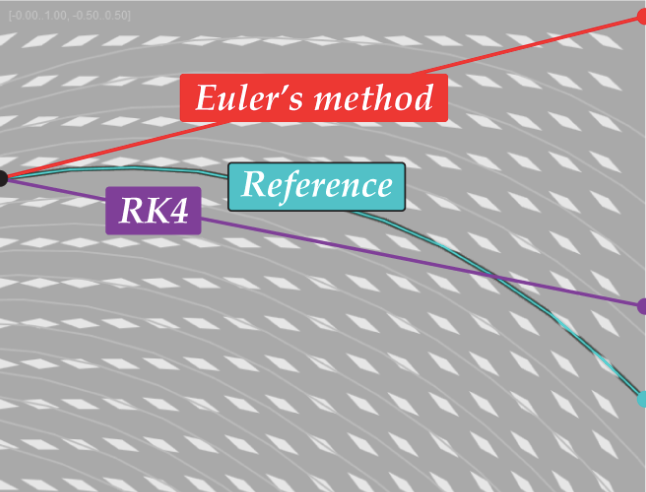
The Runge-Kutta method is a series of formulas that help estimate the trajectory of a graph from a given point. The process is similar to Euler's method, but instead of inputting just one slope, the Runge-Kutta method uses four slopes to make a prediction. As a result, the Runge-Kutta method is four times more accurate than Euler's method.
The Runge-Kutta method is a series of formulas that help estimate the trajectory of a graph from a given point. The process is similar to Euler's method, but instead of inputting just one slope, the Runge-Kutta method uses four slopes to make a prediction. As a result, the Runge-Kutta method is four times more accurate than Euler's method.
Difference in approximation between Euler’ s method and the Runge-Kutta Method:
Creates two 2D arrays by riffling the x and y values and the u and v coordinates:
In[]:=
points=Partition[Riffle[Flatten[ucoord],Flatten[vcoord]],2];grid=Partition[Riffle[Flatten[xcoord],Flatten[ycoord]],2];field=Partition[Riffle[grid,points],2];
The x and y arrays create a mesh grid, making it easier to calculate the direction of the vectors. The a and b functions compute the percentage distance from the nearest corner of 1 x 1 box in the mesh grid.
Finds the nearest latitude and longitude in u and v in order to calculate a and b:
In[]:=
indxs[p_List,x_List,y_List]:=Round[{((p[[1]]-20)/0.3333333)+1,((80-p[[2]])/0.3333333)+1}];a[p_List,x_List,y_List]:=Abs[(p[[1]]-x[[1]][[indxs[p,x,y][[1]]]])/(x[[1]][[indxs[p,x,y][[1]]+1]]-x[[1]][[indxs[p,x,y][[1]]]])];b[p_List,x_List,y_List]:=Abs[(p[[2]]-y[[indxs[p,x,y][[2]]]][[1]])/(y[[indxs[p,x,y][[2]]+1]][[1]]-y[[indxs[p,x,y][[2]]]][[1]])];
The Runge-Kutta method only operates on a mathematical function (for example, x^2), so it won't work on the ocean data directly. The VF function interpolates the data in the 1 x 1 box and creates a mathematical function that represents the vectors, allowing me to run the Runge-Kutta method on the data.
Turns a small portion of the data into a function:
In[]:=
VF[p_List,x_List,y_List,u_List,v_List]:=((1-a[p,x,y])*(1-b[p,x,y])*{u[[indxs[p,x,y][[2]]]][[indxs[p,x,y][[1]]]],v[[indxs[p,x,y][[2]]]][[indxs[p,x,y][[1]]]]})+((1-a[p,x,y])*b[p,x,y]*{u[[indxs[p,x,y][[2]]]][[indxs[p,x,y][[1]]+1]],v[[indxs[p,x,y][[2]]]][[indxs[p,x,y][[1]]+1]]})+(a[p,x,y]*(1-b[p,x,y])*{u[[indxs[p,x,y][[2]]+1]][[indxs[p,x,y][[1]]]],v[[indxs[p,x,y][[2]]+1]][[indxs[p,x,y][[1]]]]})+(a[p,x,y]*b[p,x,y]*{u[[indxs[p,x,y][[2]]+1]][[indxs[p,x,y][[1]]+1]],v[[indxs[p,x,y][[2]]+1]][[indxs[p,x,y][[1]]+1]]});
The following code in the Runge-Kutta method which plugs a set of lists into the VF function.
Takes 4 points, calculates the slope, and returns a new point:
In[]:=
k1[p_List,x_List,y_List,u_List,v_List,t_]:=VF[p,x,y,u,v];k2[p_List,x_List,y_List,u_List,v_List,t_]:=VF[p+t*k1[p,x,y,u,v,t]/2,x,y,u,v];k3[p_List,x_List,y_List,u_List,v_List,t_]:=VF[p+t*k2[p,x,y,u,v,t]/2,x,y,u,v];k4[p_List,x_List,y_List,u_List,v_List,t_]:=VF[p+t*k3[p,x,y,u,v,t],x,y,u,v];VFlow[p_List,x_List,y_List,u_List,v_List,t_]:=p+(t*(k1[p,x,y,u,v,t]+2*k2[p,x,y,u,v,t]+2*k3[p,x,y,u,v,t]+k4[p,x,y,u,v,t])/6);
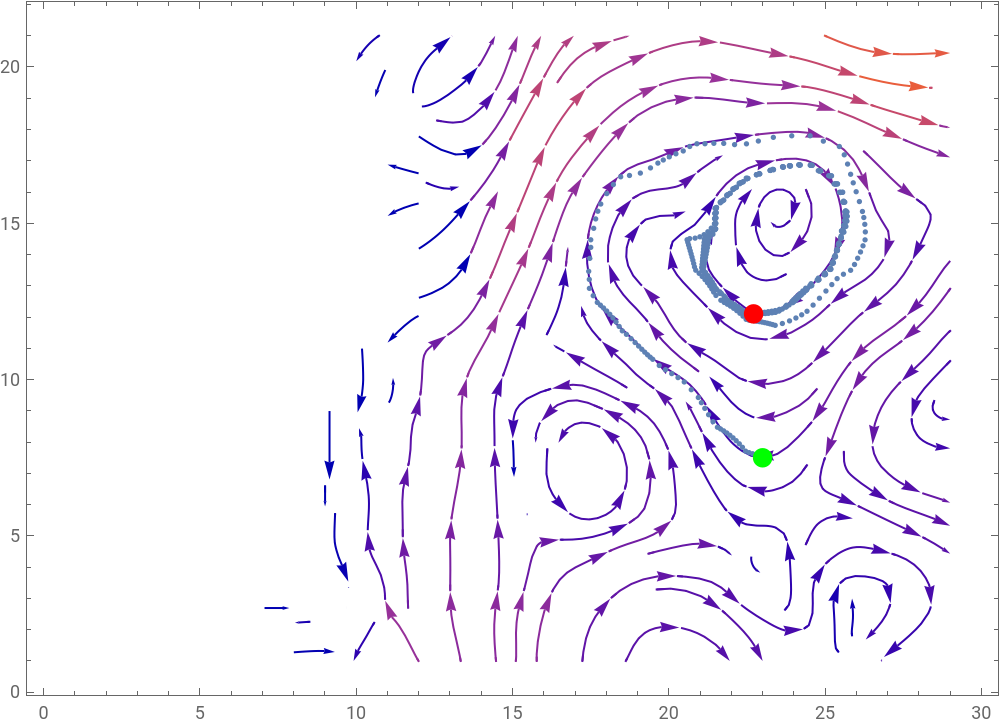
Shows the trajectory of a point according to ocean currents over a small area:
Out[]=
{23,7.5}
Out[]=
{{,Point[{23,7.5}]},{,Point[{22.7109,12.1026}]}}

Out[]=
Overlaying the trajectory with a map
Overlaying the trajectory with a map
Now that I was able to calculate the trajectory of a point, I wanted to overlay a map of the world with the trajectory.
But before that, I had to specify the initial point (p0) using latitude and longitude. I was able to get the coordinates using Google Maps. The tstep and niter variables (the step size and number of iterations) have an effect on the accuracy and length of the trajectory. The smaller the step size, the smaller the grids of vectors used to approximate the trajectory. A larger number of iterations runs the Runge-Kutta method more times and results in a longer trajectory (unless the trajectory hits land in which case, the program stops).
Specifies the initial point, step size, and number of iterations:
In[]:=
converterLon[l1_Real,l2_Real]:={l1,If[Negative[l2],360+l2,l2]};p0=Reverse[converterLon[-4.771420799802509, 72.53610881160559]];tstep=2;niter=1000;
VFlow2 serves as a helper function to create traj, which is the calculated trajectory starting at p0 running with niter iterations. startEnd highlights the initial and final points.
Calculates trajectory:
In[]:=
VFlow2[p_List]:=VFlow[p,xcoord,ycoord,ucoord,vcoord,tstep];traj=NestList[VFlow2,p0,niter];startEnd={{Green,PointSize[Large],Point[First[traj]]},{PointSize[Large],Red,Point[Last[traj]]}};
With these variables defined, we can start working on overlaying the trajectory. I used the GeoGraphics and GeoPath functions. The GeoGraphics function allowed me to create a map and the GeoPath function plotted the trajectory on this map. However, I quickly realized that some of the trajectories were incredibly small, so I used the DynamicGeoGraphics function to allow the viewer to zoom in and out.
Prints the trajectory onto a dynamic map:
Predicted trajectory for a given point:
Applications and Future Improvements
Applications and Future Improvements
On the surface, it may seem that the only application of this project is to estimate the trajectory of plastic. However, there are many other possible applications. Plastic on beaches typically come from polluted rivers (excluding trash thrown from people on the beach). This program can be used to identify rivers or locations in the ocean that contribute to polluting beaches. It can also help educate people on how the ocean currents affect the pollution of beaches around the world.
While we can apply this program in numerous ways, the program isn't perfect. There are multiple ways I could improve the program:
◼
The first is by taking wind into account. Wind has a significant effect on the location of floating objects in addition to the ocean currents. I would need to combine the trajectories from both the ocean and wind data.
◼
Another improvement would be taking the density of an object into account. The heavier an object, the more likely it will sink, and the currents change at lower depths.
◼
I could also try using streamline differentiation, a different method of calculating the trajectory that may lead to more accurate results.
But even with this improvements, there are some things that just can't be controlled. The map projection itself affects the trajectory. Sometimes, the trajectory goes onto land because the map projection distorts continents and bodies of water.
Trajectory goes onto land:
References
References