What are paclets?
What are paclets?
◼
Paclets extend the Wolfram System with new functionality.
◼
Paclets are essentially just a collection of files.
◼
Paclets primarily contain Wolfram Language source code.
◼
Paclets can also contain Palettes, directives changing FrontEnd behavior, etc.
◼
Autocompletions, etc. (FrontEndResources)
◼
Much of the built-in functionality of the Wolfram System is implemented using paclets.
◼
Paclets can be updated automatically.
In[]:=
Take[PacletFind[],10]
Out[]=
PacletObject,PacletObject,PacletObject,PacletObject,PacletObject,PacletObject,PacletObject,PacletObject,PacletObject,PacletObject

Tools in Version 13+
Tools in Version 13+
◼
DocumentationTools
◼
◼
Creating a new paclet
Creating a new paclet
In[]:=
Needs["PacletTools`"]
In[]:=
pacletObj=CreatePaclet[ "ConnorGray/MyPaclet", "~/Desktop"]
Out[]=
PacletObject
In[]:=
pacletDirectory=pacletObj["Location"]
Out[]=
/Users/connorgray/Desktop/ConnorGray__MyPaclet
In[]:=
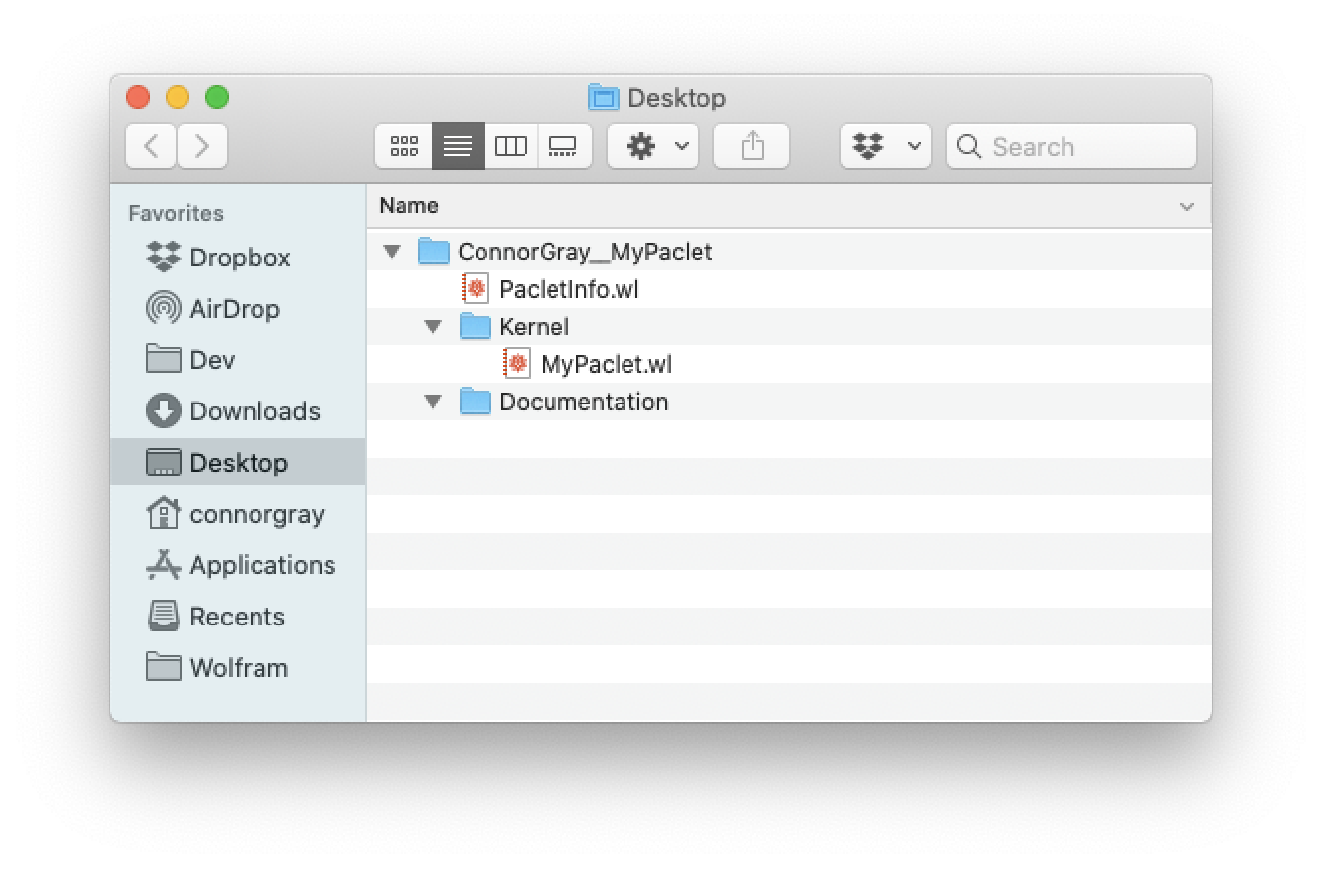
SystemOpen[ParentDirectory[pacletDirectory]]
Out[]=
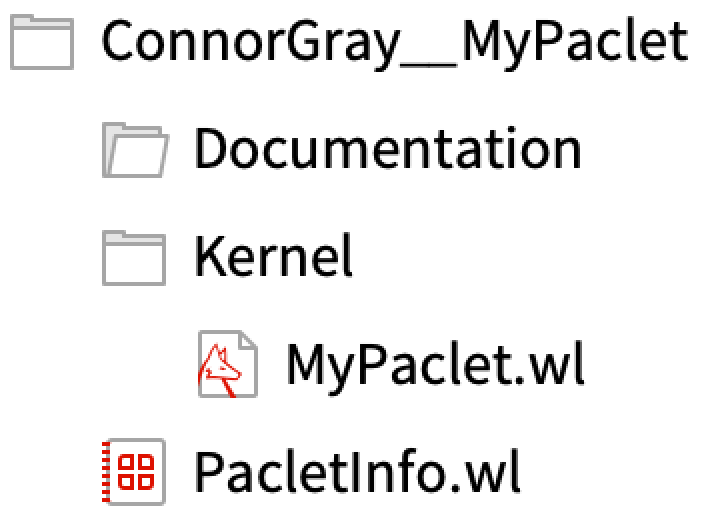
ConnorGray__MyPaclet directory |
Content of a PacletInfo.wl file
Content of a PacletInfo.wl file
Out[]=
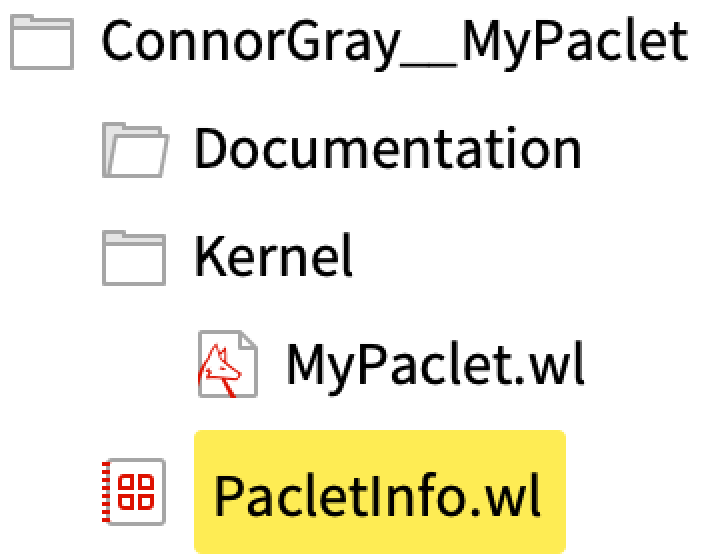
ConnorGray__MyPaclet directory |

PacletInfo.wl |
◼
The PacletInfo.wl file is the programmatic description of what a paclet is, and what files it contains.
“Name”
“Name”
Out[]=
PacletInfo.wl |
“PublisherID”
“PublisherID”
“Version”
“Version”
www.semver.org is a standard convention for software versioning.
“WolframVersion”
“WolframVersion”
“Extensions”
“Extensions”
◼
By default, the only file included in a paclet is the PacletInfo.wl file itself.
◼
Other files are only considered part of a paclet if they are declared in the “Extensions” field of the PacletInfo.wl file.
The name “Extensions” is used because paclets are used to extend the Wolfram System with new functionality.
“Kernel” extensions
“Kernel” extensions
◼
The “Kernel” extension extends the system with new Wolfram Language code.
This extension is named “Kernel” because the Wolfram Kernel is the core evaluator of Wolfram Language code.
The “Root” option
The “Root” option
◼
Every extension has a default value for the “Root” option, which is typically the name of the extension itself.
◼
For example, the {“FrontEnd”} extension type locates its files in the MyPaclet/FrontEnd/ directory by default.
For legacy reasons, the default value of the “Root” option for “Kernel” extensions is “.”, i.e. the paclets own directory (not a subdirectory of the paclet).
◼
New paclets should always specify a “Root” -> “Kernel” value. Paclets uploaded to the paclet repository are required to do this.
The “Context” option
The “Context” option
Notes
Notes
◼
If your paclet has a PublisherID, that PublisherID must be used to prefix the contexts provided by your paclet. This is a requirement of the Wolfram Paclet Repository, and ensures that publishers have separate namespaces.
◼
The “Context” option has two fundamental forms:
◼
“Context” -> “SomeContext`”
◼
Maps to a file based on the context name, e.g. SomeContext.wl.
◼
“Context” -> { {“SomeContext`”, “SomeFile.wl”} ... }
◼
Maps to the explicitly specified file name, e.g. “SomeFile.wl”
◼
The first form is the most common.
“Documentation” extensions
“Documentation” extensions
Authoring Documentation
Authoring Documentation
◼
DocumentationTools provides a palette for authoring Wolfram-style documentation for paclets.
◼
The DocumentationTools palette can be opened by clicking on the Palettes > DocumentationTools menu item.
To add documentation for a paclet, begin by clicking the “Add Paclet ...” button at the top of the DocumentationTools palette.
Adding a new symbol documentation page
Adding a new symbol documentation page
Notes
Notes
◼
The most common type of documentation pages are symbol reference pages.
◼
The DocumentationTools palette provides tools for authoring symbol reference pages, guide pages, and tech note pages.
◼
The ‘Authoring Paclet Documentation’ talk will cover the details of writing documentation in more detail.
◼
The URL is used to identify a piece of documentation, and is used to locate the page in the Wolfram Documentation Center.
◼
Each usage message should be a complete sentence, where the text describes what action is performed by each form of a function.
◼
Names which stand in for arguments should be formatted using Template Input.
Building paclet documentation
Building paclet documentation
Notes
Notes
◼
PacletDocumentationBuild is incremental: only files that have changes since the previous build will be rebuilt.
◼
This saves time when your paclet contains many files.
◼
Building just your paclet’s documentation is convenient during development, when you want to be able to quickly see your changes.
◼
Historically, the way to build paclet documentation was using the Wolfram Workbench plugin for the Eclipse IDE.
◼
Starting in version 13, the capability to build documentation is now built into the main system.
Building the complete paclet
Building the complete paclet
In[]:=
PacletUninstall["ConnorGray__MyPaclet"]
Viewing our build documentation
Viewing our build documentation
◼
Documentation for installed paclets can be viewed from the Wolfram Documentation Center by searching for the exact name of a page, or by typing in a relevant search term.
Publishing documentation to the Cloud
Publishing documentation to the Cloud
In[]:=
DeleteObject[CloudObject["MyPacletDocumentation"]]
In[]:=
DeleteObject[CloudObject["HTMLMyPacletDocumentation"]]
The Wolfram Paclet Repository
The Wolfram Paclet Repository
Paclet Development Resources
Paclet Development Resources