Visualization is the process of interpreting information through sight, and is the most common way for people with sight to represent data and information. While this is very convenient for sighted people, for people who are blind, it unfortunately makes it very difficult for them to interpret data. In place of vision, people without sight process information about the world around them primarily through audio. The primary goal of this project is to make it possible to visualize images through audio in order to aid the ability of people without sight to process visual information. In order to accomplish this, in this project we created functions that created a sonification of an image based on either the brightness of the pixels or the nearest color to each pixel.
Introduction
Introduction
Visualization is used by humans to interpret data and information. Visualizations often take the forms of graphs or of images of objects, and because sighted people are easily able to glean vast amounts of information from these representations, visuals have become one of the most widely used methods of representing information. However, people who are blind or have low vision are almost entirely excluded from accessing information that is represented visually. In order to enable people without sight to have better access to information that is typically represented visually, we wish to use audio to effectively visualize images such that people without sight can glean information from them.
Background Information
Background Information
A vast amount of the information available in the world is visual, as the human brain has been proven to process visual information such as images much faster than text. While people with sight benefit greatly from being able to absorb information through this easily comprehensible medium, people low vision are virtually excluded from accessing information that is typically presented in visual form, putting them at a disadvantage.
Many attempts have been made to bridge this accessibility gap, two of the most popular methods being Audio Descriptions, which provide spoken descriptions of visual information, and Image Sonification, which allows users to explore images and visuals more interactively and come to their own conclusions. In this project, we will be focusing on the latter method.
Many attempts have been made to bridge this accessibility gap, two of the most popular methods being Audio Descriptions, which provide spoken descriptions of visual information, and Image Sonification, which allows users to explore images and visuals more interactively and come to their own conclusions. In this project, we will be focusing on the latter method.
Importing an Example Image
Importing an Example Image
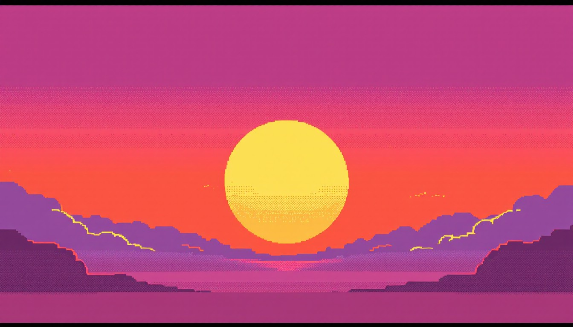
This piece of code assigns an image of a sunset to a variable:
img=
;
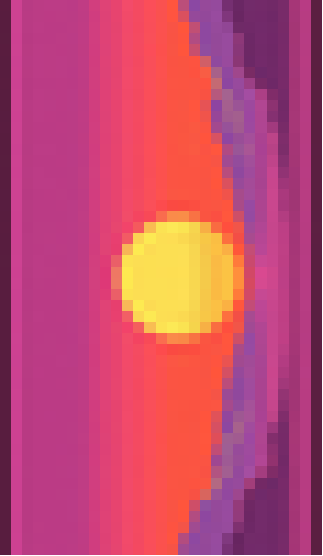
We also allow the user to choose what direction they want the image to be “read” in - from top-to-bottom, left-to-right, or vice versa. Because the rest of the code works by scanning row by row, we need to turn the image such that scanning row by row reads the image in the specified direction.
This function turns the image based on the direction the user specifies:
turnImage[readdir_,img_]:=Switch[readdir,"Bottom",ImageReflect[ImageResize[img,50]],"Top",ImageResize[img,50],"Right",ImageRotate[ImageResize[img,50]],"Left",ImageRotate[ImageReflect[ImageResize[img,50]]]]
In[]:=
turnImage[Left,img]
Getting a Sonification of the Image Based on Brightness
Getting a Sonification of the Image Based on Brightness
One of the methods we will use to get audio representing an image is to assign frequencies to each pixel based on the brightness of it. It’s quite easy to interpret the audio for simple images, but for more complicated ones, it could get confusing. One drawback of this method is that, because the frequencies aren’t limited to specific pitches, the audio output could sound unpleasant.
To begin with, we must get the brightness level of each of the pixels in a row.
To begin with, we must get the brightness level of each of the pixels in a row.
This function gets the brightness data of each of the pixels in a row of a grayscale image:
getPixelRowGrey[greyimg_,rowindex_]:=ImageData[greyimg][[rowindex]]
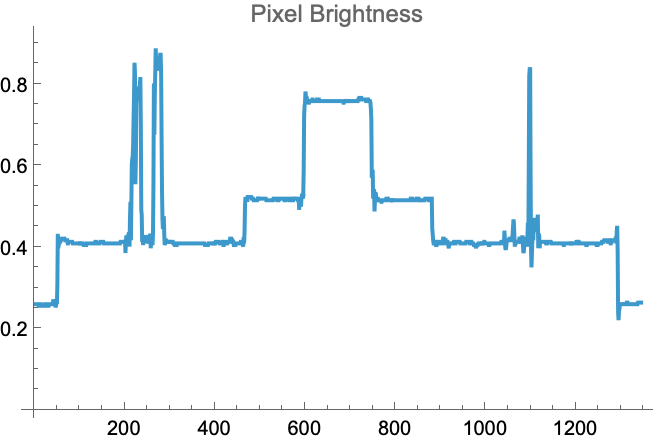
We can create a graph of the brightness of each of the pixels in a row so that we can predict what the audio output would likely sound like.
This function creates a graph of the brightness of all of the pixels in a row in a grayscale image:
In[]:=
getBrightness[greyimg_,rowindex_]:=ListLinePlot[ImageData[greyimg][[rowindex]],PlotRange->All,PlotLabel->"Pixel Brightness"]
getBrightness[ColorConvert[img,"Grayscale"],550]
Next, we need to prepare the data so that we can put it into the next function by rescaling it.
This function rescales the data of a row of pixels:
rescalePixelRow[rowpixels_]:=Rescale[rowpixels,{1,Length[rowpixels]},MinMax[rowpixels]]
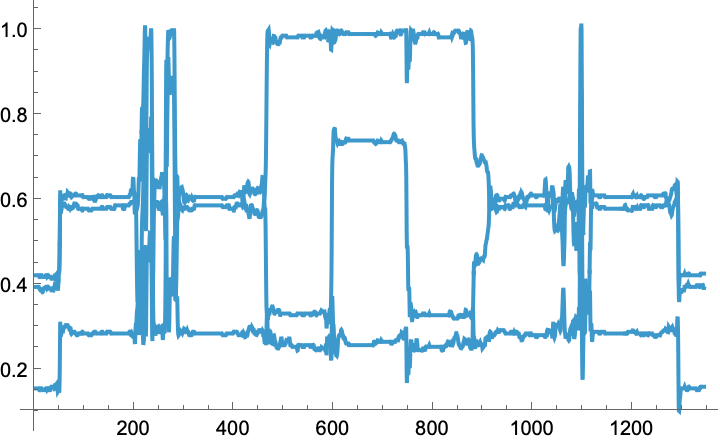
Now, we can get a function representing the brightness of all of the pixels in a row.
This function gets a function representing the brightness of a row of pixels:
In[]:=
getFunction[rowpixels_,xvals_]:=Interpolation[Transpose[{xvals,rowpixels}]]
In[]:=
Plot[getFunction[ImageData[img][[550]],Range[1,Length[ImageData[img][[550]]],1]][x],{x,1,Length[ImageData[img][[550]]]}]
Out[]=
The next step is to get frequencies representing each of the pixels in a row, based on their brightness levels, which are calculated by the function given by getFunction[].
This function gets frequencies representing each of the pixels in a row:
getFrequencies[yvals_]:=Rescale[yvals,MinMax[yvals],{220,880}]
We have a function that creates a sonification of the function of the brightness, and then we can call that function inside another function in order to get a sonification of the entire row of pixels.
This function creates a sonification of the function of the brightness of the pixels:
sonifyFunction[totaltime_,numpixels_,frequencies_]:=Sound[Play[Sin[#*2Pit],{t,0,totaltime/numpixels}]&/@frequencies]
This function creates a sonification of a row of pixels based on brightness:
buildFullRowSoundBright[rowpixels_,totaltime_]:=sonifyFunction[totaltime,Length[rowpixels],getFrequencies[getFunction[rescalePixelRow[rowpixels],Range[1,Length[rowpixels],1]]/@Range[1,Length[rowpixels],1]]]
The final step of this method is to get the sonification of an entire image, which we accomplish by calling the buildFullRowSoundBright[] function and mapping through the image data for every row.
This function creates a sonification of an entire image based on brightness:
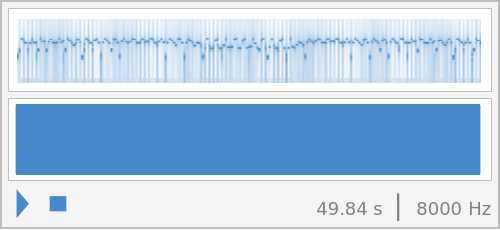
getWholeImageSoundBright[img_,timeperrow_,readdir_]:=Sound[buildFullRowSoundBright[#,timeperrow]&/@ImageData[ColorConvert[turnImage[readdir,img],"Grayscale"]]]
Sound[getWholeImageSoundBright[img,1,"Left"]]
Creating a Sonification of an Image Based on Nearest Color
Creating a Sonification of an Image Based on Nearest Color
Our next method of audio visualization involves comparing the color of every pixel to a list of standardized colors and getting the standardized color that was the least different from the actual color. Each standardized color in the list corresponds to a specific pitch. This method enables people without sight to distinguish between and recognize different colors. One drawback, however, is that people without sight who are not good at distinguishing different pitches would struggle to make sense of the audio.
In order to find the nearest pre-defined color to a given pixel, we first need to find the amount of similarity between the color of the given pixel and each of the standardized colors using the function ColorDistance[], and then we must take the pre-defined color with the least amount of difference from the given pixel.
This function finds the similarities between the color of a pixel and pre-defined colors:
compareColor[pixel_,color_]:=ColorDistance[RGBColor@@pixel,color]
This function takes in a list of pre-defined colors and the data containing the RGB values of each of the pixels in the image and gets the closest pre-defined color to each of the pixels in an image:
getColorsInImage[colornames_,imagedata_]:=Table[MinimalBy[colornames,compareColor[i,#]&],{i,imagedata}]{{},{},{},{},{},{},{},{},{},{},{},{},{},{},{},{},{},{},{},{},{},{},{},{},{},{},{},{},{}}

Each of the pre-defined colors corresponds to a specific musical note.
This function assigns each pre-defined color to a specific pitch:
colorToSound[pixel_,instrument_]:=Switch[pixel[[1]],Red,SoundNote["C3",0.01,instrument],Orange,SoundNote["E3",0.01,instrument],Yellow,SoundNote["G3",0.01,instrument],Green,SoundNote["B3",0.01,instrument],Blue,SoundNote["D4",0.01,instrument],Purple,SoundNote["F4",0.01,instrument],Black,SoundNote["A4",0.01,instrument],White,SoundNote["C5",0.01,instrument]]
In order to make the final audio less choppy, we decided to split the list wherever the color changed, so that we could hold the same note for chunks where all of the pixels had the same nearest color instead of playing the same pitch multiple times.
This function splits the list whenever the color changes:
getSplitList[colors_]:=SplitBy[colorToSound[#,"Violin"]&/@colors,First]
After we split the data by color, we need to create the notes representing each chunk.
This function takes the grouped data and gets the corresponding note values:
In[]:=
getNoteValues[splitlist_,instrument_]:=SoundNote[#[[1,1]],Total[#[[All,2]]],"Violin"]&/@splitlist
Then we can get the sound of a full row of pixels by calling the getNoteValues[] function.
This function gets the sound of the full row of pixels:
buildFullRowSound[rowdata_,instrument_,colornames_]:=getNoteValues[getSplitList[getColorsInImage[colornames,rowdata]],instrument]
Finally, we can get the sonification for the entire image by calling our buildFullRowSound[] function and mapping through the image data.
This function gets the sonification of the whole image based on the nearest color of each pixel:
Conclusion
Conclusion
At the end of this project, we succeeded in creating two functions that accomplished the goal of visualizing an image through audio.
The first of the functions calculated frequencies for each of the pixels that were based off of the brightness level of that pixel. It is relatively easy to interpret for basic images and shapes, but as the images get more complex, the audio output that this function would give would become increasingly difficult to understand. Additionally, this method has the drawbacks of not representing the distinct colors in the image, and resulting in an unpleasant sound.
The second method that we implemented successfully involved getting the closest color from a pre-defined list of colors to each pixel in an image. Each color from the standardized list corresponded to a specific musical note, which both allowed the final audio to sound more pleasant to the ear and also enables users to distinguish specific colors, provided that they are able to identify the differences between pitches. That being said, this method still poses difficulties in that it would be extremely difficult for people who struggle to distinguish pitches to interpret the audio and that as the images get more complex, as with the last method, the audio would become more and more difficult to understand.
The first of the functions calculated frequencies for each of the pixels that were based off of the brightness level of that pixel. It is relatively easy to interpret for basic images and shapes, but as the images get more complex, the audio output that this function would give would become increasingly difficult to understand. Additionally, this method has the drawbacks of not representing the distinct colors in the image, and resulting in an unpleasant sound.
The second method that we implemented successfully involved getting the closest color from a pre-defined list of colors to each pixel in an image. Each color from the standardized list corresponded to a specific musical note, which both allowed the final audio to sound more pleasant to the ear and also enables users to distinguish specific colors, provided that they are able to identify the differences between pitches. That being said, this method still poses difficulties in that it would be extremely difficult for people who struggle to distinguish pitches to interpret the audio and that as the images get more complex, as with the last method, the audio would become more and more difficult to understand.
Future Work
Future Work
Overall, while this project made good headway into creating a solution to the issue of enabling people without sight to experience images, there are many aspects that still need to be improved upon or added to our current solution.
One of the most important hurdles that must be overcome if we hope to implement these methods is that we must make the audio more easily decipherable. If we do not find a solution to this issue, the scope of our tool will be limited to only basic images and shapes.
Additionally, regarding the user interface, if we wish to provide the user with the option to select their own image that they want visualized, we must figure out some way to enable blind people to select their own files. This may be quite complicated, as it is difficult to use voice commands to accurately select files.
There are also extensions that can be made to our existing solutions, such as creating audio visualizations of 3D images.
If this project is successfully adapted, it has the potential to become a valuable, empowering tool to people without sight, helping to open up access to representations of information that have previously been almost exclusively accessible to people with sight.
One of the most important hurdles that must be overcome if we hope to implement these methods is that we must make the audio more easily decipherable. If we do not find a solution to this issue, the scope of our tool will be limited to only basic images and shapes.
Additionally, regarding the user interface, if we wish to provide the user with the option to select their own image that they want visualized, we must figure out some way to enable blind people to select their own files. This may be quite complicated, as it is difficult to use voice commands to accurately select files.
There are also extensions that can be made to our existing solutions, such as creating audio visualizations of 3D images.
If this project is successfully adapted, it has the potential to become a valuable, empowering tool to people without sight, helping to open up access to representations of information that have previously been almost exclusively accessible to people with sight.
References
References
17 important data visualization techniques | hbs online. (2019, September 17). Business Insights Blog. https://online.hbs.edu/blog/post/data-visualization-techniques
Brewster, S. (2002). Visualization tools for blind people using multiple modalities. Disability and Rehabilitation, 24(11–12), 613–621. https://doi.org/10.1080/09638280110111388
New software enables blind and low-vision users to create interactive, accessible charts. (2024, March 27). MIT News | Massachusetts Institute of Technology. https://news.mit.edu/2024/umwelt-enables-interactive-accessible-charts-creation-blind-low-vision-users-0327
Visuals are the message in effective communications. (n.d.). League of Minnesota Cities. Retrieved July 9, 2025, from https://www.lmc.org/news-publications/magazine/july-aug-2023/message-matters-july-2023/
Acknowledgements
Acknowledgements
Thank you to my incredible mentor, Logan Gilbert, who helped me with a lot of the logic and debugging, as well as keeping me sane and helping me to figure out what direction to take my project in. I would also like to thank program directors Rory Foulger and Eryn Gillam, who helped me decide what to do with my project when I wasn’t sure, and Megan Davis, who made sure that all us students were doing well throughout the program. Finally, thank you to Dr. Stephen Wolfram for giving me this project that matched with my interests perfectly.
CITE THIS NOTEBOOK
CITE THIS NOTEBOOK
Audio visualization of images for blind people
by Neha Rao
Wolfram Community, STAFF PICKS, July 12, 2025
https://community.wolfram.com/groups/-/m/t/3500169
by Neha Rao
Wolfram Community, STAFF PICKS, July 12, 2025
https://community.wolfram.com/groups/-/m/t/3500169