Starting on the 29th April 2026, and continuing for the next nine days, myself and four others completed a ‘bike-packing’ expedition from Saint-Malo (France), to Santander (Spain). Even before the trip began, I had envisioned documenting the journey in a ‘computational’ way, and, after building some requisite tools, I am ready to do just that.
Preparing for the Trip
Preparing for the Trip
Bike-packing trips, defined as transporting yourself and your belongings around by bike, are notorious for warranting diligent ‘packing’ of your belongings. Reducing excess mass and volume makes for much easier and more comfortable cycling.
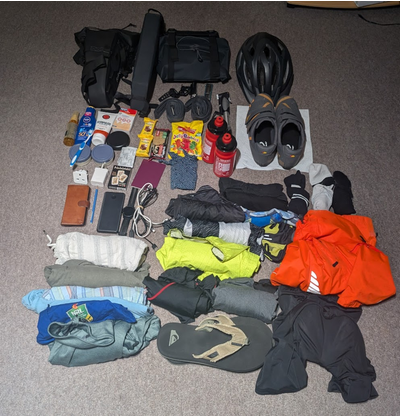
Everything I packed. Notice the saddle bag, frame bag, and handlebar bag in the top-left of this picture, into which everything else must fit.
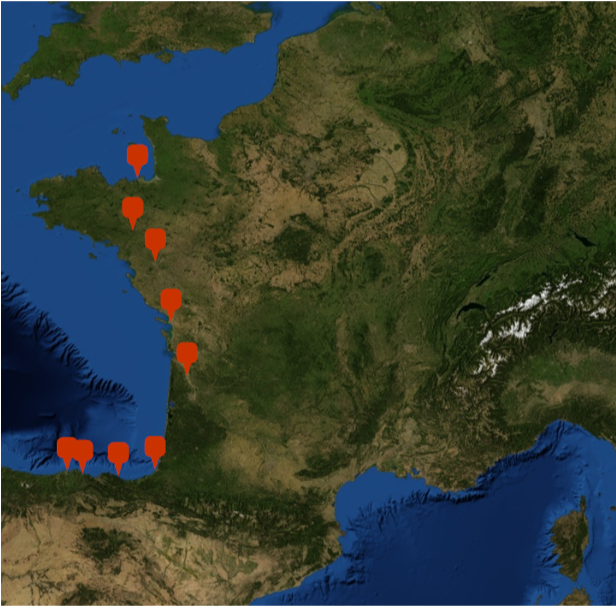
Obviously, the cycling route is also crucial. This was largely planned in advance, allowing for some flexibility if we ran into trouble.
I can visualize our intended ‘waypoints’ on a map, representing ferry ports and where we planned on staying each night, in an Airbnb or similar:
overnightStayLocations=,,,,,,,,;GeoListPlotovernightStayLocations,
Out[]=
The Journey
The Journey
My particular journey began at Wolfram’s office in Long Hanborough. However, I did not cycle from there, I took the train in the direction of our outbound ferry port, Portsmouth, via Reading and Basingstoke:
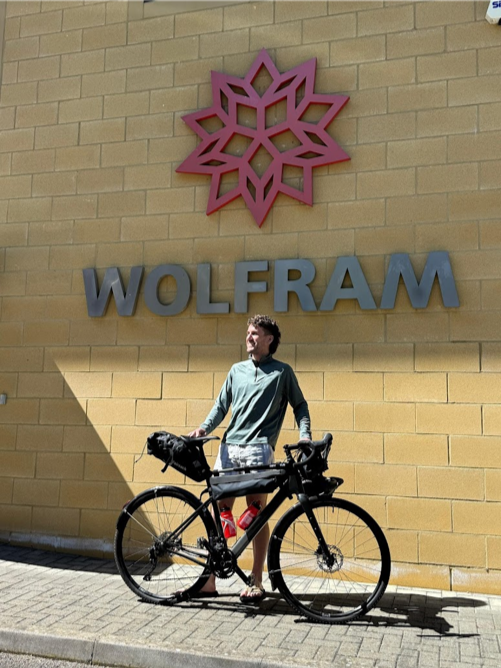
Photo credits to Xiaofan Zhang!
Retrieving Strava Data
Retrieving Strava Data
StravaLink Paclet
StravaLink Paclet
I have tracked my cycling, running, hiking, skiing, etc., on Strava since ~2016. While I am not someone who obsesses over their fitness data, the ability to analyse my exercise data from the comfort of a Wolfram notebook was always desirable. This trip gave me sufficient incentive to build an interface between Wolfram Language and Strava. I called this StravaLink, and it is currently live on the Wolfram Language Paclet Repository.
There are some setup instructions in the paclet documentation regarding authorization, but since I have set this up already I can simply install the paclet:
In[]:=
PacletInstall["JosephBrennan/StravaLink"]
Out[]=
PacletObject

And loading the necessary functions:
In[]:=
Needs["JosephBrennan`StravaLink`"]
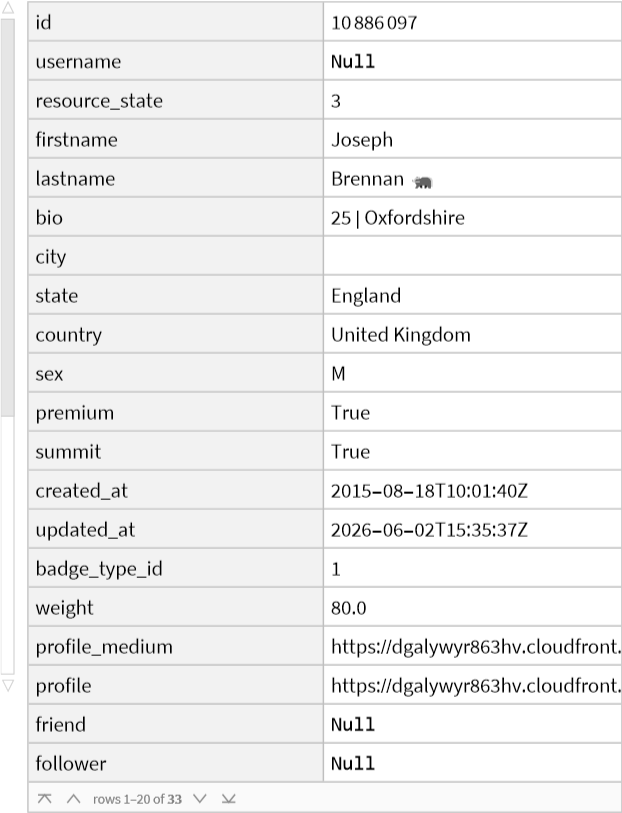
I can start by returning the data associated with my Strava account, and, yes, that is a badger emoji:
In[]:=
Dataset[StravaAthleteData[],ItemSize->20]
Out[]=
I can also choose custom dates between which to return my activities. I will reverse the output so it is returned in chronological order rather than ‘most recent’-first:
In[]:=
activities=ReverseStravaActivityData"Before"->,"After"->;
In[]:=
Dataset[activities〚All,{"name","distance","sport_type","start_date"}〛]
Out[]=
Firstly, I want to select only activities that had the “sport_type” of “Ride”:
Here are the properties contained within each activity:
Peloton in action.
Distance Per Day
Distance Per Day
Often I partitioned a day’s cycling into multiple uploads, hence “Day 4 (i)”/“Day 4 (ii)” above. I can split the activities according to the day on which they were uploaded:
Then find the daily distance over the course of the trip:
And plot the accumulated total:
My setup pictured near a beach in Biarritz.
Elevation Profile
Elevation Profile
We can also obtain activity ‘streams’ from each activity, and use these to visualize the elevation profile of the entire trip:
We must account for the fact that the ‘time’ axis must accumulate with each activity:
Vertical grey lines correspond to each day of cycling:
Evidently, the penultimate day contained the toughest climbs!
POV: Climbing uphill in Basque Country.
Speed Profile
Speed Profile
I would like to make a similar visualization but for the ‘velocity’ stream:
Difficult to deduce much from this speed profile. Instead, I can plot a histogram of all speeds:
Grade vs Speed
Grade vs Speed
I can also obtain the ‘grade’ streams, which returns the road gradient as a percentage:
We can plot the ‘grade’ data against the ‘speed’ data and look for a negative correlation:
Just For Fun
Just For Fun
Just for fun, let’s plot each ride’s distance against the no. of kudos received:
Fascinating. Almost a 90% correlation between distance cycled and kudos received!
Cycling through Bordeaux vineyards.
Recovering The Route
Recovering The Route
We could simply use the “Coordinates” stream to find the pairs of {lat, lon} for each cycle route, however I noticed that Strava returns something called a polyline for each activity.
Here I am using a version of StravaActivityData that takes the ‘activity ID’ as an argument, which enables a more detailed analysis:
Here I am using a version of StravaActivityData that takes the ‘activity ID’ as an argument, which enables a more detailed analysis:
This polyline is a result of a lossy compression algorithm that represents a series of coordinates as a single string of ASCII characters. Thankfully I have previously written a resource function (GooglePolylineEncode) which does this encoding, and crucially, written another which does the inverse (GooglePolylineDecode). I can now use the latter to convert each polyline into a list of GeoPosition objects:
Now we have everything we need to visualize the entire cycling route on a map, complete with waypoints:
It is starting to become clear where we took a train...
Overpass Turbo
Overpass Turbo
Knowing that I would ultimately want to plot my cycling routes on a map, I became interested in how I could intersperse the cycling routes with ferry routes, or even trains we took along the journey. A solid option for this is Overpass Turbo, a web-based filtering tool for OpenStreetMap.
We can make direct API calls from the notebook, so I will define a function which takes Overpass Query Language (Overpass QL) queries as a string:
I plan on using this function to obtain route information for the following routes:
◼
Outbound ferry from Portsmouth (UK) to Saint-Malo (France)
◼
Train from La Rochelle to Montendre
◼
Short ferry from Blaye to Lamarque
◼
Train from Bordeaux to Bayonne
◼
Return ferry from Santander (Spain) to Plymouth (UK)
The ‘elements’ key contains latitude and longitude co-ordinates:
Obtaining a train route is slightly more involved. Since I cannot query for specific sections of the railway, I have to use latitude/longitude constraints, and sometimes these must be different if the route is spread across two distinct named railway lines:
This seems to ‘cut off’ slightly north of the Montendre station, but it will have to do.
Next, the short ferry:
Next, the Bordeaux to Bayonne train:
And finally, the return ferry from Santander to Plymouth:
Join Everything Together
Join Everything Together
Now I can visualize our movements, both cycling and otherwise, on a single map, complete with waypoints:
We can take a closer look at the miniscule drop of cyan representing the Blaye to Lamarque ferry:
More Analysis
More Analysis
Heat Maps
Heat Maps
I wanted to see if I could replicate Strava’s heat maps, which overlays performance data such as pace, heart rate, or elevation directly onto the route line.
The ‘velocity’ and ‘coordinates’ activity streams should provide what I need to create a velocity heatmap:
The ‘velocity’ and ‘coordinates’ activity streams should provide what I need to create a velocity heatmap:
I would like to pick a random ride and create a heatmap for it. I will choose “Day 7”, which is the 10th ride in the series:
I can create a custom color function which rescales the speeds such that the 5th and 95th percentile represent 0 and 1:
Mountainous Terrain
Mountainous Terrain
The eIevation profile from earlier showed this “Day 7” section was the ‘hilliest’, so I thought it would be interesting to explore certain parts with GeoElevationData.
Firstly, I needed to choose a location around which to plot the terrain. A neat way to do this is sample some {lat, lon} points along the route and determine which Wolfram Language “City” entity is closest:
I decided that Muxika and Larrabetzu were suitable locations around which to sample the terrain:
We can also see how much of the “Day 7” route intersects with these locations:
I can combine the ‘coordinates’ and ‘elevation’ activity streams into a single list of tuples:
Earlier, I saw that it was around the 2000th coordinate that was deemed nearest to Muxika. After some tests, points 1500-2500 seem appropriate to keep.
It occurred to me that I can compare the elevation values returned by GeoElevationData to the elevation stream from Strava. I will sample every 5th point in the interests of speed:
The discrepancies do vary, but mostly the Strava elevation values are 15m to 25m higher than Wolfram’s GeoElevationData. This is probably small enough to be explained by differences in the digital elevation model (DEM) used by each.
Finally, let’s visualize the route (red) through the mountainous terrain. I have included a small vertical offset to ensure the red points appear ‘above’ the terrain surface:
I am keen to repeat this with the climbs at the end of the day, near the city of Liendo:
Excellent! You may be able to deduce what is coming...
Where Did The Day Go?
Where Did The Day Go?
I was curious to explore the time allocated to cycling vs activities like stopping for coffee or constructing baguettes on the side of the road:
Note, on the days which I separated into different uploads, the ‘static’ time is under-represented. These were essentially ‘rest days’ anyway!
Segments
Segments
Using the detailed activity breakdown, we can see all ‘segment efforts’ within a single activity. This is not simply the number of segment efforts, it contains detailed information on every single one!
We can see that one of the rides, Day 4 (iii), did not feature any segments. Below we see the relationship between the distance of each ride and the number of segments:
Interestingly, Day 6, 7, and 8 have an abundance of segments. Given that these rides all took place in the ‘Spanish’ portion of the trip, this could provide some insight into how different countries use Strava! I can also explore the distribution of segment distances on each ride longer than 50km:
One segment that caught my eye was over 43km on Day 6. We can find more details about this segment:
This segment effort has multiple IDs. There is the ID of ‘my effort’, which accounts for the possibility that I would have multiple efforts on the same segment. There is also the ID of the segment itself. This can be used to obtain even more detailed information about this segment, such as it’s polyline:
Here we can see the geographic proportion of “Day 6” taken up by this segment:
Closing
Closing
I would seriously recommend a trip like this to any keen cyclist, and I hope that the StravaLink paclet makes diving into your data as straightforward as possible!
One of the things I most appreciate about Wolfram Language is its ability to support curiosity-driven exploration, wherein each answer becomes the starting point for another question.
There is a remarkable richness in this data, and the analyses presented here only scratch the surface; this post could easily have been several times longer!
If anyone has any questions/suggestions, please reach out at josephb@wolfram.com. Thank you!
One of the things I most appreciate about Wolfram Language is its ability to support curiosity-driven exploration, wherein each answer becomes the starting point for another question.
There is a remarkable richness in this data, and the analyses presented here only scratch the surface; this post could easily have been several times longer!
If anyone has any questions/suggestions, please reach out at josephb@wolfram.com. Thank you!
CITE THIS NOTEBOOK
CITE THIS NOTEBOOK
Computational bike-packing: insights from Strava data
by Joseph Brennan
Wolfram Community, STAFF PICKS, June 7, 2026
https://community.wolfram.com/groups/-/m/t/3729321
by Joseph Brennan
Wolfram Community, STAFF PICKS, June 7, 2026
https://community.wolfram.com/groups/-/m/t/3729321