Architectural acoustics is the study of sound in different built environments. The acoustics of a space is affected by various factors, such as the geometry of the room and the material of the walls. When acoustic designers work on designing an ideal sound space, these factors are crucial to understand so they can be used effectively. Ideal sound spaces successfully amplify sound and reduce noise in places where it improves the experience of the people inside. These spaces can improve communication and preserve hearing, decrease stress, enhance musical performances, and more. In this project, I developed a ray-tracing model to simulate the behavior of sound in various 2D and 3D architectural spaces, accurately representing how sound reflects on surfaces, decays as it travels, scatters when it collides with surfaces, and is absorbed into different materials. In the end, I ran these simulations in different architectural spaces to visualize and analyze the behavior of sound in them.
Introduction
Introduction
“As abstract arts, architecture and music share a common aim to create harmony, weave patterns, define spaces, move in time, promote feelings, touch the senses and act as an outward expression of an artist’s aspirations.” - Terry Trickett
The design of a sound space is crucial in optimizing people’s experience of voices, music, noise, and silence. Acoustic architects use various methods to create spaces that improve the experience of the listeners. One important sound quality metric is reverberation time, which measures the amount of time it takes for sound to dissipate. Architects use different wall materials, such as soundproofing panels or hard reflective materials, along with various room geometries, such as fan-shaped rooms or arched ceilings, to control the reverberation time of a room to satisfy its needs, along with ensuring that sound is distributed as evenly in the whole room as possible.
In concert halls and other musical performance spaces, the goal is to design a space that helps the performers and audience members feel deeply immersed in the music, maximizing enjoyment. Daniel Libeskind, a world-renowned architect and virtuoso musician, speaks of his own experience: “Architecture is a world of relationships that is very, very close to my experience as a performing musician”. In these musical spaces, the desired immersed sensation is achieved with a high reverberation time, as the sound has more time to blend together.
In this project, I created a model to simulate sound in various 2D and 3D spaces. I started by emitting sound rays from a singular source, finding the nearest wall intersection, reflecting the ray in a new direction, and continuing the process until the sound intensity drops below watts per square meter, equivalent to 0 decibels, the human hearing threshold. The decay of sound intensity as it travels a certain distance was calculated with the Inverse Square Law. Furthermore, when a sound ray collides with a surface, some amount of the sound is absorbed and some amount is scattered in random directions due to small surface irregularities. I applied these conditions in the calculations and simulations I performed, accurately representing sound behavior. Finally, I ran these sound simulations in various spaces, such as Carnegie Hall’s Zankel Hall.
-12
10
2D Simulation
2D Simulation
I began by simulating sounds in simple 2D spaces. I modeled basic sound behavior by finding sound collision points on the edges of the room, and calculating the new direction of the reflected sound ray. I created a simulate function to continue reflecting sound around until it is not audible anymore. To accurately simulate sound energy loss, I factored in sound decay over distance, absorption into different surfaces, and random scattering. Finally, I ran these simulations for single rays of sound and multiple rays sent out in a range.
Initial Setup
Initial Setup
This is the setup of initial conditions to run 2D simulations. I created a list of edge lines, a source point and a starting direction.
Define room vertices and room edge lines:
In[]:=
squareVertices={{0,0},{10,0},{10,10},{0,10}};roomVertices=squareVertices;edges=Partition[Append[roomVertices,roomVertices[[1]]],2,1];
Define a source point, an angle that the sound emits from, and the according direction vector:
In[]:=
source={5,2};angle=50Degree;direction={Cos[angle],Sin[angle]};
Basic Sound Behavior
Basic Sound Behavior
Intersection
Intersection
The intersection function finds the closest intersection point between a source line and the edges of the room, which is necessary to calculate reflections later on. This function first creates a ray from a source, pointing out at a given direction vector. All intersections between this ray and the edges of the room are calculated and the closest point to the source point is the final intersection point. To prevent this function from finding the exact same source point, I used EuclideanDistance to ensure that only points differing from the source point are considered.
Find the intersection point between a line and the room edges:
In[]:=
intersection[source_,direction_,edges_]:=Module[{ray=HalfLine[source,direction],allIntersections,intersectionPoint,x,y},allIntersections=Quiet[#[[All,2]]&/@Solve[{x,y}∈ray&&{x,y}∈Line[edges]&&EuclideanDistance[{x,y},source]>0.001,{x,y}]];intersectionPoint=Flatten[Nearest[N[allIntersections],source]]]
Reflection
Reflection
The reflection function first finds the edge that the relevant point takes place on using RegionDistance. The direction vector of that edge is calculated, and a normal line to the edge vector is created. Finally, the new direction vector of the reflected ray is calculated and outputted. This result is calculated using the vector form of the Law of Reflection, r = i - 2 (i ⋅ n) n, where r is the reflected ray vector, i is the incoming ray vector, and n is the unit vector perpendicular to the surface.
Calculate the direction vector of a line reflecting off an edge:
In[]:=
reflection[point_,direction_,edges_]:=Module[{edge,edgeDirection,normal},edge=First[MinimalBy[edges,RegionDistance[Line[#],point]&]];edgeDirection=edge[[2]]-edge[[1]];normal=Normalize[{-edgeDirection[[2]],edgeDirection[[1]]}];direction-2(direction.normal)normal]
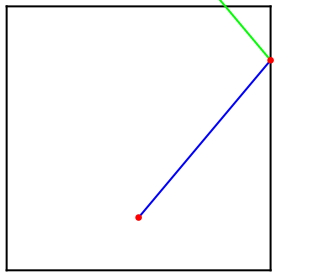
I visualized these functions in use by sending out a single ray of sound from a source point at a certain direction, finding the nearest intersection point, and inputting that point into the reflection function, which finds the new angle of the reflected ray. The visual below shows an initial sound ray in blue being emitted from a red starting point, colliding with the right wall, and a reflected, green ray being generated.
Visualize the reflection of a line of sound from a source point:
In[]:=
intersectionPoint=intersection[source,direction,edges];reflectionDirection=reflection[intersectionPoint,direction,edges];Graphics[{Line[edges],Blue,Line[{source,intersectionPoint}],Green,HalfLine[intersectionPoint,reflectionDirection],Red,PointSize[0.02],Point[source],Point[intersectionPoint]}]
Out[]=
Sound Energy Loss
Sound Energy Loss
Decay
Decay
Sound decays over distance according to the Inverse Square Law: = 1/, where is the initial sound intensity at a source point and is final sound intensity at a distance d away from the source. The function below calculates the sound intensity remaining after sound with an initial intensity travels a certain distance. A bounce factor is also included, calculated using the absorption and scattering coefficients, both of which discussed in the following section. This intensityRemaining function is used for both the 2D and 3D simulations.
I
F
I
I
2
d
I
I
I
F
Calculate sound intensity remaining after sound has traveled a certain distance:
In[]:=
intensityRemaining[totalDistance_,bounceFactor_,intensity_]:=(intensity*(1/totalDistance^2)*bounceFactor);
Absorption
Absorption
The absorption coefficient measures the amount of sound absorbed into a surface. A surface with an absorption coefficient of 0 perfectly reflects all sound, absorbing nothing. Materials with low absorption coefficients include concrete and marble. Materials with high absorption coefficients include fiberglass and foam panels, which absorb the majority of the sound. The code below demonstrates the absorption equation in use with an example coefficient and initial sound intensity.
Create an equation relating intensities and the absorption coefficient:
In[]:=
absorptionCoefficient=0.4;initialIntensity=10^-6;remainingIntensity=initialIntensity*(1-absorptionCoefficient)
Out[]=
6.×
-7
10
Scattering
Scattering
When sound hits a surface, some amount of the original sound is scattered into many random directions because of the small irregularities on the surface. The scattering coefficient measures the amount of sound scattered in relation to the total sound. A scattering coefficient of 0 completely reflects all sound, and a coefficient of 1 scatters all sound colliding with the surface.
The scattering coefficient varies based on the frequency of the sound. Higher frequency sounds have shorter wavelengths, which are more sensitive to small surface unevenness, leading to a higher scattering coefficient. Lower frequency sounds are more stable and have lower scattering coefficients. The relationship between frequency and scattering coefficient is described by a sigmoid equation, sourced from the Acoustical Society of America. This sigmoid equation is used in the function below.
Calculate the scattering coefficient given a certain frequency:
In[]:=
scatteringCoefficient[frequency_]:=Module[{lower,higher,x,k},lower=250*2^(1/3);higher=2000*2^(1/3);k=-0.8;Which[frequency<=lower,0.1,frequency>=higher,0.5,True,x=2*(frequency-lower)/(higher-lower)-1;((x-k*x)/(2*(k-2*k*Abs[x]+1))+0.5)*0.4+0.1]]
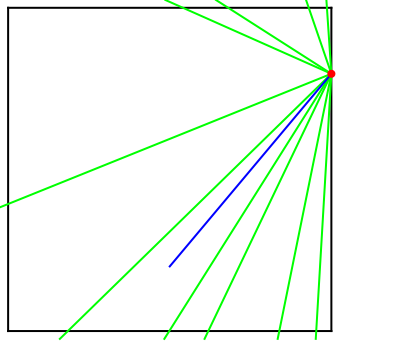
Next, I created a function to simulate the scattering of sound rays by generating multiple randomly-directed rays from a point of collision The scatter function below begins by finding the edge that the collision takes place on. The sound intensity of each scattered ray is calculated by multiplying the initial intensity with the scattering coefficient and absorption coefficient, then dividing by the amount of rays that the main ray is split up into. To create an appropriate range for the direction of a new scattered ray to point in, a lower bound angle is calculated using trigonometry. The upper bound angle is simply 180 Degrees from the lower bound. Once this range has been created, scattered rays are created with a random angle within the range.
Create randomly scattered rays and output the sound intensity of each ray:
In[]:=
scatter[point_,edges_,intensity_,absorptionCoefficient_,frequency_]:=Module[{edge,scatteredIntensity,startAngle,endAngle,angle,direction,scatteredRays},edge=First[MinimalBy[edges,RegionDistance[Line[#],point]&]];scatteredIntensity=intensity*scatteringCoefficient[frequency]*(1-absorptionCoefficient);startAngle=ArcTan[edge[[2]][[1]]-edge[[1]][[1]],edge[[2]][[2]]-edge[[1]][[2]]]/Degree;endAngle=startAngle+180;scatteredRays=Table[angle=RandomReal[{startAngle,endAngle}]Degree;direction={Cos[angle],Sin[angle]};{point,direction},{i,10}];{scatteredRays,scatteredIntensity/10}]
I visualized the scatter function in use below. The graphics below show an initial sound ray in blue colliding with the edge at a red intersection point, and 10 new, randomly-angled green scatter rays being generated.
Visualize the scattered rays from a point:
In[]:=
scatteredRays=scatter[intersectionPoint,edges,10^-6,0.02,600];Graphics[{Line[edges],Green,HalfLine[#[[1]],#[[2]]]&/@scatteredRays[[1]],Blue,Line[{source,intersectionPoint}],Red,PointSize[0.02],Point[intersectionPoint]}]
Out[]=
Simulation
Simulation
Main Simulate
Main Simulate
With the main functions created, I created the simulate and oneRun function to send out a ray of sound and continue updating values as the sound bounces around, stopping when the sound becomes inaudible. I used a NestWhile to loop each cycle, calling oneRun to update the values, and pass in the new values again. The oneRun function calculates the next intersection and reflection points, start and endpoints of the ray, total distance that the sound has traveled, as well as the bounce factor and the remaining intensity at each collision.
Simulate one round of intersection, reflection, and update intensity, direction, and bounce factor:
Simulate sound with oneRun until it is inaudible and calculate new endpoint:
The graphics below shows the simulate function in action, sending out a single 90 decibel ray of sound at 250 hertz and setting the absorption coefficient of the walls to 0.5. An interesting grid pattern is created as the sound bounces around.
Visualize the path of a single ray of sound, continuing reflecting until it becomes inaudible:
Simulate Scatter
Simulate Scatter
I created the simulateScatter function below to include the scattering that occurs at each collision. First, the function runs the main simulate function, returning a list of main sound lines and the according intensities at each collision of those lines. Then, the scatter function is run on each of the collision points on the main path, creating another list of total scattered rays. Finally, each of these scattered rays is ran through the original simulate function to accurately consider the reflection and decay of those sound rays.
Simulate the path of a ray of sound along with the scattering that occurs at each collision:
The graphics below visualize the path of a single ray of sound, shown in blue, along with the scattering that occurs with each collision on the wall, which is shown in green.
Visualize the scattered rays from each collision:
Because sound is usually emitted from a source in a range, and not from a single angle, I ran the main simulateScatter function from multiple angles in a range of sound pointing forward. The graphics below show this.
Visualize the scattering and bouncing of sound from a range of angles:
3D Simulation
3D Simulation
After simulating sound successfully in 2D spaces, I moved to 3D simulations. This involved extracting the individual faces of a room mesh for the intersection, reflection, and scatter functions. The main simulate and simulateScatter functions in 3D were nearly identical to their 2D versions. I also explored the behavior of sound in various 3D spaces, running the simulation in a classic “shoebox” room and in Carnegie Hall.
Initial Setup
Initial Setup
I chose to start simulations in an icosahedron (20-faced polyhedron) shaped room so the various cases of reflection, intersection, and scattering could be tested thoroughly. The faces of the room shape are extracted from the shape’s mesh.
Define a source point, shape, mesh, and separates the mesh into individual faces:
To create a direction vector for a certain angle where sound emits from, I used polar coordinates in 3D. The xyAngle is the azimuthal angle in xy-plane, which measures the angle counterclockwise from the x-axis. The zAngle is the polar angle, which measures the angle downward from the positive z-axis
Define start angles for the sound and calculate the direction vector:
Basic Sound Behavior
Basic Sound Behavior
Intersection
Intersection
I used a very similar method as the 2D intersection function when creating the 3D intersection function. All of the intersection points between a lines and the faces of the room are solved for, and the closest point to the source point is the final intersection point. This function also accounts for the case where there may be no intersections found.
Find the intersection point between a line and the room faces:
Reflection
Reflection
The reflection3D function finds the face that the reflection occurs on, calculates the normal line to that face, and uses the Law of Reflection to calculate the new direction vector of the ray reflecting off.
Calculate the direction vector of a line reflecting off a face using the Law of Reflection:
Visualize the reflection of a ray of sound:
Scattering
Scattering
The scatter3D function generates random direction vectors, representing the random scattering of sound, which is described in depth in the 2D simulation section. The intensity of each of the scattered rays is calculated using the original intensity, the scattering and absorption coefficient, and the number of rays the original ray is split up into.
Create randomly scattered rays and calculate the sound intensity of each ray:
The visualization below shows a sound ray in blue colliding with the wall and the random scattered rays that are created from the collision point. These vectors are spawned in any direction, including pointing out of the room. Those cases are taken care of in the main simulate3D function following this section.
Visualize the random scatter rays that are created at the collision point:
Simulation
Simulation
The simulate3D and oneRun3D functions mirror the majority of the 2D simulate and oneRun functions, differing only in that it calls the new intersection3D and reflection3D functions instead and includes some extra error-handling code.
Simulate one round of intersection, reflection, and update intensity, direction, and bounce factor:
Simulate sound with oneRun3D until it is inaudible and calculate new endpoint:
In the model below, I send out a single ray of sound at 90 decibels and 250 hertz in a room with surfaces that have a 0.5 absorption coefficient. The graphics visualize the ray’s path as it bounces around.
Visualize the path of a single ray of sound, continuing reflecting until it becomes inaudible:
Simulate Scatter
Simulate Scatter
The simulateScatter3D function below also mirrors its 2D counterpart. It runs the main simulate3D function, getting a list of main sound lines and the according intensities at each collision of those lines, then finds the scattered rays from each of the collision points and puts each ray through the simulate3D function again.
Simulate the path of a ray of sound along with the scattering that occurs at each collision:
Visualize the scattered rays from each collision:
More Room Geometries
More Room Geometries
With all the components of 3D sound simulation created and tested, I finally ran the simulation in a common shoebox room and the Zankel Carnegie Hall, which is famous for its impressive acoustics. After creating sound models for single rays and ranges of angles in these spaces, I visually analyzed the sound distribution and qualities throughout these spaces.
Shoebox Room
Shoebox Room
The “shoebox” design, a rectangular room, is a common architectural design which is very effective in creating high-quality acoustics. The shoebox design directs sound evenly off its parallel walls and maximizes early lateral reflections, creating a spacious acoustic atmosphere for the listeners. Many of the most famous concert halls, all renowned for their rich sound reverberation, use shoebox designs, such as Musikverein in Vienna, Concertgebouw in Amsterdam, and Symphony Hall in Boston.
I first created a room mesh with a Cuboid, sized with accurate measurements that could be an actual space. I also set a source point and direction.
Setup the room faces, source point, and source angle:
The model of sound resulting from the simulation is shown below. At one look, it is apparent that the path of the main ray of sound is spread evenly throughout the room, which is expected for this space design. The main sound reflects around in a lattice pattern as a result of the parallel walls, ceiling, and floor. This lattice pattern means that there are no specific hot stops, no areas of high sound concentration, and no dead spots, which are areas with a lack of sound. With a closer look, there also appears to be a buildup of scattering sound in one of the upper corners, in the direction that the initial sound ray is pointed to.
Run simulate in the room and visualize the main sound in blue and scattered sound in green:
Carnegie Concert Hall
Carnegie Concert Hall
Carnegie Hall’s acoustics are widely considered a golden standard; it is a classic example of a wonderfully designed sound space. Many acousticians and architects agree that the careful design of Carnegie Hall reaches a perfect balance of long reverberation, high-frequency clarity, and minimal background noise. Its rectangular dimensions and plaster wall material cause sound reflections to be received with a slight delay, which the brain interprets as spaciousness.
First, to construct the room and make starting conditions, I created room vertices based on a blueprint of Carnegie Hall’s Zankel Hall.
Create a polygon formed with the vertices of an actual blueprint of Carnegie Hall:
Next, I defined a starting sound point and a direction vector to use later on in these simulations.
Define source point, angles and direction vector
I used the buildPrism function below to extrude the Carnegie Hall blueprint polygon out and turn it into a polyhedron to run the 3D simulations in.
Build a polyhedron by extruding out a polygon to some scale
Finally, I used the buildPrism function to construct the polyhedron. I extracted each of the faces of this mesh, and slightly scaled each face up to prevent sound from escaping out of the corners. The final room mesh is shown below.
Construct room and visualize the 3D room
With the complete room mesh completed and initial conditions defined, I finally ran the full simulation. I used an 80 decibel ray of sound at 600 hertz, similar metrics to the sounds that are played in concert halls. When rotating the sound model, one can see that the main path of the sound, shown in blue, travels evenly across the room, reflecting on the ceiling and floor continuously. These reflections correlate directly to the world-renowned acoustics Carnegie Hall is famous for. The green scattering rays occurring at each collision is also shown, and there are roughly equal amounts of green throughout the room, meaning the sound is distributed evenly.
Simulate and visualize sound rays in Carnegie Hall
A musical performance emits many, many sound rays in a wide range of different angles into the concert hall. To simulate this, I ran the simulateScatter3D for a wide range of different angles at the same time. As shown in the model, the blue main rays spread throughout the entirety of the concert hall. Scattered energy accumulates densely near the stage end, where the rays’ first several collisions occur while their intensity is still high. By the time sound reaches the far end of the hall, the scattering is a lot less. In a real performance, this early scattered energy near the stage blends with the direct sound. Listeners in the back rely more on the reflections arriving from the walls and ceiling. The angled corner walls of Zankel Hall also visibly break up the regular lattice pattern seen in the shoebox room, so instead of sound retracing parallel paths, the reflections change more with each bounce, distributing energy across a wider variety of directions.
Visualize the scattering and bouncing of sound from a range of angles:
Conclusion
Conclusion
In this project, I built a simulation of sound behavior in both 2D and 3D architectural spaces using ray tracing. Starting with the basic geometry of intersections and reflections, I added the actual mechanisms of real sound: intensity decay following the Inverse Square Law, absorption into surfaces, and frequency-dependent scattering off rough walls. Each ray is traced until its intensity drops below the threshold of human hearing, and the scattered rays are simulated as secondary sources spreading from each collision point. These simulations show clear differences of sound in varying spaces. In the end, I simulated sound in a shoebox room and a polyhedron of Carnegie Hall’s Zankel Hall.
This project is significant because it connects the physics of sound to concrete architectural decisions in a way that can be tested easily and repeatedly. Building or renovating a performance space can cost millions of dollars; acoustic mistakes are very expensive to fix and some concert halls have been completely rebuilt because of flaws that lead to hollow or unnatural acoustics. A simulation like in this project can predict those flaws before anything is actually built. The same experiment can be rerun with different wall angles, wall materials, and other conditions many, many times to create optimal spaces with no hot spots or dead zones. These simulations also provide lots of extra detail. Because this simulation tracks individual rays with their full paths and intensities, it retains lots of useful information, such as where energy lands, what surfaces it lands on, and how focusing or echoes could build up, which can be used to design ideal sound spaces that create harmony and bring warmth to music.
Future Directions
Future Directions
There are many ways this project could be extended. The most immediate is simulating a wider variety of spaces, such as concave and convex geometries, rooms with curved ceilings, and more real architectural buildings. Another improvement would be assigning different absorption coefficients to different surfaces in the same space. Real rooms are not uniform and adding surface-dependent materials would increase the accuracy of this simulation. Also, since the scattering coefficient depends on frequency, sending out sounds at multiple frequencies simultaneously would show how the same rooms treats different pitches of sound, something that would be important for spaces designed for music. Another interesting direction could be placing a grid of receiver points throughout a room and measuring the sound energy arriving at each one. This would create a map of hot spots and dead zones, giving a direct measurement of how evenly a space distributes sound.
References
References
New Study explores the basis for estimating scattering coefficients | Ahnert Feistel Media Group. (n.d.). https://www.afmg.eu/en/new-study-explores-basis-estimating-scattering-coefficients
Architectural Acoustics: The Art of Sound Design | bigrentz. (n.d.-a). https://www.bigrentz.com/blog/architectural-acoustics
Inverse square law of sound: Simple explanation – Audio University. (n.d.-b). https://audiouniversityonline.com/inverse-square-law-of-sound/
Sound - room absorption coefficients. (n.d.-d). https://www.engineeringtoolbox.com/accoustic-sound-absorption-d_68.html
Architecture as music, a personal journey, through time ... (n.d.-b). https://scispace.com/pdf/architecture-as-music-a-personal-journey-through-time-and-2jj8uchgyg.pdf
Anatomy of a sound renovation: Carnegie Hall. (n.d.-a). https://www.mixonline.com/live-sound/anatomy-sound-renovation-carnegie-hall-368372
The geometry of sound diffusion - payette. (n.d.-g). https://www.payette.com/research-innovation/the-geometry-of-sound-diffusion/
Proceedings of 20th International Congress on Acoustics, ICA 2010. (n.d.-f). https://www.acoustics.asn.au/conference_proceedings/ICA2010/cdrom-ICA2010/papers/p887.pdf
Acknowledgements
Acknowledgements
First and foremost, I would like to thank my amazing mentor, William Choi-Kim, for his incredible guidance, insight, and care throughout this project! This project would not have been possible without him and I am so grateful I got to make this project under his mentorship. William helped me create a great project plan, debug various corner case bugs, and helped me understand the physics and math of sound behind my project. I would also like to thank Stephen Wolfram, the program directors, and teaching assistants of the 2026 Wolfram Summer Research Program for making my experience so memorable. Finally, thank you to my fellow students at WSRP26 for the many fun karaoke nights and short-cut taking!
CITE THIS NOTEBOOK
CITE THIS NOTEBOOK
Creating models of acoustical properties in varying architectural spaces
by Estella Gu
Wolfram Community, STAFF PICKS, July 9, 2026
https://community.wolfram.com/groups/-/m/t/3751941
by Estella Gu
Wolfram Community, STAFF PICKS, July 9, 2026
https://community.wolfram.com/groups/-/m/t/3751941