Introduction
Introduction
Animations and graphs based on the Wolfram Community post (and comments) “OpenAI disproves Erdős unit distance conjecture", [EPn1]. The graph creation code below is a modified version of code provided by Shenghui Yang in [EPn1]. For theoretical details about the unit distance graph edges problem see [PE1, EPn1].
Procedure outline
Procedure outline
1
.Try to figure out neat examples to visualize graphs related to Erdős unit distance conjecture.
2
.Program a few versions of formula-based visualization routines.
3
.Marvel at corresponding graphs.
3
.1
.Especially, the ones obtained with larger parameters.
3
.2
.(Try to) make a collection of them.
4
.Come up with a (much) faster computation routine in order to have a functional Manipulate interface.
5
.Consider making
5
.1
.Graph objects (not just points and lines connecting them)
5
.2
.More interesting graph-plots by coloring the vertices according to certain criteria
5
.3
.An animation of the graph-plot collection
6
.Make the animations and try to marvel at them.
6
.1
.Not that good because the animations “blink.”
6
.2
.The reason is graph-outliers that have too few edges, or plot ranges that are too different from the rest of the graphs.
7
.“Clean” the graph collection
7
.1
.Find and investigate graph outliers with too few edges.
7
.2
.Find and investigate graphs with plot ranges that are too small or too large
7
.3
.Do not do the investigation if the number of outliers is too small.
7
.3
.1
.The outlier graphs can be just removed from the animation collection.
7
.3
.2
.(Outliers have to be explained. Usually. There are more important things to do than some graph animations.)
8
.Export the graph-plot animation to a movie and a GIF and upload them.
9
.Make a blog post (notebook).
Definitions
Definitions
Here is a fast(er) definition for making unit distance graphs with a complex numbers formula:
In[]:=
Clear[UnitDistanceGraphEdges];UnitDistanceGraphEdges[α_?NumericQ,m_?IntegerQ]:=Block[{conn,ω,r,pt,nf,aVertexToIndex,aVertexCoords,lsEdges},ω=-0.5+α*I;r=Range[-m,m,1];pt=Table[a+b*I+c*ω+d*I*ω,{a,r},{b,r},{c,r},{d,r}]//Flatten;pt=ReIm/@pt;nf=Nearest[pt];conn=Association@Map[Function[p,p->Select[nf[p,{All,1.01}],Abs[1-EuclideanDistance[#,p]]≤10^-5&]],pt];conn=Select[conn,Length[#]>0&];conn=Union[Sort/@Flatten[KeyValueMap[Function[{k,v},{k,#}&/@v],conn],1]];aVertexToIndex=AssociationThread[#,Range@Length@#]&@Union[Flatten[conn,1]];aVertexCoords=Association[Rule@@@Map[Reverse,List@@@Normal[aVertexToIndex]]];lsEdges=conn/.aVertexToIndex;<|"Edges"->lsEdges,"VertexCoordinates"->aVertexCoords,"VertexToIndex"->aVertexToIndex|>];
Remark: See the comments in [EP1] for the original and related definitions.
Manipulate
Manipulate
In[]:=
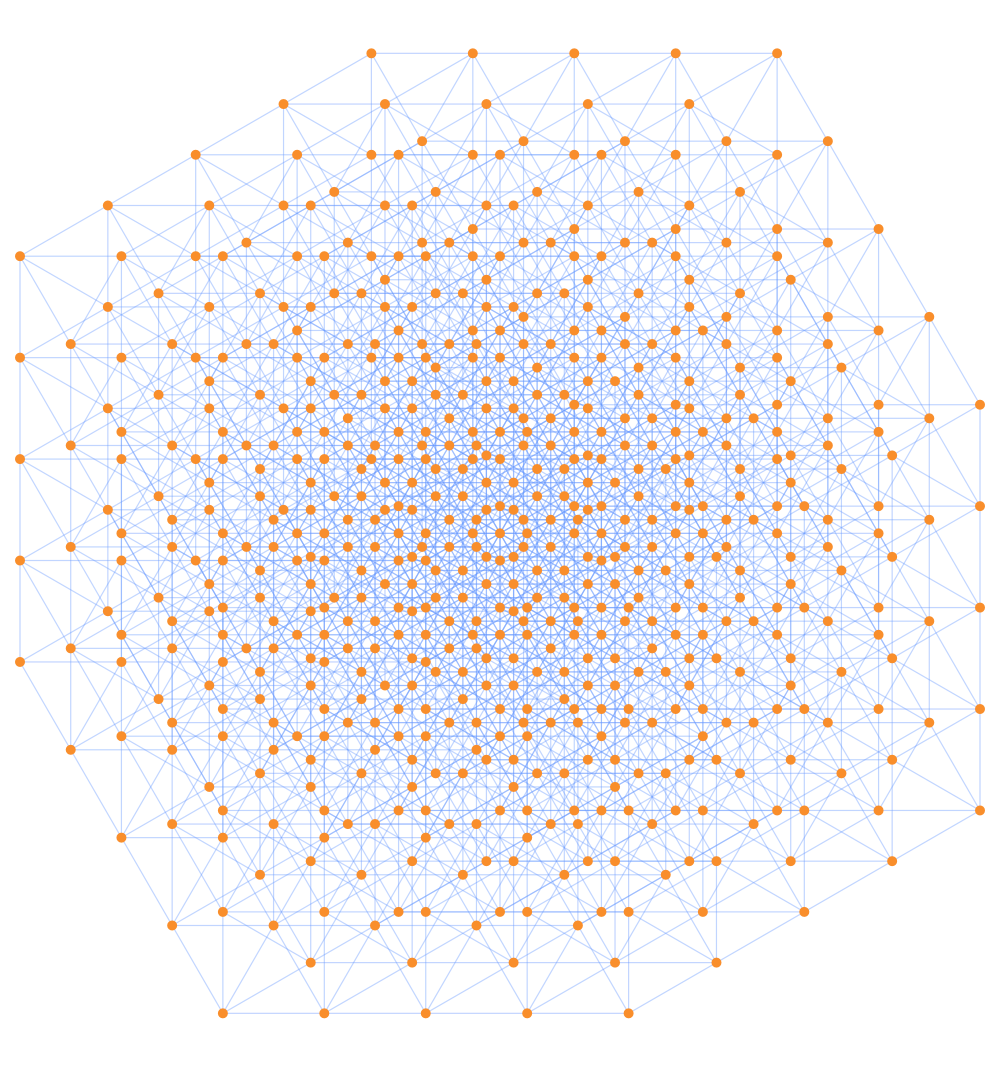
DynamicModule{aRes,conn},ManipulateaRes=UnitDistanceGraphEdges[α,m];conn=aRes["Edges"]/.aRes["VertexCoordinates"];ColumnFormRow[{"Number of edges:",Spacer[5],Length@conn}],ListPlotValues@aRes["VertexCoordinates"],,α,
3
2.,"angle:",0,2,0.01,Appearance->"Open",{{m,2,"boundary:"},1,6,1,Appearance->"Open"},SaveDefinitions->TrueOut[]=


Using graphs
Using graphs
Instead of just plotting the points and connecting them with lines, we can make actual graph objects, and use them to make graph-plots or conduct certain type of analysis. Here the elements of a nice unit graph are computed:
In[]:=
AbsoluteTimingaRes=UnitDistanceGraphEdges
3
2.,3;Out[]=
{0.334242,Null}
Here is the graph objects and basic information for it:
In[]:=
g=Graph[aRes["Edges"],VertexCoordinates->aRes["VertexCoordinates"]];Information[g]
Out[]=
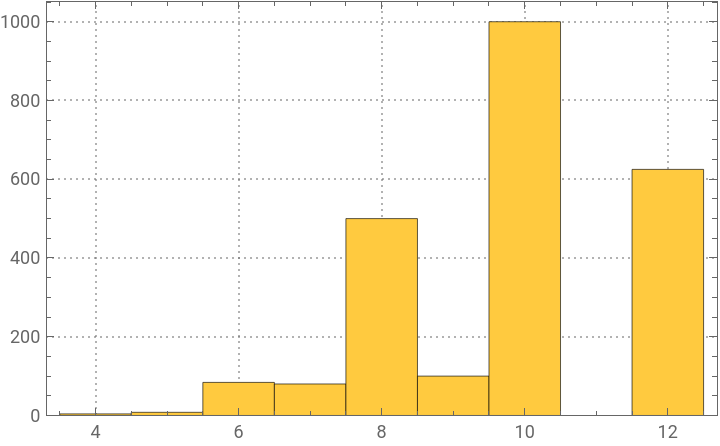
Here is the vertex degree distribution:
In[]:=
Histogram[VertexDegree[g],Automatic,PlotRange->All,PlotTheme->"Detailed"]
Out[]=
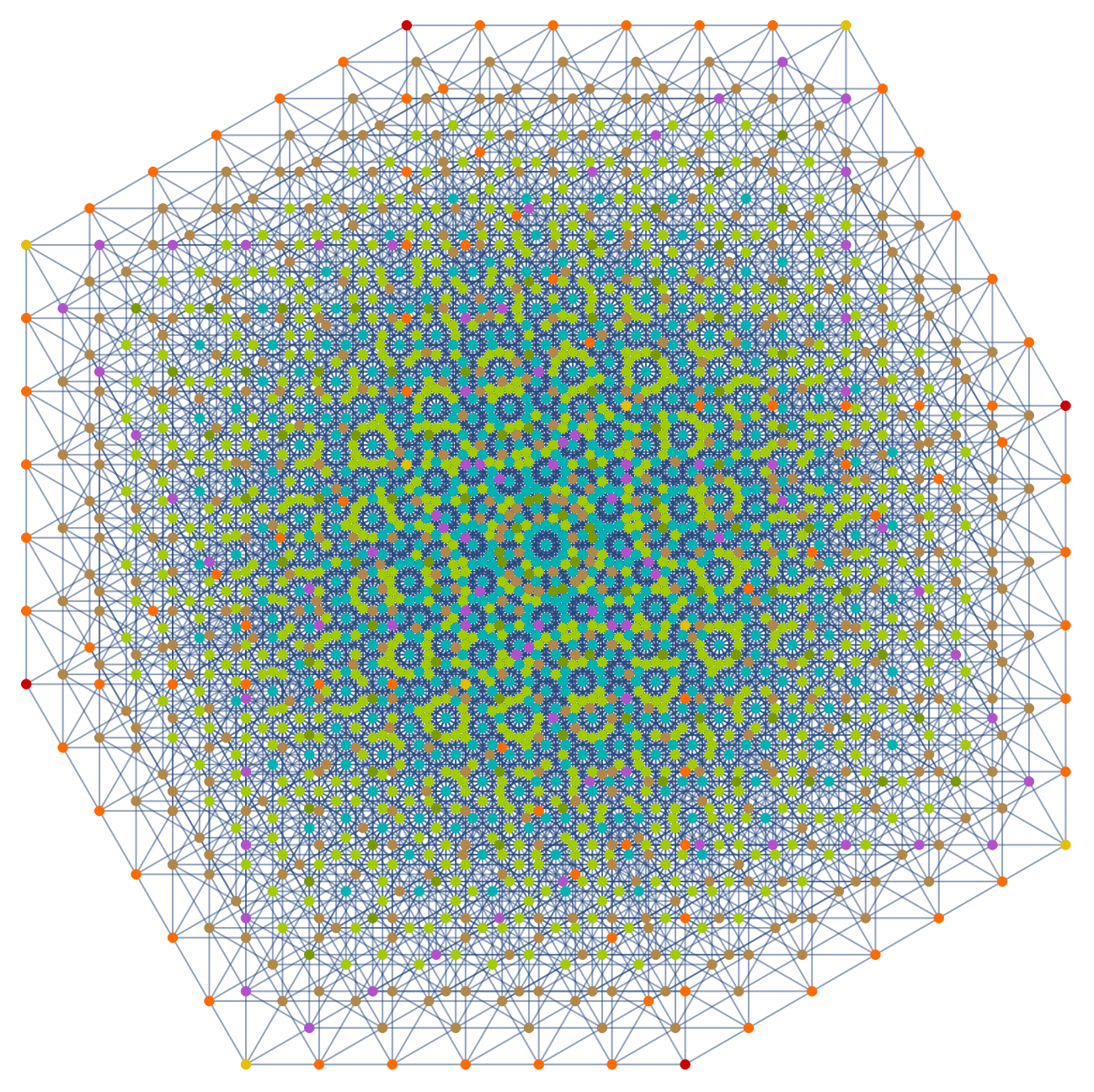
Find the vertex degrees, make a highlight spec with, and plot the corresponding highlighted graph:
In[]:=
lsHighlight=Values@SortBy[GroupBy[AssociationThread[VertexList[g],VertexDegree[g]],#&,Keys],Length];GraphPlot@HighlightGraph[g,lsHighlight,ImageSize->800,VertexSize{"Scaled",0.006}]
Out[]=
List animation
List animation
In this section we make a collection of graph plots that are used to make animations.
Make a progress bar:
Compute the graphs:
Verify by list-animation:
Find outliers with too few edges:
Find outliers by number edges:
Find the boundaries of the graphs and find outliers:
See the outlier boundaries:
Examine the graph embeddings boundaries -- without the outlier -- and come with a constant range with which to make graph plots:
Convert the graphs to plots:
Convert to images
Convert to images
Convert the graph plots to images:
Visually examine the images for nice looks and outliers:
Export
Export
Remark: The animations are exported in the subdirectory “AnimatedGIFs”.
Export to MP4
Export to MP4
Make the movie by dropping the outlier:
Here’s the dark version of the animation
Export to GIFs
Export to GIFs
Optionally, open the animations directory:
References
References
Books
Books
[PB1] Peter Brass et al., Research Problems in Discrete Geometry, 2005, Springer. ISBN-13: 978-0387-23815-8.
Notebooks
Notebooks
Packages
Packages
CITE THIS NOTEBOOK
CITE THIS NOTEBOOK
Unit distance graph animations
by Anton Antonov
Wolfram Community, STAFF PICKS, May 29, 2026
https://community.wolfram.com/groups/-/m/t/3723873
by Anton Antonov
Wolfram Community, STAFF PICKS, May 29, 2026
https://community.wolfram.com/groups/-/m/t/3723873