I have updated my package for socket interaction across Windows, macOS, and Linux operating systems. The update introduces a new function called CSocketHandler, along with overall performance enhancements. This post serves as both documentation for the new features and a tutorial to assist you in implementing your own protocols using this library.
Installation
Installation
Standard installation from the Paclet Repository:
In[]:=
PacletInstall["KirillBelov/CSockets"]
Out[]=
PacletObject

Importing
Importing
And standard import to the Wolfram Language session:
In[]:=
Get["KirillBelov`CSockets`"]
Functions
Functions
You can you Information to find all available functions:
In[]:=
Information["KirillBelov`CSockets`*"]
Out[]=
◼
CSocketOpen[host_String: “localhost”, port_Integer] - this function using for opening a new socket on target host+port
◼
CSocketConnect[host_String: “localhost”, port_Integer] - connecting to the target address
◼
CSocketObject[id] - socket representation in Wolfram Language. Id is not a port! This is internal id in c-code
◼
CSocketListener[(*internal data*)] - listener task representation in Wolfram Language
◼
СSocketHandler[opts] - special mutable message handler and packet accumulator
And overrided built-in functions:
◼
WriteString[CSocketObject[id], “string”] - now works on CSocketObject
◼
BinaryWrite[CSocketObject[id], ByteArra[{1, 2, 3, 4}]] - now works on CSocketObject
◼
SocketReadyQ[CSocketObject[id]] - now works on CSocketObject
◼
SocketReadMessage[CSocketObject[id]] - now works on CSocketObject
◼
SocketListen[CSocketObject[id], handler] - now works on CSocketObject
◼
Close[CSocketObject[id]] - now works on CSocketObject
◼
DeleteObject[CSocketListener[(*internal data*)]] - now works in CSocketListener
Create a server
Create a server
To create a simple server, you must first open a socket and specify a port:
In[]:=
server=CSocketOpen[8000]
Out[]=
CSocketObject

Now let’s start a task that will listen on the specified port:
In[]:=
listener=SocketListen[server,handler[#]&]
Out[]=
CSocketListener

After running the task, we can change the definition of the handler symbol however we want and see what happens. The way to start is it just prints whatever it received over the connection:
In[]:=
handler=Echo
Out[]=
Echo
Now let’s create a client-side connection:
In[]:=
client=CSocketConnect[8000]
Out[]=
CSocketObject
The result in the message window:
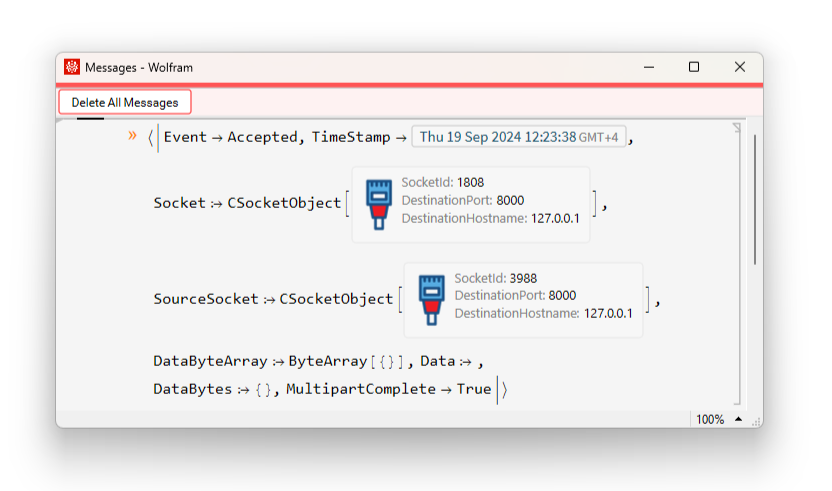
The association that was generated when the client-side connection was created was printed to the message box. This is how it looks like in the form of code:
"Event""Accepted","TimeStamp","Socket"CSocketObject,"SourceSocket"CSocketObject,"DataByteArray"ByteArray[{}],"Data""","DataBytes"{},"MultipartComplete"True

Let’s break down what that means:
◼
“Event””Accepted” - signals that this packet arrived when a new connection was created
◼
“Socket” - this is our server socket
◼
“SourceSocket” - this client socket on server side. Server can write data to this socket and client will receive it
◼
“Data*” - No data was sent while the connection was being established. But all keys starting with this word contain the same data in three different forms
◼
“MultipartComplete”True - I actually added this just for compatibility with the native sockets that are in WL
◼
“TimeStamp” - Time when the package was received
We’ll send something to the server. For example, the traditional “Hello World” string:
In[]:=
WriteString[client,"Hello World"]
Out[]=
2100
The result in the message window:
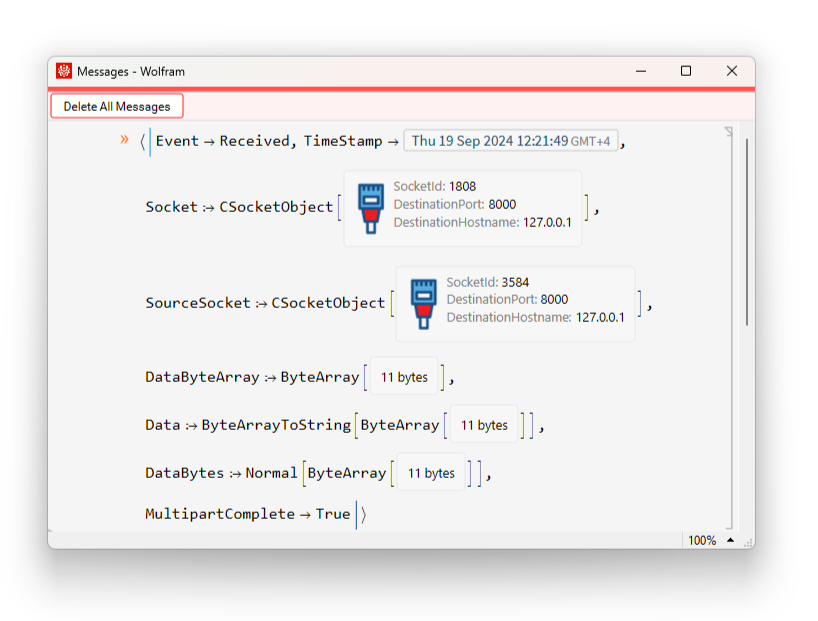
And as code:
"Event""Received","TimeStamp","Socket"CSocketObject,"SourceSocket"CSocketObject,"DataByteArray"ByteArray,"Data"ByteArrayToStringByteArray,"DataBytes"NormalByteArray,"MultipartComplete"True
As we can see here the name of the event has changed and now there is some data in the Data keys. Let’s change the handler and send the string again:
And the request is:
And request Data*
Now I can process this string and send the client something in response. To do this, I have to write data to the socket in the same way:
And on the client side, I could make sure that something came into the socket:
And read this:
Let’s cnvert to string:
Packets
Packets
Data cannot flow to the server as an endless stream; each packet has a size limit. In my implementation, I have set this limit to 64 kilobytes, even though native sockets can handle packets as small as 8 kilobytes. However, managing data packets in a continuous stream is not as straightforward as it may appear. When packets are transmitted successively, it becomes nearly impossible to determine where one message begins and another ends. For instance, a scenario may arise where a client sends three consecutive messages: the first and the last are short, while the middle one is considerably larger. Consequently, the initial packet may contain the entirety of the first message along with the beginning of the second. This will be followed by several packets containing fragments of the second message, and ultimately, a third packet that holds the remainder of the second message along with the entire third message.
To address this issue, I have implemented an additional feature that acts as an accumulation buffer. This buffer allows you to easily integrate your own functions based on straightforward guidelines. It will collect packets until the client’s message is fully received. Once the complete message is assembled, the buffer automatically invokes the designated function to handle the message. This is CSocketHandler function. Let’s create the handler:
You can set certain properties to it. Let’s consider each of them:
◼
A single function that calculates the length of a message! Yeah. it’s not that intuitive. Maybe users can tell me a better name for it. What is the point of this function. The moment a new client connects to the server and sends a packet, this function should calculate the expected message length. It is necessary for the buffer to accumulate packets from this client until their total length is greater than or equal to the expected length in the first message. By default, this function returns the length of an array of bytes:
I can check it:
This means that the expected message length is 11 bytes, which came all in one packet.
Another property of the handler is simply Accumulator. Everything is the same, but it is a table with length checks. This is needed when we need to understand the message type first and then apply the length calculation function. To use this properly I have to add a set of keys and validation rules. For example, if the first byte of the message is 1, let’s say a 32-bit integer is passed. And if the first byte of the message is 2, it is a 64-bit integer. In total, we get either 5 or 9 bytes depending on which type of number we choose. Here is how it can be correctly implemented:
If none of the checks succeeds, the default handler will be called.
Everything is the same for the message handler. There is a default handler, which is a single function that is called when no check has come up, and there is an option to add your own handlers for each type of message:
Right now, there are no inspections of the condition yet. And when the default handler is called, nothing happens because it returns Null. But I can add my handler like this:
All done! Let’s check!
Send the data:
Result:
The principal scheme is:
There are two other important handler properties that can be customized by the user. These are Serializer and Deserializer. They can be used to turn a set of bytes into a Wolfram Language expression.
LTP
LTP
Now that we have figured out how to start the server, connect to it and examined the properties of the handler - let’s implement our own protocol. This will be LTP - Length Transfer Protocol. Its essence is as follows:
◼
Bytes 1-4 are service bytes and as a string represent “LTP#”
◼
Bytes 5-8 contain a 32-bit integer that indicates the length of the message
◼
The rest is a message that is serialized using BinarySerialize
Now let’s create a function that checks the first packet:
A function that calculates the length of a message:
Well, and a function that does something. Let’s say it executes the code that was wrapped in Hold and prints it:
We still need a serializer and a deserializer:
Let’s create a new handler:
And the last function is on the client side:
Let’s check it out!
And in message windows:
Now I can execute any code on the remote server and get the result:
What are the benefits of this protocol? Why can’t I just use WSTP? The beauty of it is that I can easily create a client in any programming language just using the built-in socket library. On the WL side I will of course need to change the serialization since not all languages support WXF, but now integration and communication over the network with other languages is very easy!
CITE THIS NOTEBOOK
CITE THIS NOTEBOOK
CSockets and LTP: Creating custom communication protocol
by Kirill Belov
Wolfram Community, STAFF PICKS, September 19, 2024
https://community.wolfram.com/groups/-/m/t/3277715
by Kirill Belov
Wolfram Community, STAFF PICKS, September 19, 2024
https://community.wolfram.com/groups/-/m/t/3277715