In collaboration with Yoan Leblanc
Using the Synth, and LMMS, a free, open-source DAW (Digital Audio Workstation), we created the melody for the song “Brother Jack”, you’ll find the .mp3 attached. You can find updates of our project on: https://github.com/carlorean/Mathematica_synth
Introduction to sound, and to the concept of synth:
Introduction to sound, and to the concept of synth:
Music, and in general, sound, is made up of waves, which are mathematical functions that are absolutely computational on Wolfram; this will be the topic of this article.
Let’s define what sound is. The main difference between noise and sound is that noise is made up of waves with irregular patterns. But what do these function modeling sound waves mean? When a sound is produced, air molecules are affected by this new air projected. When I speak, air comes out of my mouth, and pushes air molecules. This creates change in local air pressure. Functions such as the well - known sine wave model this pressure difference. Noise is thus an irregular local change of air pressure.
A synthesizer creates a sound using maths. Synthesizers are very used in modern music (since the ≃ 80 s). These can create sounds ranging from kicks (bass drum), snare drums, hi - hats, to pianos, guitars, and organs. Obviously, one can very well create a new sound, unheard of in classical instruments, using a synthesizer, highlighting its power and importance in modern music.
We, Yoan Leblanc and Carlo Réan, created a synthesizer using only Mathematica, and we proceeded to use the sounds we created to make music using LMMS, a free DAW (Digital Audio Workstation), while we were at the Wolfram Summer School.
The first part of our project was to create a regular sine wave with a function: generating a table of numbers between 0 and 1 in 44100 steps (steps of 1/44100), with 440 being the frequency and 2 Pi serving as converters for the frequency (radians - degrees), and to hear it we apply the Audio[] function on Wolfram. The number of steps comes from the fact that 1/(number of steps) is the sampling rate. Humans can hear frequencies ranging from 20 Hz to 20 kHz; hence, the minimal sample rate must be at least twice the higher value of frequency. This is better - known as the Nyquist - Shannon theorem. We add 100 Hz for comfort of the ear.
We, Yoan Leblanc and Carlo Réan, created a synthesizer using only Mathematica, and we proceeded to use the sounds we created to make music using LMMS, a free DAW (Digital Audio Workstation), while we were at the Wolfram Summer School.
The first part of our project was to create a regular sine wave with a function: generating a table of numbers between 0 and 1 in 44100 steps (steps of 1/44100), with 440 being the frequency and 2 Pi serving as converters for the frequency (radians - degrees), and to hear it we apply the Audio[] function on Wolfram. The number of steps comes from the fact that 1/(number of steps) is the sampling rate. Humans can hear frequencies ranging from 20 Hz to 20 kHz; hence, the minimal sample rate must be at least twice the higher value of frequency. This is better - known as the Nyquist - Shannon theorem. We add 100 Hz for comfort of the ear.
However, sine waves aren’t the only sounds in music, we proceeded to create triangular and square functions giving a more robust sound than the sine waves; for a square signal we applied the Sign[] function and for a triangle signal we applied the ArcSin wave. The function Random gives us a random integer between 0 and 1, and the accumulation of these integers, when listened to, gives a scratchy sound, white noise which can be transformed into percussion, if mixed with the right functions.
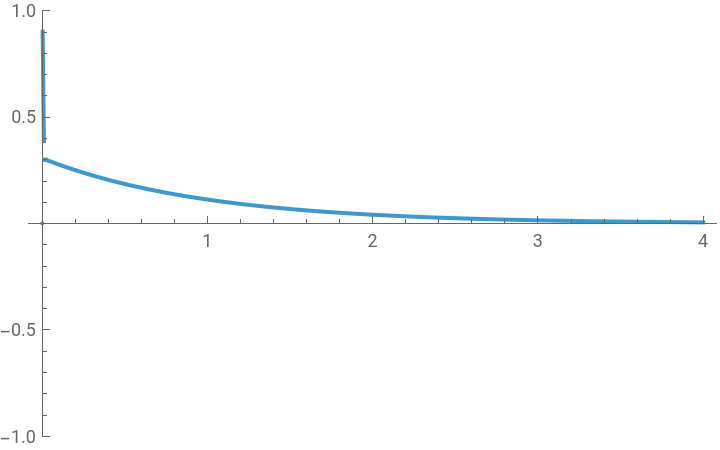
To control the amplitude variation for different effect we created an ADSR envelope made by an Attack (how fast the sound goes from 0 to 1 in amplitude), a Decay (the amplitude lowers after the attack), a Sustain (sustaining the amplitude at the end of the delay), and a Release (the sound goes back to 0 amplitude). To create it, we used an increasing exponential for the attack, a constant function for the sustain, and we made sure that the first point of the Sustain function matched with the last point of the Decay function, and that the last point of the Attack matched with the first point of the Decay function. For the Release, we used a decreasing exponential.
To control the amplitude variation for different effect we created an ADSR envelope made by an Attack (how fast the sound goes from 0 to 1 in amplitude), a Decay (the amplitude lowers after the attack), a Sustain (sustaining the amplitude at the end of the delay), and a Release (the sound goes back to 0 amplitude). To create it, we used an increasing exponential for the attack, a constant function for the sustain, and we made sure that the first point of the Sustain function matched with the last point of the Decay function, and that the last point of the Attack matched with the first point of the Decay function. For the Release, we used a decreasing exponential.
The Synth in itself
The Synth in itself
The Foundation of the synth: the ADSR function
The Foundation of the synth: the ADSR function
attaque[t_]:=1-Exp[-5000t];
Quick attack, the more the exponentiated number is great, the quicker the attack is
tempsA=Solve[attaque[t]==99/100,t∈Reals][[1,1,2]];
After how much time the attack is done (the sound is at 99 % of its dB)
decay[t_]:=((sustain-attaque[tempsA])/(tempsD-tempsA))t+(attaque[tempsA]-(sustain-attaque[tempsA])/(tempsD-tempsA)*tempsA);
Line linking the end of the attack to the beginning of the sustain
tempsD=tempsA+0.01;
sustain=0.3;
Sustain also modulable; .6 means we have a 0.6 amplitude, knowing this value is limited from 0 to 1, we are sure to never saturate here
tempsS=0.01+tempsD;
makes no sense to calculate it because it is by definition modulable
release[t_]:=sustain*Exp[tempsS-t];
We move the exponential exactly at the end of the sustain
ADSR[t_]:=Piecewise[{{attaque[t],t<=tempsA},{decay[t],tempsA<t<=tempsD},{sustain,tempsD<t<=tempsS},{release[t],tempsS<=t}}];Plot[ADSR[t],{t,0,4},PlotRange->{All,{-1,1}}]
This is the code for the ADSR function. It is quite simple, but crucial for the synth
The Synth’s functions
The Synth’s functions
These are just functions that are widely used in synths. We have a sine wave, a triangle, which gives a smooth sound, a square, which gives a hard, punchy sound, an FM function, and an AM function. Additionally, the “bruit”, which means “noise” in French, is just white noise. It is useful to create drums, since they have this “crunchy” sound. So anyway, we created a snare from White Noise through a short attack and release envelope, we also made hats with White noise through a very short envelope (for long hats the release is long). For the second part of the code, we thought it’d be interesting to create a function that takes a sound as input, and outputs an equation. It would be the reverse of the first part of the code, because we gave our function an equation, and it outputs a sound. We used the fourier transform: which converts the time representation of a wave into a frequency representation. With the latter, we can convert the input into a sine equation. Wolfram automatically transforms a sound into a time representation of the sound. We only have to use the Fourier[] function, take the phases, amplitudes, and frequencies of each sine wave, and add them together
f=100;f0=300;f1=200;sinuso[t_]:=Sin[2Pift]+.5Sin[4Pift]+.1Sin[Pift];triangle[t_]:=2PiArcSin[Sin[2Pift]];bruit[t_]:=RandomReal[{0,1}];carre[t_]:=Sign[Sin[2Pift]];FM[t_]:=Sin[2Pi(f0t+(f1/f)(1-Cos[2Pift]))];(*frequencemodulation*)AM[t_]:=(1+Sin[2Pitf1])Sin[2Pitf0](*amplitudemodulation*)(*Wealsoaddedfilters,tofurthercomplexifyoursynth*)
HP[signal_,fc_]:=HighpassFilter[signal,fc,44100](*HighPassfilter,thehigherfcisthemoreweletsignalswithhighfrequenciespass.Wekindofcutthespectrumatfcandnothingbeneathpasses.*)
LP[signal_,fc_]:=LowpassFilter[signal,fc,44100](*SameideaastheHighpassbutweonlytakefrequenciesunderfc*)
The Synth’s inverse
The Synth’s inverse
The Synth’s difference: the Fourier transform
The Synth’s difference: the Fourier transform
This function is a very rare function in Synths, because it does the exact inverse a Synth does. A Synth transforms a sound into an equation. Thus the FT (short for Fourier Transform) transforms a sound into an equation. We haven’t figured out (yet) how to make it give us an equation in terms of the ones we have defined earlier. This is especially useful when you hear a sound, and wonder what it looks like (a rare situation, yet an impossible one)
FT[audio_,nPeaks_:5]:=Module[{audioObj,fs,data,len,fft,mag,phase,indices,freqValues,maxAmp,terms,i},Quiet@Check[audioObj=If[Head[audio]===Sound,Audio[audio],audio];(*Ifthereisasound,weproceed,ifthereisn’t,westop*)fs=AudioSampleRate[audioObj];data=Flatten[AudioData[audioObj]];len=Length[data];If[len==0||Max[Abs[data]]<10^-6,Return[<|"Equation"->"0","Frequencies"->{0},"Status"->"Silent"|>];];(*ifthere’snoaudiblesound,wedon’tcontinue,becausetoomuchprecisionwoulddestroythepc*)fft=Fourier[data,FourierParameters->{1,-1}];(*centralpoint,weapplythefouriertransform*)mag=Abs[fft][[;;Ceiling[len/2]]];(*Wecalculatetheamplitudesofthedifferentsines,andwethrowawaythesecondhalfofthedatabecauseitissymetric*)phase=Arg[fft][[;;Ceiling[len/2]]];(*samewiththephase(ϕ)*)indices=If[Length[mag]>=nPeaks,Ordering[mag,-nPeaks],Range[Length[mag]]];(*Iftherearemoreelementsthatpeaks,wetakethepeaks,ifnot,weordertheelements,andweincludethemall*)freqValues=QuantityMagnitude[N[(indices-1)*fs/len]];(*formulaforbandwidth*)freqValues=Select[freqValues,20<=#<=20000&];(*weonlytakefrequenciesourearcanhear*)If[freqValues=={},Return[<|"Error, no signal detected"|>]];maxAmp=If[Length[mag[[indices]]]>0,Max[mag[[indices]]],Return["Erreur, pas de signal"]];(*ifthereareamplitudes,wetakethemainones*)terms=Table[With[{a=Round[mag[[indices[[i]]]]/maxAmp,0.01],f=Round[freqValues[[i]],0.1],ϕ=Round[phase[[indices[[i]]]],0.1]},ToString[a]<>" Sin[2π×"<>ToString[f]<>"×t + "<>ToString[ϕ]<>"]"],{i,Min[nPeaks,Length[freqValues]]}];(*Wewritethesines,definingfirstfrequency,phaseandamplitude,untilnofrequenciesarelefttoassociatewiththesines.WedivideallbymaxAmptonormalize*)<|"Equation"->StringJoin[Riffle[terms," + "]],"Frequencies"->freqValues,"Amplitudes"->mag[[indices]]/maxAmp,"Phases"->phase[[indices]],"Status"->"Success!!!"|>,<|"Status"->"Error","Message"->"Analysis failed"|>]]
The Presets, and details
The Presets, and details
Finally,we added presets:
Kick: attack=1-e^(-5000*t), D beat=A beat+0.01, sustain=0.3, S beat=D beat+0.01, f=100, the sound lasts very short, we use square.
Piano (C): attack=1-e^(-100*t), D beat=A beat+0.05, sustain=0.7, S beat=D beat+0.5, the sound lasts 4s, we use the FT function, add the ADSR envelope, and add a little background noise (very soft, multiplied by 1/20) if necessary.
Hi-Hats: attack=1-e^(-5000*t), D beat=A beat+0.02, sustain=0.2, S beat=D beat+0.05, f=180, f0=4000, f1=3000, the sound lasts very short, 0.3 seconds. We use noise, square, and AM in addition, with the envelope, and we must use the speaker, with fc=8000.
Snare: Kick parameters, the only difference is that we also use noise (noise for the muffled side of the snare, and square for the punchy side). Organ: Same parameters as the piano for the ADSR. We use FT (FT*ADSR), and divide the total by 2 to avoid saturation. Since the synth is home-made, the presets do sound like a kitchen recipe, but we couldn’t really do better than this…
Kick: attack=1-e^(-5000*t), D beat=A beat+0.01, sustain=0.3, S beat=D beat+0.01, f=100, the sound lasts very short, we use square.
Piano (C): attack=1-e^(-100*t), D beat=A beat+0.05, sustain=0.7, S beat=D beat+0.5, the sound lasts 4s, we use the FT function, add the ADSR envelope, and add a little background noise (very soft, multiplied by 1/20) if necessary.
Hi-Hats: attack=1-e^(-5000*t), D beat=A beat+0.02, sustain=0.2, S beat=D beat+0.05, f=180, f0=4000, f1=3000, the sound lasts very short, 0.3 seconds. We use noise, square, and AM in addition, with the envelope, and we must use the speaker, with fc=8000.
Snare: Kick parameters, the only difference is that we also use noise (noise for the muffled side of the snare, and square for the punchy side). Organ: Same parameters as the piano for the ADSR. We use FT (FT*ADSR), and divide the total by 2 to avoid saturation. Since the synth is home-made, the presets do sound like a kitchen recipe, but we couldn’t really do better than this…
sr=44100;(*samplerate*)dur=0.8;(*durationinseconds*)(*Pre-calculatethemainfunctiontable*)samplesMono=Table[ADSR[t]*carre[t],{t,0,dur,1/sr}];(*Pre-calculatethetablefortheotherchannel*)samplesMod=Table[ADSR[t]*carre[t],{t,0,dur,1/sr}];(*Createstereoaudio*)yc=AudioChannelCombine[{Audio[samplesMono,SampleRate->sr],Audio[samplesMod,SampleRate->sr]}]
Out[]=
Out[]=
Created melody for the song “Brother Jack”
Created melody for the song “Brother Jack”
Out[]=
Final Notes
Final Notes
A problem we encountered during our project was not being able to create a piano keyboard for the different sounds we had, because our computers weren’t powerful enough to run it. We also wished to unify all the ADSR parameters into one big function, to clarify the code, but it got too messy. This is the reason why we composed a beat on LMMS instead of the Wolfram language.
Carlo Réan
Yoan Leblanc
Carlo Réan
Yoan Leblanc
CITE THIS NOTEBOOK
CITE THIS NOTEBOOK
Music synthesizer: preset system and synth's inverse
by Carlo Réan and Yoan Leblanc
Wolfram Community, STAFF PICKS, October 1, 2025
https://community.wolfram.com/groups/-/m/t/3553666
by Carlo Réan and Yoan Leblanc
Wolfram Community, STAFF PICKS, October 1, 2025
https://community.wolfram.com/groups/-/m/t/3553666