I recently start to use Red Hat Enterprise Linux for development in a virtual machine environment. Because I can destroy the virtual machine safely and quickly on my host, I need a quick way to manage my entitlements to comply with the seat limit associated with my subscription. Red Hat provides a list of web API interfaces that cover most account management operations. Combining WL’s build-in web service query functions, I can easily turn a notebook to dynamic account management platform. The main WL functions used are
◼
HTTPRequest / URLRead / URLExecute: build complete API, just like CURL
◼
ByteArrayToString / ImportString: parse serialized data in JSON format
Step by Step
Step by Step
Follow the knowledge base article, I need to generate a offline token through my portal. This token is served as a private secrete key that I should keep to myself only.
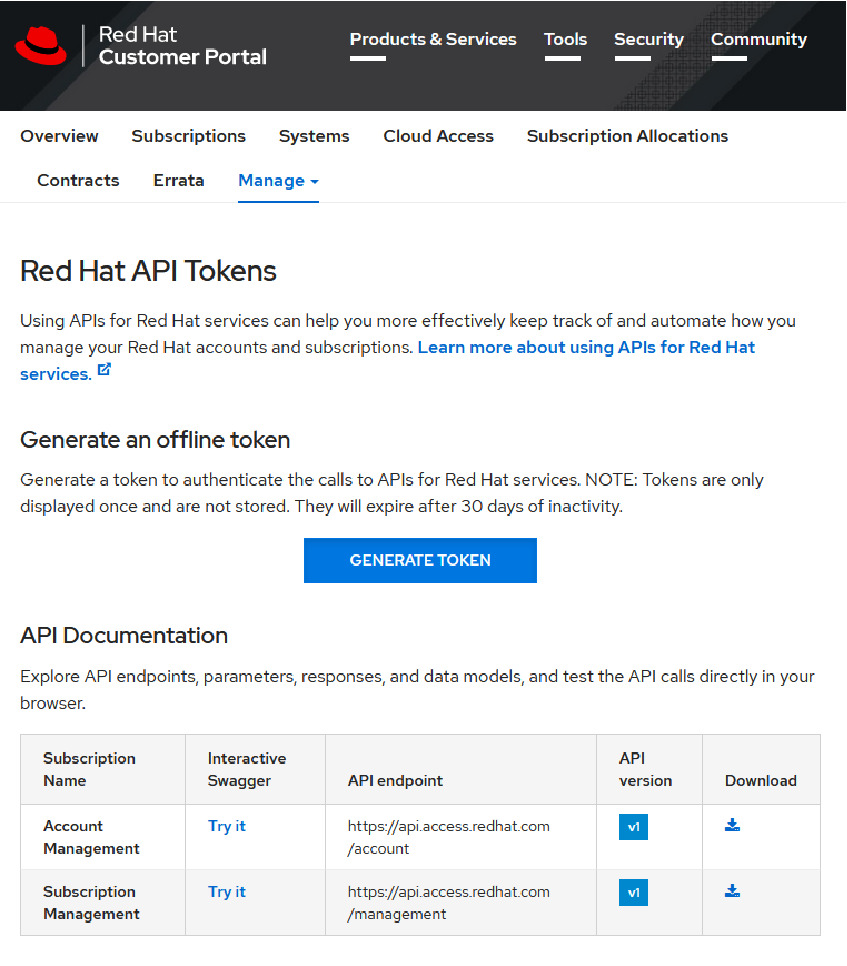
The offline code should look like this
offline="eyJhbGci...ZGe0";
The next step is to use the offline token to generate a temporary signature (or called access code) used for subsequent operation. This step is essential that the following data sensitive operation won’t be tempered over internet transition. The life time of such signature is 900 seconds = 15 minutes.
The documented CURL command in terminal looks like
The documented CURL command in terminal looks like
$ offline_token='eyJhbGciOiJSUzI1NiIsInR5cCIgOiA'
$ curl https://sso.redhat.com/auth/realms/redhat-external/protocol/openid-connect/token -d grant_type=refresh_token -d client_id=rhsm-api -d refresh_token=$offline_token
$ curl https://sso.redhat.com/auth/realms/redhat-external/protocol/openid-connect/token -d grant_type=refresh_token -d client_id=rhsm-api -d refresh_token=$offline_token
The -d option in the script is translated to a list of rule in the Body section in my HTTPRequest. The Post method can be omitted in the HTTPRequest below
In[]:=
reuqest=HTTPRequest["https://sso.redhat.com/auth/realms/redhat-external/protocol/openid-connect/token",<|"Body"{"grant_type""refresh_token","client_id""rhsm-api","refresh_token"->offline}|>]

Use URLRead to retrieve the response
In[]:=
response=URLRead[reuqest]

In[]:=
result=List@@response;
In[]:=
result〚2〛["StatusCode"]===200
Out[]=
True
In[]:=
result〚1〛//Head
Out[]=
ByteArray
The rest of the response also contains some verbose header messages. I can print them in the notebook for debug purpose
In[]:=
Grid[result[[2]]["Headers"],Background{None,{{LightBlue,None}}},AlignmentLeft]
Out[]=
Cache-Control | no-store |
X-XSS-Protection | 1; mode=block |
Pragma | no-cache |
X-Frame-Options | SAMEORIGIN |
Strict-Transport-Security | max-age=31536000; includeSubDomains |
X-Content-Type-Options | nosniff |
X-Site | phx2 |
Content-Type | application/json |
Vary | Accept-Encoding |
Content-Encoding | gzip |
Date | Tue, 15 Dec 2020 02:35:12 GMT |
Content-Length | 1730 |
Connection | keep-alive |
I use ByteArrayToString to deserialize the result to obtain the human readable form
deserialized=ByteArrayToString[result〚1〛]
{"access_token":"eyJhbGci...Y0fRwqPsbE","expires_in":900,"refresh_expires_in":0,"refresh_token":"eyJhb...iFI4RmVA","token_type":"bearer","not-before-policy":0,"session_state":"9f949da5-0290-...-...-1234","scope":"offline_access"}
Notice the output put above is string, I have convert it to expression using the RawJSON attribute in the following function. The result is of Association type.
In[]:=
access=ImportString[deserialized,"RawJSON"]
access_tokeneyJhbGci...Y0fRwqPsbEE,expires_in900,refresh_expires_in0,refresh_tokeneyJhb...iFI4RmVA,token_typebearer,not-before-policy0,session_state9f949da5-0290-...-...-1234,scopeoffline_access
Use the “access_token” key to find the signature
In[]:=
access["access_token"]
eyJhbGci...Y0fRwqPsbEE
Example: Find Subscription
Example: Find Subscription
The documented CURL command to retrieve my subscriptions are
# curl -H "Authorization: Bearer $token" https://api.access.redhat.com/management/v1/subscriptions
The command requires headers corresponding request in WL is
In[]:=
request2=HTTPRequest["https://api.access.redhat.com/management/v1/subscriptions",<|"Headers"{"Authorization""Bearer "<>access["access_token"]}|>]

In[]:=
subscription=URLExecute[request2];
Convert the body part of the response to Dataset for organized display
Dataset[Association@@@("body"/.subscription)]

In case the signature is expired or invalid, URLExcute returns the following message
URLExecute[request2Expired]
Authentication required
Example: Delete User Subscription
Example: Delete User Subscription
I need to delete a subscription associated with a virtual machine I just destroyed with RHEL previously installed. UUID is needed to operate account management on any specific user
In[]:=
request3=HTTPRequest["https://api.access.redhat.com/management/v1/systems",<|"Headers"{"Authorization""Bearer "<>access["access_token"]}|>]

Print the subscription information
Append the second UUID to a URL and add DELETE method in the head
Perform deletion on the server side. On successful deletion, URLExecute returns empty string and URLRead should return 204 for status code.
Verify the user with the given UUID is deleted by calling the system management web API with the signature
Now the second entry is deleted
Summary
Summary
◼
HTTPRequest / URLRead / URLExecute: build complete API, just like CURL
◼
ByteArrayToString / ImportString: parse serialized data in JSON format
◼
View the full list of API template from https://access.redhat.com/management/api/rhsm
◼
Steps above can be transferred to Red Hat Satellite service management as well