General Definitions
General Definitions
In[]:=
ReverseDim[dat_]:=Transpose[dat,Reverse[Range[ArrayDepth[dat]]]]ReverseDat[dat_]:=Fold[Reverse,dat,{2,3}]RescaleDat[dat_]:=ImageData[ImageResize[Image3D[ReverseDim[dat]],Reverse@Dimensions@dat,Resampling->{"Spline",1}]]ListContourPlot3DC[mask_,col_]:=ListContourPlot3D[GaussianFilter[RescaleDat[mask],3],Contours->{0.5},Mesh->False,ContourStyle->Darker@col]ListContourPlot3DN[mask_,col_]:=ListContourPlot3D[GaussianFilter[mask,3],Contours->{0.5},Mesh->False,ContourStyle->Darker@col]eq=((x-20)-10)^2+((y-30)/.8+20)^2+(0.5(z-40)-5)^2;tr=400;dat=Boole@Table[eq<tr,{x,0,40},{y,0,60},{z,0,80}];dim=Dimensions@dat;lab=MapThread[Style[#1,#2]&,{{"x","y","z"},{Red,Green,Blue}}];st=Directive[Bold,Black,12];
Align Image3D with ContourPlot
Align Image3D with ContourPlot
If data dimensions are {x, y, z} Image3D dimensions are defined as {z, y, x}, with mirroring along the y and z axes as is expected .
To align Image3D with ContourPlot reverse last two dimensions and reverse the dimension.
To align Image3D with ContourPlot reverse last two dimensions and reverse the dimension.
In[]:=
p1=ContourPlot3D[eq==tr,{x,0,40},{y,0,60},{z,0,80},BoxRatios->Dimensions@dat,AxesLabel->lab,PlotLabel->Grid@{{"label: ",lab},{"dim: ",Dimensions@dat},{"ratio: ",Dimensions@dat}},LabelStyle->st,Mesh->False,ContourStyle->Darker@Green];p2=Show[im=Image3D[ReverseDim@ReverseDat@dat],Axes->True,BoxRatios->dim,AxesLabel->lab,PlotLabel->Grid@{{"label: ",lab},{"dim: ",Dimensions@ReverseDim@dat},{"im dim:",ImageDimensions@im},{"ratio: ",Dimensions@dat}},LabelStyle->st];GraphicsRow[{p1,p2,Show[p1,p2]},ImageSize->900]
Out[]=
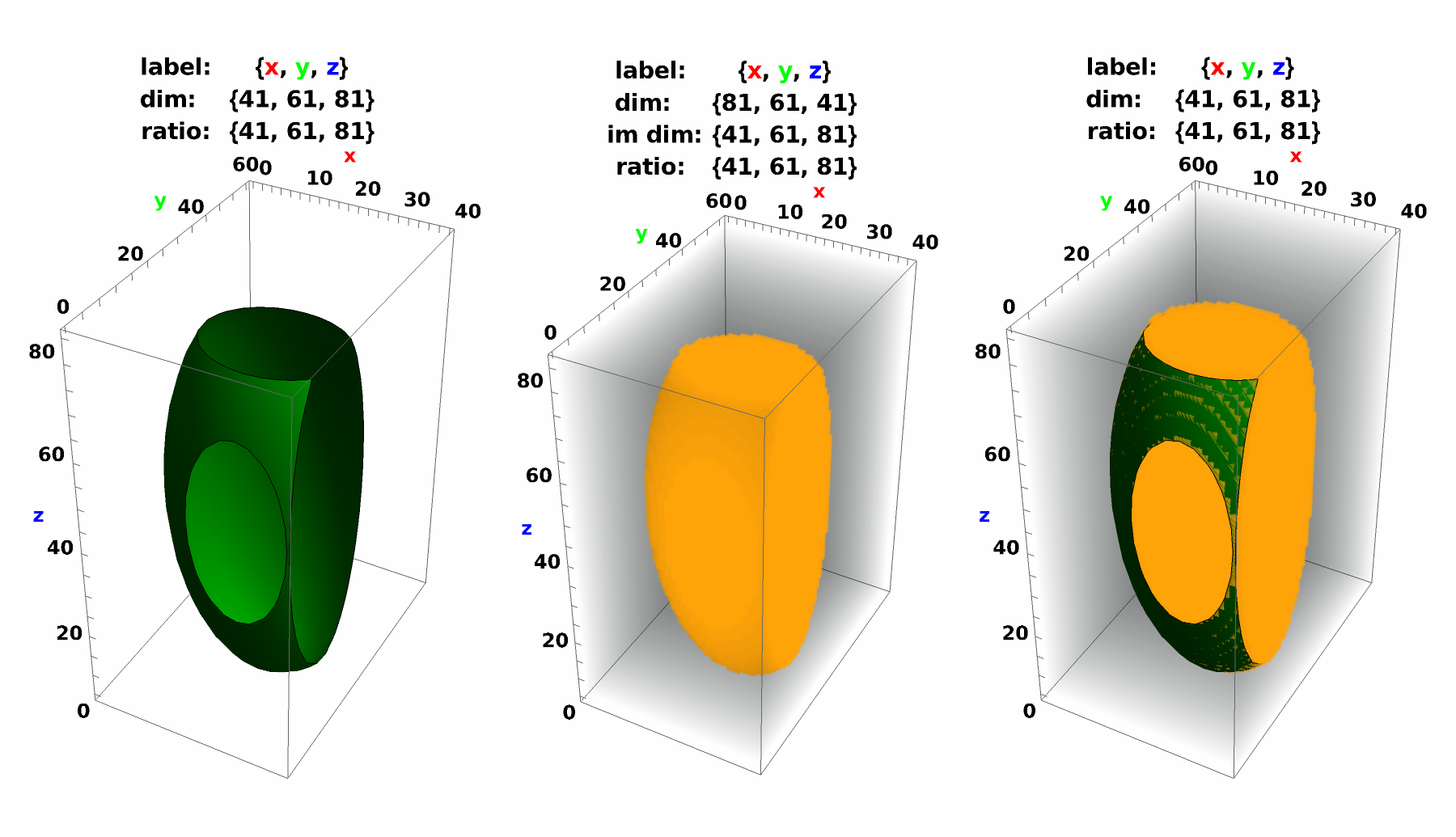
Align ListContourPlot3D with Image3D and ContourPlot3D
Align ListContourPlot3D with Image3D and ContourPlot3D
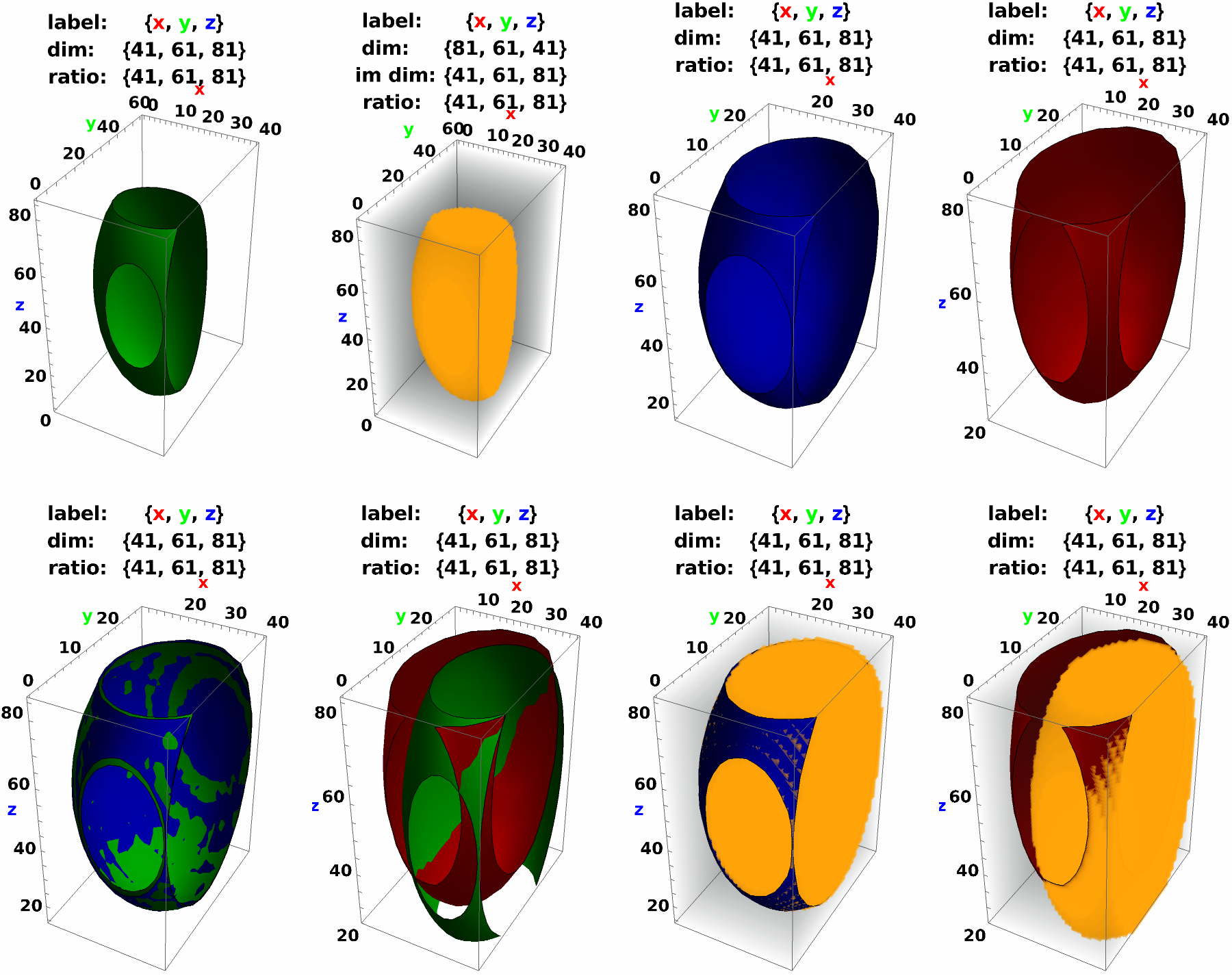
I would expect for ListContourPlot3D and ContourPlot3D to give the same results, which they dont .
To make the ListContourPlot3D output the same as ContourPlot3D the data dimensions have to be reversed, and the data has to be rescaled which is not expected for me .
To make the ListContourPlot3D output the same as ContourPlot3D the data dimensions have to be reversed, and the data has to be rescaled which is not expected for me .
In[]:=
p3=Show[ListContourPlot3DC[dat,Blue],BoxRatios->Dimensions@dat,AxesLabel->lab,PlotLabel->Grid@{{"label: ",lab},{"dim: ",Dimensions@dat},{"ratio: ",Dimensions@dat}},LabelStyle->st];p4=Show[ListContourPlot3DN[dat,Red],BoxRatios->Dimensions@dat,AxesLabel->lab,PlotLabel->Grid@{{"label: ",lab},{"dim: ",Dimensions@dat},{"ratio: ",Dimensions@dat}},LabelStyle->st];GraphicsGrid[{{p1,p2,p3,p4},{Show[p3,p1],Show[p4,p1],Show[p3,p2],Show[p4,p2]}},ImageSize->900]
Out[]=
ArrayPlot3D does not show the data
ArrayPlot3D does not show the data
Not sure what is happening here . ArrayPlot3D does not show the shape, if used with Show the contour first it does show, but if used with Show with the contour second it does not .
With ArrayPlot the axes are reversed compared to graphics (raster, matrix - plot etc .) which is also the case for the 3 D version . However, when i plot an array i would expect the data to show .
In the Documentation all examples are with data that have no padding . Any example can be broken by adding unequal padding in all directions .
When using Data Reversed -> True it also behaves differently , ie . the data is shown and the correct label styling is used .
With ArrayPlot the axes are reversed compared to graphics (raster, matrix - plot etc .) which is also the case for the 3 D version . However, when i plot an array i would expect the data to show .
In the Documentation all examples are with data that have no padding . Any example can be broken by adding unequal padding in all directions .
When using Data Reversed -> True it also behaves differently , ie . the data is shown and the correct label styling is used .
In[]:=
{ArrayPlot3D[d=RandomInteger[1,{5,7,8}]],ArrayPlot3D[ArrayPad[d,{1,1,1}]],ArrayPlot3D[ArrayPad[d,{1,2,3}]]}{ArrayPlot3D[d,DataReversed->True],ArrayPlot3D[ArrayPad[d,{1,1,1}],DataReversed->True],ArrayPlot3D[ArrayPad[d,{1,2,3}],DataReversed->True]}
Out[]=
 ,,
,,