CITE THIS NOTEBOOK: Wolfram R&D LIVE: Latest in Machine Learning by Giulio Alessandrini. Wolfram Community NOV 17 2022.
CITE THIS NOTEBOOK: Wolfram R&D LIVE: Latest in Machine Learning by Giulio Alessandrini. Wolfram Community NOV 17 2022.
Timeline
Timeline
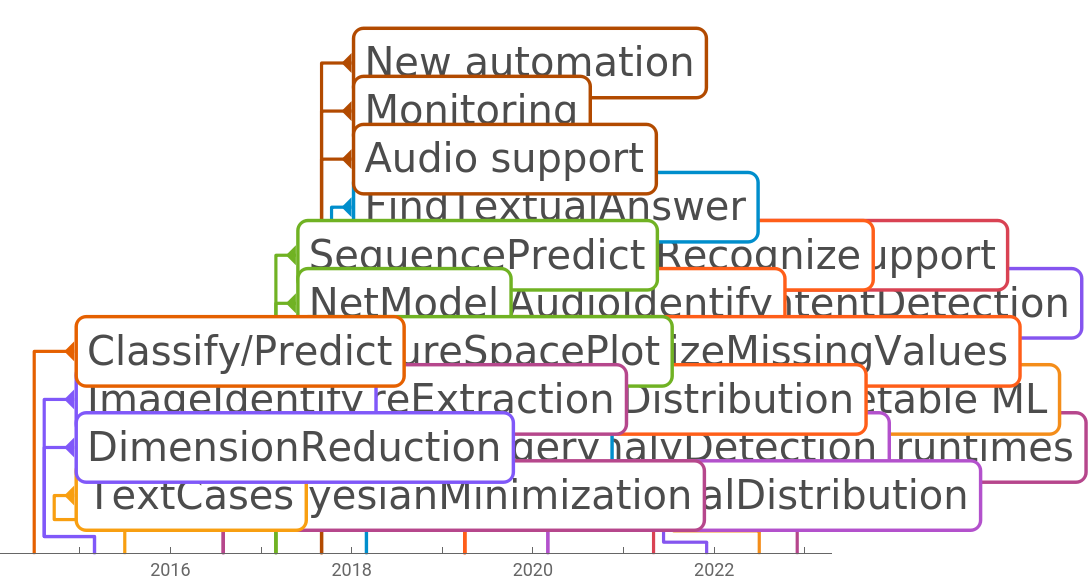
The machine learning (ML) framework evolution since it’s introduction in version 10.0 (July 2014)
Out[]=


Outline
Outline
◼
Automatic Machine Learning
◼
the pipeline
◼
future directions
◼
Interpretable Machine Learning
◼
feature impact analysis
◼
Deep learning
◼
a special ML method
◼
towards interoperability
◼
The future
◼
a new way of working with data
Automatic Machine Learning
Automatic Machine Learning
Auto ML is a complex pipeline of heuristic and optimization that allows to create functioning models with minimal input. Typically only the input data. But what is actually going on?
In[]:=
data=ResourceData["Sample Data: Titanic Survival","TrainingData"];
In[]:=
data//First
Out[]=
{1st,29.,female}survived
In[]:=
classifier=Classify[data,PerformanceGoal->"Quality",FeatureNames->{"Class","Age","Sex"}]
Out[]=
ClassifierFunction


Automatic Machine Learning
Automatic Machine Learning
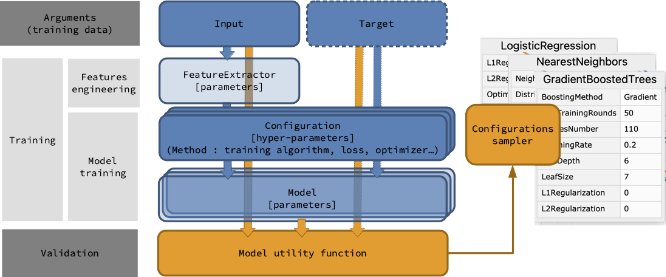
The automated ML pipeline
Feature Extraction
Feature Extraction
The first part of the process is to convert and arbitrary input into something that might be used with an algorithm such as linear regression, decision tree or whatnot.
This part of the pipeline is generally referred to as feature selection and feature extraction.
We can see what as been selected during the training
In[]:=
fe=Information[classifier,"FeatureExtractor"]
Out[]=
FeatureExtractorFunction

In[]:=
fe"Class""2nd","Age","Sex""female"
Out[]=
{{7.33845×},{2,1}}
7
10
The full pipeline is available inside the function and a current project is to fully expose it:
In[]:=
fe〚1,"Processor"〛
Out[]=
Feature Extraction
Feature Extraction
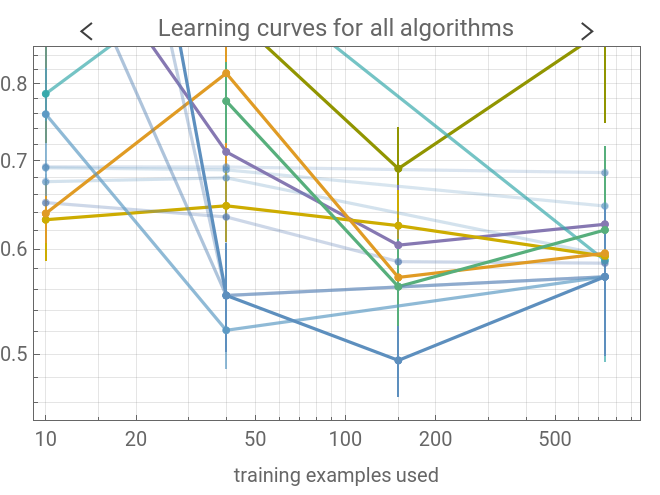
The second part of the pipeline is to select the optimal configuration, i.e. the choice of a model and a set of hyperparameters
In[]:=
Information[classifier,"LearningCurve"]Information[classifier,"MethodOption"]
Out[]=
Out[]=
Method{LogisticRegression,L1Regularization0,L2Regularization1.×,OptimizationMethodLBFGS}
-6
10
Model Selection
Model Selection
Once found, the model can be quickly retrained using the same settings
In[]:=
classifier2=Classify[data,
Information[classifier,"MethodOption"]
]Out[]=
ClassifierFunction
For extra speed the cross-validation phase can be skipped entirely
In[]:=
classifier3=Classify[data,Information[classifier,"MethodOption"],
PerformanceGoal->"DirectTraining"
]Out[]=
ClassifierFunction
In[]:=
Information[{classifier,classifier2,classifier3},"TrainingTime"]
Out[]=
,,
Future Directions
Future Directions
In progress
In progress
◼
Reporting
◼
Extra automation for clustering and unsupervised functions
Challenges
Challenges
◼
Processing pipeline makeover:
◼
high performance underlying data-structures
◼
user exposed
◼
Out of core training
◼
On-line training
◼
Use Bayesian optimisation in the configuration sampling (heavy resources usage use case)
Interpretable ML - Measurements
Interpretable ML - Measurements
Once the model is trained its performances can be measured against a test set, data that have never been seen during the training
In[]:=
testdata=ResourceData["Sample Data: Titanic Survival","TestData"];
Interpretable ML - Feature Impact
Interpretable ML - Feature Impact
The trained model enstablishes a relationship between the input features and the final result. To better understand this relationship we can attempt to measure the contribution each feature, its impact.
This is a distribution of all the contribution
We can also leverage the missing imputation step in the classifier feature extractor to probe the model using synthetic data
Interpretable ML - Feature Impact
Interpretable ML - Feature Impact
Going beyond the distribution, it’s possible to plot the feature impact against the feature value to spot the type of relationship
Interpretable ML - Feature Impact
Interpretable ML - Feature Impact
Looking at the prior probabilities from the training set distribution, we can see how it is more likely to have died than survived
This is reflected in a negative log-odds value—it is generally preferable to predict log odds are they are defined in the (-∞,+∞) range
The CumulativeFeatureImpactPlot function lets us explore how specific feature values impact the final model prediction
We can check a wide distribution of trajectories using data synthesised from the model missing imputer
Deep Learning
Deep Learning
Neural networks are differentiable computational units that can be combined in large stacks in order to analyze data
Large stacks can be really large
Deep Learning - A Special Method
Deep Learning - A Special Method
Unlike the simple auto ML pipeline, every step must be manually specified.
This extra complexity, allows a great level of flexibility
This extra complexity, allows a great level of flexibility
Deep Learning - Towards Interoperability
Deep Learning - Towards Interoperability
In the world at large there are many models which have been trained on a variety of task. A current goal is to make them immediately available in the language, without any extra step involved.
Models in the ONNX format can be imported and run directly
This has no significant overhead on the native file
But it requires a little more care with input/output handling
This is a pipeline to extract the bounding box and probability information from the result and visualize the detections, filtering the ones with low probability or large overlap
Running a model this way is still fast, this processes ~40 images per second
Future Directions
Future Directions
In progress
In progress
◼
Expanded framework support in NetExternalObject
◼
Pytorch, Tensorflow, ...
Challenges
Challenges
◼
Update the neural network framework to train/run on different backends
◼
Provide a simple interface for complex or difficult to tune methods
◼
e.g. reinforcement learning
◼
Support deployment on a large variety of devices
References
References
WL Guides
WL Guides
Books & Blogs
Books & Blogs
Courses
Courses
Communities
Communities
Repositories
Repositories