Preamble
Preamble
In my post today, I just want to show you all the fun stuff I made a long time ago. I hope that the approaches and functions that I used in this task will seem interesting and useful to someone. The question that concerns today’s post was asked in a group that is dedicated to Mathematica. One of the users asked for help with the creation of an interactive snake game. I’m sure everyone has a great idea of what kind of game this is. Since then, I have kept a notebook where I wrote all the code for myself and now I want to share it with everyone. What other interesting examples of games written in the Wolfram Language are there?
Definitions
Definitions
The first function that is necessary for the snake to work. Let’s set the holding attribute for the function that is responsible for moving the snake. This function executes the snake’s move around the arena. It takes only two arguments as input: a character representing the field where the snake can move and a character that represents the snake itselfю. It is important to note that these are exactly symbols, since expressions in the Wolfram Language are immutable. And in this game you just need to change the arena and the snake:.
SetAttributes[crawl,HoldAll]
crawl[arena_Symbol?AssociationQ,snake_Symbol?AssociationQ]:=Block[{newpos,newpt},newpos=If[Last[snake["position"]]+snake["direction"]===arena["point"],(*Then*)newpt=RandomChoice[Complement[Flatten[Table[{i,j},{i,1,arena["size"]},{j,1,arena["size"]}],1],Append[snake["position"],arena["point"]]]];Append[snake["position"],Last[snake["position"]]+snake["direction"]],(*Else*)newpt=arena["point"];Append[Rest[snake["position"]],Last[snake["position"]]+snake["direction"]]];arena["point"]=newpt;snake["position"]=newpos;]
The next function changes the direction of the snake. It must also have a holding attribute. In total, the snake has 4 directions. It always has a current direction and can change it by turning left or right relative to the current one. The snake cannot turn back:
SetAttributes[redirect,HoldAll]
redirect[snake_Symbol?AssociationQ,"Up"]:=If[snake["position"][[-1]]-snake["position"][[-2]]=!={1,0},snake["direction"]={-1,0}]
redirect[snake_Symbol?AssociationQ,"Down"]:=If[snake["position"][[-1]]-snake["position"][[-2]]=!={-1,0},snake["direction"]={1,0}]
redirect[snake_Symbol?AssociationQ,"Left"]:=If[snake["position"][[-1]]-snake["position"][[-2]]=!={0,1},snake["direction"]={0,-1}]
redirect[snake_Symbol?AssociationQ,"Right"]:=If[snake["position"][[-1]]-snake["position"][[-2]]=!={0,-1},snake["direction"]={0,1}]
This function simply displays the snake in the game arena. All done with standard Math functions that are used for graphics:
SetAttributes[render,HoldAll]
render[arena_?AssociationQ,snake_?AssociationQ]:= Block[ field=ConstantArray[0,{arena["size"]+2,arena["size"]+2}] , Table[field[[i[[1]]+1,i[[2]]+1]]=1,{i,snake["position"]}]; field[[arena["point"][[1]]+1,arena["point"][[2]]+1]]=12; ArrayPlot[ field, Frame->True, FrameTicks->False, Mesh->All, MeshStyle->{{Dashed,Gray}}, ImageSize->Large, PlotRange->{{2,arena["size"]+1},{2,arena["size"]+1}} ] ]
And the last function that is needed to check the current state of the game. It must also have a holding attribute. It is this function that checks that the snake has not collided with anything. And if faced - it ends the game and shows a message:
SetAttributes[check,HoldAll]
check[game_,arena_Symbol?AssociationQ,snake_Symbol?AssociationQ]:=If[Cases[snake["position"][[1;;-2]],snake["position"][[-1]]]=!={}||snake["position"][[-1,1]]<1||snake["position"][[-1,1]]>arena["size"]||snake["position"][[-1,2]]<1||snake["position"][[-1,2]]>arena["size"],TaskSuspend[game];MessageDialog["GAME OVER"];{arena,snake}={arena0,snake0};]
Startup block
Startup block
The game in our case is a scheduled task running in the background. In this scheduled task, only one action is performed - the snake crawls one “step” (yes, we all know that snakes cannot walk) through the game arena. As soon as the task has been created, we immediately stop it. Below restarting and stoping of the game will do using buttons:
game=SessionSubmit[ScheduledTask[crawl[arena,snake],{0.5,10000}]];TaskSuspend[game];
And here are the starting values for the snake itself and the game arena:
arena=arena0=<|"size"->12,"point"->{4,4}|>;snake=snake0=<|"position"->{{1,1},{1,2}},"direction"->{0,1}|>;
And finally, the launch of the game:
Column[{Dynamic[check[game,arena,snake];render[arena,snake],UpdateInterval->1],DynamicModule[{},Grid[{{Button["Start",TaskResume[game],ImageSize->{100,30}],Button["Up",redirect[snake,"Up"],ImageSize->{100,30}],Button["Pause",TaskSuspend[game],ImageSize->{100,30}]},{Button["Left",redirect[snake,"Left"],ImageSize->{100,30}],Dynamic[Button[Style["Points: "<>ToString[Length[snake["position"]]-2],Bold],ImageSize->{100,30}],UpdateInterval->1],Button["Right",redirect[snake,"Right"],ImageSize->{100,30}]},{Button["Step",crawl[arena,snake],ImageSize->{100,30}],Button["Down",redirect[snake,"Down"],ImageSize->{100,30}],Button["Reset",{arena,snake}={arena0,snake0},ImageSize->{100,30}]}}]]},Alignment->Center]
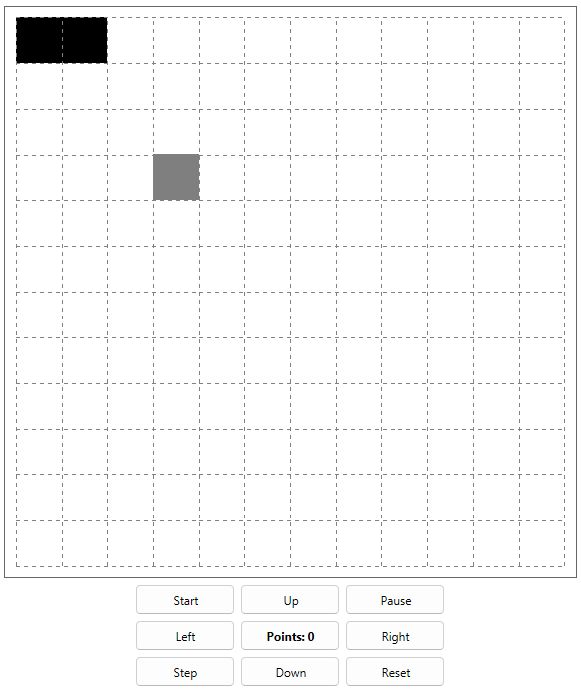
And video-demo:
Thanks for your attention!