This essay presents a method to automate the adjustment of plot ranges for animations, ensuring that outliers do not distract from the central data trends. I sample function values, create histograms to identify concentrated regions, and use this information to generate focused animations.
Introduction
Introduction
Dynamic visualizations help understand how functions behave with different parameter ranges. However, outliers can distort the visualization, especially when functions have a wide range of outputs. This makes it difficult to focus on the most important data. When creating animated graphs in Wolfram Language, the automatic plot range can be unstable because it adjusts the range for each frame based on the data displayed in that specific frame. This variability can result in the axes jumping around, making the animation harder to interpret. To address this issue, I developed a function that automatically adjusts fixed plot ranges to focus on significant data regions. This function significantly improves the clarity and usefulness of dynamic visualizations.
In this project, I examined three cases involving 2D, 3D, and parametric functions. Each type of function poses distinct challenges and offers specific opportunities for visualization. Although the approaches for dealing with these cases are similar due to their shared properties, there are noticeable differences in their execution and the insights they offer.
My work on this project provided me with valuable insights into visualizing different functions. Handling the 2D case was relatively easy as it involved creating straightforward histograms and animations. The 3D case, although more complex, followed a similar methodology but required additional computational resources and careful parameter management.
Parametric functions were the most challenging due to their complexity and the need to manage multiple interdependent variables. However, the methodologies developed for 2D and 3D functions gave me a solid foundation for tackling these challenges.
2D Functions
2D Functions
A 2D function is a mathematical relationship in which a single input variable, , is mapped to a single output variable, . This relationship can be graphically represented on a two-dimensional plane, showing how varies with respect to . Common examples include linear functions (), quadratic functions (), and trigonometric functions ().
x
y
y
x
ymx+b
ya+bx+c
2
x
ysin(x)
Out[]=
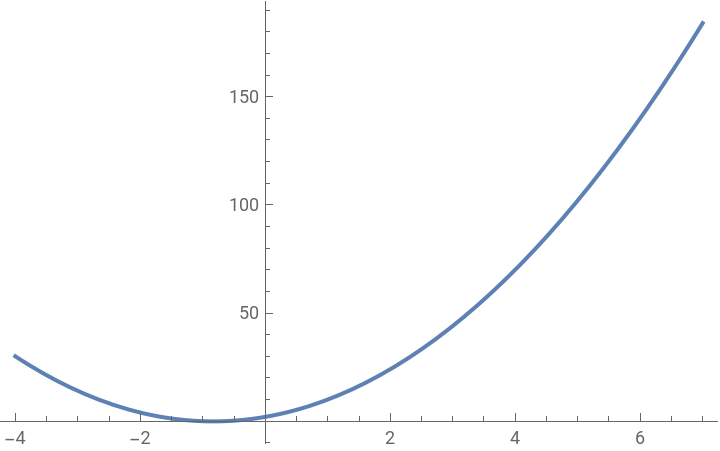
Visualizing 2D functions was relatively easy. It involved creating histograms to understand the concentration of values over a specified domain. The process included evaluating the function at various points, filtering out the outliers, and generating animations that highlight significant data regions. This approach was relatively straightforward and provided clear insights into the function’s behavior across a single parameter range.
3D Functions
3D Functions
A 3D function involves two input variables, and , that map to a single output variable, . This relationship is visualized in three-dimensional space, showing how varies with respect to both and . Examples of 3D functions include , such as or , which create surfaces that can be examined from different angles.
x
y
z
z
x
y
zf(x,y)
z+
2
x
2
y
zsin(x)*cos(y)
Out[]=

I had to deal with increased complexity when visualizing 3D functions due to the additional dimension. Creating histograms for 3D functions involved evaluating the function at different points and determining the range of values where the data is most concentrated. This was crucial for producing clear and informative animations. Although the process is similar to the 2D case, the additional dimension requires more computational effort and careful consideration of the visualization parameters.
Parametric Functions
Parametric Functions
Parametric functions are a set of equations where the output variables and are expressed in terms of one or more independent parameters, usually . Instead of directly relating and , parametric equations define and as functions of . For example, the parametric equations for a circle are and . These functions are particularly useful for describing curves and motion paths in two or three dimensions.
x
y
t
x
y
x
y
t
xrcos(t)
yrsin(t)
Out[]=
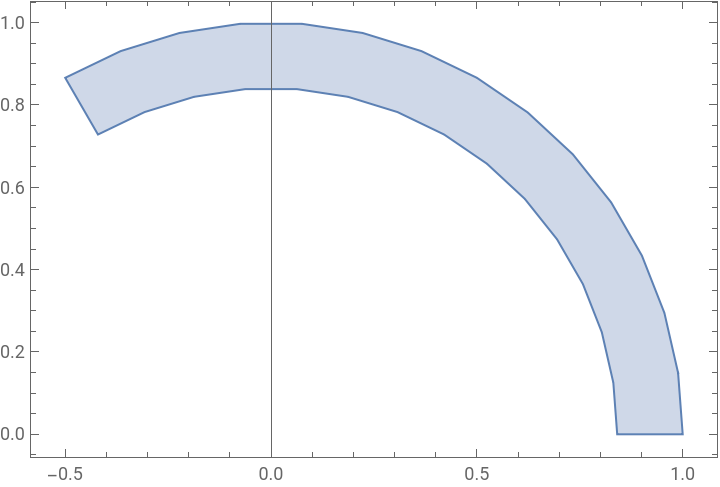
Analyzing parametric functions was the most challenging. I had to consider two functions that depended on a parameter and another varying parameter . The process involved creating two histograms for both and functions, determining their concentrated ranges, and generating animations that effectively capture the behavior of the parametric functions. This approach was more complex due to the interdependence of the functions and parameters
t
a
x
y
Histograms
Histograms
A histogram is a graphical representation of the distribution of numerical data. The data is divided into intervals or “bins,” and the height of the corresponding bar depicts the frequency of data points within each bin. Histograms help visualize the shape, central tendency, and spread of data distributions.
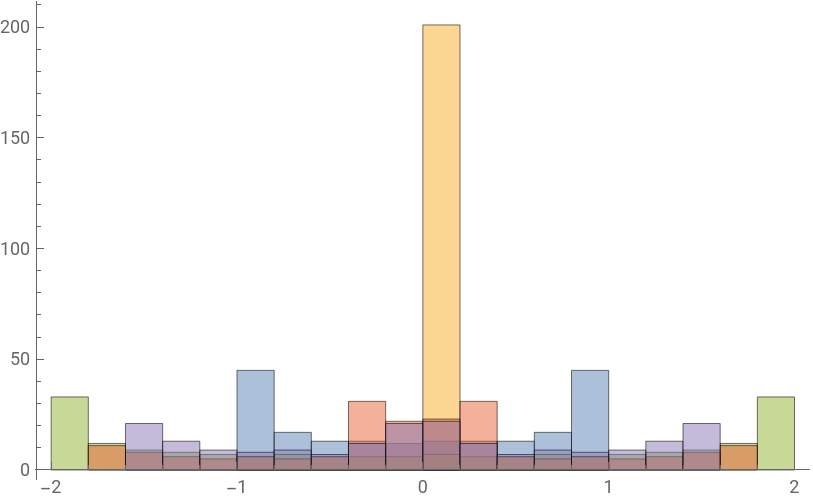
In my algorithm, histograms are crucial in identifying the regions where the function’s values are concentrated. I collected data points by sampling the function over a specified domain and parameter range. These data points were then organized into a histogram, clearly visualizing their distribution and enhancing my understanding of the data.
Creating Histograms
Creating Histograms
To understand the concentration of the function’s values, I sample the function over a specified domain and for different values of a constant parameter. This step helps in visualizing the distribution of function values.
I designed the functions below to also handle instances where the function is evaluated at a specific value of , or , resulting in either or , which can lead to errors. It is adept at managing such scenarios effectively.
x
y
a
1
0
0
0
2D Functions
2D Functions
The function createHistogramData generates histogram data for a 2D function by evaluating the function over points in the given ranges for and values. In this function, I used HistogramList instead of Histogram because HistogramList returns the histogram’s raw data, which includes the bin edges and the counts of data points in each bin. This raw data is essential for further analysis and processing steps required by my algorithm.
a
x
Creates histogram data as list for 2D function:
In[]:=
createHistogramData[function_,{x_,xmin_,xmax_},{a_,amin_,amax_}]:=Module[ {histogramData}, histogramData = HistogramList[ Flatten[ Table[ If[ Quiet[Check[function,TrueQ],{Power::infy,Power::indet,General::indet,General::infy} ]=!=TrueQ,function,Nothing ], {a,amin,amax},{x,xmin,xmax,0.05} ] ] ]; histogramData={Select[histogramData[[1]],NumericQ],histogramData[[2]]}]
An example function would be
sin(x)+sin(ax)
Out[]=
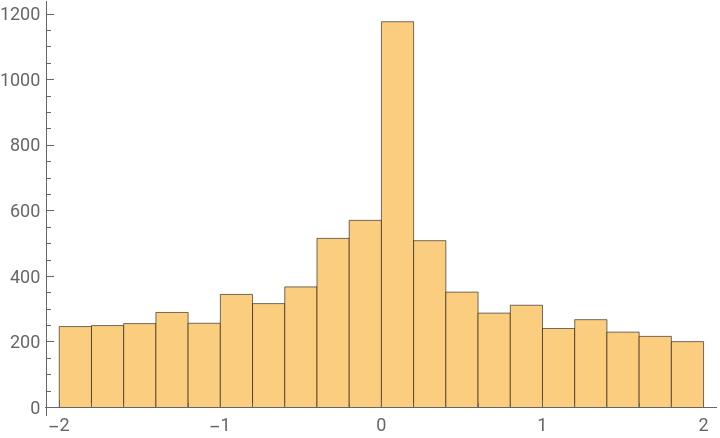
This is the histogram representation of the function . Analyzing the histogram would be challenging, so I used HistogramList in the function createHistogramData function to represent the data as lists of bin edges and counts.
sin(x)+sin(ax)
In[]:=
data2D=createHistogramData[Sin[x]+Sin[ax],{x,-10,20},{a,-3,8}]
Out[]=
-2,-,-,-,-,-1,-,-,-,-,0,,,,,1,,,,,2,{247,250,256,290,257,345,317,368,516,571,1177,509,352,288,312,241,268,230,217,201}
9
5
8
5
7
5
6
5
4
5
3
5
2
5
1
5
1
5
2
5
3
5
4
5
6
5
7
5
8
5
9
5
3D Functions
3D Functions
The function createHistogramData3D generates histogram data for a 3D function by evaluating the function over points in the given ranges for , , and values. Similar to the 2D histogram data, to understand the concentration of a 3D function’s values, I sample the function over a specified domain and range for different values of a constant parameter. This helps in understanding the distribution of function values .
a
x
y
Creates histogram data as list for 3D function:
In[]:=
createHistogramData3D[function_,{x_,xmin_,xmax_},{y_,ymin_,ymax_},{a_,amin_,amax_},epsilon_:10^-6]:= Module[ {histogramData}, histogramData = HistogramList[ Flatten[ Table[ If[Quiet[Check[function/. y->y+epsilon,TrueQ ],{Power::infy,Power::indet,General::indet,General::infy}]=!=TrueQ,function/. y->y+epsilon,Nothing ], a,amin,amax,0.1,{x,xmin,xmax,0.1},{y,ymin,ymax,0.1} ] ] ]; histogramData = {Select[histogramData[[1]],NumericQ],histogramData[[2]]}; histogramData ]
Parametric Functions
Parametric Functions
Creates histogram data as list for parametric function:
Range From Concentrated Data
Range From Concentrated Data
Since outliers can disrupt the wide-ranging outputs of these functions, it can be challenging to focus on the most important data. Therefore, I wanted to filter out these outliers and ensure that my range focuses on the concentrated data regions.
The function I made processes raw Histogram data consisting of bin edges and counts to create an association between the bin edges and their respective counts. Then, I identify the highest count among all the bins. Subsequently, bins with counts greater than or equal to a specific percentage of the maximum count are selected.
The function calculates the minimum and maximum edges of the filtered bins to define the concentrated range. I add an additional margin to the maximum edge to ensure the range is inclusive.
2D Functions
2D Functions
The determineConcentrationRange function is designed to identify the most concentrated range of data, filtering out outliers based on a frequency threshold.
Determine range of 2D graph:
3D Functions
3D Functions
The function determineConcentrationRange3D identifies the range of values where the data is most concentrated based on a frequency threshold .
Determine range of 3D graph:
Parametric Functions
Parametric Functions
The function determineConcentrationRangeParametric identifies the range of values where the data is most concentrated based on a frequency threshold .
Determine range of parametric graph:
Creating Animation
Creating Animation
Animations are valuable tools in data visualization. They allow us to observe how a function evolves over time or as a parameter changes. Using the determined range, I create an animation of the function over the specified domain and parameter range.
The animation highlights the significant data areas I identified in the previous steps to ensure the visualization is clear and informative. It dynamically illustrates how the function behaves as the parameter changes, providing insights into its variability and trends .
2D Functions
2D Functions
Creates animation with fixed range of 2D graph:
Then, I combine all the functions, allowing the user to set the PlotRange automatically for animated 2D graphs using the function below.
Animates function over certain domain with fixed range :
3D Functions
3D Functions
Creates animation with fixed range of 3D graph:
Then, I combine all the functions, allowing the user to set the PlotRange automatically for animated 3D graphs using the function below.
Animates function over certain domain with fixed range :
Parametric Functions
Parametric Functions
Creates animation with fixed range of parametric graph:
Then, I combine all the functions, allowing the user to set the PlotRange automatically for animated parametric graphs using the function below .
Animates function over certain domain with fixed range :
Extensions :
Extensions :
Conclusion
Conclusion
In conclusion, automating plot ranges for dynamic visualizations enhances clarity and focus by filtering out outliers and concentrating on significant data regions. This approach improves the utility of dynamic visualizations across various types of mathematical functions, ensuring that the viewer can easily discern important trends and variations.
Acknowledgements
Acknowledgements
I want to express my gratitude to my mentor, Jesús Adrián Montesinos Correa, for his extensive help in navigating the various functions of Wolfram and spending hours debugging. I would also like to extend my thanks to the teaching assistants, Sophie Chen, Zoya Brahimzadeh, and Alisa Zaitseva, for their help with my project. Additionally, I appreciate all the other mentors and teaching assistants for creating a collaborative and supportive environment.
Bibliography
Bibliography
◼
Writing Test Cases - OpenAI. (2024). ChatGPT [Large language model]. /g/g-0S5FXLyFN-wolfram
◼
Weisstein, Eric W. “Division by Zero.” From MathWorld--A Wolfram Web Resource. https://mathworld.wolfram.com/DivisionbyZero.html
◼
Wolfram Research (2007), Animate, Wolfram Language function, https://reference.wolfram.com/language/ref/Animate.html (updated 2014).
◼
Stover, Christopher and Weisstein, Eric W. “Parametric Equations.” From MathWorld--A Wolfram Web Resource. https://mathworld.wolfram.com/ParametricEquations.html
CITE THIS NOTEBOOK
CITE THIS NOTEBOOK
Automating plot ranges for dynamic visualizations
by Devanshi Rautaraya
Wolfram Community, STAFF PICKS, July 12, 2024
https://community.wolfram.com/groups/-/m/t/3216142
by Devanshi Rautaraya
Wolfram Community, STAFF PICKS, July 12, 2024
https://community.wolfram.com/groups/-/m/t/3216142