ORIGINAL BOOK: M. M. Hammad, Statistics for Machine Learning with Mathematica Applications, arXiv:2310.00004.
DOI: https://doi.org/10.48550/arXiv.2310.00004
RESEARCH GATE
DOI: https://doi.org/10.48550/arXiv.2310.00004
RESEARCH GATE
Book Abstract: In recent years, the field of statistics has experienced a surge in interest and application, largely due to significant advances in computer technology. This progress has led to remarkable developments in statistics methods and algorithms, enabling their widespread adoption across various disciplines. Key areas benefiting from these advancements include machine learning, economics, finance, geophysics, molecular modeling, computational systems biology, operations research, and engineering. For example, in machine learning, statistics forms the foundation for algorithms used in regression, classification, clustering, and deep learning to analyze vast datasets and make predictions.
Mathematica, among other tools, has played a significant role in enabling the integration of statistics and computer technology, facilitating deeper exploration of data-driven insights and groundbreaking discoveries across diverse domains. With a rich library of functions, Mathematica allows users to calculate measures of central tendency, dispersion, and correlation, as well as perform hypothesis testing and estimation. Moreover, it supports probability distributions, making simulations and probabilistic modeling tasks more accessible.
This monograph presents the main theorems in mathematical statistics, ranging from basic descriptive statistics to sophisticated inferential techniques. In addition, we have created, more than 200 manipulates cover different scenarios in statistics, more than 500 light Mathematica codes (examples) and 25 programs (procedures) that follow the principles of testing hypotheses and estimation theory. The code will run as-is with no code from prior algorithms or third parties required beyond the installation of Mathematica.
Mathematica, among other tools, has played a significant role in enabling the integration of statistics and computer technology, facilitating deeper exploration of data-driven insights and groundbreaking discoveries across diverse domains. With a rich library of functions, Mathematica allows users to calculate measures of central tendency, dispersion, and correlation, as well as perform hypothesis testing and estimation. Moreover, it supports probability distributions, making simulations and probabilistic modeling tasks more accessible.
This monograph presents the main theorems in mathematical statistics, ranging from basic descriptive statistics to sophisticated inferential techniques. In addition, we have created, more than 200 manipulates cover different scenarios in statistics, more than 500 light Mathematica codes (examples) and 25 programs (procedures) that follow the principles of testing hypotheses and estimation theory. The code will run as-is with no code from prior algorithms or third parties required beyond the installation of Mathematica.
Contents
Contents
CHAPTER 17: MATHEMATICA LAB: SAMPLING THEORY
CHAPTER 17: MATHEMATICA LAB: SAMPLING THEORY
Introduction
Introduction
This chapter explores the Mathematica functions related to several important probability distributions, namely the chi-square distribution, student t distribution, F ratio distribution, and the sampling distributions of mean and variance. Understanding these distributions and their corresponding functions is essential for performing statistical analyses and drawing meaningful conclusions from data.• Sampling distributions of the mean and variance are essential concepts in inferential statistics. These distributions describe the behavior of sample means and variances when repeatedly drawn from a population. Mathematica provides functions to explore the properties of these sampling distributions, such as calculating probabilities, quantiles, and moments. By utilizing Mathematica built-in functions, we can generate random samples and analyze the behavior of these sampling distributions. Throughout the chapter, we provide an in-depth explanation of the key functions, such as RandomVariate, PDF, CDF, Quantile, Histogram, ChiSquareDistribution, StudentTDistribution and FRatioDistribution and demonstrate their usage in computing and visualizing sampling distributions of mean and variance.• The Chi-square distribution plays a fundamental role in statistical inference, particularly in hypothesis testing and constructing confidence intervals for the population variance. The Student t distribution is widely used when the sample size is small, and the population standard deviation is unknown. It plays a central role in hypothesis testing and constructing confidence intervals for the population mean. The F ratio distribution is employed in statistical tests that involve comparing variances or testing the overall significance of a linear regression model. We will discuss the visualization capabilities of Mathematica and how they can enhance our understanding of these distributions. Mathematica offers various plotting functions that enable us to create histograms, probability density plots, and cumulative distribution plots, providing valuable insights into the distribution behavior and shape. • Throughout this chapter, we will provide clear explanations of the concepts, practical examples, and demonstrate how to utilize Mathematica functions effectively. By mastering these functions, you will enhance your ability to analyze data, and draw valid statistical conclusions.Chapter 17 OutlineUnit 17.1. Sampling Distributions of Mean for Large Sample with Normal DistributionUnit 17.2. Chi-Square DistributionUnit 17.3. Sampling Distributions of Sample VarianceUnit 17.4. Student t-DistributionUnit 17.5. Sampling Distributions of Mean for Small Sample with Student DistributionUnit 17.6. FRatio DistributionUnit 17.7. Sampling Distributions of Ratio of Two Sample Variances with FRatio DistributionFor more theoretical and mathematical details about sampling theory (see chapter16)
Unit 17.1. Sampling Distributions of Mean for Large Sample with Normal Distribution
Unit 17.1. Sampling Distributions of Mean for Large Sample with Normal Distribution
EXAMPLE 17.1
EXAMPLE 17.1
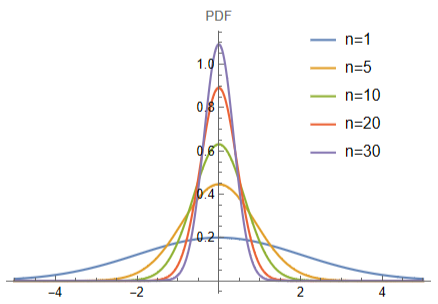
The code generates a plot of the theoretical sample distributions with different sample sizes n (1, 5, 10, 20 and 30) from a normal population with mean (μ = 0 and σ = 2), using the probability density function (PDF) of a normal distribution with mean 0 and variance 2/sqrt (n) . The plot demonstrates how the variance of the sample distribution decreases as the sample size increases, where we can see that the PDFs become more concentrated around the mean as n increases, indicating a decrease in variance which is a fundamental principle of statistical inference:
Plot[Evaluate[Table[PDF[NormalDistribution[0,2/Sqrt[n]],x],{n,{1,5,10,20,30}}]],{x,-5,5},PlotRange->All,PlotLegends->Placed[{"n=1","n=5","n=10","n=20","n=30"},{0.8,0.75}],ImageSize->320,AxesLabel{None,"PDF"}]
EXAMPLE 17.2
EXAMPLE 17.2
The code demonstrates the concept of the sampling distribution of the mean and how it can be used to make inferences about the population mean . The code generates a population of 1000 values from a normal distribution with mean 170 and standard deviation 5. It then takes a sample of size 100 and calculates the sample mean . The code repeats this sampling process 1000 times and calculates the sample means . It then calculates the mean of the sampling distribution of the mean and plots the sampling distribution of the mean using Histogram . The plot includes vertical lines representing the population mean, the mean of the sampling distribution and the dashed green line indicating the actual population mean:
(*Generatepopulationdata*)population=RandomVariate[NormalDistribution[170,5],1000];(*Calculatepopulationmean:*)populationMean=Mean[population](*Takeasampleofsize100andcalculatethesamplemean:*)sample=RandomSample[population,100];sampleMean=Mean[sample](*Repeatthesamplingprocess1000timesandcalculatethesamplemeans:*)sampleMeans=Table[Mean[RandomSample[population,100]],{i,1,1000}];(*Themeanofsamplingdistributionofthemean:*)m=Mean[sampleMeans](*Plotthesamplingdistributionofthemean:*)Histogram[sampleMeans,Automatic,"ProbabilityDensity",Epilog->{Directive[Green,Dashed,Thickness[0.006]],Line[{{populationMean,0},{populationMean,0.8}}],Directive[Red,Dashed,Thickness[0.006]],Line[{{m,0},{m,0.8}}]},PlotLabel->"Sampling Distribution of the Mean",ColorFunction->Function[{height},Opacity[height]],ImageSize->320,ChartStyle->Purple,PlotRange->Automatic]
Out[]=
169.914
Out[]=
169.579
EXAMPLE 17.3
EXAMPLE 17.3
The code generates a series of sample means of different sizes from a normal distribution with mean 5 and standard deviation 2, and comparing each sample mean to the mean of the original distribution. The absolute difference between each sample mean and the original mean is calculated and stored in a list. Finally, the list is plotted using ListPlot, where the x - axis shows the sample size and the y - axis shows the absolute difference between the sample mean and the population mean. The plot generated by this code could provide useful insights into the behavior of the mean of sample distributions as the sample size increases. It seems that the plot shows a decreasing trend in the absolute difference between the sample means and the population mean as the sample size increases, which is consistent with the central limit theorem (CLT):
EXAMPLE 17.4
EXAMPLE 17.4
This code is a demonstration of the relationship between sample size and experimental standard error, and how it compares to the theoretical standard error . This code generates a normal distribution population and then proceeds to generate 200 samples for different sample sizes, ranging from 10 to 200 with step 10. For each sample size, the sample means and experimental standard errors are calculated and compared to the theoretical standard errors, which are also calculated . It is worth noting that the theoretical standard error calculation assumes a population standard deviation of 10, which is the same as the standard deviation used to generate the population . The results are plotted in a ListPlot graph, where the experimental and theoretical standard errors are shown as blue and red points, respectively :
EXAMPLE 17.5
EXAMPLE 17.5
The code explores the CLT by comparing the standard deviation of sample means across three different population distributions : normal, exponential, and gamma . Specifically, the code generates 1000 samples of size n from three population distributions (normal, exponential, and gamma) using the RandomChoice function, and calculates the mean of each sample using the Mean function . This generates 1000 sample means for each value of n . Then, the standard deviation of the sample means is calculated for each value of n using the StandardDeviation function . The code plots the relationship between sample size (n) and the standard deviation of the sample means . The x - axis represents the sample size (n), and the y - axis represents the standard deviation of the sample means . The plot shows that as the sample size increases, the standard deviation of the sample means decreases . This relationship is in line with the CLT, which states that as the sample size increases, the distribution of the sample means approaches a normal distribution with a mean equal to the population mean and a standard deviation equal to the population standard deviation divided by the square root of the sample size :
EXAMPLE 17.6
EXAMPLE 17.6
This code demonstrates the CLT, which states that as the sample size increases, the distribution of the sample means approaches a normal distribution, regardless of the underlying distribution of the population . The histogram of the sample means approximates a bell curve, and the normal distribution curve overlaid on top shows how well the sample means fit a normal distribution . The code generates a dataset of 100, 000 random values sampled from a uniform distribution with parameters {1, 5} . Then, it creates a histogram of the data with bin widths of 0.02, displaying the PDF . Next, the code generates 100, 000 sample means, each taken from a sample of size 10 randomly drawn from the same uniform distribution as before . It then creates a histogram of the sample means with bin widths of 0.01, displaying the PDF . Finally, the code creates a plot of the normal distribution with mean equal to the mean of the sample means and standard deviation equal to the standard deviation of the sample means . The plot shows the PDF of the normal distribution on the same scale as the histograms :
EXAMPLE 17.7
EXAMPLE 17.7
This code is a demonstration of the CLT, the population distribution is uniform, which is not a normal distribution, but the CLT still applies . As the sample size increases, the histograms become more bell - shaped and symmetric, indicating that the sample means are approaching a normal distribution . Additionally, the histograms become narrower, indicating that the standard deviation of the sample means is decreasing as the sample size increases . This demonstrates the practical usefulness of the CLT in allowing us to make inferences about the population mean based on sample means, even when the population distribution is not normal . The code generates histograms of sample means drawn from a uniform distribution on the interval[1, 5] . The sample sizes n range from 1 to 10. The histograms display the PDF of the sample means . The plot labels indicate the sample size for each histogram:
EXAMPLE 17.8
EXAMPLE 17.8
The code generates histograms of sample means drawn from a gamma distribution with shape parameter 4 and scale parameter 2. The sample sizes n range from 1 to 30. The histograms display the PDF of the sample means . The plot labels indicate the sample size for each histogram . Similar to the previous code, this code also demonstrates the CLT, in this case, the population distribution is a gamma distribution, which is not a normal distribution . However, the CLT still applies, and as the sample size increases, the histograms become more bell - shaped and symmetric, indicating that the sample means are approaching a normal distribution . Additionally, the histograms become narrower, indicating that the standard deviation of the sample means is decreasing as the sample size increases :
EXAMPLE 17.9
EXAMPLE 17.9
This code generates histograms of sample means from three different distributions : exponential, gamma, and beta . The sample size is fixed at n = 30, and the number of samples is set to numSamples = 100, 000. For each distribution, the code generates a list of sample means using the Mean function and RandomVariate to generate random numbers from the specified distribution . The histograms display the PDF of the sample means for each distribution, with bars colored red, orange, and purple to represent the exponential, gamma, and beta distributions, respectively . This code provides an illustration of how the CLT can be used to approximate the distribution of sample means for different distributions . It also highlights the fact that the sample mean distribution becomes more normal as the sample size increases, regardless of the underlying distribution :
EXAMPLE 17.10
EXAMPLE 17.10
This code defines a non - normal population distribution and then generates and plots the sampling distribution of the mean for different sample sizes using the Manipulate function . The population distribution is defined as an Exponential distribution with a mean of 5. The sampleMeans0 function generates 10, 000 random samples of size n from this population, calculates the mean of each sample, and then plots the histogram of the means using Histogram function . The Manipulate function allows the user to vary the sample size from 5 to 100 in increments of 1 and observe how the sampling distribution of the mean changes as the sample size increases .
The CLT states that the sampling distribution of the mean approaches a normal distribution as the sample size increases, regardless of the shape of the population distribution . However, the convergence to normality may be slower for non - normal population distributions . In particular, when the population distribution is highly skewed or has heavy tails, a larger sample size may be required for the CLT to apply . In our case, since the population distribution is non - normal, the sampling distribution of the mean is also non - normal for small sample size . However, as the sample size increases, the sampling distribution becomes more symmetric and less skewed, and its peak becomes more concentrated around the population mean :
The CLT states that the sampling distribution of the mean approaches a normal distribution as the sample size increases, regardless of the shape of the population distribution . However, the convergence to normality may be slower for non - normal population distributions . In particular, when the population distribution is highly skewed or has heavy tails, a larger sample size may be required for the CLT to apply . In our case, since the population distribution is non - normal, the sampling distribution of the mean is also non - normal for small sample size . However, as the sample size increases, the sampling distribution becomes more symmetric and less skewed, and its peak becomes more concentrated around the population mean :
EXAMPLE 17.11
EXAMPLE 17.11
This code defines a non - normal population distribution (an Exponential distribution with a mean of 5), generates random samples of different sizes from this distribution, and then plots the sampling distribution of the mean for each sample size . The Manipulate function allows the user to interactively explore how the sampling distribution of the mean converges to a normal distribution as the sample size increases . The sampleMeans function generates 1000 random samples of size n from the population, calculates the mean of each sample, and then plots the histogram of the means using Histogram function . The Manipulate function shows both the histogram of the population distribution and the histogram of the sampling distribution of the mean for each sample size . The green dashed line represents the population mean, and its position is fixed across all sample sizes . The code demonstrates the CLT, as the sample size increases, the sampling distribution becomes more symmetric and less skewed, and its peak becomes more concentrated around the population mean :
EXAMPLE 17.12
EXAMPLE 17.12
The code generates sample data from four different probability distributions (Normal, Beta, Gamma, and Exponential) and creating a graph that compares the actual observations with the sample mean and true mean of the distributions . The graph includes the following features :
a horizontal line indicating the true mean of the distribution; the area between the observations and the true mean line is filled with a purple color, while the sample means line is blue .
Accumulate is a built - in function in Mathematica that generates a list of the cumulative sums of a list of numbers . In this case, Accumulate[observations] generates a list of cumulative sums of the observations list . Range[n] generates a list of integers from 1 to n, which represents the sample sizes . Dividing the cumulative sums of the observations by the sample sizes (which is represented by Range[n]) gives the sample means for each corresponding sample size .
Note that the sampling is still random even when using the Accumulate[observations] and Range[n] method to calculate the sample means . The RandomVariate function is used to generate the initial observations from the given probability distribution, and this function generates random samples based on the specified distribution . After generating the observations, the Accumulate[observations] and Range[n] method is used to calculate the sample means . This method does not change the random nature of the original observations . Instead, it simply performs a mathematical operation on the observed data to calculate the sample means :
a horizontal line indicating the true mean of the distribution; the area between the observations and the true mean line is filled with a purple color, while the sample means line is blue .
Accumulate is a built - in function in Mathematica that generates a list of the cumulative sums of a list of numbers . In this case, Accumulate[observations] generates a list of cumulative sums of the observations list . Range[n] generates a list of integers from 1 to n, which represents the sample sizes . Dividing the cumulative sums of the observations by the sample sizes (which is represented by Range[n]) gives the sample means for each corresponding sample size .
Note that the sampling is still random even when using the Accumulate[observations] and Range[n] method to calculate the sample means . The RandomVariate function is used to generate the initial observations from the given probability distribution, and this function generates random samples based on the specified distribution . After generating the observations, the Accumulate[observations] and Range[n] method is used to calculate the sample means . This method does not change the random nature of the original observations . Instead, it simply performs a mathematical operation on the observed data to calculate the sample means :
EXAMPLE 17.13
EXAMPLE 17.13
This code is a demonstration of the CLT in 2 D, which states that as the sample size increases, the distribution of sample means approaches a normal distribution with mean equal to the population mean and standard deviation equal to the population standard deviation divided by the square root of the sample size . In this case, the population distribution is uniform, which is not a normal distribution, but the CLT still applies . As the sample size increases, the 3 D histograms become more bell - shaped and symmetric, indicating that the sample means are approaching a normal distribution . Additionally, the 3 D histograms become narrower, indicating that the standard deviation of the sample means is decreasing as the sample size increases . The code generates 3 D histograms of sample means drawn from a uniform distribution on the interval[0, 6] . The sample sizes n range from 1 to 10. The 3 D histograms display the PDF of the sample means . The plot labels indicate the sample size for each 3 D histogram :
EXAMPLE 17.14
EXAMPLE 17.14
This code defines a 2 D non - normal population and then generates and plots the sampling distribution of the mean for different sample sizes using the Manipulate function . The population distribution is defined as 2 D uniform distribution on the interval [0, 6] . The sampleMeans3d function generates 10, 000 random samples of size n from this population, calculates the mean of each sample, and then plots the 3 D histogram of the means using Histogram3D function . The Manipulate function allows the user to vary the sample size from 1 to 50 in increments of 1 and observe how the sampling distribution of the mean changes as the sample size increases .
In our case, since the population distribution is non - normal, the sampling distribution of the mean is also non - normal for small sample size . However, as the sample size increases, the sampling distribution becomes more symmetric, and its peak becomes more concentrated around the population mean :
In our case, since the population distribution is non - normal, the sampling distribution of the mean is also non - normal for small sample size . However, as the sample size increases, the sampling distribution becomes more symmetric, and its peak becomes more concentrated around the population mean :
EXAMPLE 17.15
EXAMPLE 17.15
The code generates a 2 D dataset with 5000 random points that follow a uniform distribution on the interval[0, 6] . The scatter plot of the dataset shows the X - axis values on the horizontal axis and the Y - axis values on the vertical axis . Each point in the plot represents a pair of X and Y values from the dataset . The code also defines a function to generate and plot sample means . The function takes a sample size ‘ n’, draws 5000 samples from the population with replacement, calculates the mean for each sample, and plots the means as purple points on a scatter plot . The opacity of the points is set to 0.3 to indicate overlapping points . The Manipulate function is then used to explore the sample means point . Manipulate allows the user to interactively adjust the sample size ‘ n’ and observe the changes in the sample means point, as the sample size’ n’ increases, the spread of the sample means points around the population mean decreases :
EXAMPLE 17.16
EXAMPLE 17.16
The CLT also applies to three - dimensional datasets, and the same general principles of the theorem hold true :
EXAMPLE 17.17
EXAMPLE 17.17
Assume we have two populations with means μ1 = 10 and μ2 = 12, and standard deviations σ1 = 2 and σ2 = 3. We will take a sample of size n = 30 from each population and calculate the difference between the sample means :
EXAMPLE 17.18
EXAMPLE 17.18
This code calculates and visualizes the differences between sample means from two populations and provides histograms, plots, and sliders to manipulate the parameters . The code generates random samples from two normal distributions and computes the mean difference for each trial . It then calculates the sample mean of the differences and the standard error . Histograms and plots are displayed to illustrate the differences, sampling distribution, and sample means . The Manipulate function enables users to adjust parameters such as population means, standard deviations, and sample size, dynamically updating the visualizations . This allows users to observe how changes in the input values impact the resulting distributions and statistics :
CITE THIS NOTEBOOK
CITE THIS NOTEBOOK
Statistics for Machine Learning with Mathematica® Applications
by Mohamed Hammad
Wolfram Community, STAFF PICKS, October 6, 2023
https://community.wolfram.com/groups/-/m/t/3029132
by Mohamed Hammad
Wolfram Community, STAFF PICKS, October 6, 2023
https://community.wolfram.com/groups/-/m/t/3029132